
Not every manufacturing plant can or should be connected to the internet. Defense contractors under CMMC or ITAR requirements, pharmaceutical plants handling controlled substance manufacturing, nuclear and energy facilities with NERC-CIP obligations, semiconductor fabs with IP protection requirements, and government-adjacent manufacturers with classified process data all operate in environments where the network boundary between the plant and the outside world is not just a security preference — it is a regulatory mandate, a contractual obligation, or both.
For these environments, the standard architecture described in the rest of this series — Thinfinity Gateway in OCI, relay connecting outbound, session hosts scaling on cloud compute — is simply not the deployment model. The plant is air-gapped. There is no outbound internet connection to OCI, no cloud identity provider reachable from the plant network, no public DNS resolution for the portal URL. Everything runs on-premises, on hardware the plant controls, in a network that is deliberately and permanently disconnected from the outside world.
The question is whether ‘air-gapped’ means ‘no modern access management possible’ — whether these plants must accept the security liabilities of shared Windows sessions, no MFA, no audit trail, no centralized session management, because those capabilities are assumed to require cloud services. The answer is no. Thinfinity Workspace deployed in fully offline mode on VergeIO on-premises infrastructure — no internet dependency, no cloud dependency, no external identity provider, no phone-home licensing — delivers the same session delivery capabilities, the same security controls, and the same unified portal experience as a cloud deployment, entirely within the air-gapped boundary.
This article covers Thinfinity Offline: what it is, how RDC, VNC, and Thinfinity’s own VNC protocol work in an air-gapped deployment, which manufacturing sectors need it, and — critically — how choosing Thinfinity Offline as your starting point creates a direct, low-disruption path toward hybrid or full cloud adoption when the organization is ready. You are not choosing a dead-end solution. You are choosing the same architecture, deployed at the stage that matches your current constraints, with a clear upgrade path built in from day one.

Adversaries are mapping how control systems work, understanding where commands originate, how they propagate, and where physical effects can be induced.

Who Deploys Air-Gapped VDI and Why: Manufacturing Sectors With Zero Internet Tolerance
Air-gapped manufacturing environments are not a niche edge case. They represent a significant and growing share of industrial IT deployments as regulatory frameworks tighten and geopolitical risks elevate IP protection requirements. The following sectors regularly deploy Thinfinity in fully offline configurations.
| Sector | Applications Virtualized | Air-Gap Driver | Primary Protocol | Thinfinity Offline Value |
|---|---|---|---|---|
| Defense & Aerospace Manufacturing | CAD/CAM (CATIA, NX), program management, classified documentation viewers, ERP (restricted) | CMMC Level 2/3, ITAR, classified network requirements — CUI systems cannot touch internet-connected infrastructure | RDC (Windows CAD hosts) + Thinfinity VNC (Linux tools) | Unified portal for classified and unclassified apps; session recording to local immutable storage satisfies CMMC audit requirements; no cloud dependency |
| Pharmaceutical — Controlled Substance | Batch management, dispensing systems, electronic batch records, QMS, SCADA HMI | 21 CFR Part 1301 / DEA Schedule requirements; some facilities classified as closed systems prohibiting internet connectivity | RDC for Windows workstations; Thinfinity VNC for Linux process servers | Session recording satisfies 21 CFR Part 11 without cloud storage; local LDAP/AD MFA enforced at Thinfinity Gateway; full audit trail on-premises |
| Nuclear & Energy (NERC-CIP) | DCS consoles, historian workstations, outage management, engineering analysis tools | NERC-CIP CIP-005 requires electronic security perimeters; CIP-007 system security management; external routable connectivity to control systems prohibited | Thinfinity VNC for UNIX/Linux control consoles; RDC for Windows engineering workstations | NERC-CIP compliant access control without internet dependency; operator session isolation; local audit log for compliance reporting |
| Semiconductor Fab | Process recipe management, equipment control (SECS/GEM), yield analysis, EDA tools | IP protection for process recipes (extreme competitive sensitivity); some fabs under FedRAMP or EAR/ITAR; customer IP obligations | RDC for Windows EDA tools; Thinfinity VNC for Linux process servers and UNIX legacy | Recipe and process IP never leaves the air-gapped boundary; access controlled and audited entirely within the fab network |
| Government-Adjacent Manufacturing | Contract manufacturing for government programs, classified parts manufacturing, export-controlled processes | ITAR, EAR, or customer contractual requirements prohibiting internet connectivity for program-specific systems | RDC primary; Thinfinity VNC for Linux/UNIX workstations | Contractual audit trail requirements satisfied by local session recording; no Thinfinity component ever communicates with internet in offline mode |
| High-Security Process Industries (Chemical, Water) | DCS, SCADA, safety instrumented systems (SIS) operator consoles, process engineering workstations | ICS-CERT guidance on network isolation; IEC 62443 Zone 3/4 requirements; insurer requirements for OT isolation | Thinfinity VNC for embedded Linux HMIs; RDC for Windows engineering hosts | Zone boundary enforcement without internet dependency; operator-to-console sessions fully isolated and recorded |
Thinfinity Offline: What ‘No Internet Dependency’ Means Architecturally
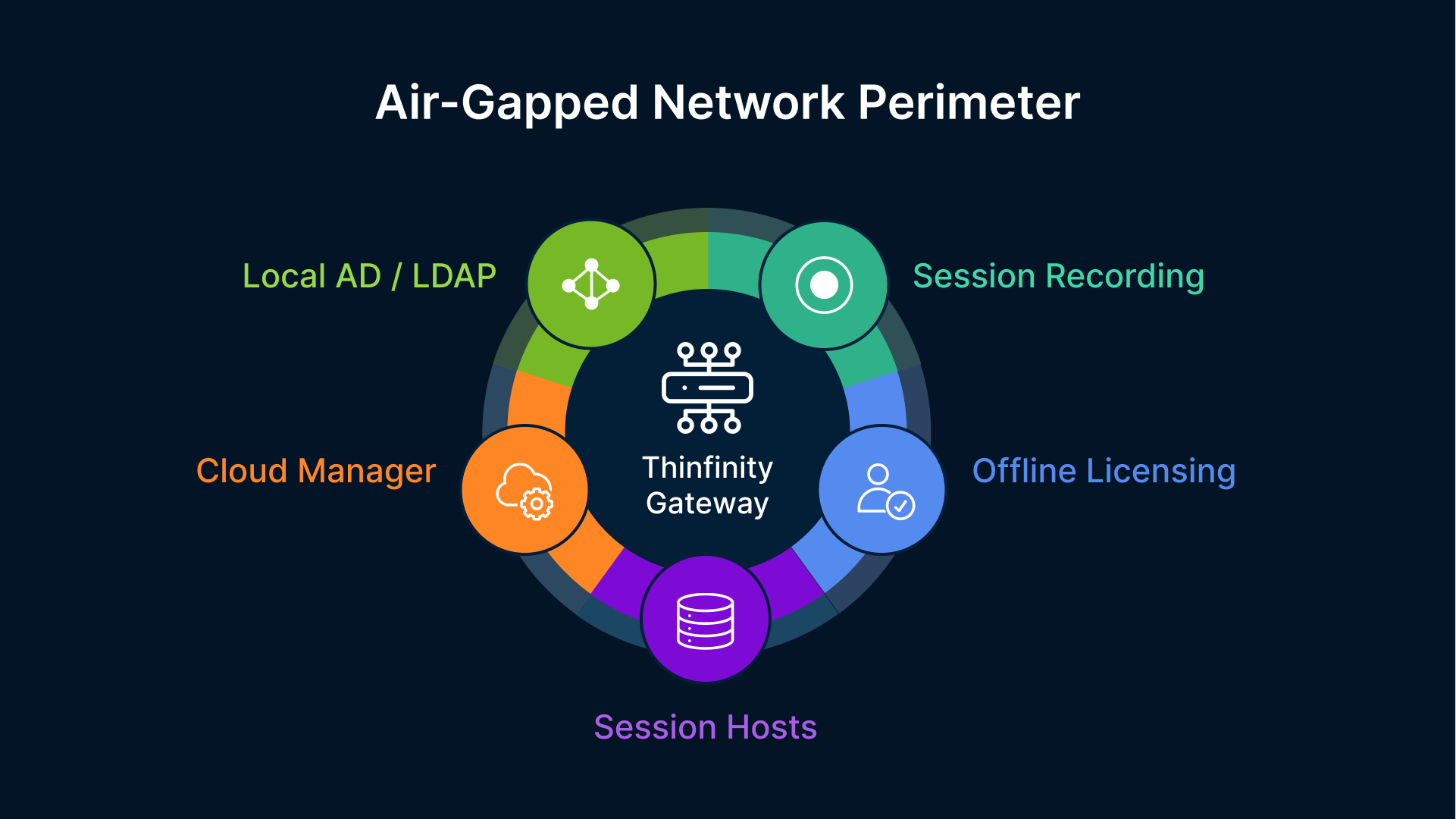
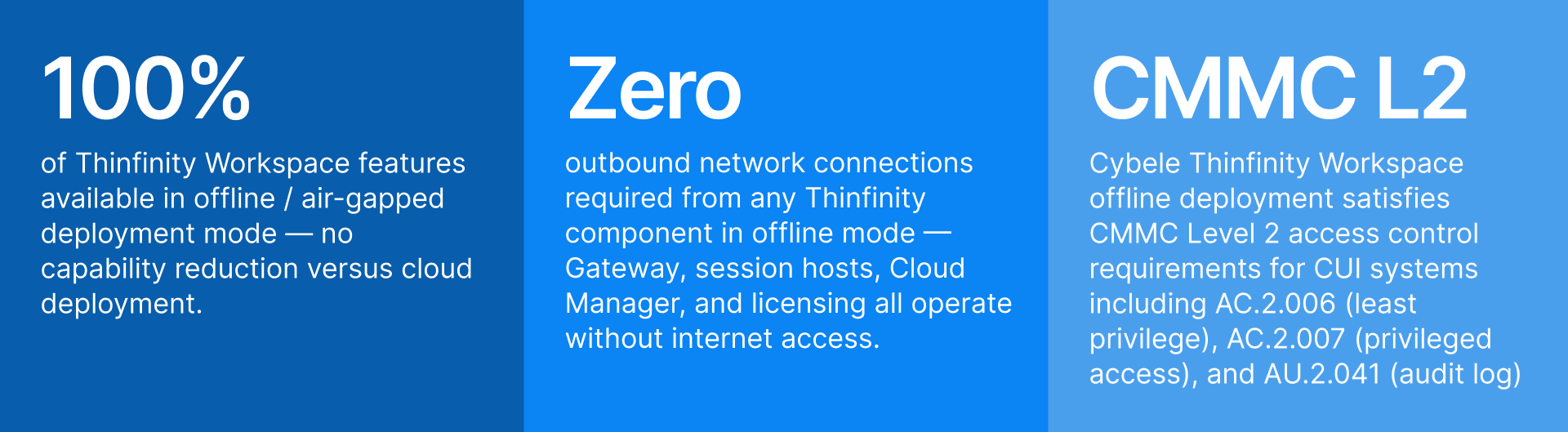
‘Offline mode’ in Thinfinity means something specific and complete: every component of the Thinfinity Workspace stack — the Gateway, the session broker, the Cloud Manager console, the licensing validation, the session recording storage, and the identity authentication — runs on hardware inside the air-gapped network with no outbound connections required to any external service, ever. This is not a degraded or limited mode. It is a fully supported deployment model with the same feature set as a cloud deployment, with every component pointing inward rather than outward.
The Gateway Runs On-Premises — On VergeIO or Bare Metal Windows Server
The Thinfinity Gateway in an offline deployment runs on a VM on the VergeIO hyperconverged cluster inside the air-gapped plant, or directly on a bare metal Windows Server if VergeIO is not part of the infrastructure. The Gateway listens on HTTPS port 443 and is reachable by users on the plant’s internal network — not from the internet. Users access the Thinfinity portal URL using an internal DNS name that resolves to the on-premises Gateway IP. The TLS certificate is issued by the plant’s internal Certificate Authority (Microsoft ADCS or an on-premises PKI), not by a public CA. External users never reach this Gateway — it has no internet-facing exposure and requires none.
VergeIO is the preferred platform for the offline Thinfinity Gateway and session hosts for two reasons. First, VergeIO’s hyperconverged architecture collapses the compute, storage, and networking stack onto a small number of physical nodes — reducing the hardware footprint for air-gapped deployments where rack space is often constrained and where adding hardware goes through extended approval and procurement cycles. Second, VergeIO’s snapshot and replication capabilities provide the local DR and backup infrastructure covered in Article 13 without any cloud dependency — snapshots stay on-premises, replication can be to a second VergeIO cluster at the same site or at a nearby classified facility.
Identity: Local Active Directory and LDAP, No Cloud IdP Required
In a cloud deployment, Thinfinity delegates authentication to Okta or Microsoft Entra ID — cloud services that require internet connectivity. In an offline deployment, Thinfinity authenticates users against the plant’s local Active Directory or LDAP directory, using LDAP/S or Kerberos — protocols that have operated on-premises for decades and require no external connectivity. MFA in an offline environment is implemented using on-premises MFA solutions: Microsoft NPS with TOTP extensions, on-premises RADIUS servers, hardware token solutions (RSA SecurID, SafeNet) that have been deployed for air-gapped access control in defense and government environments for years, or Windows Hello for Business configured against local AD.
The security controls enforced at the Thinfinity Gateway — MFA required before session assignment, RBAC based on AD group membership, per-application access policy — are identical to a cloud deployment. The identity backend is different (local AD instead of cloud IdP), but the control layer is the same. An operator who passes MFA and has the correct AD group membership gets a session; one who does not, does not. The Gateway enforces this regardless of whether the backing directory is Okta in OCI or Active Directory on a VergeIO VM in the plant basement.
Session Recording to Local Immutable Storage
In a cloud deployment, Thinfinity session recordings are written to OCI Object Storage with WORM (write-once-read-many) immutable retention. In an offline deployment, session recordings are written to a locally configured storage location — an SMB share on a Windows file server, a NAS volume, or VergeIO shared storage — with the same immutability guarantee enforced at the Thinfinity layer. The recording service writes each session as a sealed file after the session ends; the file is marked read-only and cannot be modified by the user or by session host administrators. For regulated air-gapped environments (21 CFR Part 11, CMMC), the local storage path is supplemented by a backup policy that copies sealed recordings to a write-once tape library or to an off-line media archive — maintaining the audit trail integrity without any network connectivity to external services.
Licensing: Offline Activation, No Phone-Home
Thinfinity Workspace supports offline license activation for air-gapped environments. The license is activated once through a manual process — a license request file is generated on the air-gapped system, taken out on approved media, activated against the Cybele licensing server on an internet-connected machine, and the resulting license file is brought back in and applied. After initial activation, the deployed instance validates its license locally and does not require periodic check-ins with any external licensing server. For environments where even the initial manual activation is procedurally complex (classified facilities with strict media transfer controls), Cybele Software supports pre-activated license delivery through the customer’s secure procurement channel.
The Three Session Delivery Protocols in Thinfinity Offline: RDC, VNC, and Thinfinity VNC
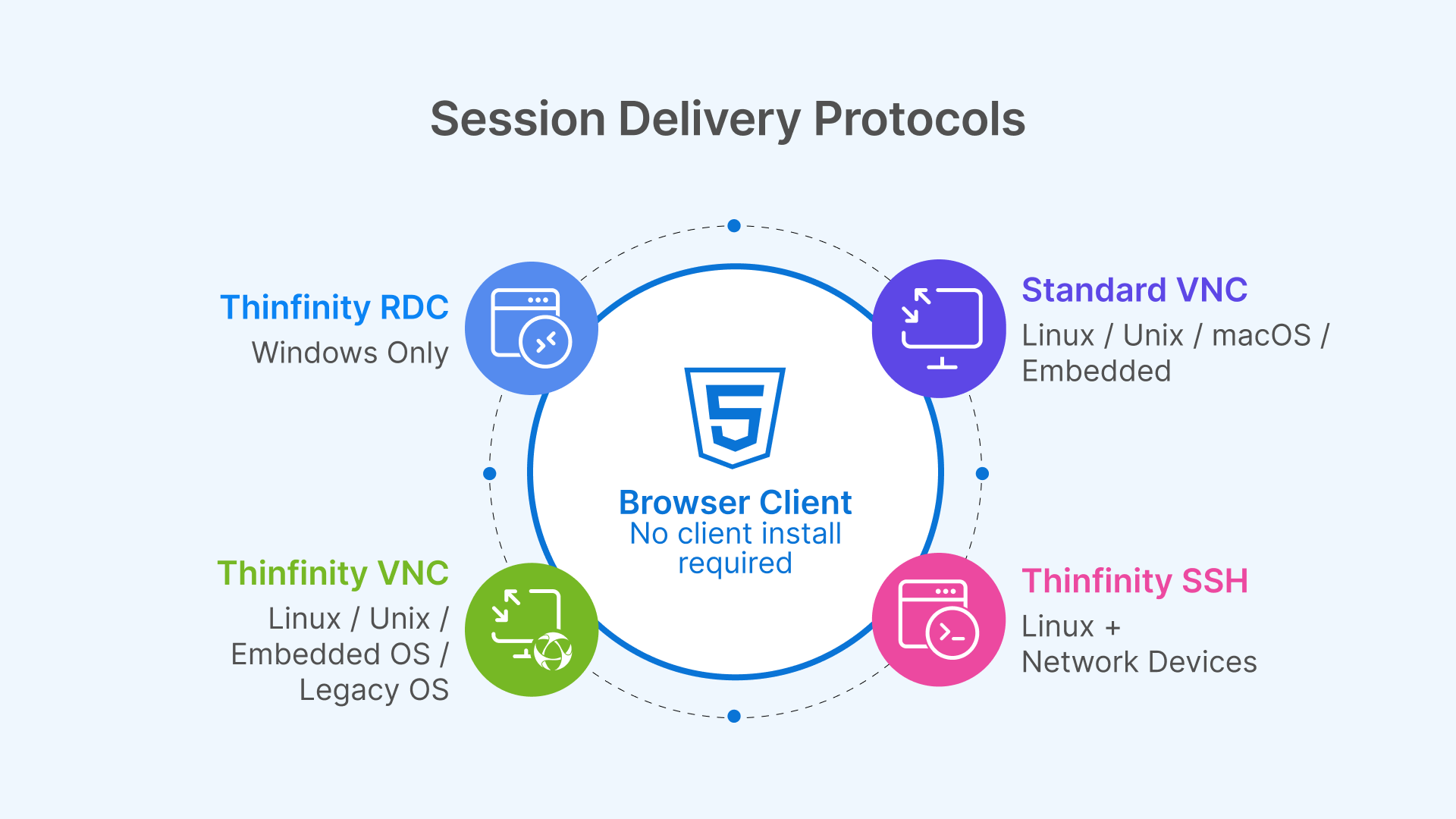
Thinfinity Offline supports three session delivery protocols, each designed for a different class of session host and workload. Choosing the right protocol for each application is the most consequential technical decision in an air-gapped Thinfinity deployment — it determines session quality, network bandwidth requirements, and which legacy operating systems can be served.
Thinfinity RDC: Windows Session Hosts for CAD, ERP, and Win32 Applications
Thinfinity RDC (Remote Desktop Connection) delivers sessions from Windows Server and Windows 10/11 session hosts to the user’s browser over an encrypted WebSocket connection. It is built on the RDP protocol foundation with Thinfinity’s own transport and encoding layer on top: the session host captures rendered frames, compresses them using H.264 or H.265 encoding (hardware-accelerated via NVIDIA NVENC on GPU-equipped hosts), and streams pixel data to the browser. No RDP client is required on the user’s device — the session renders entirely in a standard browser tab.
In an air-gapped deployment, Thinfinity RDC is the primary protocol for Windows-based workloads: defense CAD workstations running CATIA or Siemens NX, pharmaceutical batch record systems on Windows Server, process engineering analysis tools, and legacy Win32 manufacturing applications delivered through VirtualUI. The encoding and decoding happen entirely on the local network — H.264/H.265 frame encoding on the session host, decoding in the browser’s WebGL layer — with no dependency on any external codec service or CDN. For GPU-equipped session hosts on VergeIO (or bare metal), NVENC hardware encoding offloads compression from the CPU to the GPU’s dedicated encode engine, delivering high-quality CAD frame rates without consuming CPU cycles needed for the 3D rendering workload itself.
RDC’s color depth and frame rate fidelity make it the protocol of choice for visual-intensive applications in air-gapped environments: the defense engineer reviewing a complex 3D assembly, the nuclear engineer analyzing stress distribution visualizations, the semiconductor process engineer examining wafer defect maps. The protocol carries full 32-bit color at frame rates that match the application’s rendering output, bounded by the available bandwidth of the plant’s internal network — which, for an air-gapped plant with a modern LAN backbone, is typically 1–10 Gbps between session host and user endpoint, yielding latency well under 5ms and frame rates at the display’s native refresh rate.
Thinfinity VNC: Linux, UNIX, and Embedded OS Session Hosts
Thinfinity VNC delivers sessions from Linux, UNIX, and embedded operating system hosts — workloads that cannot be served by the Windows-based RDC protocol. In air-gapped manufacturing, the proportion of Linux and UNIX session hosts is often higher than in standard enterprise IT: nuclear DCS operator consoles run embedded Linux, semiconductor EDA tools run on RHEL or CentOS workstations, defense simulation and analysis tools run on Linux HPC nodes, and legacy process control consoles run on Solaris or HP-UX systems that predate Windows-based HMI platforms.
Thinfinity VNC connects to a VNC server running on the target Linux or UNIX host — tigervnc-server, RealVNC, x11vnc, or the built-in VNC server of most Linux desktop environments — and delivers the session to the user’s browser through the Thinfinity Gateway using the same WebSocket transport as RDC. The user’s experience is identical to an RDC session from the portal perspective: they click the application icon in the Thinfinity portal, the session opens in their browser tab, the session is recorded and governed by the same RBAC and access policies as Windows sessions. The protocol running underneath — VNC rather than RDP — is an infrastructure detail the user never sees.
VNC’s design reflects its origin as a cross-platform remote display protocol: it transmits the raw framebuffer of the remote display rather than a compressed video stream. In a local air-gapped network where bandwidth is abundant and latency is sub-millisecond, this is not a practical limitation — the framebuffer transmission is fast enough for the session latency to be imperceptible. For older Linux hosts with limited CPU resources, VNC’s lower encoding overhead (compared to H.264) is actually an advantage: the session host spends less CPU on session encoding and more CPU on the application workload.
Thinfinity VNC Protocol: Enhanced VNC for Air-Gapped Environments
Thinfinity’s own VNC protocol variant — distinct from standard VNC — is an enhanced implementation built specifically for the Thinfinity delivery layer. It extends standard VNC with capabilities that matter in manufacturing and industrial deployments: adaptive compression that adjusts encoding quality based on available bandwidth (relevant for plants where the LAN between a remote building and the main server room is constrained), delta frame encoding that sends only screen regions that have changed rather than full framebuffer updates (reducing session bandwidth for applications with large static screen areas, like DCS operator consoles that have a mostly static plant diagram with a few updating values), and TLS encryption at the transport layer enforced by the Thinfinity Gateway rather than relying on the VNC server’s own encryption configuration.
The TLS enforcement point is particularly important for air-gapped manufacturing. Many VNC server installations on legacy Linux and UNIX hosts use older VNC authentication mechanisms (VNC password, NTLMv1) that are cryptographically weak by modern standards. Rather than requiring organizations to update VNC server configurations on potentially dozens of legacy hosts — updates that may require re-qualification in validated or certified environments — Thinfinity’s enhanced VNC protocol wraps the VNC connection in a TLS tunnel at the Gateway layer, providing modern transport-level encryption regardless of what the VNC server itself supports. The legacy host is unmodified; the session is encrypted. This is the same philosophy as the legacy application security model in Article 10: apply the security control at the delivery layer, not at the application.
Thinfinity VNC protocol also supports shared session and session handoff capabilities that standard VNC does not: a supervisor can view an operator’s session in real time (shadow mode) for training and incident investigation, and session handoff allows an outgoing shift operator to pass an active process monitoring session to the incoming operator without closing the application — maintaining process visibility continuity across shift changes, a critical capability in continuous process manufacturing environments where SCADA visibility must never lapse.
Thinfinity SSH: Browser-Based Terminal Access for Linux and Network Device Administration
Beyond graphical session delivery, Thinfinity Workspace includes native SSH support — delivering secure shell terminal sessions to Linux servers, UNIX hosts, network devices, and embedded systems directly in the browser, through the same Thinfinity Gateway and the same RBAC and session recording stack as RDC and VNC sessions. In an air-gapped manufacturing environment, SSH access is a critical but often poorly controlled vector: engineers and administrators connect to Linux process servers, embedded Linux HMIs, network switches, and firewall appliances using SSH clients installed on their workstations, with credentials managed inconsistently and no central audit trail of which commands were executed. Thinfinity SSH replaces direct SSH client connections with a brokered, policy-governed browser session: the user clicks the target device in the Thinfinity portal, authenticates through the Gateway with MFA enforced by local AD, and receives a terminal session in their browser. The SSH connection originates from the Thinfinity relay inside the plant network — the device never needs to accept connections directly from user endpoints. Session recording captures the full terminal output, including every command typed and every response received, written to the same local immutable storage as graphical session recordings. For CMMC and NERC-CIP environments where privileged access to network devices must be logged with command-level granularity, Thinfinity SSH’s session recording satisfies this requirement without deploying a separate privileged access workstation (PAW) infrastructure or a dedicated jump server. The same Cloud Manager console that manages Windows RDC pools and Linux VNC hosts also publishes SSH targets — routers, switches, firewalls, Linux servers, and embedded systems — as bookmarks in the unified Thinfinity portal, giving operators and administrators a single authenticated access point for every device type in the air-gapped plant.
Rather than chasing novelty, attackers invested in understanding how industrial environments actually function — how access persists, how trust is inherited, and how operational impact can be staged long before it is executed.
Protocol Selection Matrix for Air-Gapped Manufacturing
| Dimension | Thinfinity RDC | Standard VNC | Thinfinity VNC Protocol | Thinfinity SSH |
|---|---|---|---|---|
| Target OS / Device | Windows Server, Windows 10/11, Windows 7 (session host) | Linux, UNIX, macOS, embedded Linux | Linux, UNIX, embedded OS — same targets as VNC with enhanced delivery | Linux, UNIX, network devices (routers, switches, firewalls), embedded systems with SSH daemon |
| Session type | Full graphical desktop or RemoteApp window | Full graphical desktop of remote host | Full graphical desktop with delta encoding | Terminal / CLI — command-line access; no graphical output |
| Encoding | H.264 / H.265 (NVENC hardware on GPU hosts); full video stream | Raw framebuffer; some compression with TightVNC/ZRLE | Delta frames + adaptive compression; bandwidth-optimized for LAN and constrained links | Text stream — extremely low bandwidth; SSH protocol native encryption |
| Transport security | TLS 1.3 enforced by Thinfinity Gateway; end-to-end encrypted WebSocket | Depends on VNC server config; older servers may lack TLS | TLS enforced at Thinfinity Gateway regardless of VNC server capability | SSH protocol encryption + TLS at Gateway; credentials never exposed to user endpoint |
| Session recording | Full pixel-accurate video recording | Full pixel-accurate video recording | Full pixel-accurate video recording | Full terminal output recording — every command and response captured as text + timed replay |
| Air-gap suitability | Excellent — no external dependency | Good — lightweight, works on old hardware | Excellent — secures legacy VNC without reconfiguration | Excellent — replaces uncontrolled direct SSH clients with brokered, audited, MFA-enforced access |
| Typical air-gap use cases | CAD (CATIA, NX), Win32 legacy apps, ERP thick clients, Windows engineering workstations | Linux HMI, UNIX legacy tools, process servers, embedded OT consoles | SCADA operator consoles (shift handoff), DCS monitoring (shadow mode), legacy UNIX with weak VNC auth | Linux process server admin, network device config (routers/switches/firewalls), embedded Linux diagnostics, privileged admin access requiring command-level audit |
| Bandwidth per session | 800 Kbps – 4 Mbps (H.264 adaptive) | 500 Kbps – 3 Mbps (raw framebuffer) | 300 Kbps – 2 Mbps (delta encoding) | < 50 Kbps — negligible; text-only stream |
| Client requirement | Any modern browser — no plugin, no client | Any modern browser via Thinfinity Gateway | Any modern browser via Thinfinity Gateway | Any modern browser via Thinfinity Gateway — no SSH client on user device |
VergeIO as the Air-Gapped Thinfinity Platform: Hyperconverged Infrastructure Without Cloud Dependency
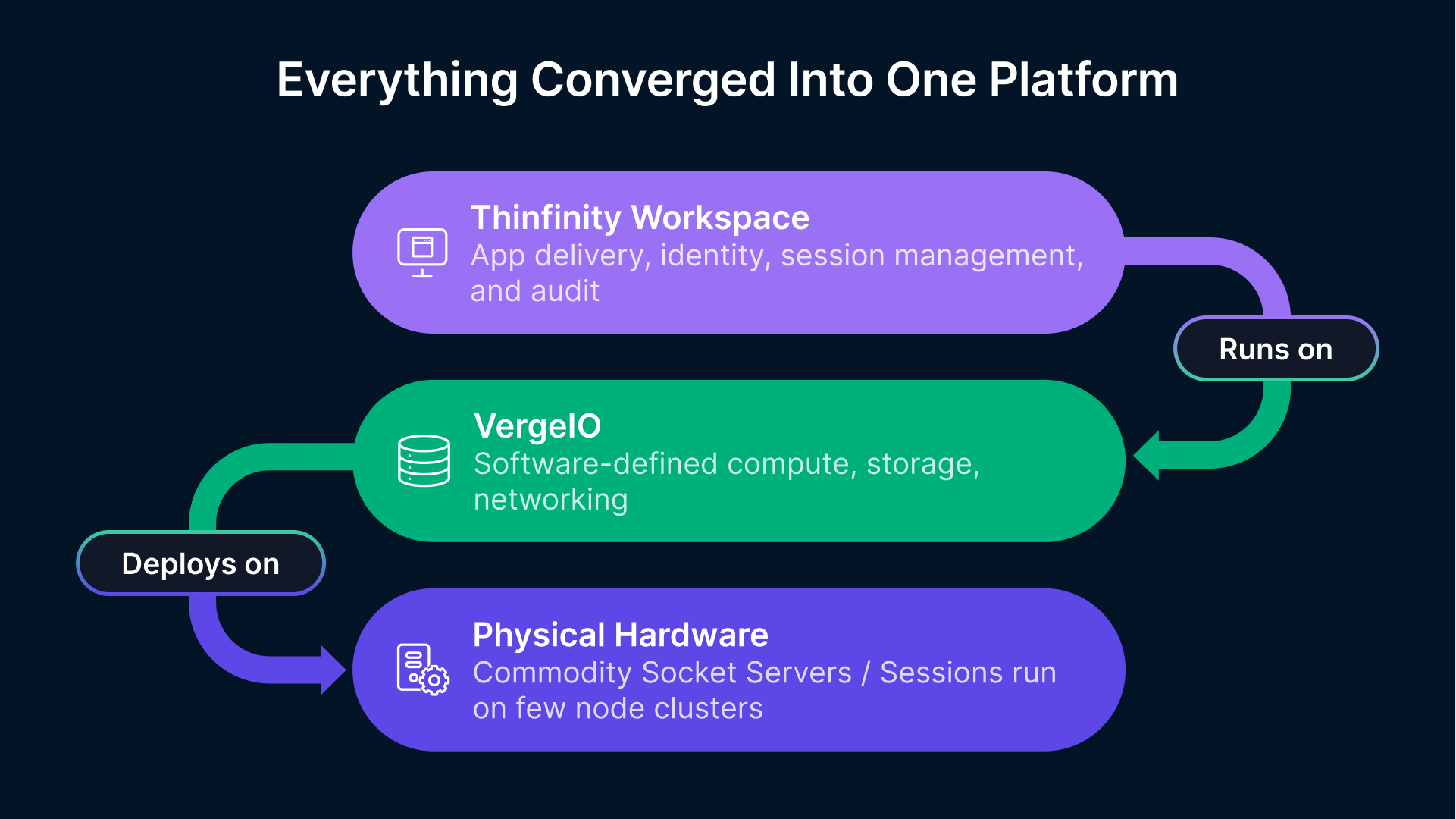
VergeIO is the on-premises hyperconverged infrastructure platform that makes Thinfinity Offline practical at manufacturing scale. Its design — collapsing compute, storage, and networking onto commodity servers with a software-defined fabric — is well matched to the constraints of air-gapped industrial environments: limited rack space, no internet connectivity for updates or licensing, requirement for complete on-premises operation, and the need to run a mixed workload of session host VMs, storage services, and supporting infrastructure on a small hardware footprint.
Running Thinfinity Session Hosts, Gateway, and Cloud Manager on VergeIO
A complete Thinfinity Offline deployment on VergeIO consolidates all components onto the hyperconverged cluster: the Thinfinity Gateway VM, the Thinfinity Cloud Manager VM, Windows session host VMs (for RDC delivery), Linux session host VMs (for VNC and Thinfinity VNC delivery), Active Directory domain controllers, the internal Certificate Authority (ADCS), FSLogix container storage (VergeIO SMB share), and session recording storage (VergeIO NFS or SMB share). A deployment supporting 50–100 concurrent sessions can comfortably run on a 3–4 node VergeIO cluster with standard 2-socket servers — the same hardware that would previously have been dedicated to a Citrix or VMware Horizon deployment, now running Thinfinity with lower per-VM overhead and no external licensing dependencies.
VergeIO’s native snapshot policy provides the local backup and DR capability described in Article 13, entirely on-premises: daily snapshots of session host VMs, weekly snapshots of the Gateway and Cloud Manager VMs, and continuous snapshot of the FSLogix container storage volume. For air-gapped environments where DR replication to OCI is not possible, VergeIO’s site-to-site replication can synchronize the Thinfinity deployment to a second VergeIO cluster at a secondary facility — a backup site, a mirror room in the same building, or a classified secondary location — over the air-gapped internal network.
Software Updates in Air-Gapped VergeIO Deployments
Air-gapped environments require a formal media transfer process for all software updates — OS patches, application updates, Thinfinity version updates, and VergeIO itself. The standard approach: updates are downloaded on an internet-connected system in a separate, unclassified network zone, scanned for malware and verified for integrity using cryptographic hash validation, transferred to the air-gapped environment on approved removable media (USB drive, DVD, or a one-way data diode transfer where available), and applied within the air-gapped zone through standard update mechanisms. Thinfinity’s update packages support this model: each update release includes SHA-256 hash values for integrity verification, and Thinfinity Cloud Manager’s maintenance mode procedure allows rolling session host updates with zero production impact — the same golden image rotation procedure described in Article 13, applied entirely on-premises.
The Same Architecture at Every Stage: Why Starting Offline Creates the Fastest Path to Hybrid
The most important strategic point about Thinfinity Offline is not what it does in the air-gapped plant today — it is what it does not foreclose for the organization’s future. Thinfinity Workspace is a single product with a single architecture: Gateway, session broker, Cloud Manager, session host pools, RBAC policies, session recording, access policies. These components run on VergeIO on-premises in an air-gapped deployment and on OCI in a cloud deployment. The operational knowledge, the policy configuration, the session host golden image management, the FSLogix profile strategy, and the Thinfinity Cloud Manager console skills developed in the offline deployment transfer directly and completely to the hybrid and cloud deployments that may follow.
Contrast this with the alternative: deploying a specialized air-gapped access solution today that has no upgrade path to cloud, then replacing it when the organization decides to extend connectivity or move to hybrid. That replacement involves a new product, new training, new policy migration, new integration work with the identity provider, and a new session recording archive strategy. The organizational cost of that replacement — measured in project time, retraining, and the inevitable configuration gaps during transition — is the hidden cost of choosing a dead-end solution.
With Thinfinity Offline, the transition from fully air-gapped to hybrid to cloud is an incremental configuration extension, not a replacement. The same Gateway gets a second endpoint in OCI. The same Cloud Manager adds an OCI session host pool alongside the VergeIO pool. The same RBAC policies extend to cover the new cloud-based applications. The same session recording configuration adds OCI Object Storage as a second recording destination. The people who operate the air-gapped deployment know exactly how to extend it — because the air-gapped deployment is the same product.
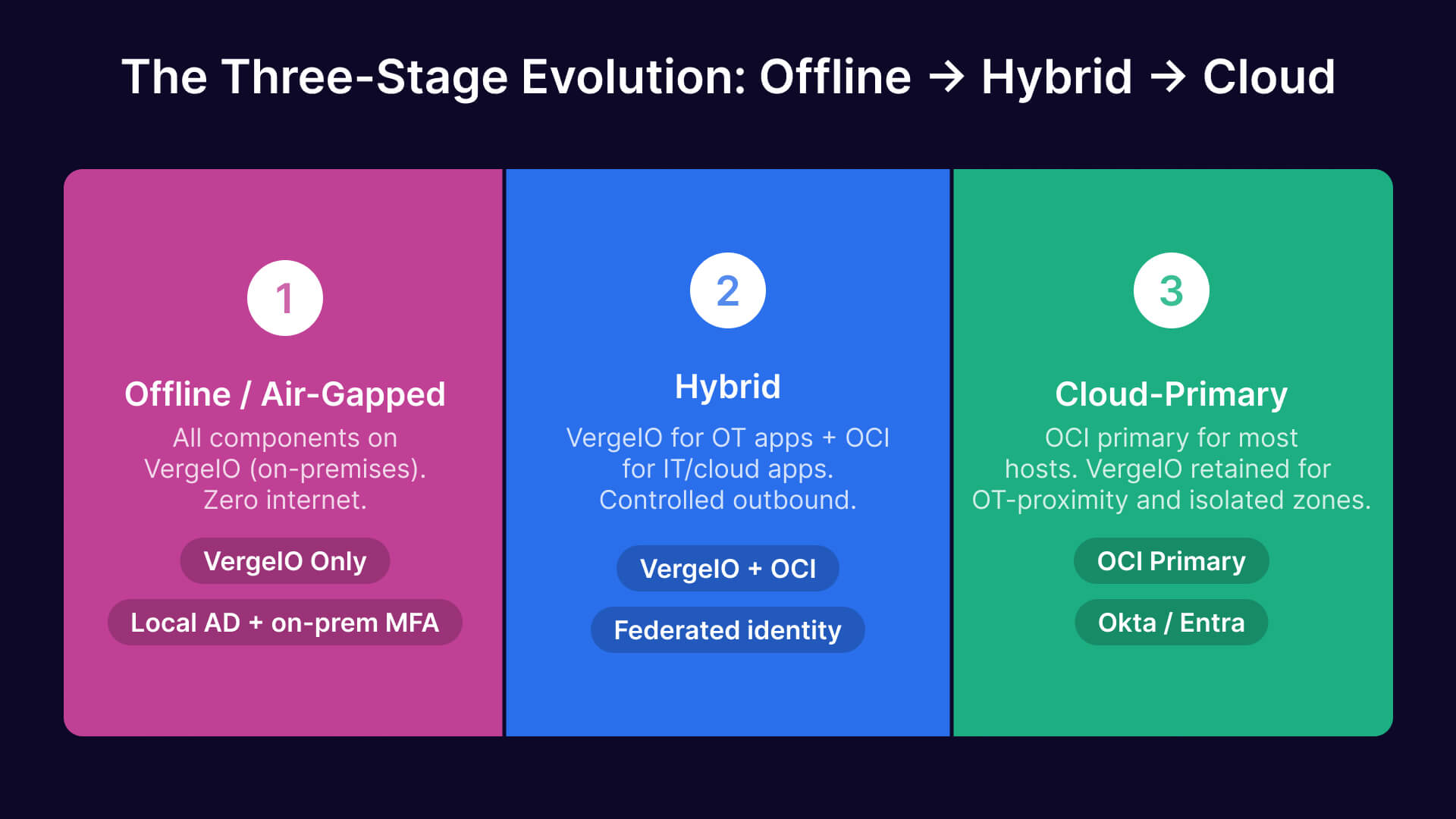
The Three-Stage Evolution: Offline → Hybrid → Cloud
| Stage | Infrastructure | Connectivity | Identity | Gateway Location | What Changes to Advance to Next Stage |
|---|---|---|---|---|---|
| Stage 1 — Offline / Air-Gapped | VergeIO on-premises only; all VMs local | None — fully air-gapped; no internet connection | Local Active Directory / LDAP + on-premises MFA (RADIUS, hardware token) | Thinfinity Gateway on VergeIO VM; internal DNS only | Nothing changed in the production plant. Add OCI credentials and a second Gateway instance in OCI when connectivity is approved. |
| Stage 2 — Hybrid | VergeIO on-premises (OT-proximity apps) + OCI session hosts (cloud-native / IT-layer apps) | Relay outbound to OCI Gateway over controlled internet link (or FastConnect); plant OT network remains air-gapped from internet | Local AD + optional Entra ID / Okta for cloud-facing users; federated or parallel identity | Primary Gateway on OCI; secondary Gateway on VergeIO for local fallback; same portal URL | Add OCI session host pools for applications that benefit from cloud scale. VergeIO pool continues serving OT-proximity apps unchanged. |
| Stage 3 — Cloud-Primary | OCI primary for most session hosts; VergeIO retained for lowest-latency OT-adjacent apps or DR | OCI FastConnect or relay-based; internet connectivity established for cloud workloads | Okta or Entra ID as primary IdP; local AD synchronized or replaced | Primary Gateway on OCI; VergeIO Gateway as local fallback or for remaining air-gapped zones | Full cloud architecture from Articles 11–13. VergeIO remains for specific isolated zones. Architecture is the series in full. |
What Stays the Same Across All Three Stages
| Component | Role | Stage 1: Offline | Stage 2: Hybrid | Stage 3: Cloud-Primary |
|---|---|---|---|---|
| Thinfinity Gateway | Session broker and policy enforcement point | VergeIO VM, internal-only | VergeIO (local) + OCI (primary); same config | OCI primary; VergeIO as fallback |
| Thinfinity Cloud Manager | Session host pool management, policies, golden images | On-premises VergeIO VM | Same instance; OCI pools added | Same instance; manages both pools |
| Session host pools | Windows (RDC) and Linux (VNC / Thinfinity VNC) session hosts | All on VergeIO | VergeIO + OCI pools, side by side | OCI primary; VergeIO for OT-proximity |
| RBAC policies | Per-application access control, user group mappings | Configured against local AD groups | Same policies; IdP groups added | Same policies; IdP is Okta or Entra ID |
| Session recording | Audit trail for all sessions | Local VergeIO storage; immutable on-prem | VergeIO storage + OCI Object Storage | OCI Object Storage WORM; VergeIO backup |
| FSLogix profiles | User profile persistence across non-persistent sessions | VergeIO SMB share | VergeIO + OCI File Storage | OCI File Storage primary |
| Protocols (RDC / VNC) | Session delivery to browser | Unchanged at all stages | Unchanged at all stages | Unchanged at all stages |
| Portal URL and UX | User-facing access portal | Internal DNS, internal-only | Same URL; external DNS added for OCI Gateway | Same URL; cloud-hosted DNS |
The Value of Architectural Continuity
When a manufacturing organization’s air-gapped plant eventually opens a controlled internet link — for supply chain integration, cloud ERP access, or as part of a broader digital transformation — the Thinfinity deployment does not need to be replaced. The VergeIO-based offline deployment becomes Stage 2 in a matter of days: deploy the OCI Gateway instance, connect the OCI relay, add the OCI session host pool in Cloud Manager, and the users’ portal looks exactly the same with more applications available. The IT team’s operational knowledge carries forward without retraining. The policy configurations carry forward without migration. The session recording archive carries forward without format conversion. This is architectural continuity — and it is one of the strongest reasons to choose Thinfinity Offline rather than a purpose-built air-gapped solution with no upgrade path.
Observability in Air-Gapped Environments: On-Premises Datadog and Local Monitoring
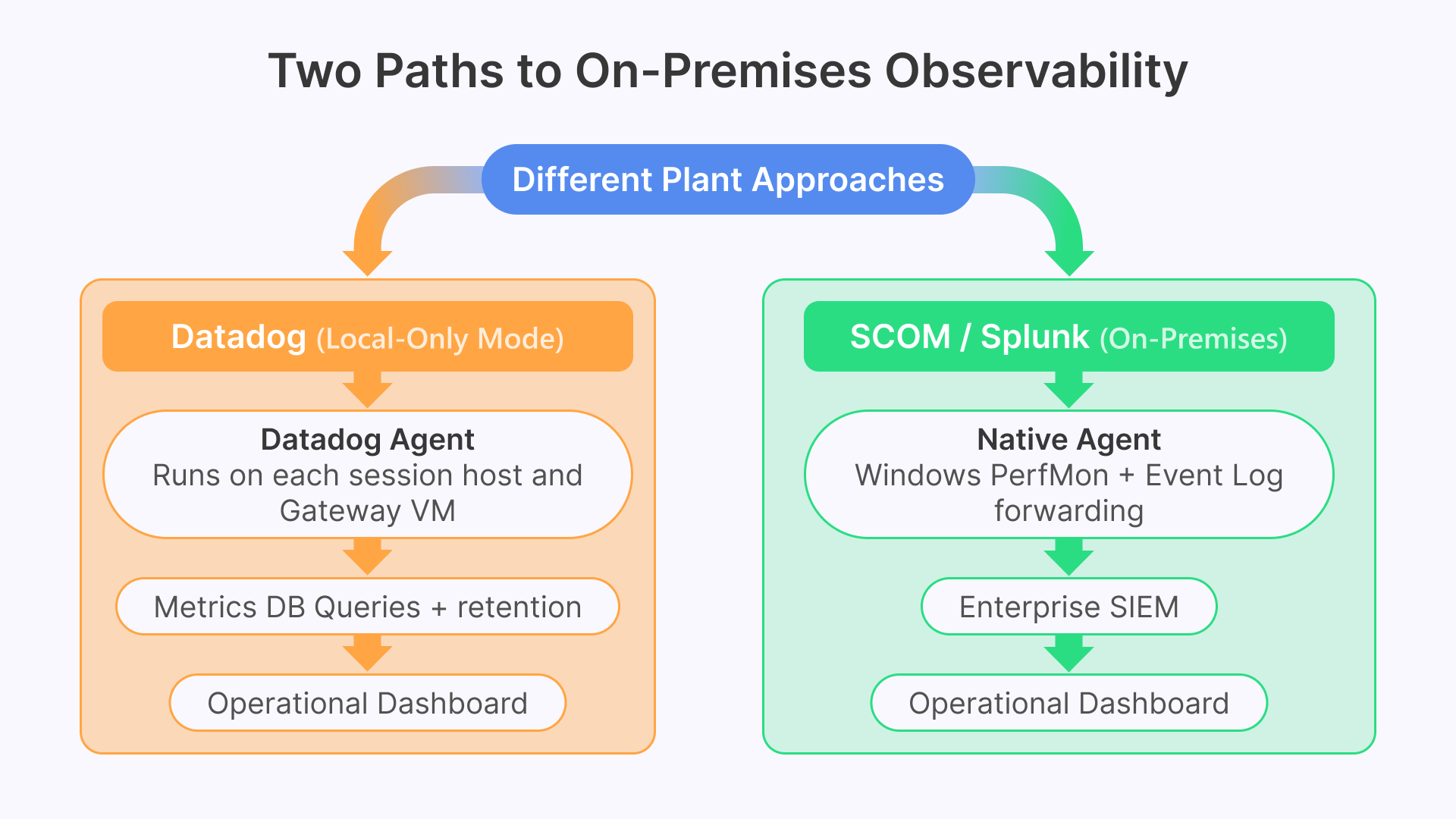
The monitoring and observability stack described throughout this series — Datadog receiving metrics from Thinfinity session hosts, Windows Event Logs, VCN Flow Logs, and Claroty OT alerts — requires adaptation for air-gapped environments where the Datadog SaaS platform in the cloud is not reachable. Two approaches work in practice.
The first approach uses Datadog Agent in local-only mode: agents are deployed on VergeIO session host VMs and on the Thinfinity Gateway VM, collecting metrics and forwarding them to an on-premises Datadog Cluster Agent or a self-hosted metrics aggregation stack (Prometheus + Grafana, or Elastic + Kibana). The Datadog Agent’s collection capabilities — Windows Event Log, Windows Performance Counters, custom Thinfinity log parsing — work identically in local-only mode. Dashboards and alerts are hosted on the on-premises aggregation stack rather than the Datadog SaaS platform. For organizations that have a Datadog deployment in an unclassified zone alongside their air-gapped network, a one-way data diode transfer can forward sanitized session host metrics from the air-gapped zone to the Datadog instance without creating an inbound path back into the classified environment.
The second approach uses Windows Performance Monitor and Event Log aggregation natively within the air-gapped environment: Microsoft System Center Operations Manager (SCOM) or Splunk on-premises collects the same session host metrics and event data that Datadog would collect in a cloud deployment. Thinfinity’s logging output format is compatible with both platforms. The operational dashboards — session host pool availability, concurrent session count, login queue time, application crash events — can be replicated in SCOM or Splunk using the same underlying metrics, just aggregated and visualized on-premises rather than in Datadog SaaS.
Thinfinity Offline as the Starting Point for Every Manufacturing Deployment
This article is the final article in the manufacturing series, and it is worth naming a pattern that runs through all fourteen articles: every deployment benefits from the same core Thinfinity architecture, regardless of where it sits on the offline-to-cloud spectrum. The air-gapped plant and the cloud-first plant are not opposite ends of a spectrum requiring different products — they are different configurations of the same product, and the distance between them is measured in configuration steps, not in architectural distance.
For manufacturing organizations that are not air-gapped but are hesitant about cloud adoption — uncertain about latency, concerned about data sovereignty, operating in a jurisdiction with data residency requirements, or simply not yet ready to take applications off-premises — Thinfinity Offline on VergeIO is also the right starting point. Deploy on-premises first. Learn the Cloud Manager. Build the session host golden images. Configure the RBAC policies. Establish the FSLogix profile strategy and the session recording archive. When the organization is ready to extend to OCI — next quarter, next year, on its own schedule — the cloud extension is an additive configuration. Nothing is replaced. Nothing is re-architected. The platform grows with the organization.
The air-gapped deployment and the on-premises-first deployment both follow the same path described in this article’s migration table. Stage 1 is Thinfinity Offline on VergeIO. Stage 2 is hybrid, with OCI added alongside VergeIO. Stage 3 is cloud-primary, with VergeIO retained for the workloads where on-premises proximity remains essential. At every stage, the users see the same portal, the security team enforces the same policies, the operations team manages the same Cloud Manager console, and the auditors review the same session recording format. The journey from offline to cloud is an evolution, not a replacement.
The Complete Manufacturing Series
This article concludes Cybele Software’s 14-article manufacturing VDI series. Articles 1–13 cover the full cloud and hybrid deployment architecture — business case, infrastructure, security, Zero Trust, legacy application delivery, OT/IT integration, autoscaling, and disaster recovery. This Article 14 covers the starting point: Thinfinity Offline for air-gapped environments, and the architecture that makes the journey to hybrid and cloud a configuration extension rather than a replacement project.