
Manufacturing plants measure downtime in minutes of lost production, not in hours of IT inconvenience. When the VDI infrastructure that delivers MES dashboards, quality reporting tools, shift scheduling systems, and engineering CAD applications fails, the impact is immediate and measurable: operators cannot enter production data, supervisors cannot access scheduling tools, engineers cannot open the assemblies they are working on. For a plant running USD 50,000 worth of output per hour, a 90-minute VDI outage is a USD 75,000 incident — and that is before counting the compliance and audit implications if regulated applications were unavailable during a production run.
The challenge is that VDI disaster recovery is substantially more complex than recovering a single application server. A VDI environment has multiple interdependent components: the session delivery infrastructure (Thinfinity Gateway and session hosts on OCI and VergeIO), user profile containers (FSLogix VHDs on OCI File Storage or VergeIO shared storage), golden images (the base OS plus application stack that every session host uses), authentication dependencies (Okta or Entra ID, which are cloud services but still have dependency implications), and OCI-to-plant connectivity (FastConnect or VPN, which is the physical network path users depend on). Failure of any one component in the wrong sequence can prevent users from getting sessions even if the others are fully functional.
This article defines the failure scenarios specific to manufacturing VDI environments, assigns target recovery time objectives (RTO) and recovery point objectives (RPO) to each, maps those targets to specific infrastructure designs using OCI multi-region, VergeIO snapshot replication, FSLogix container backup, and Thinfinity’s own redundancy capabilities, and provides the operational runbooks that turn those designs into documented, testable recovery procedures.

Digital infrastructure operators are still struggling to meet the high standards that customers expect and service level agreements demand – despite improving technologies and the industry’s strong investment in resiliency and downtime prevention.
Andy Lawrence, Executive Director

Manufacturing VDI Failure Scenarios: What Standard DR Plans Miss
Standard enterprise DR plans focus on data center failure, application server failure, and database corruption. Manufacturing VDI adds several failure scenarios that standard plans do not address — and that manufacturing IT teams discover during incidents rather than in DR planning.
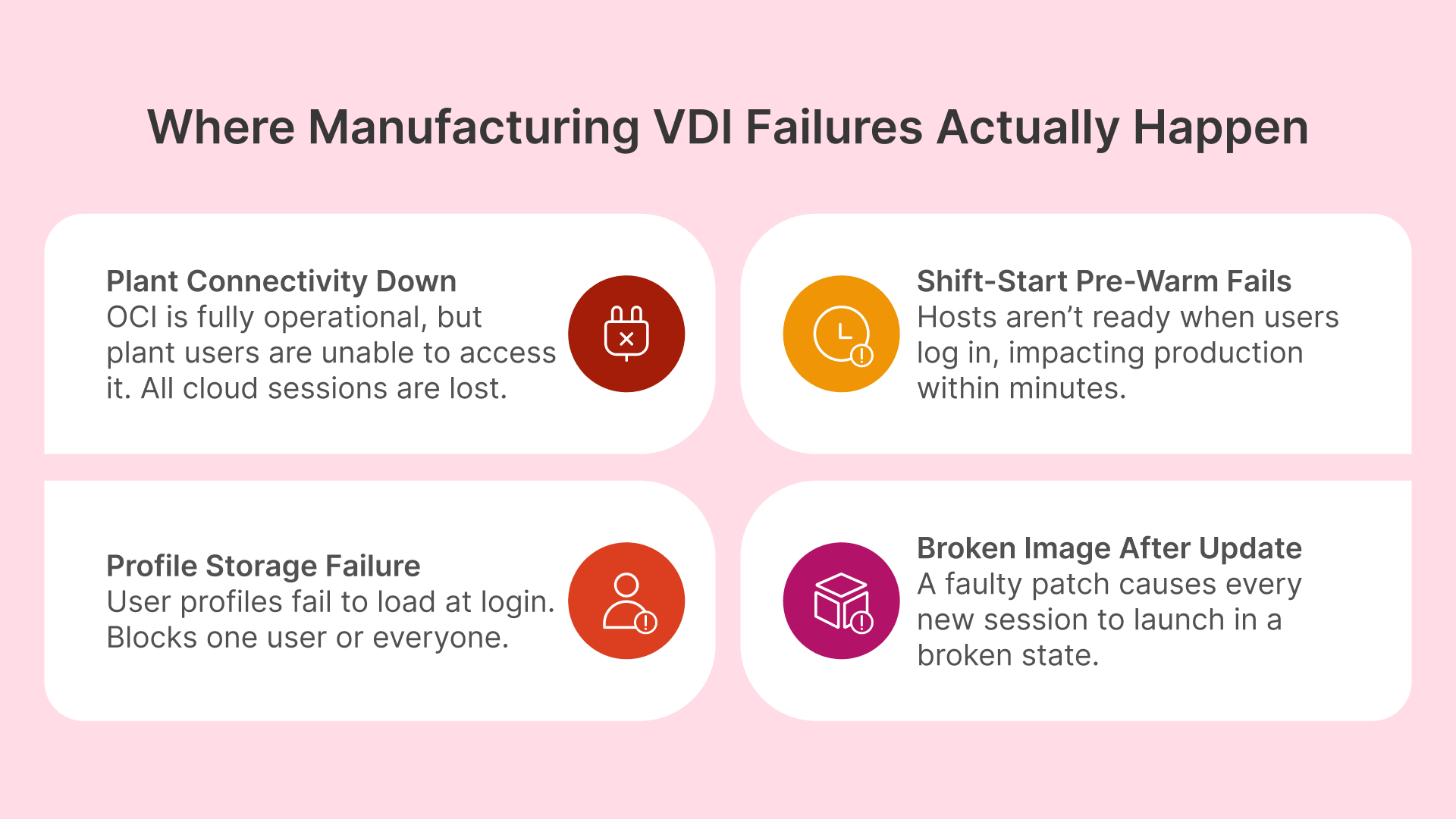
Plant Site Connectivity Failure: OCI Is Up But Users Cannot Reach It
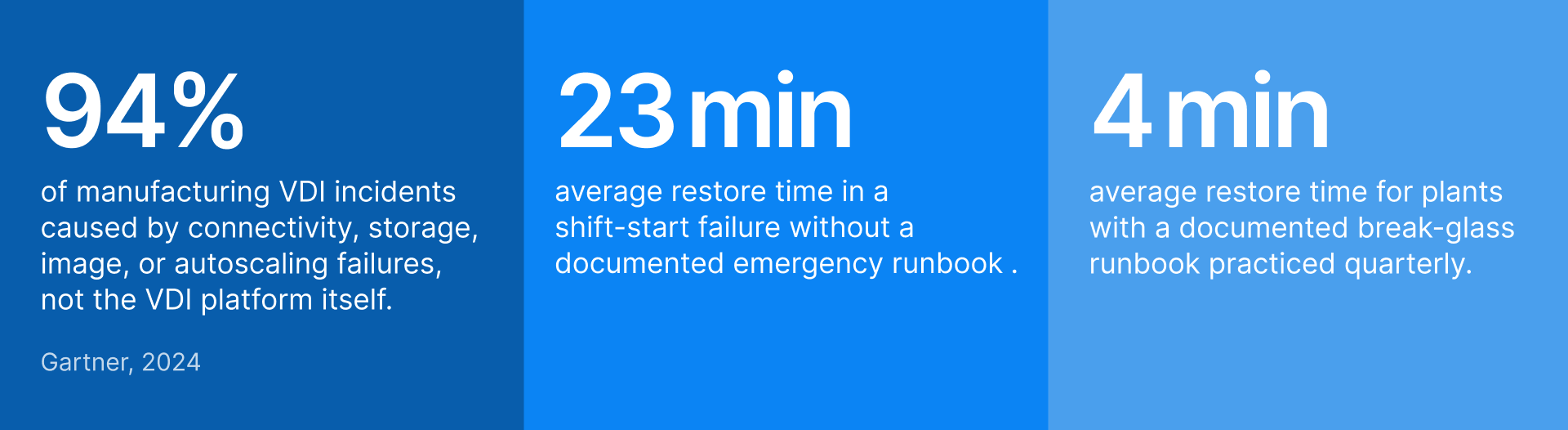
The most common VDI availability incident in manufacturing is not an OCI outage — it is a failure of the WAN link or FastConnect circuit between the plant site and the OCI region. OCI is running normally; the Thinfinity Gateway is healthy; session hosts are ready and waiting. But users at the plant cannot reach the gateway because the internet circuit or the dedicated FastConnect link is down. From the users’ perspective, the experience is identical to an OCI outage: they cannot get sessions.
This failure mode is particularly important because it is outside OCI’s SLA and OCI’s recovery capabilities. OCI cannot restore a customer’s internet circuit or their carrier’s FastConnect link. The DR design must account for it as a primary failure scenario, not a secondary one. The mitigation is a local recovery path that does not depend on OCI reachability: a VergeIO-hosted Thinfinity Gateway and session host pool at the plant site that users can reach over the local network without traversing the WAN. This local fallback is not a full mirror of the OCI deployment — it provides access to the subset of applications that are most critical during a connectivity outage (MES, shift scheduling, quality tools), using session hosts that are physically in the plant.
It is worth noting that for deployments where the plant network and OCI are intentionally kept in completely separate domains — with no FastConnect, no VPN tunnel, and no direct routable path between them — this failure mode is fundamentally different in character. Thinfinity’s relay component, installed on a standard Windows Server inside the plant, initiates an outbound-only HTTPS connection on port 443 to the Gateway hosted in OCI. No inbound ports are opened on the plant firewall, no firewall rules are modified, and no carrier circuit needs to be provisioned or maintained. The Gateway in OCI and the relay in the plant communicate entirely through the plant’s existing outbound internet access — the same path any browser uses to reach a website. Organizations that cannot or choose not to deploy FastConnect or site-to-site VPN (due to security policy that prohibits direct cloud-to-OT-adjacent network connectivity, budget constraints, circuit provisioning lead times, or a deliberate architectural decision to keep the cloud and plant in isolated domains) can deploy Thinfinity in production the same day the relay is installed, with full MFA, RBAC, and session recording enforced at the cloud Gateway. For these deployments, the connectivity DR scenario changes: the failure to plan for is not ‘FastConnect circuit down’ but ‘plant internet access down’ — mitigated by exactly the same local VergeIO fallback Gateway described above, which serves users entirely within the plant network and requires no internet connectivity whatsoever.
Autoscaling Failure at Shift Start: The 06:00 Incident
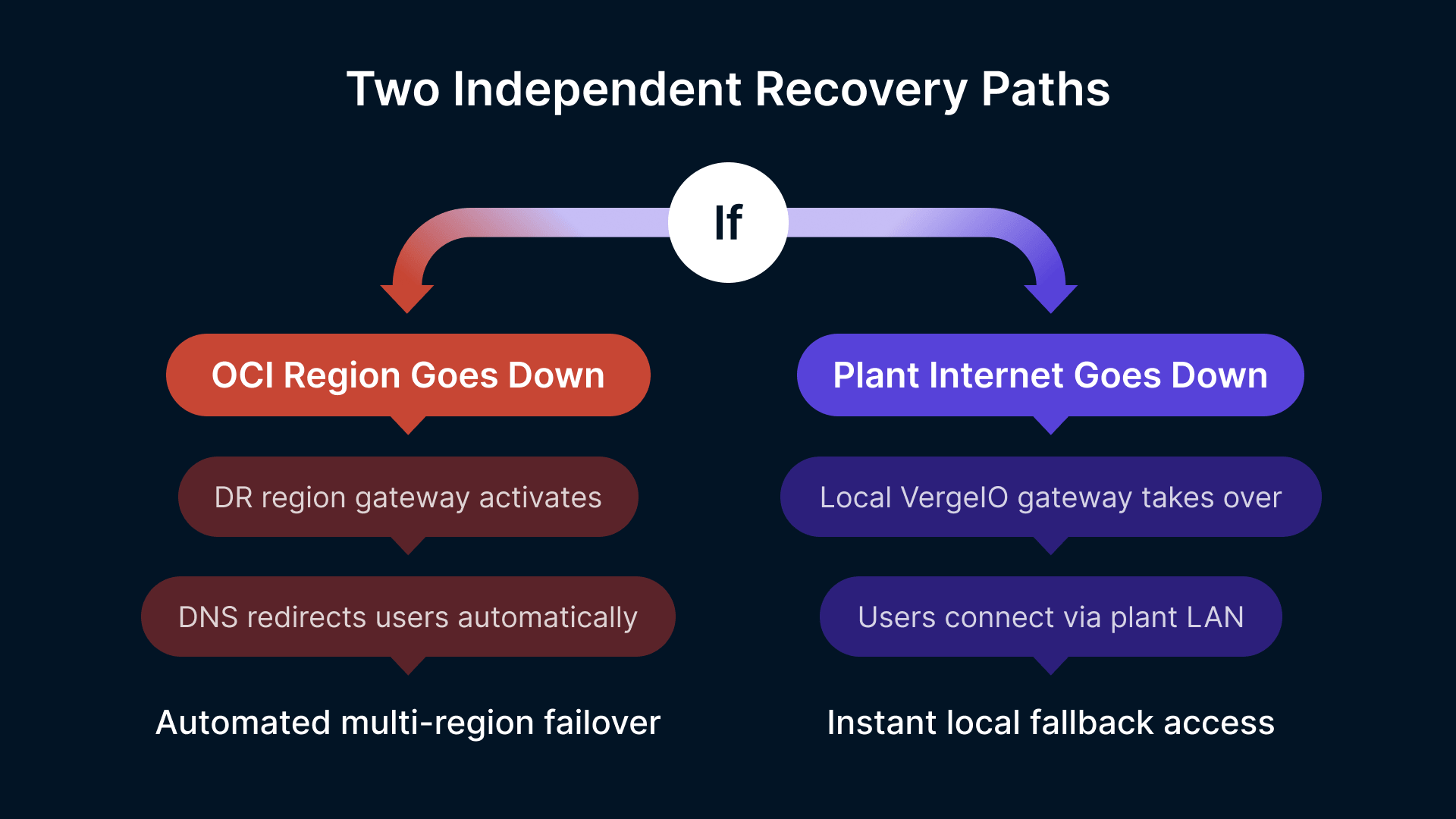
As covered in Article 12, manufacturing VDI depends on shift-aligned pre-warming to have session hosts ready before the shift start login spike. If the pre-warm policy fails to fire — due to a Thinfinity Cloud Manager configuration error, an OCI instance quota exhaustion, a golden image that fails validation and blocks the pre-warm from completing, or a network issue preventing session hosts from reaching the FSLogix container storage mount point — the shift start fails. Workers cannot log in; shift managers escalate immediately; the operations team has 10 minutes to resolve the problem before it becomes a production incident.
This failure mode requires a specific runbook — not a full DR failover, but an emergency procedure that can be executed in under 15 minutes: bypassing the failed pre-warm, manually starting break-glass session hosts, and routing the login spike to those hosts while the root cause is investigated. The runbook must be known by the on-call operations team member, documented in a location accessible without VDI (a printed procedure or a mobile-accessible runbook is appropriate — if the runbook lives in a document management system that requires VDI to access, it is useless during a VDI incident).
FSLogix Container Corruption or Storage Failure
FSLogix Profile Containers store the accumulated application settings, cached data, and user-specific configuration for every VDI user. A corrupted FSLogix container prevents the affected user from logging into any session — the container mount fails at login, and the session host returns a profile load error. Corruption can result from a forced session termination during a container write operation, a storage-level error on the backing OCI File Storage share or VergeIO volume, or an application that writes data in a way that leaves the container in an inconsistent state when the session ends abnormally.
Individual container corruption is a high-frequency, low-severity issue — it affects one user at a time and can be resolved by reverting to the previous container snapshot. Storage failure affecting the container share is a low-frequency, high-severity issue — it can prevent all users from logging in simultaneously if the FSLogix container storage is unavailable. Both require distinct response procedures and distinct backup strategies.
Golden Image Corruption After Update: The Monday Morning Problem
Golden image updates (monthly patch cycle, application updates, driver updates for GPU session hosts) are deployed during off-shift maintenance windows, typically late Friday night or over the weekend. If the updated golden image has a defect — a patch that breaks an application, an NVIDIA driver update that causes GPU initialization failures, or a misconfiguration in the image build process — the problem is discovered at Monday morning shift start when every new session host starts from the broken image and delivers broken sessions to users.
This failure scenario requires two protections: a validated rollback to the previous golden image (which must be retained after updates, not immediately deleted), and a validated image testing procedure that catches the most common failure modes before the image is promoted to production. A broken golden image that is discovered at 05:58 on Monday morning with the first shift starting at 06:00 is a production incident; the same broken image discovered during Friday night validation is a routine maintenance task.
RTO and RPO Targets for Manufacturing VDI: Matching Recovery Objectives to Production Impact
Recovery Time Objective (RTO) is the maximum acceptable time to restore service after a failure. Recovery Point Objective (RPO) is the maximum acceptable data loss — the furthest back in time the system can be restored to. As NIST SP 800-34 emphasizes, these metrics play a pivotal role in prioritizing recovery efforts and selecting appropriate backup and recovery strategies. For manufacturing VDI, both targets vary by application type and by the production impact of the failure.
| Failure Scenario | Production Impact | RTO Target | RPO Target | Recovery Approach |
|---|---|---|---|---|
| Plant site WAN / FastConnect failure (OCI unreachable from plant) | All cloud-hosted sessions unavailable; workers cannot access MES, quality tools | < 10 min | No data loss (local sessions) | Automatic failover to VergeIO local Thinfinity Gateway. Local session hosts serve production-critical apps. OCI sessions resume automatically when connectivity restores. |
| OCI regional outage (full OCI region unavailable) | All OCI-hosted sessions unavailable; engineering and remote access impacted | < 30 min | < 1 hour (last FSLogix sync) | Thinfinity Cloud Manager redirects pool assignments to DR region session hosts. FSLogix containers replicated to DR region. OCI region failover via secondary Thinfinity Gateway in DR VCN. |
| Shift-start autoscaling failure (pre-warm did not complete) | Shift workers cannot log in; login queue builds; production data entry delayed | < 15 min | No data loss (sessions not active yet) | On-call engineer executes break-glass runbook: manually start break-glass pool, redirect login traffic. Root cause investigated post-incident. |
| FSLogix container storage failure (entire share unavailable) | All users blocked from logging in; profile mount fails at session start | < 20 min | < 4 hours (last backup snapshot) | Redirect FSLogix to DR container storage replica. Restore most recent OCI File Storage snapshot. Users log in with temporary local profile if DR storage not yet available. |
| Individual FSLogix container corruption (single user affected) | One user blocked; minimal production impact | < 5 min | < 15 min (last container snapshot) | OCI File Storage snapshot revert for affected container. User logs in with restored container. Typically self-service via Thinfinity Cloud Manager user profile tool. |
| Golden image corruption after update (all new sessions broken) | All new session assignments fail or deliver broken applications; shift start failure | < 20 min | No data loss (image rollback) | Cloud Manager rolls back pool launch configuration to previous validated image. Previous image retained for 14 days post-update. New sessions start from previous image immediately. |
| Thinfinity Gateway failure (OCI Gateway instance down) | All user connections fail; no sessions can be established | < 5 min | No data loss | OCI Load Balancer health check detects Gateway failure and routes to standby Gateway instance. Active sessions reconnect automatically. No manual intervention required. |
| VergeIO cluster storage failure (on-premises NVMe failure) | On-premises session hosts unavailable; local-fallback path lost | < 45 min | < 1 hour (last VergeIO snapshot) | VergeIO storage rebuild from RAID / erasure coding (most failures self-heal). For catastrophic failure: restore session host VMs from last VergeIO snapshot to spare hardware or to OCI. |
DR Tier Design: Matching Architecture Complexity to Recovery Requirement
Not every manufacturing VDI deployment requires the same DR architecture. The appropriate tier depends on the production impact of VDI unavailability and the capital and operational budget available for DR infrastructure. The following tiers map to progressively shorter RTOs and progressively higher infrastructure investment.
| DR Tier | RTO | RPO | Architecture | Relative Cost |
|---|---|---|---|---|
| Tier 1 — Backup and Restore | 2–4 hours | 4–8 hours | Daily FSLogix container backup to OCI Object Storage. Weekly golden image backup. Thinfinity Cloud Manager configuration export weekly. Manual restore procedure documented. No standby infrastructure running. | Lowest — no standby infrastructure cost |
| Tier 2 — Warm Standby | 15–30 min | < 1 hour | FSLogix containers replicated to OCI DR region every 30–60 min via OCI File Storage replication. Secondary Thinfinity Gateway in DR VCN (stopped, starts in < 5 min). DR region session host pool defined but not running — starts on failover trigger. VergeIO local fallback for plant site connectivity failures. | Moderate — replication cost + occasional standby validation |
| Tier 3 — Hot Standby | < 5 min | < 15 min | FSLogix containers replicated to OCI DR region continuously (OCI File Storage cross-region replication). Secondary Thinfinity Gateway always running in DR VCN. Minimum session host pool running in DR region at reduced capacity. OCI Traffic Management routes failed gateway traffic to DR automatically. Active session rehydration on failover. | Higher — standby session hosts and active Gateway in DR region |
| Tier 4 — Local + Cloud Dual Active | < 2 min | Zero (active-active) | VergeIO on-premises + OCI simultaneously serving sessions. Thinfinity Cloud Manager load-balances across both. If OCI fails, all capacity shifts to VergeIO. If VergeIO fails, all capacity shifts to OCI. FSLogix containers on shared storage accessible from both. Requires FSLogix container locking architecture to prevent concurrent write conflicts. | Highest — full dual-active infrastructure; appropriate for plants with zero-tolerance production VDI requirements |
Recommended Tier for Most Manufacturing Deployments: Tier 2 Warm Standby
Tier 2 provides the recovery capability that covers the most common and most impactful failure scenarios — OCI regional failure, plant site connectivity loss, and autoscaling failures — at a cost that is justified by manufacturing’s production impact per hour of downtime. The standby Gateway costs USD 50–100/month when stopped; the DR region session hosts cost nothing until failover. For plants where each hour of VDI downtime costs USD 25,000+ in lost production, Tier 2’s infrastructure cost pays for itself in the first prevented incident. Tier 3 is appropriate for plants running 24/7 continuous process manufacturing (chemical, pharmaceutical, food and beverage) where even 15–30 minutes of VDI unavailability is unacceptable.
OCI Multi-Region Architecture for Thinfinity Gateway and Session Host DR
OCI Region Selection for Manufacturing VDI DR
OCI’s global region footprint gives manufacturing organizations the ability to place DR infrastructure in a geographically separate region that shares no physical infrastructure with the primary region — protecting against regional outages that affect an entire OCI data center complex. For manufacturing deployments in North America, the typical primary/DR region pair is US East (Ashburn) / US West (Phoenix) or Canada South (Toronto) / US East (Ashburn). For EMEA, Germany Central (Frankfurt) / UK South (London). For APAC, Japan East (Tokyo) / Australia East (Sydney).
Region selection should prioritize two criteria: geographic separation (primary and DR should be in different fault domains — different cities, different power grids, different carrier routing) and latency from plant sites (both primary and DR regions should have acceptable latency from the manufacturing plants they serve; a DR region that has unacceptably high latency from the plant site is not a usable fallback). OCI’s region-to-region latency map and the plant site connectivity tests done during deployment planning (see Article 11) should inform region pair selection.
VCN Peering and DR Gateway Configuration
The DR VCN in the secondary OCI region is a reduced-footprint mirror of the primary VCN — the same subnet structure (Gateway, Session Host, Management, Storage subnets) but with smaller or stopped instances. OCI Remote VCN Peering connects the primary and DR VCNs over OCI’s private backbone network, allowing FSLogix container replication traffic to flow between regions without traversing the public internet.
The secondary Thinfinity Gateway instance in the DR VCN is configured identically to the primary Gateway — same SSL certificate (issued for the same gateway hostname), same SAML integration with Okta or Entra ID, same application and pool definitions exported from Thinfinity Cloud Manager and imported to the DR instance. In Tier 2 warm standby, the DR Gateway instance is stopped and starts in under 5 minutes when the failover procedure triggers. In Tier 3 hot standby, it is running continuously and OCI Traffic Management (DNS-based traffic steering with health checks) automatically routes user connections to the DR Gateway when the primary Gateway health check fails.
The DNS failover approach is the key operational detail for Thinfinity Gateway DR. The Thinfinity portal URL (for example, portal.manufacturer.com) resolves to an OCI Traffic Management policy with two endpoints: primary Gateway IP with a 30-second health check interval, and DR Gateway IP as the failover target. When the primary Gateway fails its health check three consecutive times (90 seconds), Traffic Management updates the DNS response to return the DR Gateway IP. Users who attempt to connect after failover complete resolution receive the DR Gateway; users with active sessions on the primary Gateway are interrupted and must reconnect — their sessions cannot be migrated mid-flight. For manufacturing environments where active session interruption during failover is unacceptable, Tier 4 dual-active architecture is required.
Session Host Pool Failover in the DR Region
In Tier 2 warm standby, the DR region session host pool is defined in Thinfinity Cloud Manager but has zero running instances. The Cloud Manager failover procedure — triggered manually by an operator or automatically by a monitoring alert — starts the DR region pool by launching the DR golden image on OCI Compute in the DR region. DR session hosts start in 2–5 minutes for CPU shapes and 4–7 minutes for GPU shapes.
The DR region golden image should be maintained on the same update cycle as the primary region golden image — both updated during the same maintenance window, both validated before the maintenance window closes. A DR golden image that is one month out of date when failover occurs means users’ sessions in the DR region will not have the latest application updates and patch levels, potentially creating compliance gaps if the application update included a regulatory-required software fix. OCI Custom Image cross-region copy allows the validated primary golden image to be copied to the DR region automatically after each maintenance window using OCI CLI scripts or OCI DevOps pipelines — ensuring both regions are always on the same image version.
If you can’t control when a disaster strikes, the next best thing is to be able to control the recovery process.
Protecting User Profiles and Session Host Data: FSLogix Backup and VergeIO Snapshots
FSLogix Container Backup Architecture on OCI
FSLogix Profile Containers are VHD/VHDX files stored on OCI File Storage (NFS mount accessible from session hosts). Each user has one container file, typically ranging from 2–15 GB depending on application types and how well exclusion lists are configured. A 500-user deployment has 500 container files on a single NFS share — or distributed across multiple shares by department, plant, or application group.
OCI File Storage supports snapshot-based point-in-time copies at the file system level. Configure hourly FSLogix container snapshots retained for 48 hours (covering the standard shift cycle for reverting individual container corruption), daily snapshots retained for 14 days (covering the standard patch window), and weekly snapshots retained for 4 weeks (covering quarterly compliance review windows). Snapshot creation is near-instantaneous and has negligible impact on running sessions — it does not require session hosts to be offline or containers to be dismounted.
For cross-region DR replication (Tier 2 and Tier 3), OCI File Storage cross-region replication continuously replicates the container NFS share to the DR region’s File Storage mount target. Replication lag is typically 15–60 minutes depending on the volume of container write activity and the bandwidth of the OCI backbone between regions. The RPO for FSLogix container loss is therefore equal to the replication lag — in practice, less than 1 hour for normal production operations. Configure OCI Monitoring alarms on the replication lag metric; if replication lag exceeds 2 hours, alert the operations team to investigate before a potential DR event extends the real RPO beyond the target.
MSIX App Attach VHD Backup
MSIX App Attach packages (VHD files containing packaged applications, mounted at session startup) are stored on OCI File Storage alongside FSLogix containers. These VHDs are typically 500 MB–3 GB each and change only when applications are updated. Backup strategy: include MSIX VHD storage in the same OCI File Storage snapshot policy as FSLogix containers. Cross-region replication of the MSIX VHD share ensures that DR region session hosts can mount the same application packages as primary region hosts. Because MSIX VHDs are read-only at runtime (writes are redirected to the per-user virtual file system), they do not have the corruption risk of FSLogix containers — backup is primarily for recovery from accidental deletion or a failed application update that requires rollback.
VergeIO Snapshot and Replication for On-Premises Session Hosts
VergeIO’s hyperconverged architecture includes native snapshot and replication capabilities for VMs and storage volumes. For Thinfinity session host VMs running on VergeIO, configure snapshot policies that capture a point-in-time image of each session host VM daily — immediately after the off-shift golden image update process completes. These snapshots serve as rapid rollback points if a golden image update causes problems: instead of rebuilding from the base image, the VM can be reverted to the pre-update snapshot in under 5 minutes.
VergeIO’s site synchronization feature replicates VM snapshots from the on-premises VergeIO cluster to a secondary site — either a second VergeIO cluster at another plant location or to OCI (VergeIO supports S3-compatible export, which maps to OCI Object Storage). For manufacturing organizations with multiple plant sites running VergeIO, site synchronization between plants provides mutual DR coverage: if Plant A’s VergeIO cluster fails, Plant A’s session host VMs can be restored on Plant B’s cluster and serve Plant A users remotely (with latency) until Plant A infrastructure is restored. For single-plant deployments, weekly export of VergeIO VM snapshots to OCI Object Storage provides off-site DR coverage at low cost.
Golden Image Versioning and Rollback
Golden image management is the most frequently overlooked component of manufacturing VDI DR — until a broken image update causes a shift-start failure. The golden image versioning policy should retain the last three validated golden images in OCI Custom Images (or VergeIO VM templates): current production image, previous production image (1 month old), and the image before that (2 months old). This provides two rollback points without requiring a full image rebuild from scratch.
After each monthly patch cycle, the image promotion process is: build new image on a staging session host → run the validation test suite (application launch tests, FSLogix mount test, NVIDIA driver initialization test for GPU images, network connectivity tests) → if validation passes, promote to production by updating Thinfinity Cloud Manager pool launch configuration → retain the previous production image for 30 days before deletion → if validation fails at any stage, halt promotion, keep current production image in use, and investigate the failed validation before the next patch window. The validation test suite should be automated — a Thinfinity Cloud Manager API call that starts a validation session on the new image, runs predefined application launch checks, and reports pass/fail without requiring a human to manually test each application. Automated validation catches the most common image failures in under 10 minutes.
Complete Backup and Replication Inventory for Manufacturing VDI
| Component | What Is Backed Up | Backup Destination | Frequency | Retention | Tool / Service |
|---|---|---|---|---|---|
| FSLogix containers (user profiles) | VHD/VHDX files for all users on NFS share | OCI File Storage snapshots + cross-region replication | Hourly snapshots; continuous replication | 48h hourly; 14d daily; 4w weekly | OCI File Storage Snapshot Policy + Cross-Region Replication |
| MSIX App Attach VHDs (packaged applications) | Read-only application package VHDs | OCI File Storage snapshots; cross-region replication | Daily snapshot after app update | 30 days (3 versions) | OCI File Storage Snapshot Policy |
| Golden images (OCI — session host OS + apps) | OCI Custom Images for CPU and GPU session host pools | OCI Custom Image catalog; cross-region copy | Monthly after patch cycle validation | 3 versions (90 days) | OCI Custom Image + cross-region copy via OCI CLI |
| Golden images (VergeIO — on-premises) | VergeIO VM templates / snapshots for local session hosts | VergeIO local snapshots + OCI Object Storage export | Monthly after patch; weekly VM snapshot | 3 versions + 4 weekly snapshots | VergeIO Snapshot Policy + S3 export to OCI Object Storage |
| Thinfinity Cloud Manager configuration | Pool definitions, RBAC policies, autoscaling schedules, application mappings | OCI Object Storage (exported JSON/YAML config) | Weekly + after any config change | 90 days | Cloud Manager config export API + OCI Object Storage lifecycle policy |
| OCI VCN configuration (NSGs, security lists, routing) | VCN topology, subnet definitions, NSG rules | OCI Resource Manager state files in OCI Object Storage | After any infrastructure change | 90 days (all versions) | OCI Resource Manager (Terraform state) + OCI Object Storage versioning |
| Session recordings (audit trail) | VDI session video recordings for regulated applications | OCI Object Storage with WORM (immutable) retention | Continuous (real-time upload during session) | Minimum 12 months; 7 years for 21 CFR Part 11 | Thinfinity session recording engine + OCI Object Storage immutable bucket |
| Thinfinity Gateway certificate and config | TLS certificate, SAML configuration, gateway settings | OCI Vault (certificate) + OCI Object Storage (config export) | After any certificate renewal or config change | Previous 2 versions + current | OCI Vault + Cloud Manager config export |
| OCI IAM policies and compartment structure | IAM user, group, policy definitions | OCI IAM audit logs + periodic policy export | After any IAM change | 365 days (OCI audit log retention) | OCI Audit Service + OCI IAM policy export |
Operational Runbooks: Step-by-Step Recovery Procedures for Manufacturing VDI
Runbooks are the operationalization of the DR architecture. A DR design that exists only in an architecture document is not actually recoverable — the on-call engineer at 02:00 during a shift-start failure needs a step-by-step procedure, not a conceptual diagram. The following runbooks cover the four highest-priority failure scenarios.
Runbook 1: Plant Site Connectivity Failure (WAN / FastConnect Down)
| Step | Action | Time | Owner |
|---|---|---|---|
| 1 | Confirm failure: ping test from plant network to OCI Gateway IP. Check OCI FastConnect / VPN Connect status in OCI Console. Confirm ISP circuit status if applicable. | 0–3 min | On-call engineer (from plant network or mobile) |
| 2 | Alert plant IT lead and shift manager: ‘OCI connectivity lost; activating local fallback. Estimated session restoration: 5–8 minutes.’ | 3–4 min | On-call engineer |
| 3 | Start VergeIO local Thinfinity Gateway (if warm-standby — stopped state): VergeIO console → start Gateway VM. Verify Gateway VM reaches running state. | 4–6 min | On-call engineer (VergeIO console or remote KVM) |
| 4 | Start VergeIO local session host pool: Cloud Manager → VergeIO pool → manual pre-warm → target capacity for current shift headcount. | 5–8 min | On-call engineer (Cloud Manager console — accessible from local network) |
| 5 | Update DNS for portal.manufacturer.com to resolve to VergeIO local Gateway IP (or confirm DNS failover has fired automatically via OCI Traffic Management). | 6–9 min | On-call engineer (DNS provider console or OCI Traffic Management) |
| 6 | Notify shift manager: ‘Local session access available. Direct workers to log in as normal. OCI applications (ERP, external PLM) may be unavailable until connectivity restores.’ | 9–10 min | On-call engineer |
| 7 | Monitor OCI connectivity recovery. When connectivity restores, start OCI session host pool pre-warm. Communicate to shift manager that OCI applications will be available in ~5 min. | Ongoing | On-call engineer + monitoring (Datadog alert on OCI connectivity metric) |
| 8 | After full OCI connectivity confirmed: update DNS back to OCI Gateway (or allow Traffic Management to restore automatically). Drain VergeIO local pool as OCI sessions take over. | Post-recovery | On-call engineer |
| 9 | Post-incident: document root cause, duration, impacted users, and steps taken. Submit to change management for ISP/FastConnect incident report. | Next business day | On-call engineer + IT Manager |
Runbook 2: Shift-Start Autoscaling Failure (Pre-Warm Did Not Complete)
| Step | Action | Time | Owner |
|---|---|---|---|
| 1 | Detect: Datadog alert fires at T-5 min from shift start if pre-warm completion metric < 80% of target capacity. Or: shift manager calls reporting login failures at shift start. | T-5 min or T+2 min | Datadog alert → on-call engineer pager |
| 2 | Check Cloud Manager dashboard: is the pre-warm pool starting? Check OCI Console: are instances being provisioned? Check OCI Service Limits: has instance quota been hit? | 0–3 min | On-call engineer |
| 3 | If OCI instance quota hit: submit OCI Service Limit increase request (emergency) AND activate break-glass pool (pre-defined pool of 2–4 always-available session hosts). | 3–5 min | On-call engineer (OCI Console + Cloud Manager) |
| 4 | If golden image validation blocked pre-warm: roll back pool launch config to previous validated image in Cloud Manager. Start pre-warm with previous image immediately. | 3–7 min | On-call engineer (Cloud Manager → Pool → Launch Config → Previous Image) |
| 5 | If FSLogix container storage unreachable (mount failure blocking session start): verify OCI File Storage availability in OCI Console. Check NFS mount status on started hosts. | 5–10 min | On-call engineer |
| 6 | Activate break-glass session hosts (always-running, pre-validated, covers 5–10 concurrent sessions for most critical apps). Notify shift manager of break-glass activation. | 5–8 min total | On-call engineer |
| 7 | Communicate to shift manager: ‘Limited sessions available via break-glass. Workers with highest production priority should log in first. Full capacity estimated in X minutes.’ | 8–10 min | On-call engineer + shift manager |
| 8 | Continue resolving root cause while break-glass absorbs critical users. Add capacity as root cause is resolved. | 10–30 min | On-call engineer |
| 9 | Post-incident: root cause analysis, runbook update if procedure was insufficient, Datadog alert threshold review. | Next business day | IT Manager + Infrastructure Engineer |
Runbook 3: Golden Image Rollback After Failed Update
| Step | Action | Time | Owner |
|---|---|---|---|
| 1 | Detect: automated validation suite reports failure on new image (application launch failure, GPU init failure, FSLogix mount failure). OR: Datadog alerts on high session failure rate after image update. | Immediate (automated) or T+5 min (user reports) | Automated validation → Datadog alert → on-call engineer |
| 2 | Do NOT promote failed image to any production pool. If image was already partially promoted, identify which pools are running the failed image. | 0–2 min | On-call engineer |
| 3 | Cloud Manager: for each affected pool, navigate to Launch Config → select Previous Validated Image from image history. Save and apply immediately. | 2–5 min | On-call engineer (Cloud Manager console) |
| 4 | Drain session hosts running the failed image: Cloud Manager → pool → drain hosts with new image. New session assignments go to hosts with previous image. | 5–8 min (drain + restart) | On-call engineer |
| 5 | Verify rollback: start a test session from the previous image and confirm applications launch correctly. Confirm NVIDIA driver init for GPU pools. | 8–12 min | On-call engineer |
| 6 | Notify IT Manager and application owners: ‘Image update rolled back. Previous image active. Users on systems started from new image may need to reconnect — no data loss.’ | 10–12 min | On-call engineer |
| 7 | Investigate failed image: check Windows Event Log on validation host, check NVIDIA driver logs for GPU init failures, check application-specific launch logs. Identify root cause before rescheduling update. | Next business day | Infrastructure Engineer + Application Owner |
| 8 | Reschedule image update with root cause fix applied. Re-run full validation suite before next promotion attempt. | Next maintenance window | Infrastructure Engineer |
DR Testing: Manufacturing VDI Recovery Procedures That Are Actually Practiced
A DR plan that has never been tested is a document, not a recovery capability. Manufacturing VDI DR testing has a specific challenge: most DR tests require either simulating a production failure (which risks actual production impact) or running the test outside production hours (which means the test does not reflect real shift-start conditions). The following testing approach addresses both constraints.
Quarterly Break-Glass Test: Practiced During Off-Shift Hours
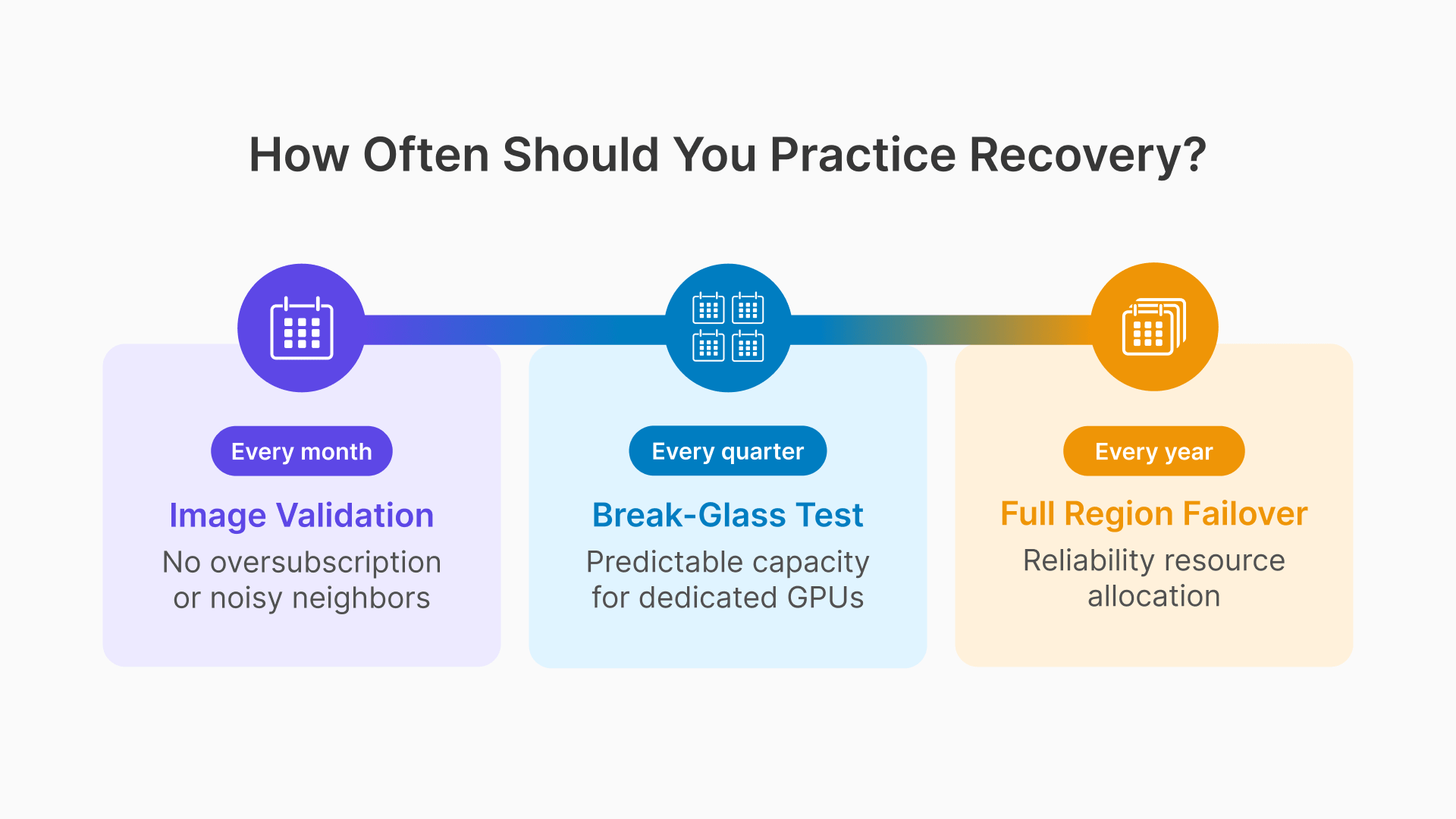
Once per quarter, during a Saturday maintenance window, the operations team executes the break-glass runbook under controlled conditions: the primary session host pool is intentionally reduced to zero capacity, the break-glass pool is activated, and 3–5 test users verify that they can log into production-critical applications through the break-glass hosts. The test confirms that the break-glass pool is operational, that the break-glass runbook steps are accurate, and that the on-call engineer can execute the procedure without assistance. Total test duration: 20–30 minutes. Document the test result, any deviations from the runbook, and any updates required.
Annual OCI Region Failover Test: Planned Maintenance Event
Once per year, during a planned plant shutdown or extended maintenance window, execute a full OCI region failover test: activate the DR region Gateway, start the DR region session host pool, point DNS to the DR region, and have 10–20 test users log in and use their applications from the DR region. Verify that FSLogix containers mount correctly from the replicated DR region storage, that applications launch from the DR region golden image, and that session recording writes to the DR region Object Storage bucket. The test should run for at least one hour to confirm stability, not just connectivity. Document RTO achieved (time from activation command to all test users having active sessions), any gaps between actual and target RTO, and the remediation plan for any gaps identified.
Monthly Golden Image Validation: Automated
Every monthly patch cycle, the image validation suite runs automatically on the new golden image before any promotion decision. The suite is implemented as a Thinfinity Cloud Manager API script that: starts one session host from the new image, assigns a synthetic test session, runs application launch commands for each critical application (MES client, quality tool, CAD applications for GPU pools), checks FSLogix container mount success, verifies NVIDIA driver initialization for GPU images, and reports pass/fail with detailed logs. The automation runs unattended overnight and produces a report before the on-call engineer’s morning review. Failed validation blocks image promotion automatically — no human needs to remember to check. As Oracle’s disaster recovery framework emphasizes, testing the plan periodically is essential to ensuring it works when needed.