
Most conversations about VDI modernization in manufacturing treat the decision as a binary — stay on-premises or move to the cloud — and then work backward to justify whichever direction the author prefers.
That framing does not reflect how manufacturing IT actually works. Plant floor workstations, remote engineering teams, legacy industrial applications, and OT-connected users are not versions of the same problem. They are different workloads that belong on different infrastructure placements.
This guide provides a workflow-first framework for making those placements correctly — and covers the full ecosystem you need to execute them: migration tooling, profile management, monitoring, backup, and identity.
The Core Problem: Platform Lock-In
The disruption that pushed manufacturing organizations to re-evaluate their VDI strategy was not caused by on-premises infrastructure failing. It was caused by platform lock-in — the tight coupling between the delivery layer (Citrix Virtual Apps and Desktops, VMware Horizon) and the infrastructure layer (the hypervisor, storage fabric, and management stack underneath it).
When Broadcom restructured VMware’s licensing after the 2023 acquisition — eliminating perpetual licenses, moving to subscription-only bundles, and discontinuing standalone product sales — organizations that had deployed Horizon on vSphere found themselves with no negotiating leverage. They had built their VDI architecture on a stack where every component was controlled by the same vendor. The same dynamic played out with Citrix, where customers on multi-year renewal contracts faced price increases that bore no relationship to the value delivered.
The structural lesson here is not that on-premises is bad or that cloud is better. It is that a VDI delivery layer that is decoupled from the infrastructure underneath it gives you optionality that a tightly coupled stack does not. If your session brokering, access control, and user experience layer can run on your existing VMware estate, on a modern hyperconverged platform, on Oracle Cloud, or on a hybrid combination — and present the same management interface and the same user experience in all cases — then your infrastructure decisions become independent of your VDI platform decisions. That independence is what most manufacturing organizations lacked when the licensing disruption hit.
What This Does Not Mean
Decoupling delivery from infrastructure does not mean on-premises infrastructure is obsolete or that every manufacturing organization should migrate to cloud. For organizations with air-gapped OT requirements, recently refreshed hardware, or latency-sensitive industrial applications, on-premises infrastructure remains technically and financially correct. The goal of modernization is to make the right infrastructure choice for each workload — not to make one infrastructure choice for all workloads.
The Financial and Technical Challenges — Stated Plainly
Before discussing solutions, it is worth naming the pressures clearly. Most manufacturing CIOs are dealing with some combination of the following, and the right modernization path depends on which pressures are actually present in your organization.
Rising Platform Costs With Declining Perceived Value
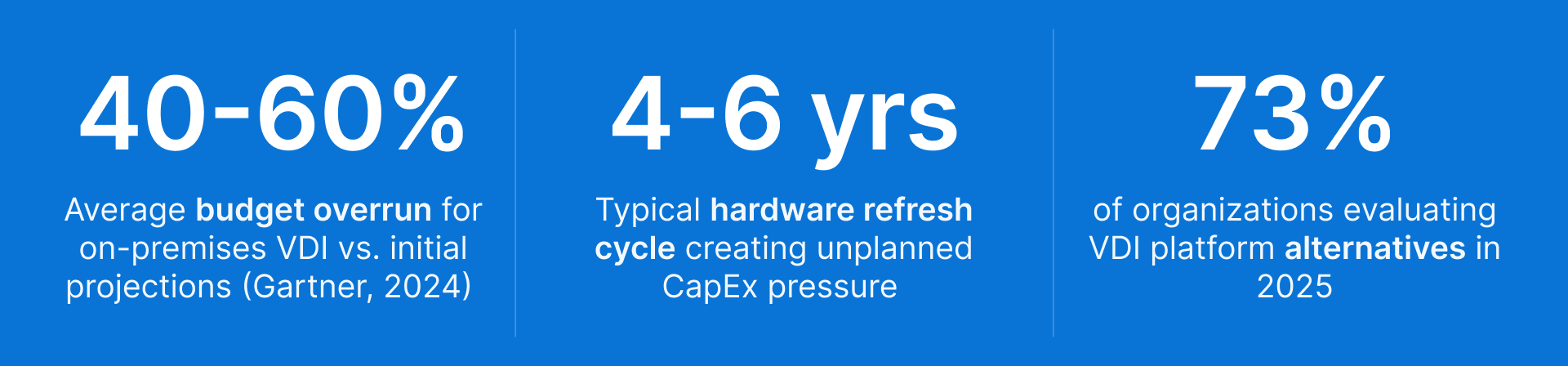
Both Citrix and VMware Horizon have moved toward subscription licensing with pricing structures that reflect historical market positions rather than current competitive alternatives. Organizations renewing perpetual licenses are facing conversations that can represent a 100–200% increase in annual spend for equivalent functionality.
In manufacturing, where VDI usage is typically narrower than the full enterprise feature set — primarily remote access, application delivery, and plant floor thin client support — the gap between what is being paid for and what is actually used is often significant.
The real question is straightforward: Is the cost of switching platforms less than the cost of staying on the current one over a 3–5 year horizon? That calculation requires a complete cost model, not just a comparison of list prices.
Hardware Refresh Cycles and Their Timing
On-premises VDI infrastructure requires refresh every 4–6 years. When a refresh cycle coincides with a licensing disruption, organizations face a compounded cost event
- Hardware CapEx and licensing restructuring at the same time
- No flexibility to defer either decision independently
- A narrow window where the financial case for migration is clearest
A hardware refresh is both a pressure and a strategic opportunity. It is the moment where rebuilding on-premises, migrating to cloud, or pursuing a hybrid architecture has the strongest financial justification.
Legacy Application Complexity
Manufacturing environments carry more legacy application debt than any other sector. Common constraints include:
- Custom Win32 applications built in the 1990s
- Vendor-supplied industrial software locked to specific Windows versions
- Applications with hardware key or parallel port dependencies
- HMI software validated only on Windows 7 or Windows 10 LTSC
Many of these can be addressed through FSLogix (which isolates application data from the base image, allowing non-persistent pools to behave like persistent ones) or through RemoteApp delivery, which publishes individual applications through a browser session rather than requiring a full desktop.
However, some applications have constraints that no delivery technology can fully abstract — specific OS versions, hardware-level dependencies, or behaviors that break in shared session environments. Identifying these before starting a modernization project is more valuable than any architecture decision.
OT Network Access
Users who access SCADA systems, PLCs, historian platforms, and HMI panels through their VDI session present a constraint that each stack — on-premises, hybrid, and cloud — must solve differently.
The OT network is isolated for technical and regulatory reasons:
- Purdue Model — defines logical segmentation between IT and OT layers
- IEC 62443 — establishes security requirements for industrial automation systems
- NIS2 (Europe) — sets network segmentation expectations for critical infrastructure
Any VDI modernization involving a cloud delivery layer must address how authenticated, monitored access flows from a cloud-delivered session to an isolated OT network — without creating a network path that bypasses that isolation.
Multi-Site Latency Variability
Manufacturing organizations typically have plants, distribution centers, and engineering offices at disparate locations with very different WAN quality profiles. A single infrastructure placement decision cannot serve all of them equally.
Latency thresholds that matter:
| Round-trip latency | Impact |
|---|---|
| < 40ms | Acceptable for interactive VDI sessions |
| 40–80ms | Noticeable degradation for knowledge workers |
| > 80ms | Unacceptable for productivity; unusable for latency-sensitive industrial applications |
A plant on 50 Mbps MPLS, a central campus on dedicated fiber, and a remote distribution center on LTE backup require different infrastructure placement strategies — not a single answer applied uniformly.
Three Infrastructure Stacks — Each Optimized for Different Workloads
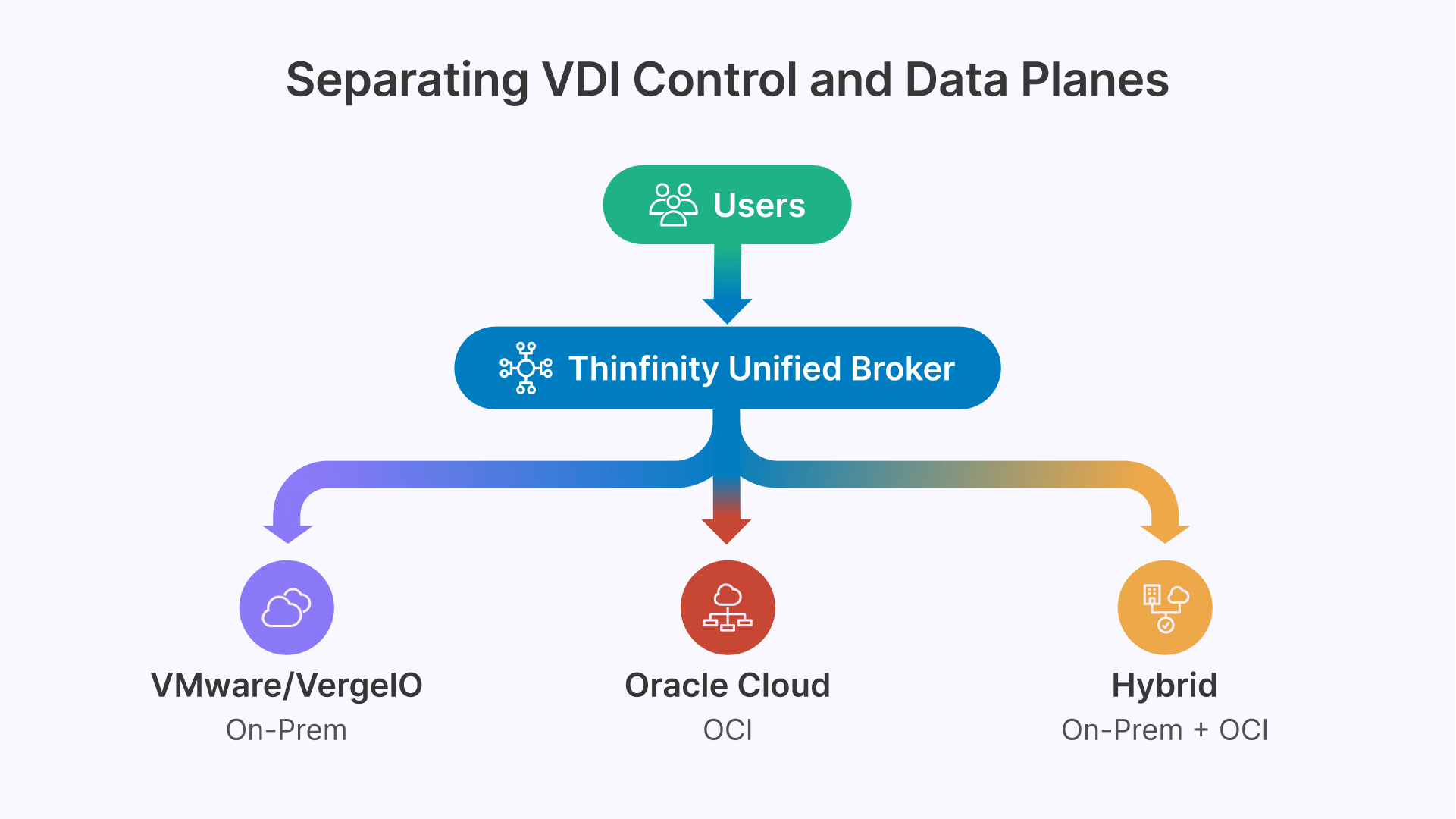
The following three stacks represent the primary architecture patterns for manufacturing VDI. They are not mutually exclusive — the most common real-world deployment uses elements of all three, managed from a single platform.
| On-Premises Modernized | Public Cloud | Hybrid |
|---|---|---|
| Thinfinity + VergeIO (replaces Citrix/Horizon on VMware) | Thinfinity + Oracle Cloud Infrastructure (OCI) | Thinfinity + VergeIO + OCI (single management console) |
| OT-adjacent and plant floor workloads Air-gapped or network-isolated environments Ultra-low latency industrial applications Recently refreshed hardware (defer CapEx) VMware-locked workloads with no near-term migration path VergeIO replaces VMware hypervisor + storage + networking as unified stack | Administrative and back-office users CAD/GPU engineering (on-demand GPU shapes) Multi-site and globally distributed teams Shift-based workforces (autoscaling by schedule) New sites without existing on-prem infrastructure Oracle ERP users (database co-location on OCI) | Mixed workload environments (most manufacturing orgs) Staged migration from VMware/Citrix/Horizon On-prem for constrained; cloud for elastic workloads Gradual hardware depreciation path to cloud Single Thinfinity Cloud Manager for both layers Most realistic path for complex existing environments |
What About Existing VMware Workloads That Cannot Migrate?
If your organization has workloads that are deeply integrated with VMware vSphere or ESXi — and where a hypervisor migration is not currently feasible due to operational risk, application validation requirements, or contractual timelines — Thinfinity integrates directly with VMware as the session host substrate. You replace the Citrix or Horizon delivery layer with Thinfinity, reducing your platform licensing exposure immediately, while leaving the VMware hypervisor in place. The hypervisor migration to VergeIO or OCI can then proceed on a separate timeline, workload by workload, without changing what users see or how IT manages sessions.
This incremental approach is valid and often the most risk-appropriate path for large environments with significant VMware investment. It is not a permanent answer — the goal is to eventually consolidate the infrastructure layer as well — but it is a legitimate and financially rational first step.
The Ecosystem Tools You Need — Regardless of Which Stack You Choose
One of the gaps in vendor-written VDI guides is that they focus entirely on the delivery platform and ignore the broader ecosystem of tools required for a production VDI environment to work reliably. The following tools are not optional components — they are required pieces of a complete architecture, and choosing them well is as important as choosing the VDI delivery platform.
| Tool / Platform | Role in VDI Stack | Why It Matters in Manufacturing |
|---|---|---|
| FSLogix | Profile management | Microsoft’s profile container technology (free with Windows 365 / Azure / MSFT licensing) separates user profiles and application data from the base desktop image. This is the foundational technology that makes non-persistent VDI pools practical — users get their personalized environment on login regardless of which session host they land on. Essential for shift workers and pooled desktop deployments. |
| RackWare RMM | Workload migration | RackWare’s Replication and Migration Manager automates the discovery, replication, and migration of VMs from VMware to OCI or VergeIO. It tracks workload changes in real time and can execute cutovers during maintenance windows with minimal downtime. For large manufacturing environments migrating hundreds of VMs, manual migration is impractical — RackWare (an OCI Technology Partner) automates the heavy lifting and provides audit trails for compliance. |
| Datadog | Infrastructure and session monitoring | End-to-end observability for VDI infrastructure — session latency, session host CPU/memory, user login time, application launch time, and infrastructure health across both on-premises (VergeIO) and cloud (OCI) components. Datadog’s OCI integration surfaces metrics through unified dashboards that correlate infrastructure events with user experience degradation. Critical for manufacturing environments where VDI performance directly affects production workflow throughput. |
| Veeam / OCI Object Storage | Backup and disaster recovery | Veeam Backup & Replication provides image-level backup for both VMware and VergeIO session hosts, with replication to OCI Object Storage for off-site copies. For cloud-hosted desktops on OCI, native OCI backup policies protect VM images with configurable retention. In manufacturing, the DR objective is restoring production-critical VDI workloads within defined RTO targets — typically 4 hours for administrative users and 1 hour for OT-adjacent users. |
| Terraform / OCI Resource Manager | Infrastructure as Code | Provisioning OCI session hosts, networking, and autoscaling policies through code rather than console clicks makes VDI infrastructure repeatable, auditable, and version-controlled. OCI Resource Manager provides Terraform-native infrastructure management with built-in state file management and drift detection. For manufacturing organizations deploying to multiple OCI regions (multi-site), IaC is the only practical way to maintain consistency across deployments. |
| Okta / Microsoft Entra ID | Identity and MFA | Thinfinity integrates with SAML 2.0, OAuth 2.0, and LDAP identity providers. For manufacturing environments, the identity architecture has to handle both corporate users (standard Entra ID / Okta integration with MFA) and plant floor users (shared accounts, badge authentication, PIN-based login). These two populations require different authentication policies within the same identity stack — most modern IdPs support this through conditional access policies and device enrollment profiles. |
| Microsoft Intune / endpoint policies | Endpoint management | For persistent desktops and shared plant floor terminals, endpoint policies enforce security baselines without requiring a full endpoint agent. For non-persistent pools managed by Thinfinity, the session host image is the unit of management — Intune or equivalent tooling manages the base image rather than individual sessions. This distinction matters for patching strategy: cloud images on OCI can be updated and redeployed without touching physical hardware. |
These tools do not replace the VDI delivery platform — they work alongside it. A complete architecture decision includes evaluating how your chosen VDI platform integrates with each of these components, not just whether the platform delivers sessions correctly.
Workflow-First Decision Framework
The most reliable approach to infrastructure planning is to classify workloads first and let the classification determine the infrastructure placement. The following framework maps common manufacturing VDI workflow types to their appropriate stack and explains the reasoning behind each placement.
| Workflow Type | Recommended Stack | Reasoning |
|---|---|---|
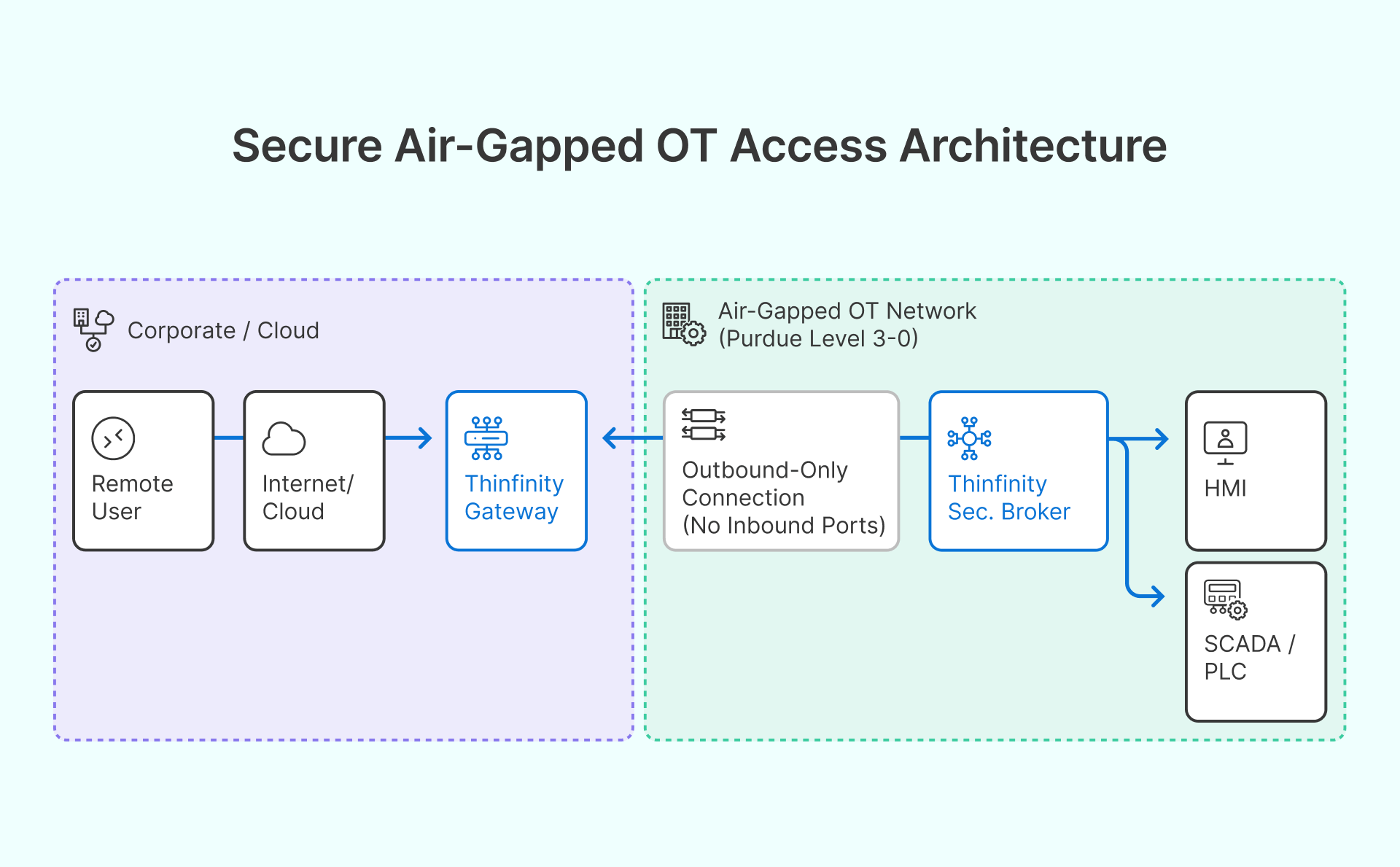
| SCADA / HMI / PLC operator access | On-prem (VergeIO or VMware) | OT network isolation requires session broker inside or adjacent to OT segment; no feasible cloud path through an air-gap. VergeIO or existing VMware with Thinfinity secondary broker is the correct architecture. |
| Shift workers on shared terminals | Cloud (OCI) or On-prem | OCI autoscaling aligns compute cost with shift schedule; pre-provision 20 min before shift start, scale down after. On-prem valid if plant has reliable local compute and connectivity to cloud is not guaranteed. |
| CAD / 3D rendering / simulation | Cloud (OCI GPU shapes) | OCI A10 and A100 GPU shapes available on demand — eliminate expensive on-prem GPU hardware that sits idle between project phases. Pay for GPU only during active use; autoscaling powers down shapes when sessions end. |
| Oracle ERP power users | Cloud (OCI) | Database and application co-location on OCI eliminates cross-cloud round-trips. Oracle EBS, JD Edwards, Oracle Manufacturing Cloud users see measurable latency improvement when desktop and database share the same OCI VCN. |
| Administrative / back-office | Cloud (OCI) | Standard productivity workloads with no OT dependency; benefit most from autoscaling and geographic proximity to collaboration services. Lowest complexity migration cohort — good starting point for phased rollout. |
| Legacy Win32 / custom industrial apps | On-prem or Hybrid (RemoteApp) | Audit for OS version, hardware key, and serial port dependencies before assigning stack. FSLogix handles most profile separation; RemoteApp delivery via Thinfinity publishes specific apps through browser without a full desktop. Genuinely incompatible apps stay on-prem. |
| Remote engineering (multi-site) | Cloud (OCI regional) | Deploy session hosts in OCI region nearest to user population. Eliminates WAN latency for centralized on-prem delivery. Profile data managed by FSLogix containers stored in OCI File Storage for consistent roaming experience. |
| VMware-locked workloads | On-prem (VMware + Thinfinity) | Replace Citrix or Horizon delivery layer with Thinfinity on existing VMware. Reduces licensing cost immediately; preserves hypervisor migration path to VergeIO or OCI on independent timeline. |
| DevOps / test / training environments | Cloud (OCI) | Short-lived environments map perfectly to cloud elasticity. Provision full desktop environments from Terraform templates for training sessions; decommission after session ends. Zero idle cost. |
| Ultra-low latency real-time control | On-prem (VergeIO) | Sub-5ms round trip requirements cannot be reliably met over any cloud connectivity. If the application genuinely needs this latency, on-premises is the technically correct answer and should stay there indefinitely. |
Completing this classification for your specific application portfolio — with tested latency measurements, not assumptions — is the most valuable technical work you can do before any architecture decision.
Cost Reduction Without Sacrificing Features
A persistent concern in VDI modernization is whether moving away from Citrix or VMware Horizon means accepting a degraded feature set. This concern is understandable — both platforms have mature capability sets built over decades — but it is often overstated when applied to the delivery layer rather than the infrastructure layer.
The core capabilities required for manufacturing VDI — session-based and persistent desktop delivery, RemoteApp and published application support, GPU acceleration, multi-monitor support, RDC and VNC protocol support, AD/SSO integration, RBAC, autoscaling, session recording, USB and peripheral redirection, and a unified management interface — are available in modern VDI delivery platforms that are not priced for legacy market dominance. Feature parity at the delivery layer is real; what the modern platforms have improved is the operational complexity required to achieve those features, and the infrastructure flexibility underneath them.
Where Cost Reduction Actually Comes From in Each Stack
On-premises (Thinfinity + VergeIO):
VergeIO’s ultraconverged infrastructure consolidates hypervisor, storage, and networking into a single software stack running on commodity hardware. Organizations migrating from VMware report:
- 40–60% improvement in hardware utilization: VergeIO eliminates the resource overhead of VMware’s management VMs, vSAN storage fabric, and NSX networking layer
- Reduced delivery licensing cost: replacing Citrix or Horizon with Thinfinity removes platform licensing while preserving delivery capabilities
- Same or reduced hardware footprint: without requiring a cloud migration
Cloud (Thinfinity + OCI):
OCI compute pricing runs 30–50% below equivalent Azure and AWS instance types. Combined with Thinfinity autoscaling, cloud spend tracks actual peak concurrency rather than total user count.
Example — 400-user plant, three shifts of 130 workers:
- Peak concurrent sessions: ~150 (not 400)
- Cloud spend reflects: 150 instances × 8 hours per shift
- Idle hours: zero — hosts power down after shift end
OCI also includes 10 TB of free monthly data egress per region, which meaningfully reduces network cost for multi-site environments.
Hybrid (Thinfinity + VergeIO + OCI):
The hybrid model captures cost benefits from both layers:
- On-premises handles OT access, latency-sensitive apps, and recently refreshed hardware — at full utilization
- Cloud handles elastic overflow, GPU workloads, and geographically distributed users — on demand
- Single console (Thinfinity Cloud Manager) manages both — the incremental operational cost of a second infrastructure layer is significantly lower than running two separate management systems
Modeling Concurrency Correctly Is the Most Important Financial Variable
The most common error in cloud VDI cost modeling is comparing cloud list price per named user against on-premises cost per named user, without accounting for concurrency. Manufacturing workforces with predictable shift patterns rarely have all users active simultaneously. Before finalizing any cloud cost model, determine your actual peak concurrency rate across all shifts. The difference between total users and peak concurrent
Building a Migration Trajectory That Matches Your Organization
The workflow-first framework gives you a target architecture. What most organizations also need is a realistic migration sequence — one that delivers tangible value early, manages risk carefully, and does not assume the organization can absorb a full cutover within an arbitrary deadline.
| 1 | Audit: Classify Before You Commit Complete a full workload classification before selecting target infrastructure or signing contracts. Map every application (OS requirements, hardware dependencies, session type), every user persona (location, connectivity, shared vs. individual terminals), and every infrastructure constraint (OT network topology, WAN latency to candidate cloud regions). The output is a workload placement document that identifies which workflows belong in each stack. Use RackWare’s discovery capabilities or manual asset inventory — the point is to have documented evidence, not assumptions. This phase typically takes 4 to 8 weeks for a 300-user environment. |
|---|
| 2 | Pilot: Test Your Hardest Use Cases, Not Your Easiest A pilot that only tests administrative users on fast corporate networks tells you nothing useful about whether your migration will succeed. Include your three most challenging user personas: plant floor shift workers on shared terminals, engineers running GPU-intensive applications, and OT-adjacent users who access SCADA systems through their VDI session. Validate FSLogix profile containers, autoscaling behavior during simulated shift transitions, peripheral redirection (barcode scanners, label printers, badge readers), and the OT access architecture. Run the pilot in parallel with existing infrastructure. Define measurable acceptance criteria before the pilot starts — session launch time, GPU application frame rate, peripheral detection rate, and user satisfaction scores — and evaluate against those numbers. |
|---|
| 3 | Migrate in Cohorts, Ordered by Operational Risk Sequence migration cohorts from lowest to highest operational criticality: (1) administrative and back-office users — lowest blast radius, validates cloud infrastructure; (2) engineering and power users — validates GPU workloads and CAD application performance; (3) shift workers and plant floor users — validates autoscaling, shared terminal authentication, and FSLogix behavior at scale; (4) OT-adjacent and SCADA-connected users — highest risk, migrate last after all other cohorts are stable. Use RackWare for VM replication and cutover during maintenance windows. Keep legacy infrastructure available for fallback throughout. Maintain parallel operation for a minimum of 30 days per cohort before decommissioning legacy capacity. |
|---|
| 4 | Optimize: Tune After Go-Live, Not Before Post-migration optimization — right-sizing OCI instance types based on actual CPU and memory telemetry from Datadog, converting baseline session host capacity from on-demand to OCI reserved instances (typically 30 to 40 percent cost reduction), configuring shift-aligned autoscaling policies, tuning FSLogix container sizes based on actual profile growth rates, and setting Veeam backup windows to avoid peak session hours — typically reduces total infrastructure cost by 25 to 40 percent compared to the go-live configuration. Build this optimization phase into the project timeline and assign explicit ownership. It is not a set-and-forget operation — Datadog dashboards should be reviewed weekly for the first 90 days post-migration. |
|---|
Where Thinfinity Workspace Fits Into This Architecture
The preceding sections have been deliberately infrastructure-neutral. This section explains specifically what Thinfinity does that is particular to the manufacturing scenarios described above.
One Platform Across All Three Stacks
Thinfinity Workspace runs on VMware vSphere/ESXi, VergeIO, Hyper-V, Proxmox, Oracle Cloud, Azure, AWS, GCP, and others. Thinfinity Cloud Manager provides a single management console across all of them — users connect through one HTML5 portal and are routed to whichever infrastructure hosts their applications.
Why this matters in manufacturing: The realistic answer to a workload placement analysis is almost always hybrid. A platform that manages OT-adjacent workloads on-premises, administrative workloads in the cloud, and VMware-locked workloads on existing vSphere — all from one console — means your IT team trains once and your users see one interface.
FSLogix Integration and Non-Persistent Pool Support
Thinfinity delivers pooled non-persistent desktop sessions that work correctly with FSLogix profile containers. The session host is stateless (fast provisioning, no per-user configuration drift); the user’s profile and personalization persist across sessions through FSLogix containers stored in a shared location.
Why this matters in manufacturing: Shift workers sharing terminals pick up their profile regardless of which session host or physical terminal they log into — with no support overhead on every login..
The OT Access Architecture
For isolated OT networks, Thinfinity’s secondary broker deploys inside the OT segment and initiates outbound-only connections to the primary Thinfinity Gateway — no inbound connectivity from cloud or corporate network into the OT segment is required. Session recording provides the audit trail required by IEC 62443 and NIS2.
Why this matters in manufacturing: Authenticated, monitored access reaches SCADA, HMI, and historian platforms without network bridging or compromising Purdue model segmentation.
Autoscaling Configured for Manufacturing Shift Patterns
Thinfinity Cloud Manager’s autoscaling policies pre-provision session hosts on a schedule aligned to shift start times — typically 20 minutes before — and power down idle hosts after shift end based on session count thresholds.
Why this matters in manufacturing: Cloud compute spend tracks your operational calendar, not a flat always-on count. Combined with OCI reserved instances for baseline capacity and on-demand for peak overflow, the monthly cost becomes predictable and directly tied to your shift schedule.
Monitoring Integration With Datadog
Thinfinity exposes session metrics — login time, active connections, host resource utilization — that integrate with Datadog through OCI’s monitoring stack or direct API, giving operations teams unified VDI and infrastructure observability in one place.
Migration Support Through RackWare
For organizations migrating from VMware, Thinfinity’s session host images are standard VMs — RackWare replicates them to OCI, validates them in parallel, and cuts over during maintenance windows. The Thinfinity management layer stays in place throughout; users experience no change in their portal or access method during the migration.
A Note on Evaluation
Evaluate any VDI platform — including Thinfinity — against your specific workload classification document and the challenging use cases you identified in your audit phase. The questions that matter are specific to your environment: Does the OT access architecture work with your network topology? Does FSLogix perform correctly with your industrial applications? Does autoscaling handle your shift pattern accurately? Does Datadog integration give you the observability you need? These questions have objectively verifiable answers that a well-designed pilot will surface. Generic demos that show administrative user workflows on standard office networks will not tell you what you need to know for a manufacturing deployment.