
If you are reading this, you have probably already made the decision — or are close to it. The Citrix renewal conversation has happened, the numbers did not make sense, and the question is no longer whether to replace Citrix but how to do it without taking down production.
That is the right question. Citrix migrations fail not because the replacement technology is inadequate, but because the migration is treated as a technology swap rather than an operational project. Manufacturing VDI is not office VDI. Your users include shift workers on shared terminals, engineers running CAD on sessions that cannot drop mid-assembly, and OT operators accessing SCADA systems through VDI connections that exist precisely because direct access to the OT network is not permitted. A migration plan that does not account for these constraints will encounter them during production rollout.
This guide covers what actually drives organizations to replace Citrix, what you need to do before choosing a replacement, the technical components a complete Citrix migration touches beyond just the VDI broker, the ecosystem tools required to execute the migration safely, a phased migration sequence built around manufacturing operational realities, and a direct comparison of what changes and what stays the same after the migration. Thinfinity Workspace is the replacement platform we recommend — we will explain why at the end, and we will explain it in terms you can verify in a proof-of-concept rather than take on faith.
Why Manufacturing Organizations Are Replacing Citrix in 2025 and 2026
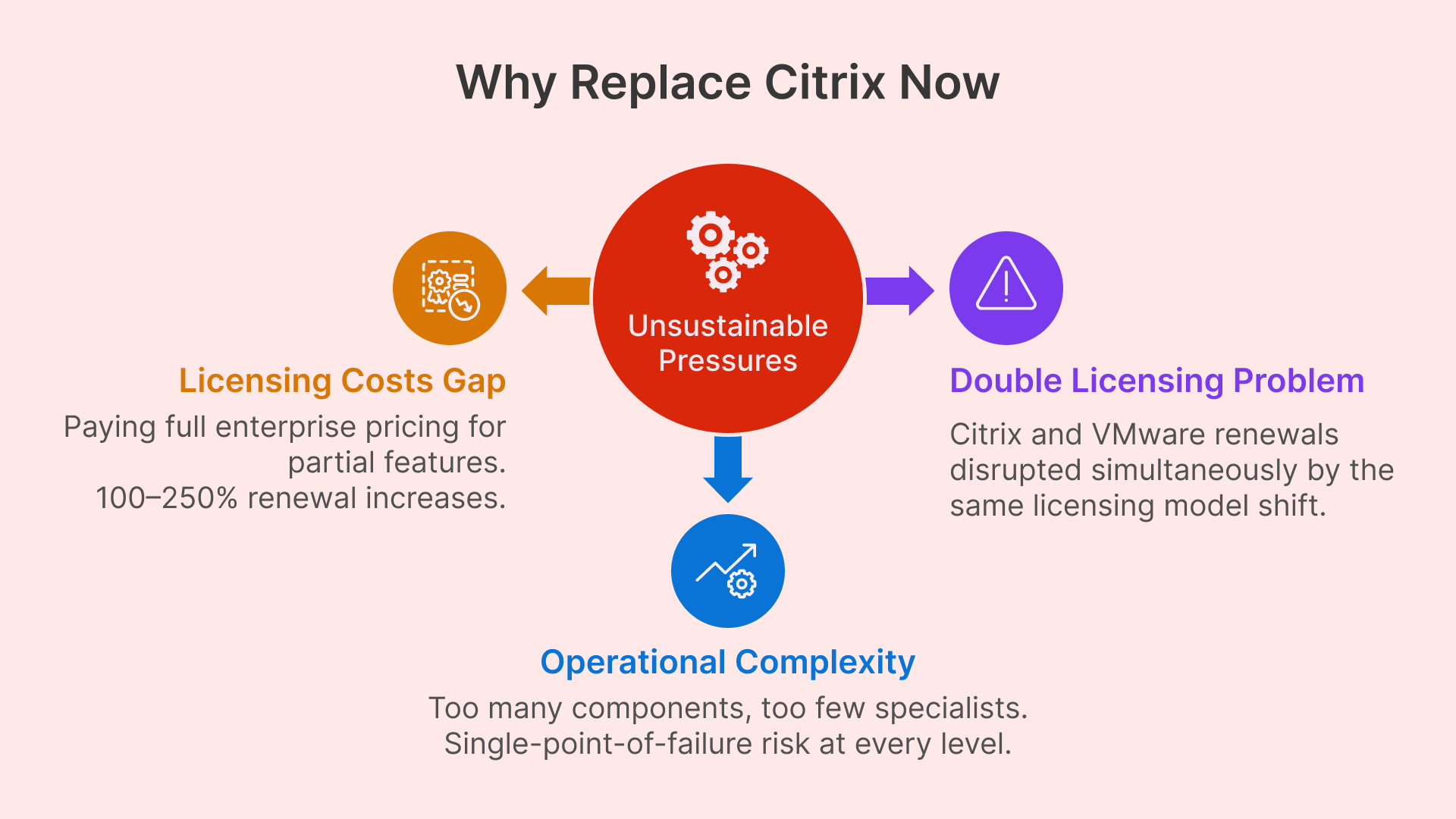
The decision to replace Citrix is rarely made in isolation. It is usually the result of several converging pressures that make the status quo financially or operationally untenable at renewal time.
Citrix Licensing Cost Increases Are Hitting Manufacturing Disproportionately
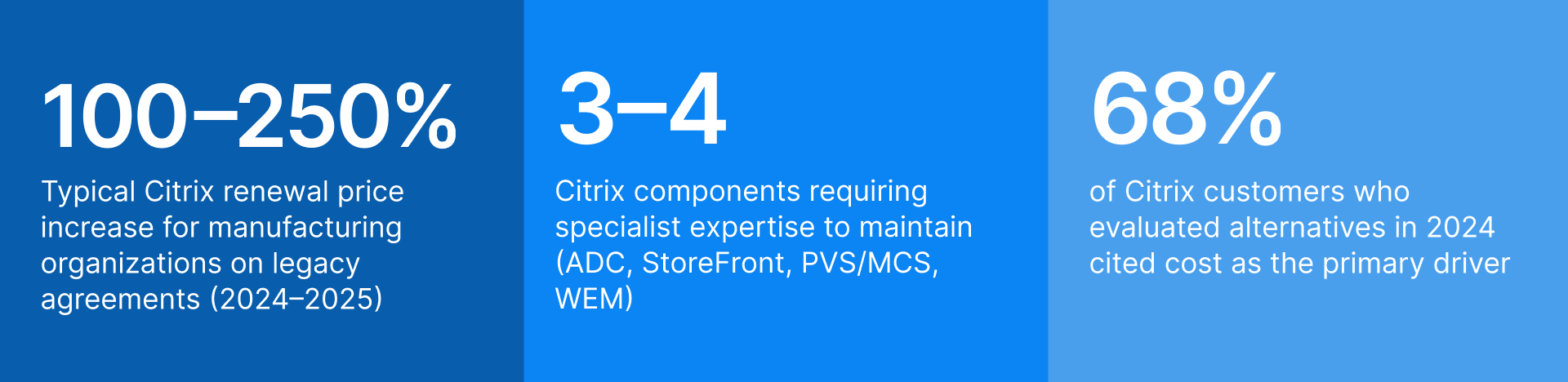
Citrix, operating under Cloud Software Group since 2022, has moved aggressively toward subscription licensing and cloud-delivered services. Organizations on perpetual licenses with Customer Success Services (CSS) agreements are encountering renewal proposals that reflect a full transition to Citrix Cloud pricing — which for manufacturing environments that primarily use Virtual Apps and Desktops as a delivery mechanism for plant floor and remote worker sessions can represent a 100 to 250 percent increase in annual spend.
The impact is disproportionate in manufacturing because the feature utilization profile is narrower than in enterprise office environments. Manufacturing deployments typically do not use Citrix Analytics, Citrix Endpoint Management, or the full suite of Workspace Intelligence features. They use session delivery, RemoteApp publishing, and access control. Paying for the full enterprise feature set to get those three capabilities creates a cost gap that becomes very visible when renewal proposals arrive.

One of the consultancies briefed on the new arrangements told The Register that when the news was delivered to a gathering of the Citrix faithful the result was “stunned silence followed by anger and disbelief.”

The VMware Acquisition by Broadcom Created a Double Licensing Problem
Many manufacturing organizations deployed Citrix Virtual Apps and Desktops on VMware vSphere with vSAN storage. Broadcom’s 2023 acquisition of VMware introduced the same licensing disruption dynamic on the infrastructure layer: perpetual VMware licenses discontinued, subscription bundles introduced, and pricing restructured in ways that eliminated the cost advantage that had made VMware the default hypervisor choice for enterprise VDI.
Organizations in this position face a compounded decision: replace Citrix, replace VMware, or replace both simultaneously. The risk of replacing both simultaneously is higher than most manufacturing IT organizations are comfortable accepting. The phased approach — replacing the delivery layer first while keeping VMware, then migrating the hypervisor separately — is often the more operationally rational path, and any replacement VDI platform must support it.
Citrix Operational Complexity Creates Specialist Dependency That Is Hard to Sustain
A production Citrix environment requires expertise across Citrix ADC (NetScaler), StoreFront, Director, Provisioning Services or Machine Creation Services, WEM (Workspace Environment Management), and the Citrix Licensing Server — each of which has its own upgrade cadence, troubleshooting model, and certification path. As Citrix has lost market share over the past three years, the pool of engineers with current hands-on experience has contracted, making this expertise both harder to recruit and more expensive to retain.
For manufacturing organizations that rely on one or two Citrix specialists internally, the risk is not just cost — it is single-point-of-failure operational dependency. When that specialist leaves, the organization discovers how much institutional knowledge about the Citrix configuration exists only in that person’s head.
What a Complete Citrix Migration Actually Replaces — and What It Does Not
The most common planning mistake in Citrix migrations is scoping the project as a VDI broker swap. Citrix is not a single product — it is a stack of tightly integrated components, and replacing it means addressing each layer.
Mapping Every Citrix Component to Its Replacement
| Citrix Component | Function | Replacement in Thinfinity Stack |
|---|---|---|
| Virtual Delivery Agent (VDA) | Session agent installed on each session host VM | Thinfinity Gateway + Broker Agent (installed on session hosts) |
| StoreFront | User-facing application portal and resource enumeration | Thinfinity Workspace Portal (HTML5, browser-native, no plugin) |
| Citrix ADC / NetScaler | Load balancing, SSL offload, ICA proxy, gateway functions | Thinfinity Gateway (reverse connection, no open inbound ports) |
| Delivery Controller | Session brokering, load balancing decisions, machine catalog management | Thinfinity Broker (on-prem or cloud-hosted) |
| Provisioning Services (PVS) | Streaming OS images to session hosts from central image store | Machine Creation Services equivalent in Thinfinity Cloud Manager; image management via VergeIO or OCI templates |
| Machine Creation Services (MCS) | VM provisioning from master image for desktop pools | Thinfinity Cloud Manager (pool provisioning on VergeIO, OCI, VMware, Hyper-V, Proxmox) |
| Workspace Environment Management (WEM) | User environment optimization, GPO replacement, app launch speed | GPO / Microsoft Intune (WEM is a Citrix-specific optimization layer; standard GPO handles equivalent functions) |
| Citrix Profile Management | User profile persistence across non-persistent sessions | FSLogix Profile Containers (Microsoft-native, free with qualifying licenses — full functional replacement) |
| Director / Monitor | Session and infrastructure monitoring console | Thinfinity Cloud Manager + Datadog integration for full observability |
| Citrix Licensing Server | License enforcement and reporting | Thinfinity concurrent license model (no separate license server required) |
| Citrix Gateway (remote access) | External user access, MFA enforcement, ZTNA-lite capabilities | Thinfinity ZTNA Gateway (zero-open-port architecture, MFA, RBAC, session recording) |
| SecureICA / TLS session encryption | Session encryption in transit | TLS 1.3 session encryption (Thinfinity native, no additional configuration) |
Two components in this list deserve additional attention: profile management and monitoring. Both are areas where organizations frequently underinvest during Citrix migrations, and both are areas where the migration creates an opportunity to adopt tooling that is actually better suited to their environment than what Citrix provided.
Why FSLogix Is the Right Replacement for Citrix Profile Management
Citrix Profile Management has been a functional but Citrix-specific solution for user profile persistence in non-persistent VDI pools. FSLogix Profile Containers — now free with Windows 365, Microsoft 365 E3/E5, and certain Azure licensing tiers — are the current industry standard for this function and offer several practical advantages for manufacturing environments.
FSLogix containers store the entire user profile in a VHD or VHDX file on shared storage (OCI File Storage for cloud deployments, SMB or NFS for on-premises deployments). The container is mounted at login and unmounted at logout — the session host remains stateless while the user sees a persistent, personalized environment. FSLogix Application Masking allows different user groups to see different applications from the same base image, which simplifies image management for manufacturing environments with diverse user populations: administrative, engineering, and plant floor workers can all use the same session host pool with different application visibility profiles.
One important compatibility note: some older Citrix Profile Management configurations include per-application exclusion rules and registry redirects that have been tuned over years. These do not automatically translate to FSLogix — the migration requires a deliberate FSLogix configuration that replicates the same exclusion logic. Build this into your migration project scope.
Replacing Citrix Director With Proper Observability Tooling
Citrix Director provides session-level monitoring — login duration, session latency, application fault events — within the Citrix ecosystem. It does not provide infrastructure-level observability across your hypervisor, storage, networking, and session delivery layers in a unified view.
Datadog’s integration with both OCI and on-premises VergeIO infrastructure provides this unified observability plane. Session metrics from Thinfinity (concurrent sessions, login times, session host resource utilization, disconnect events) flow into Datadog alongside compute, memory, disk, and network metrics from the underlying infrastructure. The practical result is that when a user reports a slow session, your team can correlate the user experience event with infrastructure metrics — storage latency spike, session host CPU saturation, network congestion — in a single dashboard rather than switching between Director, vCenter, and your network monitoring tool.
For manufacturing environments where VDI performance degradation has direct production impact, this unified observability is operationally significant. Datadog’s alerting can be configured to notify on-call teams when shift-start login waves exceed acceptable login time thresholds — giving operations 20 minutes to respond before the shift reaches full productivity impact.
Net-new desktop virtualization deployments are almost exclusively DaaS, with on-premises VDI either migrating to DaaS or adopting a cloud control plane for all but a few specialized cases.
Citrix vs. Thinfinity Workspace: What Changes, What Stays the Same
Before committing to any migration, a CIO needs to understand precisely what changes for users, what changes for IT administrators, and what does not change at all. The following comparison focuses on the dimensions that matter most in a manufacturing context.
| Dimension | Citrix CVAD (Current) | Thinfinity Workspace |
|---|---|---|
| User access method | Citrix Workspace app (installed client) or limited browser access via Citrix HTML5 receiver | HTML5 browser-native — no plugin, no client install required on any endpoint |
| Session types supported | Published apps (RemoteApp), pooled desktops, persistent desktops, hosted shared desktop | Published apps, pooled desktops, persistent desktops, hosted shared desktop — full parity |
| Protocol support | ICA/HDX (proprietary) | RDP, VNC, SSH, Telnet, TN3270/5250, Thinfinity VNC, VirtualUI (broader protocol coverage) |
| GPU / CAD workloads | Citrix HDX 3D Pro (requires specific GPU licensing) | GPU-accelerated sessions on OCI A10/A100 shapes or on-prem GPU hosts; H.264 compression native |
| External access / ZTNA | Citrix Gateway (ADC required); VPN alternative requires full ADC deployment | Thinfinity ZTNA Gateway — zero open inbound ports, reverse connection architecture, no ADC hardware |
| Multi-monitor support | Yes | Yes — full multi-monitor, configurable display policies |
| USB / peripheral redirection | Yes (ICA channel) | Yes — USB, serial, printers, barcode scanners, badge readers |
| Session recording and audit | Citrix Session Recording (separate component, additional licensing) | Built-in session recording and audit logs — no additional component or license |
| Identity integration | AD, LDAP, SAML, Azure AD (via Citrix Federated Authentication Service) | AD, Azure AD / Entra ID, SAML 2.0, OAuth 2.0, LDAP — native integration |
| OT network access | Requires custom architecture (Citrix not designed for OT isolation) | Secondary broker architecture validated for OT-isolated networks — no inbound connectivity to OT segment required |
| Hypervisor support | VMware, Hyper-V, XenServer, Nutanix AHV | VMware, VergeIO, Hyper-V, Proxmox, OCI (KVM), AWS, Azure, GCP — broader substrate support |
| Management console | Citrix Studio + Director (separate tools) | Thinfinity Cloud Manager — unified provisioning, monitoring, and lifecycle management |
| Licensing model | Subscription (Citrix Cloud) or perpetual CSS agreement (legacy) | Concurrent session licensing — pay for active sessions, not named users |
| Typical TCO vs. Citrix | Baseline | 30 to 50% lower TCO on equivalent workload profile (OCI compute + Thinfinity licensing vs. Citrix CVAD on VMware) |
What Does Not Change for End Users
This is the most important stakeholder communication in a Citrix migration. Users on Citrix today access their applications through a browser tab (Citrix HTML5) or through the Workspace app. Users on Thinfinity access their applications through a browser tab with no plugin. For the majority of manufacturing users — especially plant floor workers and administrative staff on shared terminals — the experience is indistinguishable. The session looks and behaves identically. The transition is invisible if the migration is planned correctly. This is worth communicating explicitly to managers and union representatives before the migration begins.
Migration Risks in Manufacturing Production Environments — and How to Mitigate Them
Every VDI migration carries risk. In manufacturing, some of those risks have direct production consequences. The following table identifies the risks that are specific to or amplified in manufacturing environments, their potential impact, and the mitigation approach for each.
| Risk | Impact Level | Mitigation Approach |
|---|---|---|
| Legacy industrial app breaks in non-persistent pool | HIGH | Audit every application for OS version dependency, hardware key, and session persistence requirement before choosing pool type. For applications that require persistent desktops, configure persistent pools. For applications with hardware key dependencies, evaluate USB redirection or keep on dedicated on-premises session hosts managed through the hybrid architecture. |
| OT operator sessions drop during plant-floor production | CRITICAL | Validate OT access architecture in a full network simulation lab before production migration. Migrate OT-adjacent users last — after all other cohorts have proven stable. Configure session reconnection policies so that a temporary connectivity interruption resumes the session rather than terminating it. Maintain Citrix infrastructure for OT users as fallback until the new platform has operated in production for 60 days. |
| Shift-start login wave overwhelms session host capacity | HIGH | Configure Thinfinity Cloud Manager autoscaling to pre-warm session hosts 20 minutes before scheduled shift start. Size the initial session host fleet based on peak concurrency plus 20% headroom, not average concurrency. Test login wave performance during the pilot by simulating 80% of peak concurrency within a 5-minute window. Datadog alerting on login queue depth provides early warning during production rollout. |
| User profile data lost or corrupted during FSLogix migration | HIGH | Do not migrate profiles and sessions simultaneously. Complete FSLogix container creation and profile migration first, validate with a pilot user group for 30 days, then proceed with session host migration. Use RackWare or manual backup to create a point-in-time snapshot of Citrix profile store before migration begins. Test FSLogix container mounting with each application persona before the production rollout. |
| Citrix-specific application delivery policies do not translate | MEDIUM | Citrix policies (Citrix Policy objects in Studio) do not have a direct export-import path to other platforms. Export and document all existing Citrix policy configurations before decommissioning Studio. Map each policy to its equivalent in Thinfinity session policies or Windows Group Policy. Test policy equivalence with representative users from each persona during the pilot phase. |
| USB peripheral compatibility on shared plant terminals | MEDIUM | Inventory every peripheral type in use across all plant floor terminals: barcode scanners, label printers, badge readers, serial-connected industrial devices. Test each peripheral type in a Thinfinity session lab environment before pilot rollout. Document which devices require USB redirection vs. serial redirection vs. network-attached print queues. |
| Specialist knowledge loss during platform transition | MEDIUM | Before decommissioning Citrix infrastructure, document every custom configuration: delivery groups, machine catalog settings, policy objects, profile exclusion rules, StoreFront customizations, and ADC load balancing rules. This documentation serves as both a migration reference and a fallback specification. Assign two team members to the Thinfinity administration role rather than one, to avoid recreating the single-specialist dependency. |
Migration Tooling for a Production-Safe Citrix Replacement
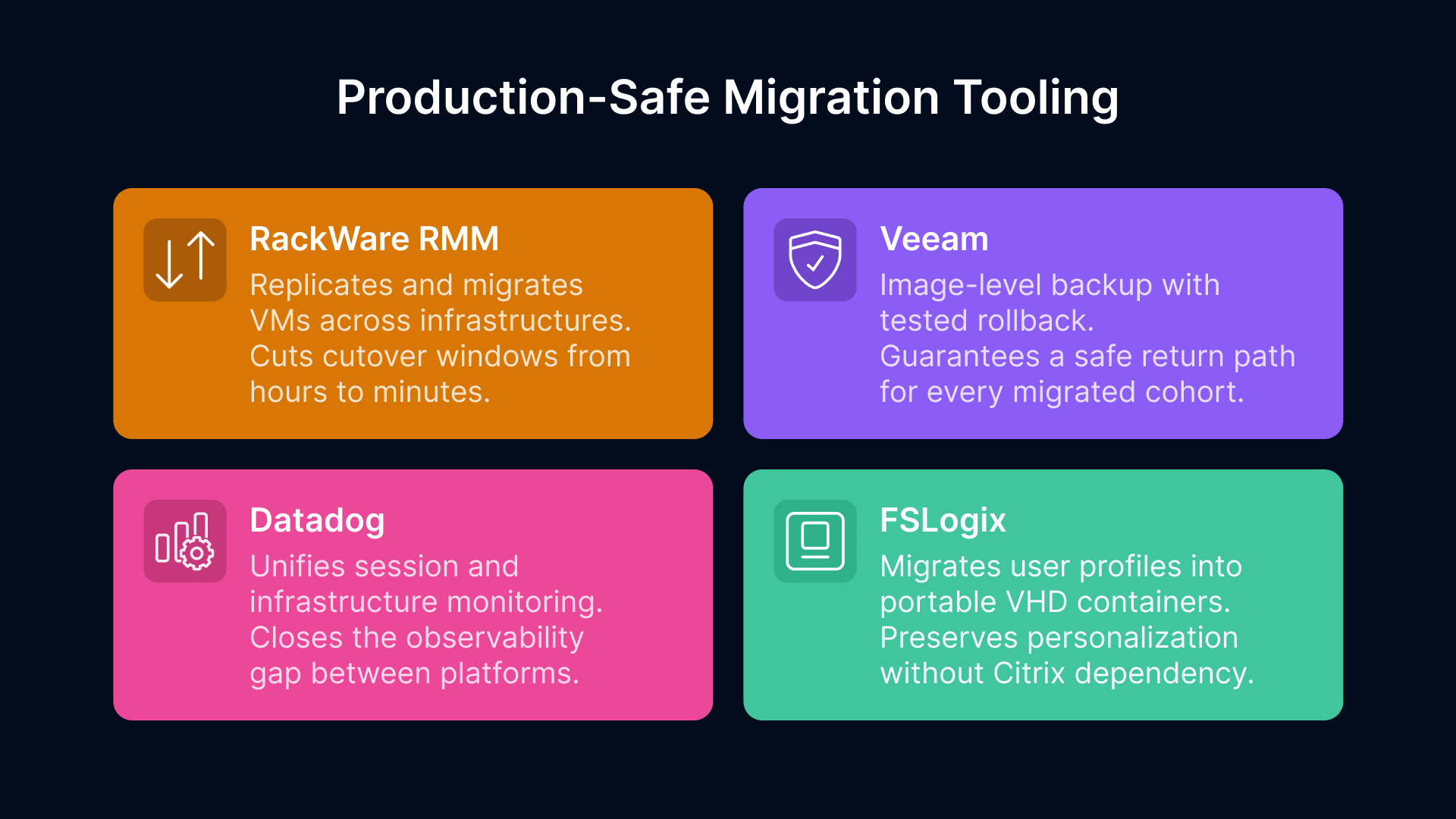
A successful Citrix migration in manufacturing requires more than a new VDI platform. The following tooling addresses the four operational categories where migrations most commonly fail: VM workload transfer, user profile migration, monitoring continuity, and rollback capability.
RackWare RMM: Automating VM Migration From Citrix Session Hosts to the New Infrastructure
RackWare’s Replication and Migration Manager (RMM) is an Oracle-validated migration tool that automates the discovery, replication, and cutover of VMs from VMware vSphere to Oracle Cloud Infrastructure. For a Citrix migration, the relevant workflow is: discover all Citrix VDA-hosted VMs (the session hosts), replicate them incrementally to OCI or to VergeIO, validate the replicated images in a parallel test environment, and execute cutovers during planned maintenance windows.
The practical advantage for manufacturing is the cutover window. RackWare’s incremental replication means that by the time you execute the cutover, the delta between the source VM and the target replica is only the changes since the last sync — typically minutes of data. A cutover that would require 6 to 8 hours of downtime with a manual VM export/import takes 15 to 30 minutes with RackWare. For manufacturing plants where VDI maintenance windows are constrained to shift changeovers or weekend production stops, this difference is significant.
RackWare also provides a pre-migration discovery report that identifies dependencies, open ports, installed services, and scheduled tasks on each VM — information that is useful for identifying Citrix-specific services that need to be decommissioned before the image is reused as a Thinfinity session host.
Migrating User Profiles From Citrix Profile Management to FSLogix Containers
Citrix Profile Management stores user profiles in network-accessible file shares, typically on UNC paths mapped per user. FSLogix Profile Containers store profiles in VHD/VHDX files on SMB or NFS shares (for on-premises) or on OCI File Storage (for cloud deployments). The migration process copies each user’s profile data from the Citrix profile store into a new FSLogix container, which is then mounted at login from the Thinfinity session.
Microsoft provides the Profile Migration tool as part of the FSLogix documentation, and several third-party tools (including Liquidware ProfileUnity and Ivanti User Workspace Manager) automate this process at scale. For a 300-user environment, manual profile migration is feasible but time-consuming; for larger environments, scripted bulk migration is more practical.
Before migrating profiles, review the Citrix profile exclusion list that has been configured in your environment. Exclusions in Citrix Profile Management (folders and registry keys excluded from roaming) should be replicated as exclusions in the FSLogix container configuration. Failing to replicate these exclusions results in containers that are larger than necessary and may include application data that should not roam (application caches, temp files, large binary stores).
Maintaining Monitoring Continuity Through the Migration With Datadog
One of the underappreciated risks in a VDI migration is the monitoring gap — the window during which Citrix Director is no longer the source of truth but the new monitoring stack is not yet fully configured. During this window, production incidents can go undetected or take longer to diagnose.
The mitigation is to configure Datadog monitoring on the new Thinfinity infrastructure before the first production cohort migrates, not after. This means setting up OCI metrics integration, configuring Thinfinity session metric collection, building the shift-start login performance dashboard, and establishing alerting thresholds during the pilot phase — when the stakes of a misconfigured alert are lower. By the time the first production cohort migrates, the Datadog environment should be fully operational and the team should have operational familiarity with its alerts and dashboards.
Maintain Citrix Director in a read-only or monitoring-only mode until all cohorts have migrated and the Datadog environment has been validated against a full production shift cycle. Do not decommission Director until you have confirmed that every metric you relied on in Director has an equivalent in your new observability stack.
Backup and Rollback Planning With Veeam and OCI Backup Policies
Every migration cohort should have a documented, tested rollback procedure before the cutover is executed. For session host VMs migrated to OCI, OCI’s native backup policies create point-in-time snapshots that can be restored if the migration encounters an issue. For session host VMs remaining on-premises (VergeIO or VMware), Veeam Backup and Replication provides image-level backup with configurable retention and restore testing.
The rollback procedure should be documented at the level of: who authorizes the rollback decision, what the specific trigger criteria are (not ‘if something goes wrong’ but ‘if more than X percent of users in the cohort report session failures within 4 hours of migration’), how long the rollback takes, and what the fallback state is for each user. A rollback that takes 6 hours is not a practical option for a plant floor cohort that goes live at 6 AM shift start. Test the rollback procedure during the pilot phase, not during a production incident.
How to Replace Citrix in Manufacturing: A Five-Phase Migration Sequence
The following sequence is designed specifically for manufacturing environments where VDI downtime has production impact and where the user population includes both standard knowledge workers and plant floor users with non-standard session requirements.
Why Thinfinity Workspace Is the Right Citrix Replacement for Manufacturing
We have spent most of this guide on the migration process — the risks, the tooling, and the sequence — because that is where migrations succeed or fail. The platform choice matters, but it matters less than the execution quality.
That said, the platform choice does matter. Here is why we recommend Thinfinity Workspace specifically for manufacturing Citrix replacements, stated plainly and in terms you can verify.
No-Client HTML5 Delivery Solves the Plant Floor Terminal Problem
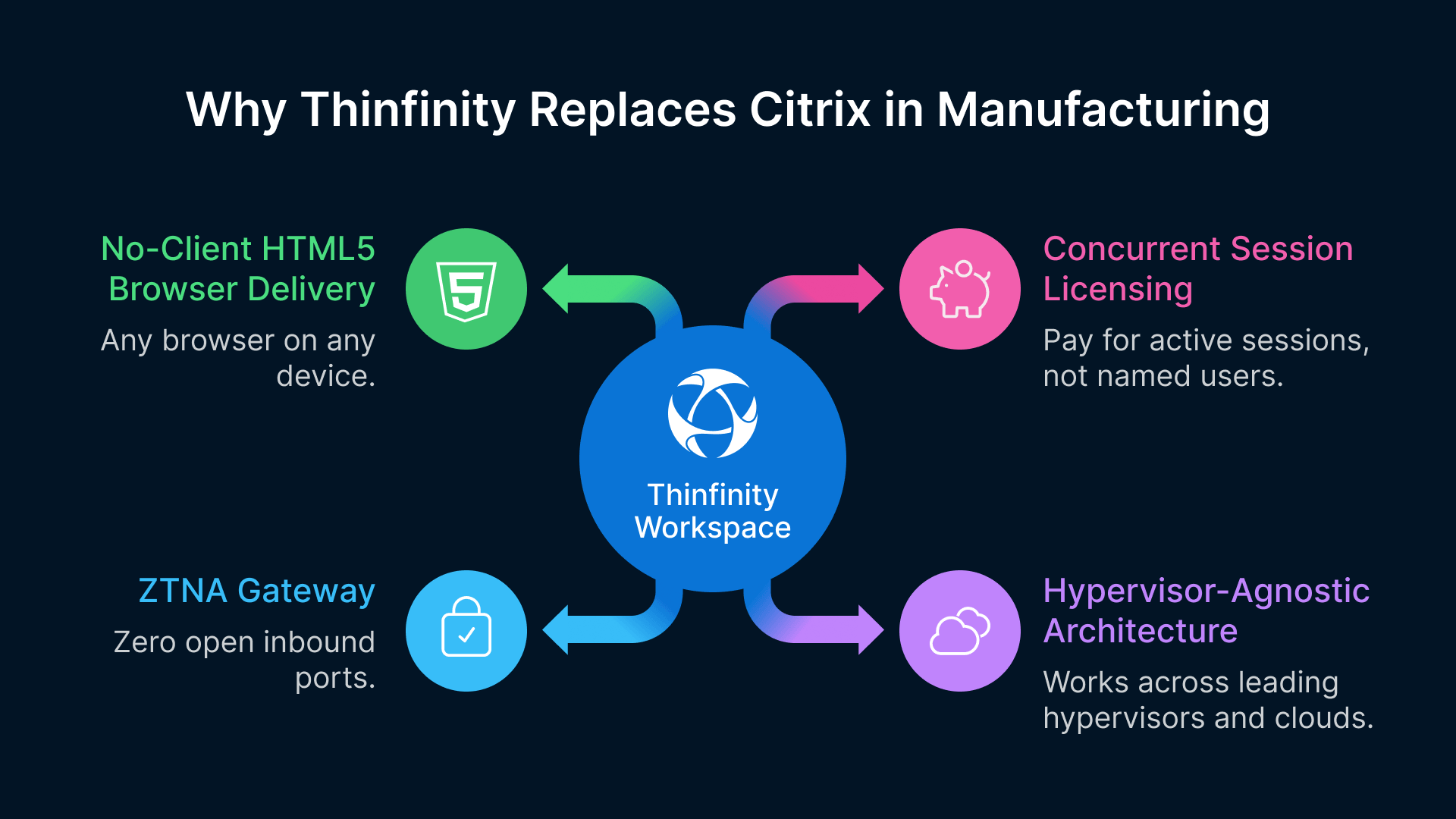
Thinfinity delivers sessions entirely through an HTML5 browser with no plugin, no Workspace app, and no endpoint agent. For shared plant floor terminals — which often run locked-down configurations that resist client software installation and update — this eliminates the endpoint management overhead that Citrix’s Workspace app created. Any browser on any device is a valid endpoint. Thin clients, repurposed PCs, ruggedized industrial terminals, and personal mobile devices all access sessions through the same portal with the same user experience.
Thinfinity’s ZTNA Gateway Replaces NetScaler Without the Hardware Dependency
One of the most expensive components of a Citrix environment is the ADC (NetScaler) — the hardware or virtual appliance that provides external access, load balancing, and ICA proxy functions. Thinfinity’s ZTNA Gateway architecture uses reverse connections initiated by the Broker, which means no inbound ports need to be opened on your firewall and no ADC hardware or licensing is required. The security posture is actually stronger than the ADC model: there is no publicly accessible endpoint that can be probed or attacked, because the session path is established from the inside out.
For manufacturing environments where the IT/OT network boundary management is already complex, eliminating an inbound-accessible appliance from the DMZ simplifies the network architecture and reduces the attack surface simultaneously.
Hypervisor-Agnostic Architecture Lets You Migrate the Citrix Layer and the VMware Layer Independently
If your Citrix environment runs on VMware, you have two migration decisions: replacing the Citrix delivery layer and replacing the VMware hypervisor. These do not have to happen simultaneously. Thinfinity runs natively on VMware vSphere and ESXi. You can deploy Thinfinity on your existing VMware estate, complete the Citrix migration, and then plan the VMware-to-VergeIO or VMware-to-OCI migration on a separate timeline with a separate business case and a separate risk assessment.
This staged approach reduces the blast radius of each migration project and allows the organization to build operational confidence in the Thinfinity platform before introducing infrastructure change as a simultaneous variable. RackWare supports both migration paths — VMware to VergeIO and VMware to OCI — so the tooling investment in Phase 1 of the Citrix migration carries forward to the hypervisor migration project.
Concurrent Session Licensing Aligns Cost With Manufacturing Workforce Patterns
Citrix licenses by named user or device in its current subscription model. For manufacturing organizations where VDI users are spread across multiple shifts — meaning your 400 licensed users are never all active simultaneously — named user licensing means you are paying for the full headcount even when 70 percent of users are off shift.
Thinfinity’s concurrent session licensing model charges for active sessions, not named users. A 400-user manufacturing environment with a peak concurrency of 150 sessions purchases 150 concurrent licenses rather than 400 user licenses. Combined with OCI autoscaling that powers down session hosts when sessions end, the cost model is directly proportional to actual usage rather than total workforce size.
Before You Begin: One Action That Saves the Most Time
The single most time-saving action you can take before starting a Citrix migration is a complete export of your Citrix configuration — Studio export of all delivery groups and machine catalogs, Director export of session recording policies, and a manual documentation pass of all policy objects and StoreFront configurations. This export is the foundation of your new platform configuration. The time invested in a thorough export during the audit phase pays back multiple times during the parallel infrastructure build phase, when you need to know exactly what the Citrix environment was doing in order to replicate it correctly on Thinfinity.