
Manufacturing is unusual in enterprise IT for one reason that matters enormously for infrastructure budgets: demand is predictable. While most enterprise IT teams manage VDI (Virtual Desktop Infrastructure) capacity for users who could be active at any hour, manufacturing plants run on defined shift schedules. First shift starts at 06:00; second at 14:00; third at 22:00. During the two hours between shifts, session counts drop to nearly zero. On weekends, many plants run skeleton crews or shut down entirely.
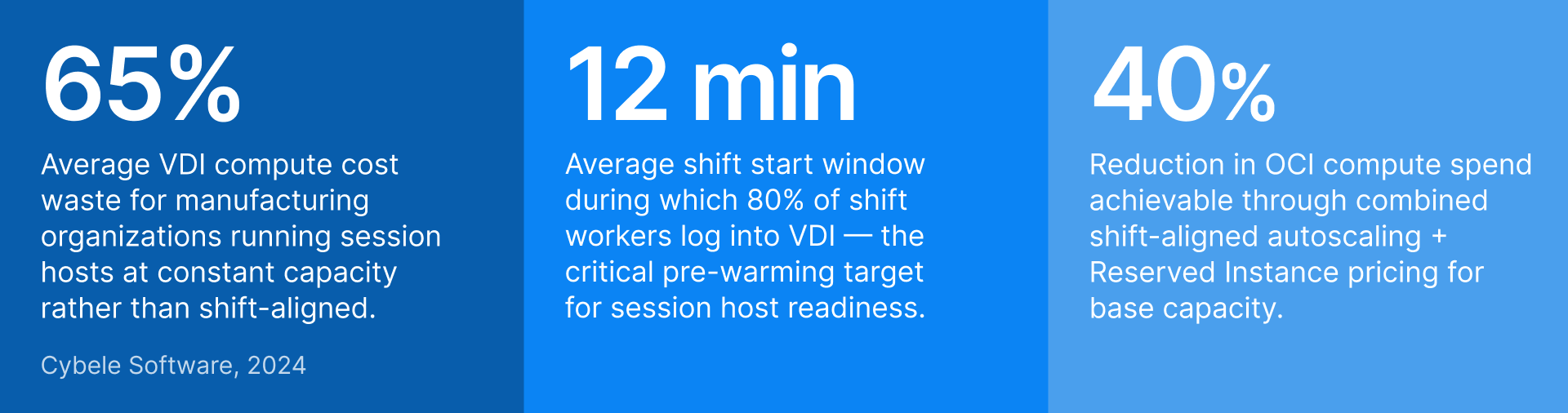
In a cloud VDI environment where every session host is a billable compute instance, running those instances continuously — at full capacity, 24 hours a day, 7 days a week — means paying for roughly 128 hours of compute per week to serve about 45 hours of actual peak demand. That is a 65% waste rate. And the problem compounds for GPU session hosts, where per-hour costs are significantly higher.
Thinfinity Cloud Manager, running session host pools on Oracle Cloud Infrastructure (OCI) or VergeIO, is built to exploit manufacturing’s predictable demand. This guide explains how to configure shift-aligned autoscaling that powers hosts on before each shift, drains them safely between shifts, handles seasonal spikes, and uses OCI’s pricing models to cut infrastructure cost without cutting availability.
Manufacturing VDI demand patterns: why they are different
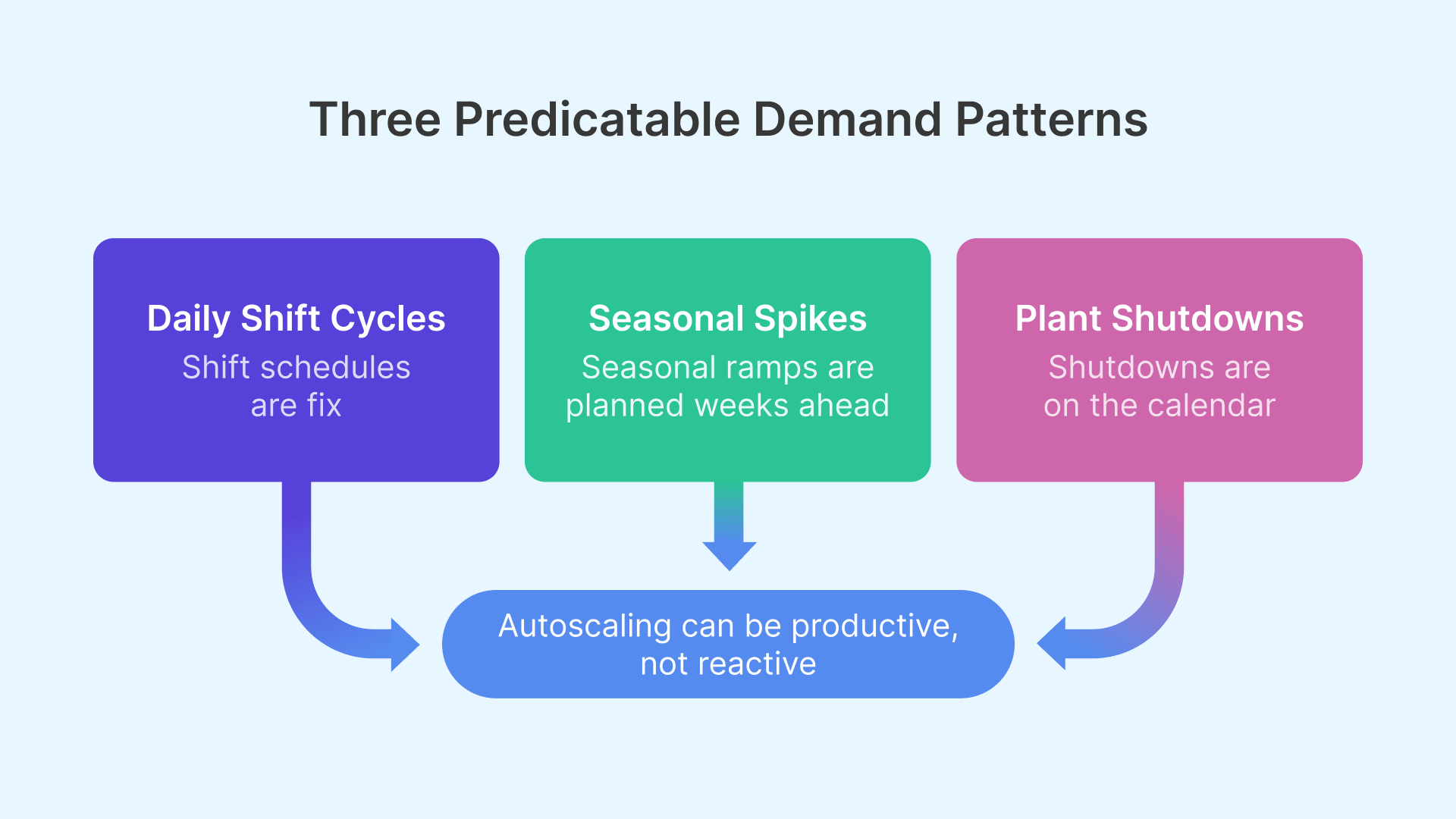
Manufacturing VDI demand differs from typical enterprise VDI in three key ways that drive the entire autoscaling strategy.
Shift-synchronized demand: sharp peaks, real valleys
Standard enterprise VDI demand looks like a gradual morning ramp, a midday plateau, and an evening taper. Manufacturing VDI demand is a step function: near-zero before shift start, a sharp spike in the 10–15 minutes after workers log in simultaneously, a sustained plateau, then near-zero between shifts.
The shift start spike is the most critical design constraint. If session hosts are not fully started and ready before shift start, the first wave of workers — potentially 50 to 200 people logging in within 15 minutes — will either fail to get sessions or wait for hosts still booting. Pre-warming means starting session hosts before the spike, not in response to it.
Seasonal production demand: model year changeover, holiday ramp, Q4 push
Beyond the daily cycle, manufacturing environments face predictable annual demand spikes. Automotive plants run overtime before model year changeover, increasing VDI session demand by 20–40%. Consumer goods manufacturers ramp production 6–10 weeks before the holiday season. Pharmaceutical plants run quarterly validation campaigns requiring additional compliance staff for 2–4 week windows. These spikes are known in advance — the infrastructure challenge is providing extra capacity for the spike period without permanently paying for it year-round.
Plant shutdown events: planned zero-demand windows
Manufacturing plants have planned zero-demand windows that office environments do not: annual maintenance shutdowns, holiday closures, and non-production weekends. For OCI-hosted session hosts, the cost benefit is direct — a stopped VM does not accrue compute charges. A 2-week annual shutdown for a 50-host deployment saves approximately USD 8,000–15,000 depending on shape pricing.
OCI pricing models for manufacturing VDI
OCI offers three pricing models for compute instances. The right strategy for manufacturing VDI uses all three in a layered approach — each tier matched to a specific demand pattern.
| Pricing model | Discount vs on-demand | Best for in manufacturing VDI | Key consideration |
|---|---|---|---|
| Reserved Instance (1-year) | ~30–36% | Base shift capacity that runs every working day — the minimum session host count regardless of season | Commit to minimum base capacity accurately. Under-committing wastes the discount; over-committing pays for unused capacity. |
| Reserved Instance (3-year) | ~45–52% | Stable permanent capacity for workloads that won’t change over 3 years — core MES client and engineering pools | Highest discount, highest commitment. Only for capacity you are certain of. Avoid for GPU shapes until utilization is proven. |
| On-Demand | None (baseline) | Seasonal overtime above reserved base, shift-specific overflow, new pools being piloted | Full flexibility — start and stop any time. No availability guarantee during regional capacity constraints. |
| Preemptible (Spot) | ~50–70% | Batch workloads: overnight report generation, software deployment, GPU rendering queues that can tolerate interruption | OCI can reclaim with 30-second notice. Never use for interactive user sessions. |
| Free Egress (10 TB/month) | Free up to 10 TB | Session display traffic from OCI to user endpoints — effectively zero network cost for most deployments | Monitor monthly egress for high-resolution multi-monitor CAD sessions with very high concurrency. |
The three-tier capacity model
The practical implementation uses three capacity tiers matched to the three demand patterns above.
- Tier 1 — Reserved base capacity covers the minimum session host count needed for any production shift, purchased at Reserved Instance (RI) pricing. This is the capacity that is always available during shifts and never subject to scaling decisions.
- Tier 2 — On-Demand overflow covers capacity above the Reserved base during seasonal peaks, overtime, and model year changeover. These instances start in response to demand exceeding the Reserved tier and power off when demand returns to baseline.
- Tier 3 — Preemptible instances run during off-shift hours for background tasks: application updates, batch simulation jobs, and report generation. Preemptible pricing (50–70% discount) makes these workloads significantly cheaper during the idle off-shift window.

Cloud economics reward organizations that match infrastructure consumption to actual demand. In shift-based manufacturing, schedule-driven autoscaling is the single highest-ROI optimization available — the demand pattern is already known, and the tools to exploit it exist today.

Thinfinity Cloud Manager: configuring shift-aligned autoscaling
Thinfinity Cloud Manager manages the lifecycle of session host pools on OCI and VergeIO — provisioning, scaling, image updates, and drain procedures — from a single console. Autoscaling policies define how the pool responds to demand, and shift-aligned scheduling defines when to act proactively rather than reactively.
Schedule-based scaling: acting before demand, not after
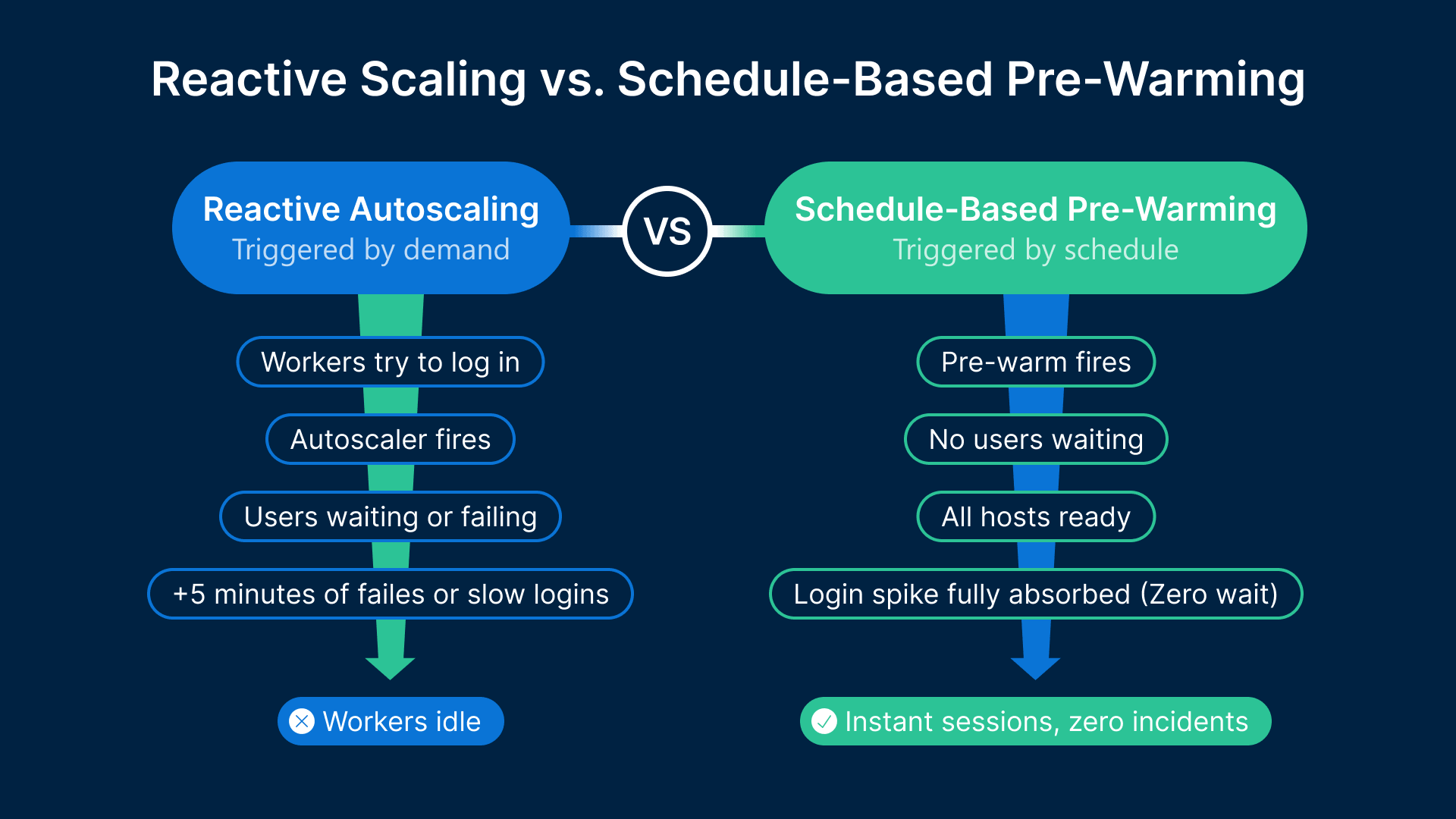
Reactive autoscaling — adding hosts when demand exceeds a threshold — is fundamentally unsuitable for manufacturing shift start events. A session host on OCI takes 2–5 minutes to start, initialize, load the Thinfinity agent, mount FSLogix (Microsoft’s profile container technology for VDI), and reach a state where it can accept sessions. If the autoscaler waits until the first users are failing before starting hosts, those hosts will come online 3–5 minutes into the shift — after the spike has already caused failures.
Thinfinity Cloud Manager’s schedule-based scaling resolves this by decoupling the scaling action from the demand signal. For a 06:00 shift start, the pre-warm schedule fires at 05:45 — starting enough session hosts 15 minutes before any user connects. By 06:00, all hosts are started, initialized, and waiting. The schedule for a standard 3-shift operation has six events: pre-warm for Shift 1 (05:45), transition for Shift 1-to-Shift 2 (13:45), scale-down after Shift 2 (22:15), pre-warm for Shift 3 if applicable (21:45), scale-down to zero or skeleton for off-peak, and Monday morning resume (05:30 Sunday night).
Session drain procedure: scaling down safely
Scaling down session hosts requires care because an operator mid-session cannot be abruptly disconnected. Thinfinity Cloud Manager’s drain procedure handles this: when a scale-down event fires, targeted hosts are marked as draining — they stop accepting new sessions but continue serving existing ones. Once a host’s session count reaches zero, it powers off.
The drain timeout defines the maximum wait time. For manufacturing shift changeovers, 20–30 minutes is typical. Configure a visible 10-minute notification: “Your session will end in 10 minutes. Please save your work.” For GPU session hosts used by CAD engineers, use a 45-minute drain timeout — saving large assembly files can take several minutes.
Golden image update deployment: patching without production impact
Monthly Windows patch cycles cannot be applied to running instances without disrupting users. The golden image update procedure uses between-shift windows (22:00 to 06:00 on no-Shift-3 days, or weekend shutdowns) to roll out updates. After Shift 2 drains, Cloud Manager starts one session host from the new golden image and runs automated validation tests. If validation passes, the pool’s launch configuration is updated. If validation fails, Cloud Manager rolls back automatically and alerts the operations team before shift start.
| Scaling scenario | Trigger | Cloud Manager action | Pre-warm lead time |
|---|---|---|---|
| Shift 1 start (daily) | Schedule: 05:45 | Start Reserved tier hosts + validate readiness before 06:00 | 15 min |
| Shift changeover (Shift 1 → 2) | Schedule: 13:45 | Maintain capacity; start On-Demand hosts if Shift 2 headcount > Shift 1 | 15 min pre-Shift 2 |
| Shift 2 scale-down | Schedule: 22:15 + drain | Mark hosts draining; wait for drain timeout; power down empty hosts | N/A — outbound scale |
| Seasonal overtime ramp | Manual trigger or calendar event | Expand On-Demand tier; reserve additional OCI capacity if peak > 2 weeks | 24 hours ahead |
| Plant shutdown (holiday/annual) | Schedule: last shift end + 30 min drain | Drain all sessions; power down all hosts; stop OCI instances | N/A — full power-down |
| Session demand spike (unexpected) | Session queue depth > threshold for 3 min | Start On-Demand overflow hosts; alert operations team | Reactive — 3–5 min host start |
| Golden image update | Monthly maintenance window | Validate new image on 1 test host; update pool config; replace fleet during pre-warm window | Scheduled for between-shift window |
VergeIO hybrid burst: on-premises base with OCI overflow
For manufacturing organizations with existing on-premises server infrastructure, the hybrid capacity model is often the most cost-effective architecture: VergeIO handles base capacity (equivalent to Reserved Instances on OCI), and OCI handles overflow (On-Demand).
Why VergeIO as the base layer makes economic sense
On-premises compute, once purchased and depreciated, has a marginal cost close to zero — essentially power and cooling. A VergeIO node running Thinfinity session hosts during shifts costs almost nothing per session beyond electricity and maintenance amortization. For manufacturing plants with existing server hardware or VergeIO clusters already deployed, using that capacity as the base tier eliminates the Reserved Instance cost entirely for that tier. The tradeoff is scaling speed: on-premises VergeIO capacity cannot be added in 3 minutes the way an OCI instance can. But for the base capacity tier that does not need to scale dynamically, this is not a constraint.
Managing both tiers as one unified pool
Thinfinity Cloud Manager treats OCI session host pools and VergeIO session host pools as members of the same application delivery environment. A user logging into the Thinfinity portal is assigned to the next available session host — whether that host is a VergeIO VM on-premises or an OCI Compute instance is transparent to the user. On a normal production day, the VergeIO base tier pre-warms 15 minutes before shift start (VM power-on on VergeIO is typically 45 seconds to 2 minutes, versus 3–5 minutes for a cold OCI instance start). If VergeIO capacity is insufficient, Cloud Manager’s reactive threshold policy triggers additional OCI On-Demand instances to fill the gap.
| Workload / demand pattern | VergeIO on-premises role | OCI role | Scaling trigger |
|---|---|---|---|
| Normal production shift (baseline) | Primary session hosts — all base sessions served from VergeIO | Idle (not started) — no OCI cost during normal shifts | Schedule: pre-warm VergeIO VMs 15 min before shift start |
| Shift overflow (unplanned overtime) | Continues serving existing sessions at full capacity | On-Demand instances started by reactive threshold policy | Session queue depth > 5 for > 3 minutes |
| Seasonal overtime ramp | Continues at base capacity; may add VergeIO nodes if budget allows | On-Demand pool expanded for duration of overtime period | Manual trigger + calendar-scheduled end date |
| Plant shutdown (holiday/annual) | All session host VMs powered off; cluster at reduced power | All instances stopped; Reserved Instances suspended (no charge while stopped) | Schedule: post-last-shift drain + 30 min; full shutdown |
| Latency-sensitive OT apps | Dedicated VergeIO session hosts; low-latency path to OT systems | Not used — latency to OCI too high for OT-adjacent sessions | Static pool assignment in Cloud Manager |
| Cloud-native / IT-layer apps | Not used — no proximity benefit | Session hosts on OCI; co-located with cloud-hosted ERP and PLM | Static pool assignment in Cloud Manager |
GPU session host autoscaling: special considerations for CAD engineering pools
GPU session hosts — OCI VM.GPU.A10.1 and similar shapes — require a modified autoscaling approach. GPU instance start time is longer, costs are higher, and session density is lower. All three factors affect the pre-warming strategy and cost model. Visit NVIDIA’s vGPU Software page for the latest GPU virtualization certification details relevant to manufacturing CAD deployments.
Longer pre-warm windows for GPU instances
A VM.GPU.A10.1 instance on OCI typically takes 3–6 minutes from start request to full NVIDIA vGPU stack initialization. The pre-warm schedule for GPU session host pools should fire 20 minutes before the engineering team’s shift start — not 15. For engineering teams starting at 08:00, the GPU pre-warm fires at 07:40. Configure Thinfinity Cloud Manager to delay accepting user session assignments on a GPU host for 60 seconds after the host reports ready state, ensuring the NVIDIA vGPU stack is fully initialized before the first CAD session begins.
GPU pool sizing by engineering shift patterns
Engineering teams rarely have 100% of staff logged in simultaneously at shift start the way production workers do. Typical engineering team concurrency at peak is 70–80% of team size, versus 90–95% for production shift workers. A 30-engineer CAD team needs pool capacity for approximately 22–24 concurrent sessions at peak. With a VM.GPU.A10.1 handling 2–3 concurrent vGPU sessions at the 16Q profile, a pool of 8–10 VM.GPU.A10.1 instances covers a 30-engineer team with headroom. GPU On-Demand overflow instances at USD 2.50–3.50 per hour — not running 4 overflow instances for 200 idle days per year — saves USD 4,000–7,000 annually.
Datadog for VDI capacity planning and cost visibility
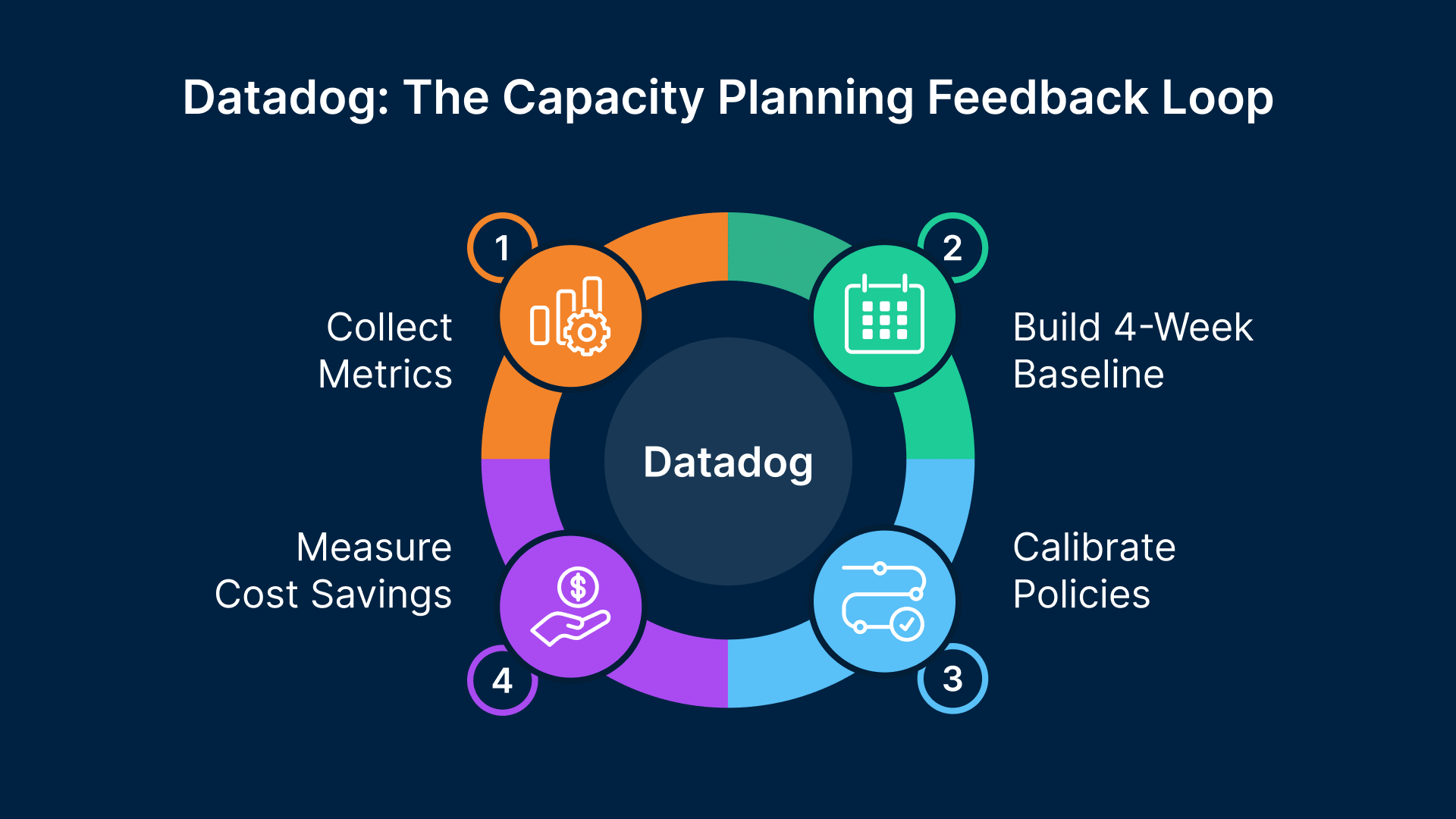
Autoscaling policies are “set and forget” only if they are based on accurate demand data. In practice, demand patterns change — new applications are added, headcount shifts, shift patterns adjust. Datadog’s NVIDIA DCGM integration provides the utilization data and trend analysis that allows Thinfinity Cloud Manager policies to be calibrated accurately and updated when patterns change.
The metrics that drive capacity decisions
- Peak concurrent session count by pool and by shift — the primary input to session host sizing
- Session host utilization at peak — CPU, memory, and VRAM for GPU hosts; hosts consistently above 85% indicate the pool needs more capacity
- Login queue time — time from session request to assignment; more than 30 seconds at shift start indicates insufficient pre-warm capacity
- Session host availability at shift start — the fraction of hosts reaching ready state before shift start; should be 100%
Building the shift demand baseline in Datadog
The first step in configuring accurate autoscaling policies is building a 4-week demand baseline for each session host pool. Datadog’s time series data for concurrent session count shows the exact shape of demand across shifts, days of the week, and the transition between normal and overtime weeks. Datadog’s forecast feature can project seasonal demand changes based on historical patterns — if the automotive model year changeover in September typically increases concurrent session counts by 35% over 6 weeks, Datadog’s forecast will show the upcoming ramp. This gives the operations team advance visibility to pre-purchase On-Demand capacity or submit OCI Compute Reservation requests before the seasonal spike arrives.
Organizations that combine cloud-native autoscaling with shift-pattern scheduling see 35–50% reductions in VDI infrastructure spend compared to always-on deployments — without any reduction in end-user session availability.
Cost dashboards: connecting infrastructure decisions to budget impact
Datadog’s cost management integration with OCI (via OCI Usage API) surfaces per-resource compute spend alongside session metrics. A manufacturing IT manager can see on a single dashboard: OCI compute spend by session host pool this month versus last month, Reserved versus On-Demand spend ratio, estimated annualized savings from shift-aligned autoscaling versus always-on cost, and projected spend for the next 90 days. Cost dashboards also flag anomalies before they become billing surprises — a session host pool consuming On-Demand hours outside of expected shift windows indicates a scheduling policy misconfiguration. For broader cloud cost management guidance, Gartner’s cloud strategy research offers benchmarks that help contextualize savings targets.
Putting it together: configuring Thinfinity Cloud Manager for a 3-shift plant
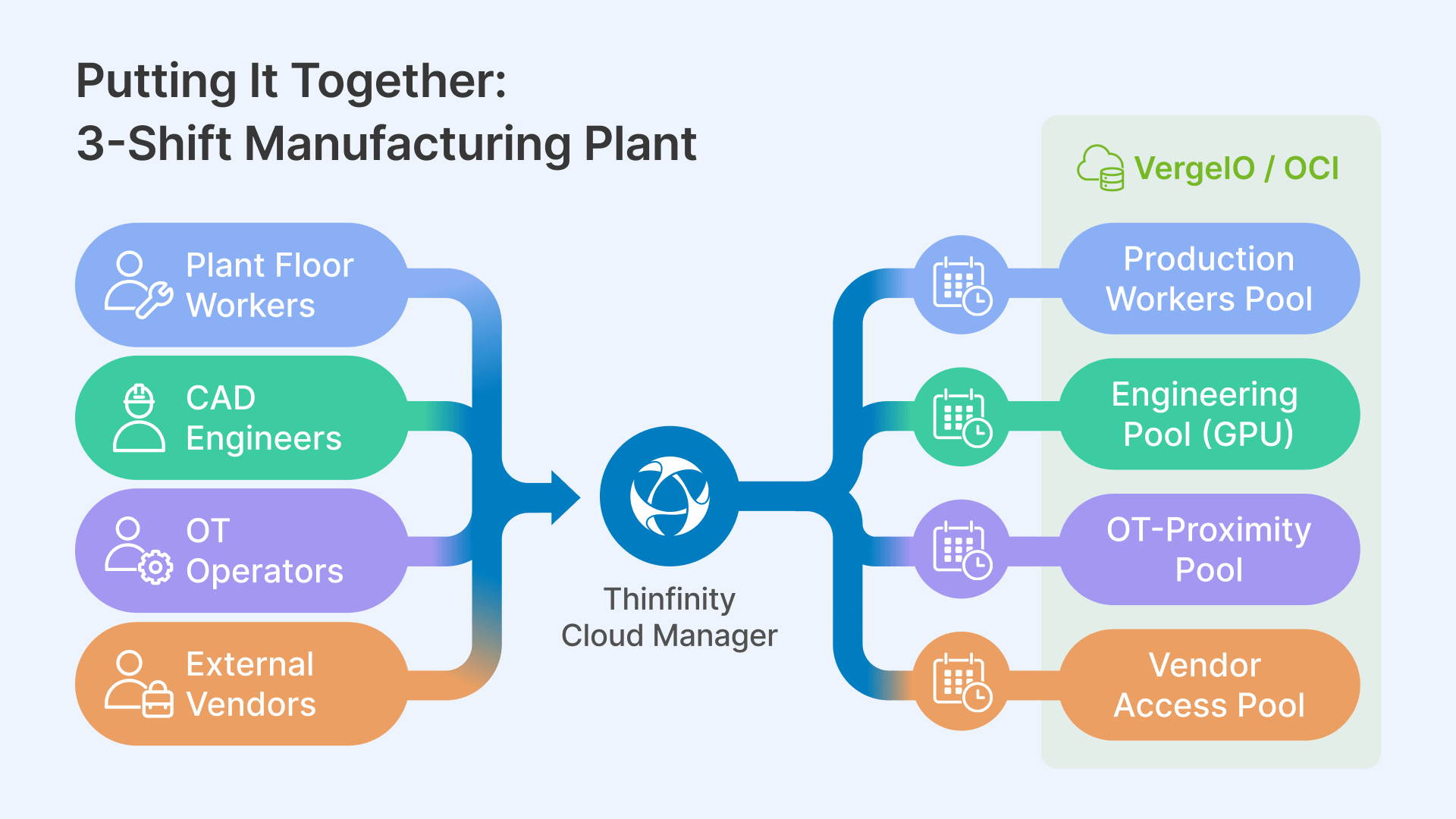
The following walks through the complete Thinfinity Cloud Manager configuration for a representative deployment: a plant running 3 shifts with production workers (CPU session hosts) and engineering staff (GPU session hosts), on a hybrid OCI + VergeIO architecture.
Session host pool architecture
The deployment uses four session host pools managed from a single Thinfinity Cloud Manager instance:
- Production Workers Pool — VergeIO base + OCI On-Demand overflow; standard CPU session hosts; serves MES (Manufacturing Execution System) clients, quality tools, CMMS
- Engineering Pool — OCI VM.GPU.A10.1 Reserved base + On-Demand overflow; serves CAD applications via RDC (Remote Desktop Connection) and web SCADA via RBI (Remote Browser Isolation)
- OT-Proximity Pool — VergeIO only; session hosts co-located on plant floor network; serves legacy MES clients and SCADA HMI tools requiring OT network proximity
- Vendor Access Pool — OCI; isolated network path; serves third-party vendor sessions brokered through Thinfinity for OT asset access
Shift schedule configuration in Cloud Manager
For the Production Workers Pool: pre-warm event at 05:45 targeting 10 hosts (covers Shift 1 peak of approximately 80 concurrent users at 8 users per host), transition event at 13:45 maintaining 10 hosts, scale-down event at 22:15 with 20-minute drain timeout, Shift 3 pre-warm at 21:45 if applicable. Weekend policy: maintain 2 skeleton hosts on Saturday; full shutdown Sunday 22:00 to Monday 05:30.
For the Engineering Pool: pre-warm event at 07:40 targeting 8 VM.GPU.A10.1 instances (Reserved base), reactive threshold at 85% pool utilization starting 2 additional On-Demand GPU instances, scale-down for On-Demand instances at 17:30 with 45-minute drain timeout, full pool shutdown at 19:00 if no active GPU sessions remain.
Break-glass and failover configuration
Two session hosts — one on VergeIO, one on OCI — are designated as break-glass instances: always on, never subject to scale-down policies, accessible by authorized users when normal session host pools are unavailable. Sized for 5–10 concurrent sessions serving production-critical applications (MES, shift scheduling, SCADA web client). Their cost is approximately USD 200–400 per month — insurance against a scale-down policy misfire or pre-warm failure during a critical production event.
Break-glass availability recommendation
OCI Compute Reservations back the Reserved Instance base capacity for both pools, guaranteeing availability when the pre-warm schedule fires — particularly important during regional capacity constraint events. For plants where each hour of VDI downtime costs USD 25,000+ in lost production, the break-glass infrastructure cost pays for itself in the first prevented incident.