
Manufacturing plants run dozens of internal web applications that were never designed to be accessed from outside the plant network. MES dashboards, ERP portals, SCADA historian web interfaces, quality management systems, maintenance ticketing tools, production scheduling platforms, and document management systems all live inside the corporate network — and all of them need to be accessible to engineers, supervisors, and support staff who are working remotely, at a different plant, or from a shared terminal behind a network boundary.
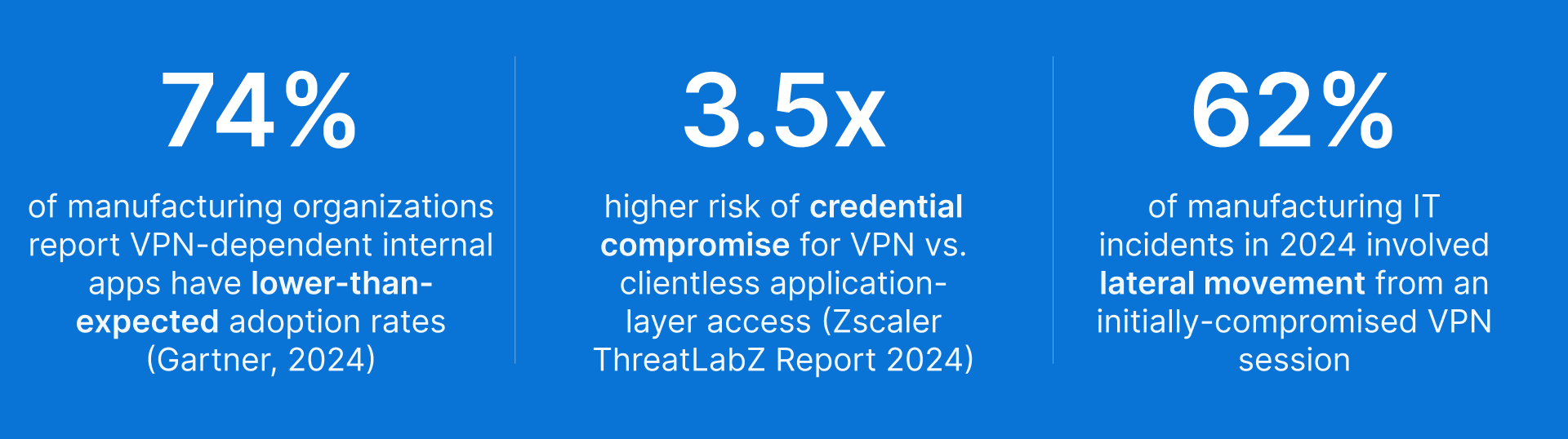
The traditional answer is VPN: give users a tunnel into the corporate network and let them reach the internal application directly. This works until it does not. VPN grants network-level access, which means a compromised device on the VPN is a compromised device inside your network. For manufacturing environments where internal web applications share network segments with OT systems, the risk calculus has changed significantly.
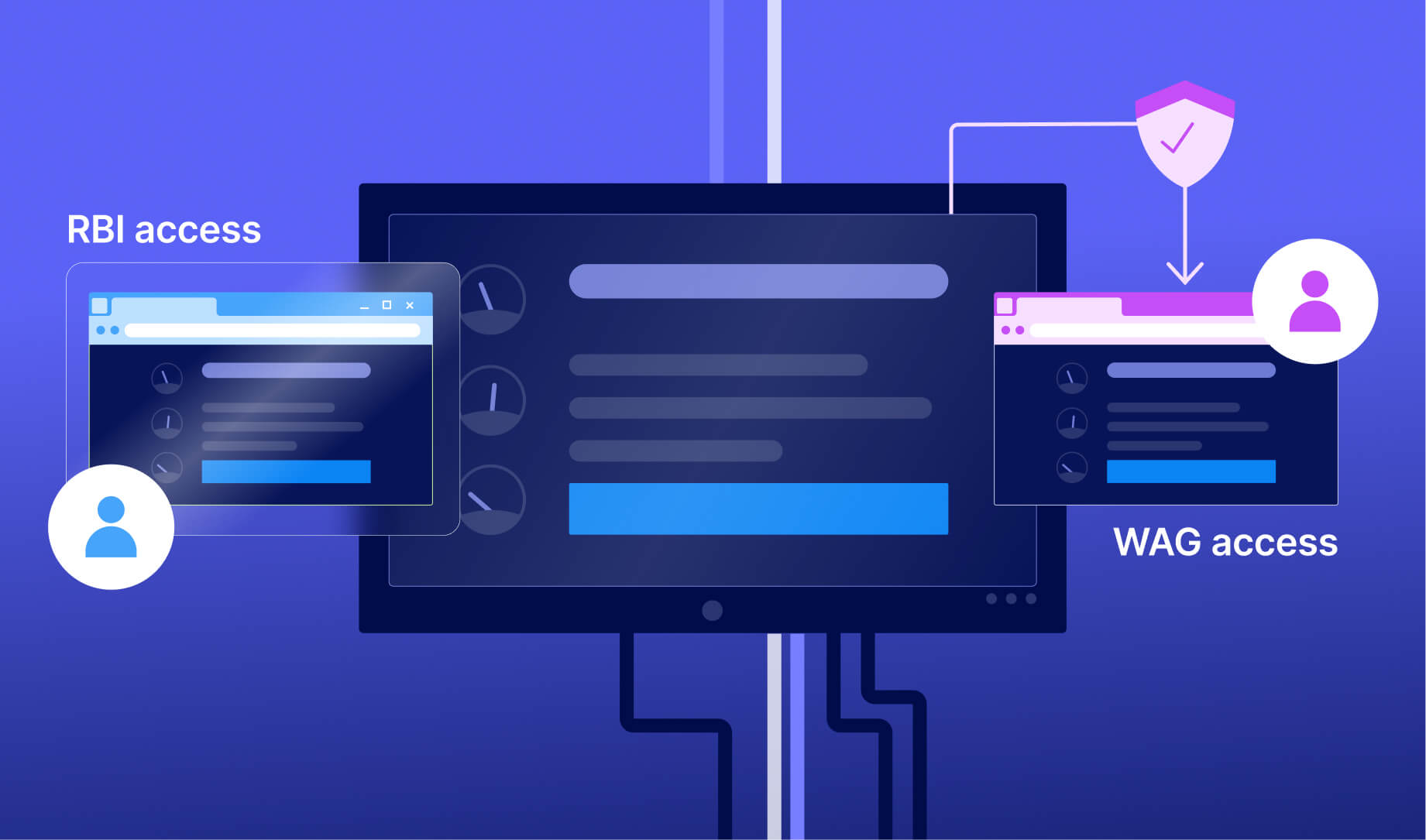
There are two architecturally superior alternatives to VPN for internal web application access: Remote Browser Isolation (RBI) and Web Application Gateway (WAG). Thinfinity Workspace delivers both natively — a Kubernetes-based RBI that spins up temporary, isolated browser containers for each session, and a WAG that proxies authenticated access to specific internal applications. The right choice between them depends on the complexity and sensitivity of each application. This article explains how both work, when to use each, and how together they replace VPN for every internal web application in your manufacturing environment.
Why VPN Is the Wrong Answer for Accessing Manufacturing Internal Web Applications
VPN was designed to extend network access, not to secure application access. For internal web applications specifically, this distinction matters more than it does for other use cases.
The Fundamental Problem: VPN Provides Network Access, Not Application Access
When a user connects to your network via VPN to access the MES web dashboard, they do not get access to the MES dashboard — they get access to the network segment where the MES server lives. Everything else on that segment is also reachable from their device. Other internal web applications on the same subnet, file shares, database ports, management interfaces — all of it is reachable by a device that was authenticated only to the level of ‘this user has valid VPN credentials.’ In a manufacturing environment where MES servers, historian databases, and engineering workstations share network segments, VPN access for one application implicitly grants access to adjacent systems. Split tunneling can narrow this, but requires ongoing maintenance and still grants network-level access rather than application-level access.
Endpoint Trust: VPN Imports Whatever Is on the Remote Device Into Your Network
VPN extends your network to the remote device. This means the security posture of that remote device becomes a factor in your network’s security posture. An engineer connecting from a personal laptop with outdated antivirus, a browser with malicious extensions, or active malware brings that device’s risk into your network the moment the VPN tunnel is established. Manufacturing organizations face a specific variant of this problem: plant floor supervisors and shift managers who need to check production dashboards frequently do so from shared computers, personal tablets, or mobile phones. These devices are not managed by IT, have no endpoint security baseline, and may be used on public Wi-Fi. VPN access from these devices is a structural risk that cannot be mitigated without controlling the endpoint — which is operationally impractical for personally-owned devices.
Operational Friction: VPN Reduces Adoption of the Internal Tools You Invested In
Users who need to connect to the VPN before opening an MES dashboard frequently skip the step — checking production metrics by calling someone on the plant floor instead. The friction of VPN authentication, especially on mobile devices or from environments with slow internet connections, degrades adoption of the internal tools that manufacturing IT has invested in deploying. When a production supervisor stops using the MES dashboard because the VPN is too inconvenient on their phone, the investment in the MES platform is partially wasted.
Thinfinity RBI and Thinfinity WAG: Two Architectures, One Platform, Zero VPN
Thinfinity Workspace replaces VPN for internal web application access through two complementary delivery mechanisms. Understanding the technical difference between them is the key to mapping the right product to the right application — because choosing incorrectly (WAG where RBI is needed, or RBI where WAG would do) either creates unnecessary complexity or leaves a security gap.
Thinfinity RBI: Kubernetes-Based Ephemeral Browser Containers
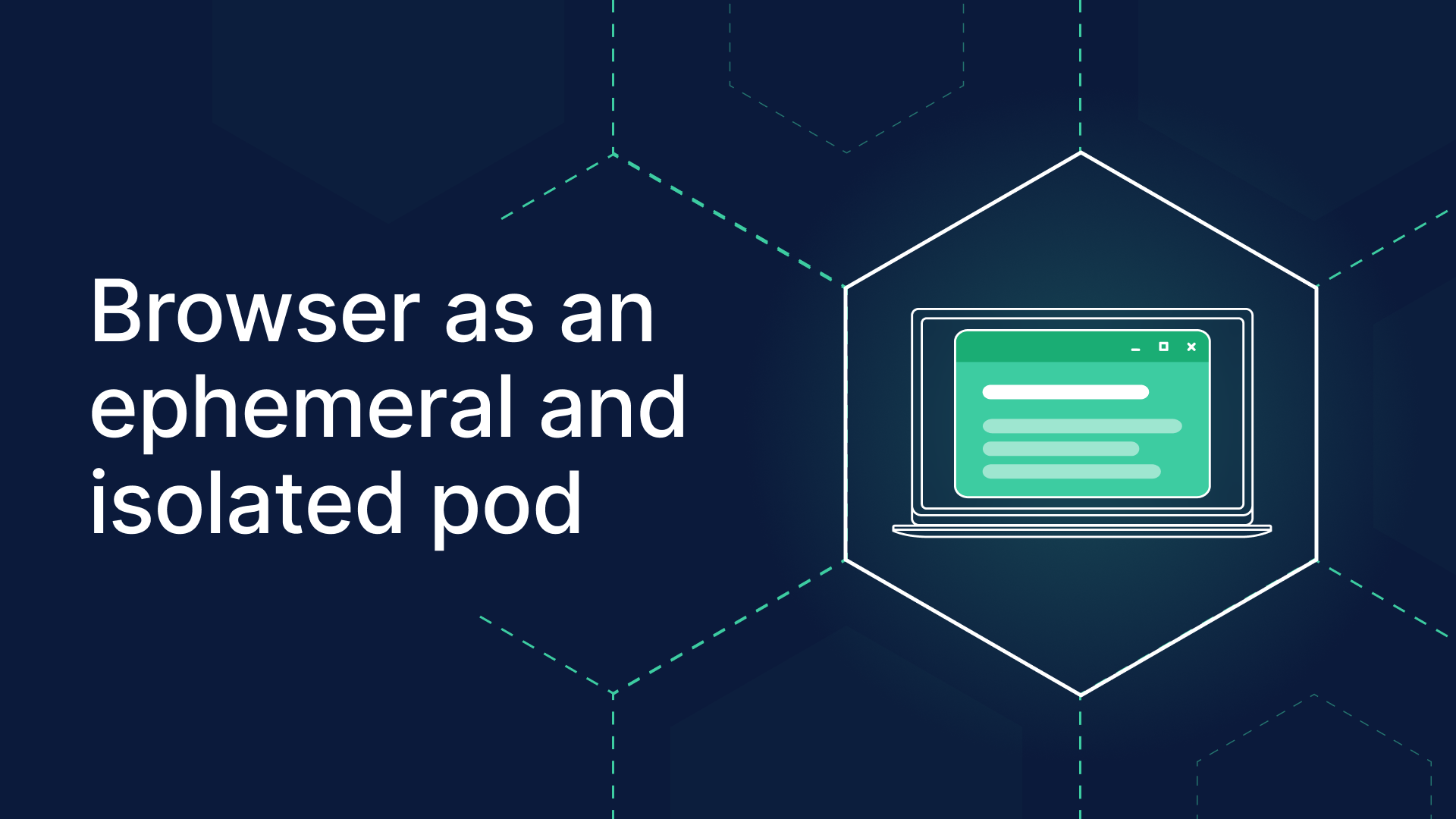
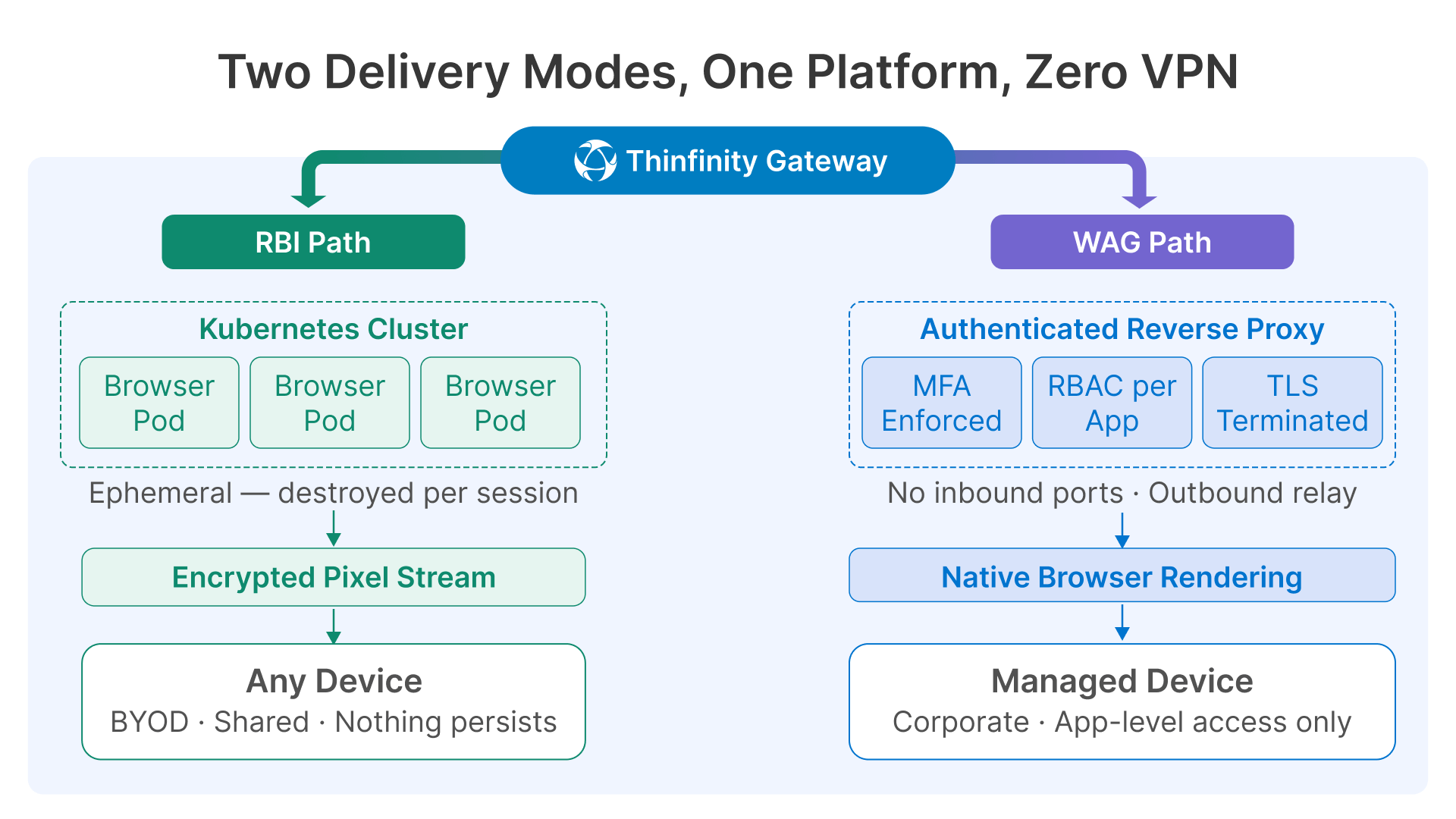
Thinfinity’s Remote Browser Isolation engine uses Kubernetes to spin up a temporary, isolated browser container for each user session. When a user accesses an application through RBI, a clean browser instance is created in a Kubernetes pod on-demand. The application runs entirely inside that container — no JavaScript executes on the user’s device, no files land on the endpoint, no browser state persists between sessions. Only the rendered screen is streamed to the user, typically as compressed video frames over an encrypted WebSocket connection.
When the session ends, the container is destroyed. There is no persistent browser state, no cached credentials, no locally stored session tokens. The next user who accesses the same application gets a completely fresh container with no trace of the previous session. For a plant floor supervisor checking the SCADA web client from a shared terminal, this means the application behaves identically for every user and every session — and nothing sensitive persists on the shared device.
The security properties of this architecture are significant. Even if an attacker injects malicious content into the web application — a cross-site scripting payload, a malicious document attached to a QMS record, a phishing link embedded in a production report — that content executes inside the Kubernetes container and is destroyed when the session ends. It never reaches the user’s device. The container is completely ephemeral and completely isolated.
RBI is operationally more resource-intensive than WAG — each session requires a running Kubernetes pod with a full browser stack. This cost is justified when the application complexity, content sensitivity, or endpoint trust level makes it necessary. It is the right choice for complex JavaScript-heavy applications, applications with regulated content, and any scenario where the endpoint cannot be fully trusted.
Thinfinity WAG: Authenticated Reverse Proxy for Trusted Access Scenarios
Thinfinity’s Web Application Gateway (WAG) publishes specific internal applications through an authenticated, MFA-enforced reverse proxy. The user’s local browser renders the application natively — the rendering happens on the endpoint, not in a remote container. The network path from the browser to the internal application server runs through the Thinfinity Gateway, which enforces identity, MFA, RBAC, and session policies before any request reaches the internal server.
The internal application server is never directly reachable from the user’s network. There are no open inbound ports to the internal server. From the user’s perspective, they open a browser, authenticate once, and their application appears — no VPN, no client install, no portal friction. From the security perspective, the gateway is the only entry point, and it enforces per-application access policies regardless of what device the user is connecting from.
WAG is significantly lighter-weight than RBI: it does not require Kubernetes or container orchestration, adds minimal latency (the proxy overhead is typically 5–15ms for co-located deployments), and performs well for interactive applications because the browser renders locally at native speed. It is the right choice for standard internal applications where the user is authenticated, the device is reasonably trusted, and the primary requirement is replacing VPN’s network-level access with application-level access control.
Thinfinity RBI vs. Thinfinity WAG vs. Traditional VPN: Direct Comparison
| Dimension | Thinfinity RBI | Thinfinity WAG | Traditional VPN |
|---|---|---|---|
| How it works | Kubernetes container runs the browser remotely; only pixels streamed to device | Authenticated reverse proxy; local browser renders natively through gateway | Encrypted network tunnel — device joins corporate network segment |
| Content reaches endpoint | Never — container is ephemeral and isolated | Rendered page content reaches browser (no raw backend data) | Full network access — all segment traffic reachable from device |
| Endpoint trust required | None — endpoint receives only pixels; malware on device cannot interact with app | Moderate — endpoint renders page; endpoint security posture matters | High — compromised endpoint compromises the network segment |
| Lateral movement risk | None — no network path from device to internal segment | None — proxy enforces app-level scope, no network path | High — full subnet access after authentication |
| Suitable for BYOD / shared terminals | Yes — ideal; each session is a clean ephemeral container | Partially — acceptable for managed or semi-managed devices | No — unsafe without endpoint management |
| Complex JavaScript / SPA apps | Full support — runs in full browser inside container | Full support — local browser handles all JS natively | Full support — but exposes entire network segment |
| Regulated / sensitive content | Strongest protection — nothing persists to endpoint | Good — access controlled, but content renders locally | No content protection — data accessible on device |
| Session recording / audit | Yes — full session video recorded server-side | Yes — configurable per application | No — encrypted tunnel, no session visibility |
| Legacy plugin-dependent apps(ActiveX, Java) | Yes — container browser can include legacy plugins | No — depends on local browser plugin support | Yes — if plugin installed locally |
| Performance | Slight latency from pixel streaming; imperceptible on 20Mbps+ | Native browser speed; sub-15ms proxy overhead | Native speed after tunnel established |
| Deployment complexity | Kubernetes cluster required; higher infrastructure overhead | Single gateway component; low operational overhead | VPN concentrator + client management on every device |
| Best for | Complex apps, regulated content, BYOD, high-sensitivity access | Standard internal apps, managed devices, authentication focus | Nothing — replace with RBI or WAG based on app type |
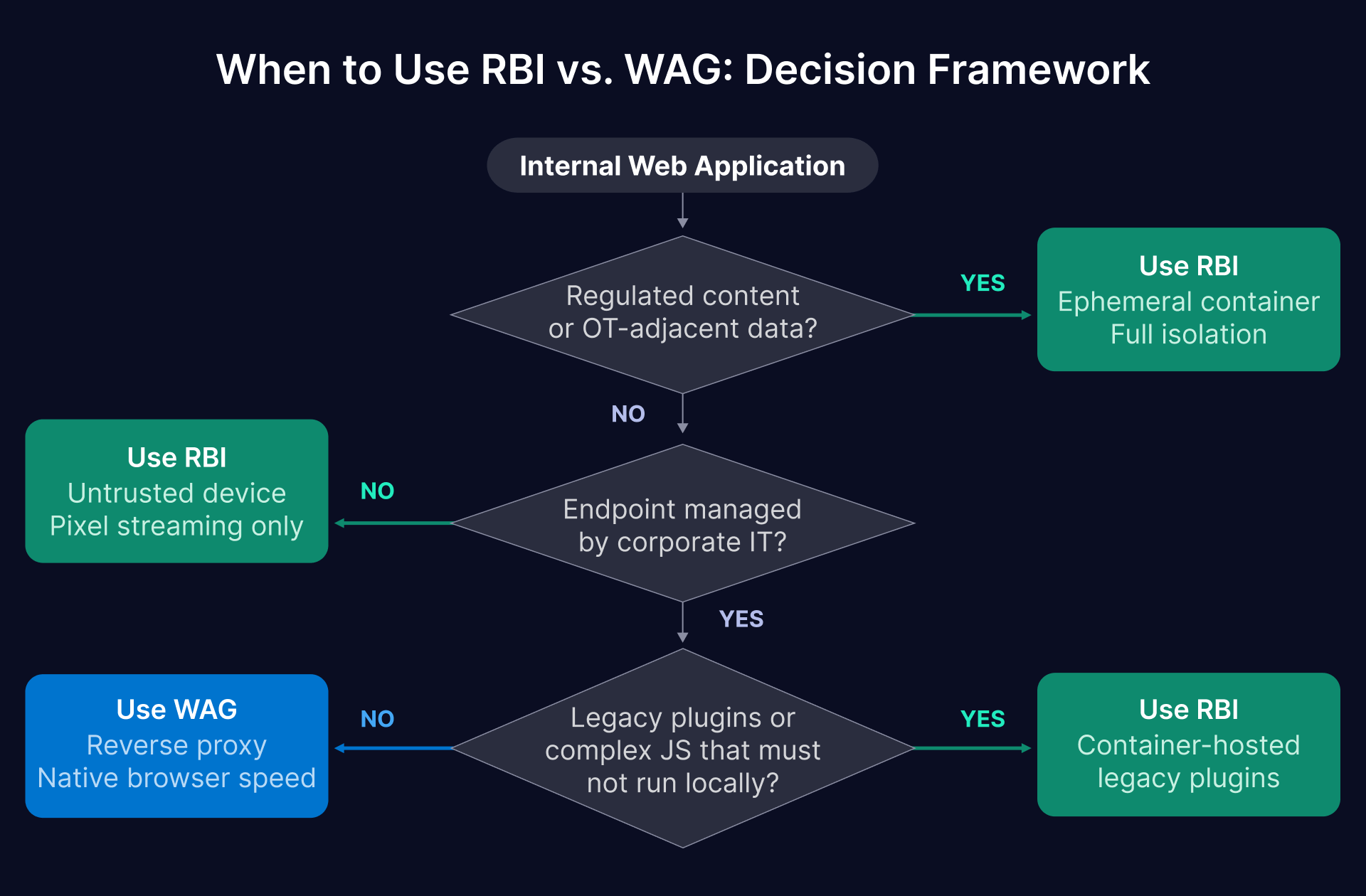
| The Decision Rule: RBI for Complexity and Sensitivity, WAG for Everything Else Use Thinfinity RBI when: the application handles regulated or sensitive content (QMS, SCADA web clients, financial ERP modules), users are on unmanaged or shared devices (BYOD, plant floor shared terminals), the application runs complex JavaScript that must not execute locally, or content must never persist to the endpoint. Use Thinfinity WAG when: users are on managed corporate devices with baseline endpoint security, the application is a standard internal tool (MES dashboard, CMMS, scheduling, intranet), and the primary goal is replacing VPN’s network-level access with application-level authentication and RBAC. Both approaches eliminate the lateral movement risk and over-permissive access that VPN creates — the choice between them is about the security depth required for each specific application and user population. |
|---|
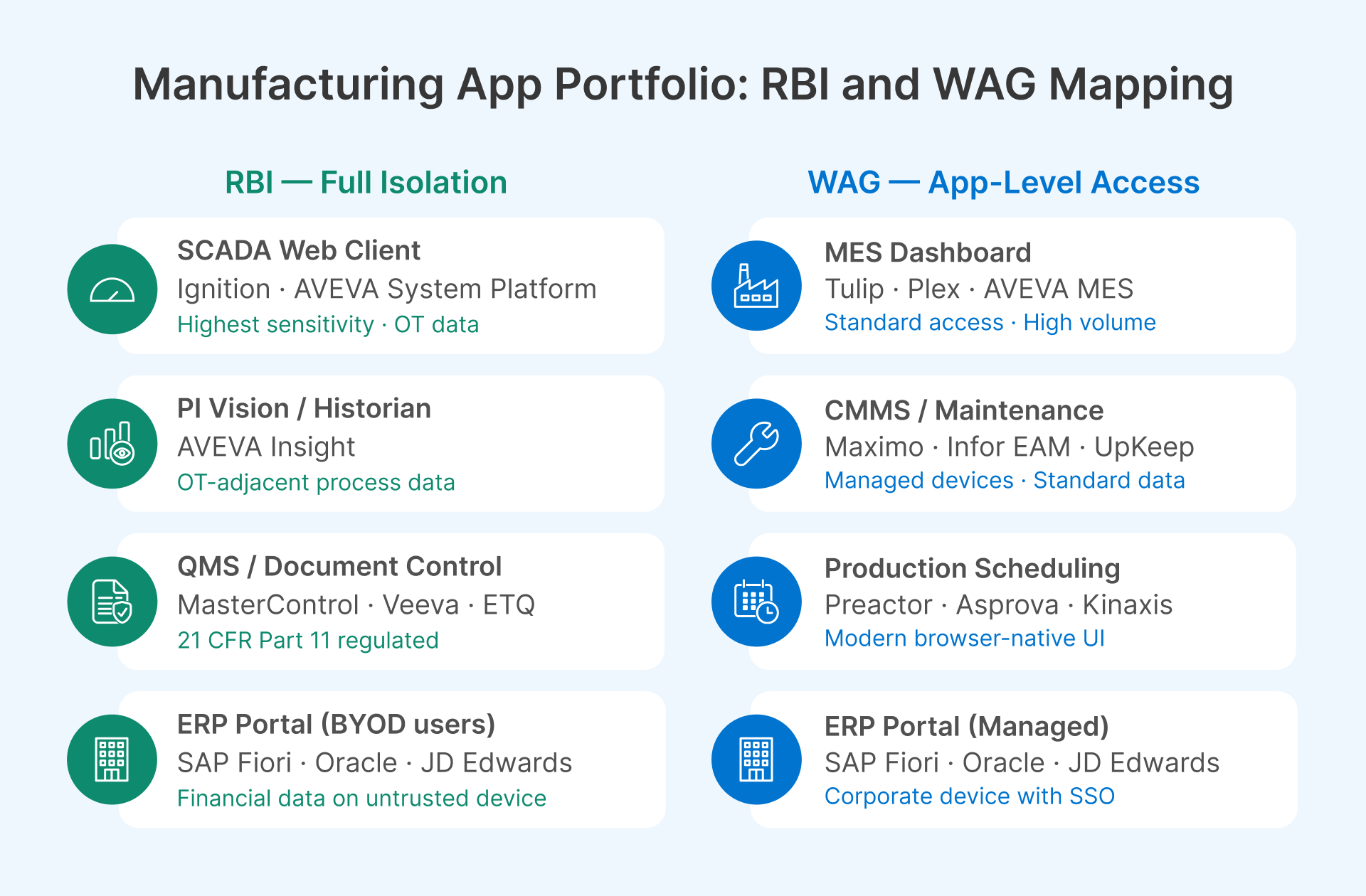
Manufacturing Internal Web Applications: Which Thinfinity Product Fits Each App
The following maps the most common manufacturing web application types to their recommended Thinfinity delivery mode, with the access challenge and rationale for each decision.
| Application | Stack Type | Access Challenge | Product | Decision Rationale |
|---|---|---|---|---|
| MES Dashboard(Aveva MES, Tulip, Plex) | Modern SPA | Supervisors connect from shifts, home, mobile. High session volume. Connected to OT data streams. | WAG | Standard authenticated access with MFA and RBAC is sufficient. Users typically on semi-managed devices with shift-pattern logins. WAG’s low overhead handles high session volume efficiently. |
| ERP Web Portal(SAP Fiori, Oracle, JDE) | Browser ERP UI | Large user base. Financial and supply chain data. Mixed managed / BYOD population at remote sites. | WAG (managed)RBI (BYOD) | WAG for corporate devices with Okta/Entra ID SSO. Upgrade to RBI for remote or BYOD users accessing financial modules — content sensitivity warrants full isolation on untrusted endpoints. |
| PI Vision / AVEVA Insight(Historian web UI) | OT data visualization | OT-adjacent process data. Must not expose historian server. Sensitive operational data displayed in real time. | RBI | Real-time process data is highly sensitive and the historian server is OT-adjacent. Ephemeral container ensures no process data is cached or persisted to endpoint. Strongest isolation for OT-facing web interfaces. |
| SCADA Web Client(Ignition, AVEVA System Platform) | Process visualization | Displays live process alarms and values. Highest sensitivity in manufacturing web stack. Mostly for engineers and OT supervisors. | RBI | SCADA content is the highest-sensitivity web surface in the plant. Kubernetes RBI provides session isolation, full audit recording, and ephemeral container destruction after each session — directly supports IEC 62443 and NIS2 audit requirements. |
| CMMS / Maintenance(Maximo, Infor EAM, UpKeep) | Web-based CMMS | Technicians on plant floor tablets. Vendors need read access for service history. Mixed managed / unmanaged endpoints. | WAG | Application handles maintenance tickets — sensitive but not regulated in the same way as SCADA or QMS. WAG with Okta guest access for vendor read-only roles, device posture check for managed devices. |
| QMS / Document Control(MasterControl, Veeva, ETQ) | Regulated docs | FDA 21 CFR Part 11 or ISO 9001 regulated. No content should reach unmanaged devices. Audit trail mandatory. | RBI | Regulated content under 21 CFR Part 11 must not be downloaded to or cached on unmanaged devices. RBI’s ephemeral container guarantees no regulated document content reaches the endpoint. Session recording satisfies Part 11 audit trail requirements. |
| Production Scheduling(Preactor, Asprova, Kinaxis) | Scheduling UI | Often legacy web frameworks. May use older plugin-dependent rendering. Limited concurrent users. | RBI (legacy)WAG (modern) | Modern browser-native versions: WAG is sufficient. Older versions with ActiveX or Java plugin dependencies: RBI with container-resident legacy plugins handles what local browsers cannot. |
| Internal SharePoint / Intranet | M365 or on-prem | Mixed content sensitivity. Large user base. BYOD access common for plant floor workers. | WAG (M365)RBI (on-prem sensitive) | M365 SharePoint: Microsoft’s own conditional access handles this natively. On-premises SharePoint with sensitive content: WAG for standard content, RBI for document libraries with confidential or regulated material. |
Security Controls That Apply Across Both RBI and WAG Deployments
Whether a manufacturing application is delivered through Thinfinity RBI or WAG, the following security controls apply at the gateway layer — enforced independently of the application’s own access controls, and independently of what device the user is connecting from.
| Security Control | Threat It Addresses | Implementation Guidance |
|---|---|---|
| Multi-factor authentication (MFA) | Credential-only authentication; phished passwords granting app access | Enforce MFA for all applications — both RBI-delivered and WAG-proxied — without exception. TOTP or push-based MFA via Okta or Microsoft Entra ID. For SCADA web clients and QMS under RBI, hardware FIDO2 keys provide the strongest authentication before the ephemeral container is created. |
| Role-based access control (RBAC) | Authenticated users accessing modules beyond their role | Define access policies per application and per application module. A production supervisor gets MES dashboard access; they do not get MES configuration access. RBAC at the gateway layer is independent of the application’s own access control — defense in depth that applies regardless of application-level authorization bugs. |
| Device posture check | Unmanaged or compromised devices accessing sensitive applications | For WAG-delivered applications: configure conditional access policies (Okta Device Trust, Entra ID Conditional Access) to check device management status. Managed corporate device gets full WAG access; unmanaged device is routed to RBI instead for the same application — a tiered access policy that matches security depth to endpoint trust level. |
| Session timeout and idle termination | Abandoned sessions on shared terminals | RBI: container is destroyed on session timeout — no cleanup required, session state is gone with the container. WAG: configure idle timeout per application type. Plant floor shared terminals: 15–30 minutes. Engineering workstations: 4–8 hours. Session policies configurable per application and per user group in Thinfinity Cloud Manager. |
| Download and clipboard restrictions | Sensitive data exfiltration to unmanaged devices | RBI: file downloads and clipboard are controlled at the container level — you can permit, restrict, or log any clipboard or download action without relying on the application to enforce it. WAG: configure download restriction in session policy for regulated applications. Both approaches enforce the control at the delivery layer, not the application layer. |
| Session recording (selective) | No audit trail for sensitive application actions | Mandatory in RBI for SCADA web clients, QMS, and regulated ERP modules — the session video is stored server-side and the user’s device never receives the recording. Recommended in WAG for applications in scope for 21 CFR Part 11, NIS2, or ISO 9001 audit. Recordings stored in OCI Object Storage with immutable retention policies. |
| TLS and header security | Man-in-the-middle attacks; internal hostname leakage | Both RBI and WAG terminate TLS at the gateway with a valid certificate. Enable HSTS on all published applications. Configure URL rewriting to prevent internal hostnames appearing in the user’s browser. Inject identity headers into backend requests for applications that support header-based SSO. |
Ecosystem Tools That Work With Thinfinity RBI and WAG
The Thinfinity RBI and WAG stack integrates with the identity, monitoring, and WAF tools your manufacturing IT team already operates.
Okta and Microsoft Entra ID: Identity Foundation for Both Products
Thinfinity integrates with SAML 2.0 and OAuth 2.0 identity providers natively for both RBI and WAG. The authentication layer is identical regardless of which delivery mechanism is used: users authenticate through Okta or Entra ID with MFA before any session is created. For RBI sessions, authentication happens before the Kubernetes container is provisioned — no container resource is consumed for an unauthenticated request. For WAG sessions, the same authentication flow precedes the proxy session.
For manufacturing environments with significant BYOD or vendor populations, Okta Workforce Identity and Entra ID External Identities both support external guest accounts with MFA enforcement, access restricted to specific applications, and automatic account expiration aligned to contractor or vendor contract end dates. The same identity infrastructure serves both RBI and WAG sessions — a single IdP integration covers the entire application portfolio.
Conditional access policies in Entra ID or adaptive MFA in Okta can be configured to automatically route users to RBI vs WAG based on device posture signals: a managed corporate device accessing a QMS application might go through WAG; the same user on an unmanaged personal device accessing the same application is automatically routed to the RBI container. The access policy is enforced transparently without the user needing to know which delivery mechanism they are using.
Datadog: Monitoring RBI Container Performance and WAG Session Telemetry
Datadog monitors both Thinfinity delivery mechanisms, but the metrics are different for each. For RBI, Kubernetes cluster metrics (pod startup time, container memory utilization, pod failure rate, active container count) are the primary operational indicators — if container startup time exceeds 3 seconds, users experience a perceptible delay before their session appears, and the cluster may need additional nodes or faster storage. Datadog’s Kubernetes integration surfaces these metrics with alerting thresholds configurable per environment.
For WAG sessions, the relevant metrics are authentication event volume, session count per application, login failure rate, and proxy response latency per application. Manufacturing-specific dashboards worth configuring: shift-start authentication wave performance (100 MES dashboard logins in 5 minutes at 06:00 shift start should complete without latency spikes), per-application error rate (an MES application returning errors at shift start indicates either the MES server is down or the proxy connection has broken), and after-hours access to regulated applications (logins to QMS or financial ERP modules outside business hours are worth alerting on as potential account compromise signals).
Both RBI container logs and WAG session audit logs export to Datadog’s log management in standard JSON format. This gives your security team a single observability platform covering both delivery mechanisms, without running separate monitoring tools for each.
OCI Web Application Firewall: Protecting the Published Gateway Endpoint
Both RBI and WAG publish their session endpoints through an HTTPS gateway that is accessible from outside the corporate network. OCI Web Application Firewall (deployed as part of the OCI load balancer) provides OWASP Top 10 protection, rate limiting, and geo-based access restriction for this published endpoint. For OCI-hosted Thinfinity deployments, OCI WAF integrates natively without additional configuration. For on-premises deployments, Cloudflare’s WAF and tunnel capabilities provide equivalent protection without requiring inbound firewall rules.
How Thinfinity Implements Both RBI and WAG for Manufacturing Internal Applications
Thinfinity Workspace delivers both products from a single deployment and a single management console. Here is how each works in practice for manufacturing environments.
Thinfinity RBI in Practice: Kubernetes Ephemeral Containers for Each Session
When a manufacturing user accesses a SCADA web client or QMS application through Thinfinity RBI, the sequence is:
- User authenticates through Okta or Entra ID with MFA
- Thinfinity Gateway verifies authorization and requests a container from the Kubernetes cluster
- Kubernetes spins up a fresh browser pod (typically 1–3 seconds on a pre-warmed cluster)
- The user’s session streams rendered pixels from the container to their device over an encrypted WebSocket connection
- When the user closes the session, the Kubernetes pod is terminated and all container state is permanently destroyed.
The Kubernetes cluster hosting the RBI containers can be deployed on OCI Container Engine for Kubernetes (OKE), on-premises with an existing Kubernetes installation, or in a hybrid configuration — on-premises Kubernetes for OT-adjacent applications (SCADA web clients, historian interfaces) and OCI-hosted Kubernetes for IT-side applications (ERP modules, QMS). The choice depends on data sensitivity and network topology: applications whose backend servers are in the OT DMZ or L3 zone are best served by containers running on the same network segment, so the streaming path is short and the backend connection stays within the OT network perimeter.
Container pre-warming is worth configuring for manufacturing environments with predictable usage patterns. For SCADA web client access that happens at shift start (06:00 and 14:00), pre-warming a pool of ready containers 5 minutes before shift start eliminates the 1–3 second provisioning delay for the first wave of logins. Thinfinity Cloud Manager handles pre-warming schedules alongside its VDI autoscaling policies — the same shift-aligned scheduling logic applies to both.
Thinfinity WAG in Practice: Reverse Connection Architecture With No Open Inbound Ports
Thinfinity’s WAG uses the same reverse connection architecture as its VDI Gateway. A Thinfinity relay component deployed inside the network segment where the internal application lives initiates an outbound connection to the Thinfinity Gateway in the DMZ or on OCI. No inbound ports need to be opened on the internal network firewall. The application server is never directly reachable from the internet — it is only reachable through the gateway’s authenticated proxy session.
For applications on the OT-adjacent network (historian web interfaces, SCADA web clients that are delivered through WAG for managed users), this architecture ensures that publishing the application through the gateway does not create any new inbound network path from the internet to that segment. The relay component in the IDMZ or L3 zone maintains an outbound connection to the gateway; user sessions are proxied through that connection to specific authorized application servers.
Header injection is worth configuring for applications that support identity-aware SSO. Many MES and ERP platforms accept authenticated user identity in HTTP request headers — Thinfinity WAG injects the authenticated user’s identity (from the SAML assertion) into the request header before forwarding to the backend application. Users authenticate once at the Thinfinity gateway; the application receives their identity through the injected header without prompting for a second login. For manufacturing environments with large user populations accessing multiple internal applications, SSO header injection reduces login friction significantly.
Thinfinity VirtualUI: Bringing Legacy Win32 Apps Into the Same Portal
Not every manufacturing internal ‘application’ is a web application. Production scheduling tools, custom Win32 plant management applications, and legacy ActiveX-dependent plant floor tools are common in manufacturing environments. Thinfinity VirtualUI wraps an existing Windows desktop application in a browser session and delivers it through the Thinfinity portal without any code changes to the original application.
This matters in the context of this article because it means the Thinfinity portal becomes the single access point for all manufacturing applications — modern web apps through RBI or WAG, and legacy Win32 apps through VirtualUI. A production supervisor’s portal shows their MES dashboard (WAG), their SCADA web client (RBI), their production scheduling tool (VirtualUI), and their maintenance ticketing tool (WAG) — all through one browser window, one authentication, one session management policy, and one audit trail.