
TL;DR
- Legacy VPN architecture cannot scale to modern retail: hundreds of micro-perimeters, 40-50% seasonal staff spikes, BYOD chaos, and third-party vendor sprawl create attack surface that perimeter security was never designed to handle.
- Zero Trust replaces network-location trust with identity-first, context-aware, session-bounded access — every request evaluated against user, device, location, time, and behavior signals.
- Browser-native VDI on OCI eliminates VPN clients, neutralizes lateral movement, and turns BYOD from a liability into a normal operating mode through session-level isolation.
- Phased rollout (identity foundation → 5-10 store pilot → full deployment) takes 12-16 weeks for a 500-store footprint with no fork-lift hardware replacement.
- Measurable ROI: $400K+ annual VPN savings, 85% drop in vendor access violations, 90% cut to post-breach lateral movement, and 15-minute time-to-productivity for seasonal staff.
Every night, your stores lock their doors. Every morning, 200 employees across a dozen locations log in to networked systems they need to run the business. Within that cycle—from store opening to closing—your retail network handles thousands of transactions, customer interactions, and sensitive cardholder data. And if you’re still using the same VPN architecture you deployed five years ago, you’re managing a security problem at massive scale.
This is the challenge retail CTOs face: how to secure a distributed network of micro-environments where every location is a potential entry point, where seasonal staff rotate in and out, where BYOD blurs the line between personal and corporate devices, and where legacy VPN infrastructure was never designed to handle the complexity of modern retail operations.
Zero Trust is the answer. But implementing Zero Trust across a 500-store footprint isn’t about buying new hardware at every location. It’s about fundamentally reimagining how identity, access, and trust work in a retail environment where there is no perimeter to defend.
The Death of the Retail Perimeter
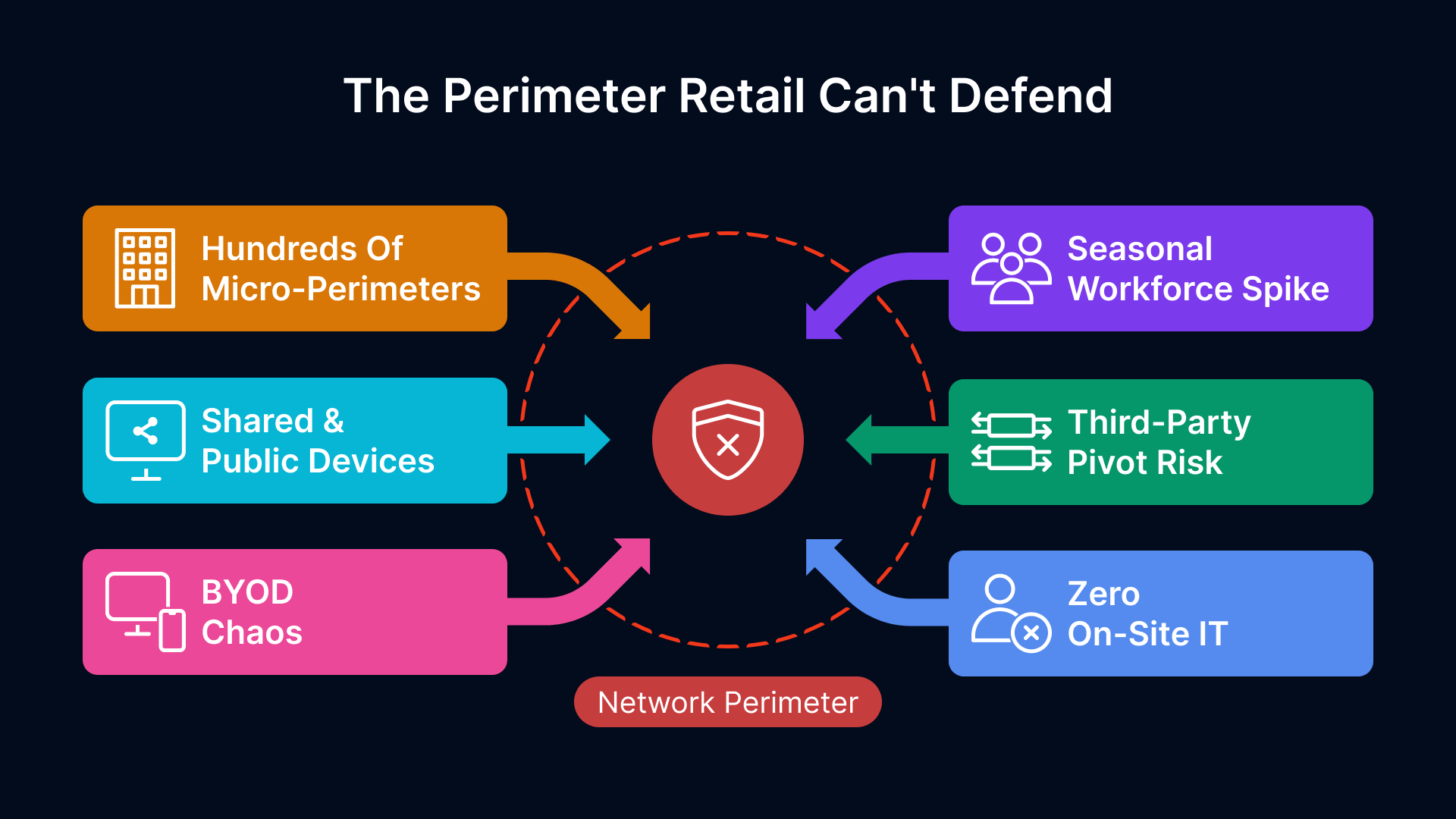
The traditional network perimeter—the assumption that everything inside the firewall is trusted and everything outside is hostile—was always a simplification. For retail, it has become a liability.
Why Retail Is the Hardest Zero Trust Problem
Retail networks aren’t static. They’re dynamic, distributed, and perpetually porous. Consider what a CTO in a 200-store chain actually manages:
- Hundreds of micro-perimeters: Each store is its own network island, with its own router, potentially its own Wi-Fi, and often minimal on-site IT oversight. Managing security policy across this distributed architecture is exponentially harder than a centralized data center.
- Seasonal workforce volatility: Retail staffing spikes 40-50% during Q4. You’re onboarding hundreds of temporary employees who may never touch a computer again after the holidays. Traditional identity and access models don’t scale to this pattern.
- Shared and public devices: Checkout systems, self-service kiosks, and back-office terminals are shared across multiple users per shift. Device-level trust is meaningless when the same hardware serves a parade of identities.
- BYOD chaos: Store managers check inventory on personal phones. Loss prevention uses personal laptops. HR staff access payroll on tablets. You cannot mandate device hardening when the device isn’t yours.
- Third-party complexity: Vendors, delivery partners, MSPs, and POS integrators all need network access. Each one is a potential pivot point for lateral movement.
- Limited on-site IT: Most stores have zero IT staff. You’re managing network security at locations with no one in the building qualified to troubleshoot a firewall or enforce policy on a device.
This combination—distributed topology, high staff turnover, personal devices, and limited local IT—creates a security nightmare. The traditional response is to fortress each location with a VPN, hope store staff use it correctly, and audit compliance after the breach.
The VPN Tax: Cost, Complexity, and Security Theater at Store Level
VPNs made sense for remote workers in the 1990s. They were the best tool available to secure access to corporate networks over untrusted networks. For retail in 2026, they’re an architectural anchor.
The hidden costs of a legacy VPN architecture in retail are substantial:
- Client management at scale: Every device needs a VPN client installed, configured, and kept updated. In a 500-store footprint with employees bringing devices in and out constantly, this becomes an endless support burden. Outdated clients become security liabilities.
- Store network complexity: Each store’s internet connection is a potential bottleneck. A user connecting to a VPN concentrator hundreds of miles away adds latency to every transaction. Retail operations are latency-sensitive—slow network access to POS, inventory, or payment systems directly impacts revenue.
- Vendor access friction: A delivery driver needs to confirm inventory or sign for a shipment. A POS vendor needs to diagnose a checkout system failure. A corporate auditor needs to spot-check a store. Each requires VPN access, and setting that up—even temporarily—creates friction and often bypassed policies.
- Lateral movement at scale: Once inside the VPN, an attacker has access to the entire store network, and often the ability to pivot to other locations. VPNs don’t create a boundary; they create a boundary-less tunnel.
- Compliance theater: You’re checking that VPN logs show employees accessed resources, but you’re not checking that only the right employee was accessing the right resource at the right time on the right device. Compliance reports look good. Actual security is weak.
The VPN Debt
A mid-market retail chain with 300 stores, each with 15-20 devices needing VPN access, spends $400K+ annually on VPN licensing, maintenance, and support. That doesn’t include the cost of security breaches that could have been prevented with microsegmentation.
Zero Trust Architecture Principles for Retail
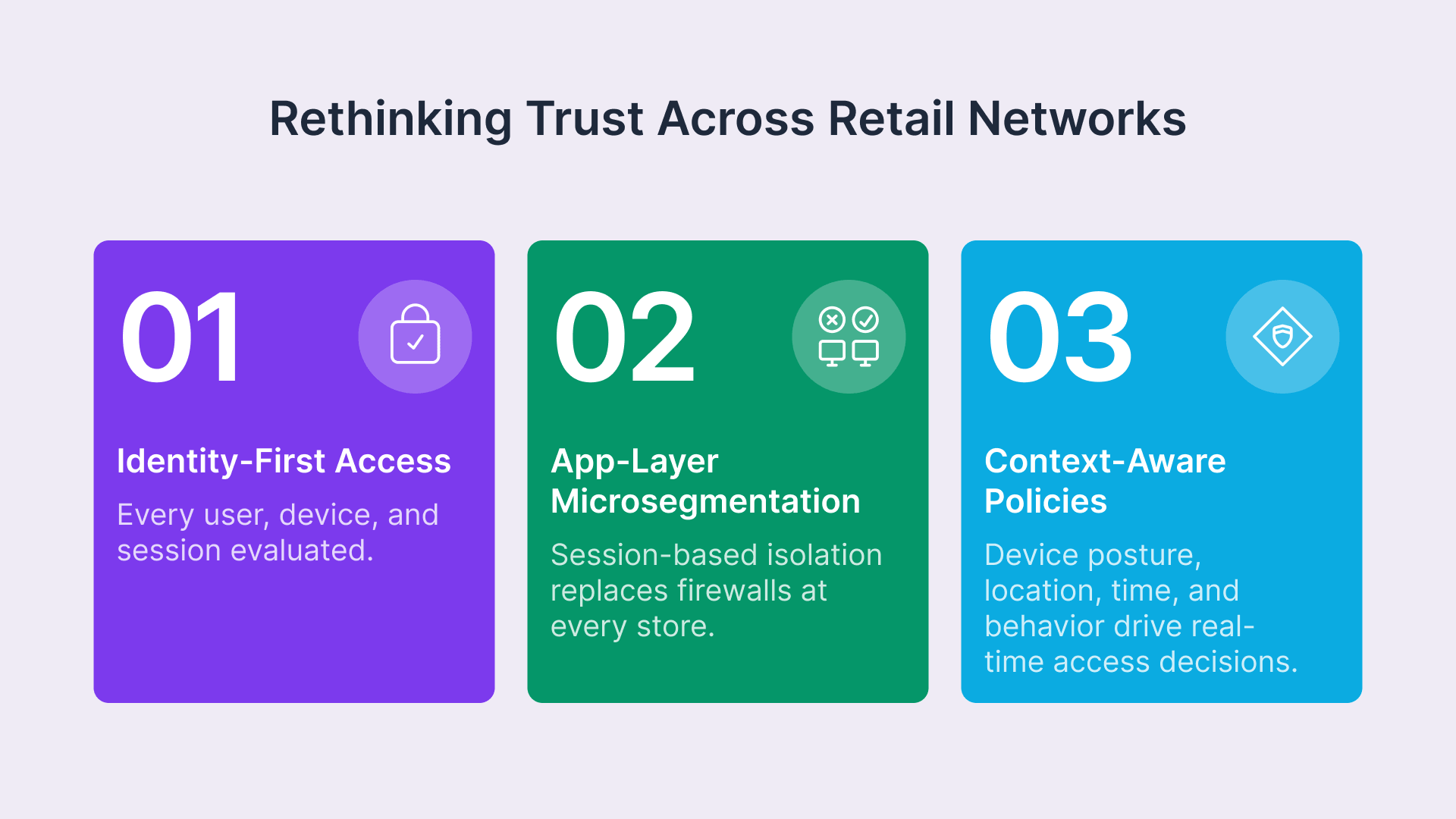
Zero Trust is not a product; it’s a design principle. It starts with a fundamental assumption: never trust, always verify. The framework is formalized in NIST Special Publication 800-207, which defines Zero Trust as a paradigm shift away from network-based perimeters and toward continuous verification of users, devices, and resources. In retail, this means moving from network-level trust to user, device, session, and context-level trust.

Zero Trust is a security strategy that assumes breach and verifies every request.

Identity-First Access: Every User, Every Session, Every Time
In a Zero Trust model for retail, access decisions are based on identity, not on network location. This is critical because your employees are not sitting at static desks—they’re moving between store locations, working from home, accessing systems from their phones, and sometimes (especially seasonal staff) are handling systems they’ve never used before.
Every access request triggers a decision:
- Who is this person?: Strong identity verification—ideally MFA—confirms that the user is who they claim to be.
- What device are they using?: Is it a known corporate device? A BYOD phone with an updated OS? A kiosk running 10-year-old firmware? Context matters.
- What are they trying to access?: A cashier doesn’t need access to payroll systems. A store manager doesn’t need access to corporate M&A docs. Policies reflect least privilege.
- When and where are they accessing it?: Is this access consistent with their role and location? A manager accessing systems at 3 AM from a different country might signal compromise.
This approach eliminates the false dichotomy of “inside” vs. “outside” the network. There is no inside. Every access is scrutinized. Every session is bounded.
Microsegmentation Without Store-Level Hardware
Microsegmentation is the practice of dividing the network into small zones to isolate and protect each workload or segment. In enterprise data centers, this often means expensive firewalls and appliances at every layer. In retail, it means something smarter: policy-based segmentation at the application layer, not the network layer.
Using browser-native access and VDI delivered through Thinfinity, you create segmentation without requiring a firewall in every store. Users don’t access systems on the store network; they access a virtualized session. What they can do within that session is determined by policy, role, and context.
Context-Aware Policies: Device Posture, Location, Time, and Role
Zero Trust access policies for retail are multi-dimensional. A simple rule is not enough. Instead, policies should evaluate multiple signals in real time:
- Device posture: Is the device running an updated OS? Is the antivirus active? Is the screen lock enabled? If device posture is poor, access can be restricted or require additional authentication.
- Location: If an employee’s phone shows they’re in the store, they can use the store Wi-Fi to access inventory systems. If they’re traveling, they can still access approved remote resources but perhaps with rate limiting or additional logging.
- Time: Certain actions—like accessing sensitive reports—might be restricted outside of business hours or to specific roles and times of day. This is especially useful for detecting unauthorized access.
- Behavior: Is this user accessing systems in a way consistent with their role? A checkout operator accessing the general ledger 50 times in an hour is an anomaly worth investigating.
Table 1: Traditional Perimeter vs. Zero Trust Comparison (8 Dimensions)
| Dimension | Traditional Perimeter VPN | Zero Trust Retail Model |
|---|---|---|
| Trust model | Trust based on network location | Trust based on verified identity, device, and context |
| Device access | Any device with VPN client can connect; post-connection trust assumed | All devices evaluated for posture; access granular and revoked per session |
| Segmentation | Flat trust inside perimeter; lateral movement unrestricted | Every transaction evaluated; microsegmentation at policy level |
| Third-party access | VPN credentials shared or separate tunnels; limited audit trail | Temporary, session-based, role-specific; full audit logging |
| Seasonal staff | Slow provisioning/deprovisioning; accounts often persist after departure | Rapid onboarding with auto-expiring tokens; access revoked immediately on offboarding |
| BYOD handling | Discouraged or unmanaged; security risk | Natively supported with device posture requirements; session isolation |
| Performance impact | Latency from VPN tunnel; store network bottlenecked | Local browser session; no network tunnel; minimal latency |
| Compliance visibility | IP logs and connection records; limited audit of actual resource access | Comprehensive logging of who accessed what when; policy enforcement audit trail |
Implementation Architecture on OCI
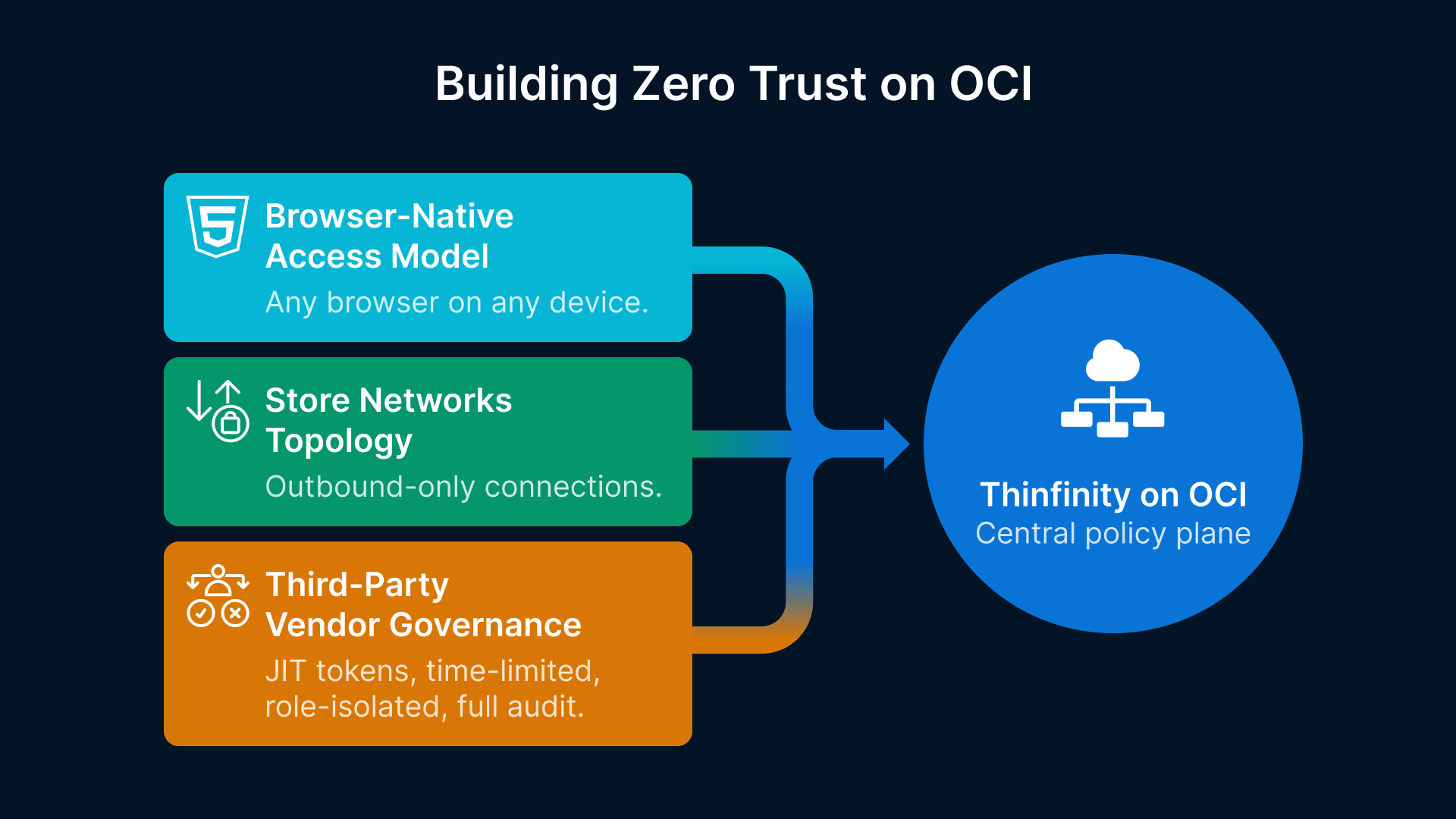
Implementing Zero Trust across a retail network requires infrastructure that can scale, be managed centrally, and operate reliably even when individual store connections are spotty. Oracle Cloud Infrastructure (OCI) is an ideal foundation because it provides the compute, networking, and security services needed at enterprise scale without requiring hardware deployments at every store.
The Browser-Native Access Model: No Client, No VPN, No Attack Surface
The core innovation in modern Zero Trust for retail is eliminating the client. Instead of installing a VPN client on every device, users access secure sessions through a standard web browser. This changes everything:
- No client management: Browser is already installed. No version tracking, no compatibility issues, no forced updates that break compatibility with old POS terminals.
- No attack surface on the device: There is no VPN client to compromise, no tunnel to intercept, no local credentials to steal.
- Instant BYOD support: Any device with a browser—phone, personal laptop, store kiosk, tablet—can access secure sessions. No onboarding friction.
- Session-level isolation: What a user can do is bounded by the session, not by network-level permissions. Close the browser tab; the session ends. Access is revoked immediately.
Thinfinity Workspace delivers this model. Users authenticate through a browser, enter a Zero Trust session (HTML5-based, no plugins), and access systems within a controlled, logged, and policy-enforced environment. The infrastructure to manage this sits on OCI, replicated across regions for availability.
Store Network Topology Under Zero Trust
A typical retail store today has:
- POS terminals (local network)
- Back-office servers (inventory, reporting)
- Guest Wi-Fi (customer use)
- Corporate Wi-Fi (employee use)
- Internet connection (often limited bandwidth)
Under a Zero Trust model on OCI, this topology is simplified:
- POS systems: Remain on the local network but are accessed only by authenticated, session-based connections routed through Thinfinity.
- Back-office: Not directly exposed; users access virtualized sessions that can read from back-office APIs.
- Identity provider: Central directory (Active Directory, Okta, etc.) verified against every access request.
- Logging and monitoring: All access flows through OCI; all events logged centrally; anomalies detected in real time.
- Store internet: Used for outbound only; no inbound services exposed.
The result: store networks become much simpler, much less exposed, and much easier to defend.
Zero Trust architecture and PCI-DSS 4.0 compliance are two sides of the same coin — every microsegmentation boundary you define also shrinks your cardholder data environment scope. For a control-by-control PCI-DSS 4.0 mapping that shows exactly how VDI cuts audit scope by 50% and transforms QSA evidence collection, read: “Retail VDI Under PCI-DSS 4.0: A CISO’s Architecture Guide for Multi-Site Store Security.“
Third-Party Vendor Access Governance
One of the hardest Zero Trust problems in retail is third-party access. Vendors need temporary, limited access to systems; you need to audit that access; and you need to ensure that vendor access to one store doesn’t become a vector to compromise other stores.
Zero Trust solves this with temporary, role-based tokens:
- Just-in-time (JIT) access: A vendor requests access for a specific task; you grant a time-limited session (e.g., 2 hours). After time expires, access is automatically revoked. No persistent credentials.
- Role isolation: The vendor’s token grants access only to the resources they need (e.g., inventory API, POS diagnostics), not the entire network.
- Full audit trail: Every API call, every resource accessed, every error logged. If a vendor acts beyond their scope, you know immediately.
- Revocation on demand: If a vendor’s contract ends, if there’s a security incident, or if trust is lost, you revoke all active sessions instantly. No delayed deprovisioning.
Table 2: Zero Trust Access Policies by Retail Role
| Role | Primary Resources | Authentication | Device Constraint | Access Window | Audit/Risk Control |
|---|---|---|---|---|---|
| Store Cashier | POS, payment processing | MFA (card reader or PIN) | POS terminal only | Store hours | Real-time transaction logging; anomaly detection on payment reversals |
| Store Manager | POS, inventory, labor, safe | MFA + biometric option | Corporate device or managed BYOD | 5 AM – 11 PM | Session recording for sensitive operations; approval required for after-hours |
| Loss Prevention | All store cameras, POS, inventory | MFA + hardware token | Dedicated laptop | 24/7 with approval chain | Full video and audit trail; no export allowed |
| Vendor (POS Support) | POS diagnostics API only | JIT token (time-limited) | Vendor’s laptop with posture check | Duration of support window only | API logs; limited to 5 concurrent sessions; no customer data access |
| Corporate Auditor | Reports, POS history, compliance logs | MFA + IP whitelist | Corporate network only | Business hours | Read-only; timestamp on all queries; session recording |
| Seasonal Staff (Holiday) | Checkout only | PIN + face recognition | Shared terminal | Assigned shift only | Auto-revoked at end of season; no lateral movement |
BYOD and the Seasonal Workforce Challenge
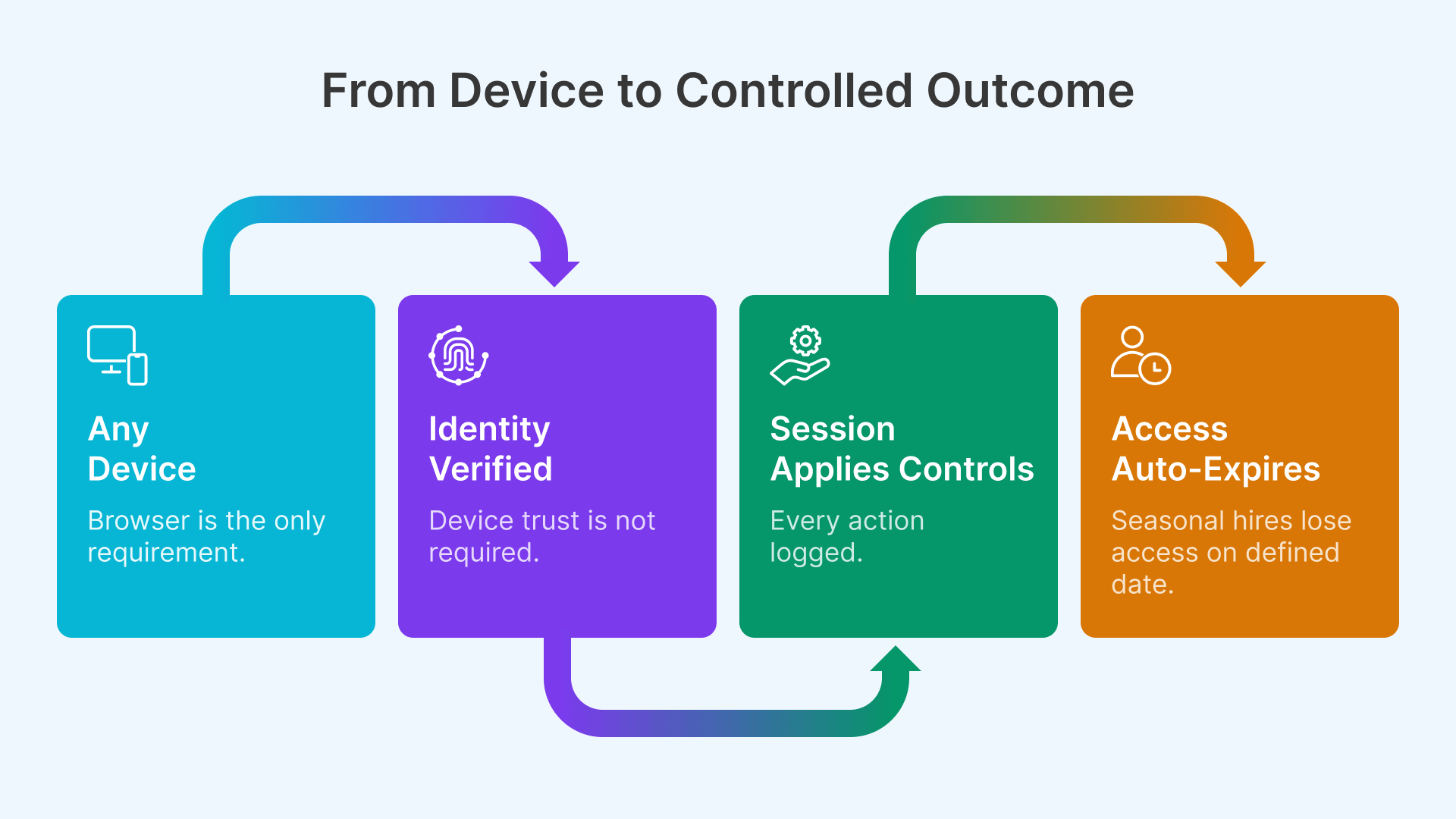
Most retail IT policies treat BYOD as a security problem to be avoided. Zero Trust treats it as the normal state and designs around it.
Untrusted Devices, Trusted Sessions
A manager accesses store inventory using a personal iPhone. That phone could have jailbroken roots, outdated OS, or malicious apps installed. You cannot control the device. But you can control the session.
Using Thinfinity on OCI, the manager authenticates through a browser (identity verified via MFA), enters a virtualized desktop session, and accesses inventory systems. What happens inside the session is:
- Isolated from the device: Keystrokes, clipboard, USB access, and file system are blocked. You can’t exfiltrate data through the device.
- Logged and monitored: Every action is recorded; anomalies trigger alerts.
- Session-bound: Close the browser; the session terminates. Access is not persistent on the device.
- Posture-evaluated: If the device shows signs of compromise (outdated OS, missing patches), access can be downgraded or require additional authentication.
The BYOD problem is inverted: instead of trying to secure the device, you secure the session. This is more effective and far easier to operate at scale.
Rapid Onboarding at Holiday Scale
November 1st is when retail staffing spikes. In a single week, you might onboard 1,000 seasonal employees across dozens of locations. Each one needs access to checkout systems, and each one is a potential insider threat vector.
In a traditional VPN model, this means:
- IT overhead: Each employee requires manual account creation, VPN client installation, and device inventory.
- Security gaps: In the rush to onboard, provisioning is often incomplete or misconfigured.
- Long offboarding: Seasonal employees often retain access months after their last shift because deprovisioning isn’t automated.
In a Zero Trust model with Thinfinity, it’s:
- Bulk import: Upload a CSV of new employees. Automated account creation, automatic role assignment based on job code.
- Instant access: No client installation. No device prep. Employees can log in immediately using a browser on any device.
- Auto-expiring access: Specify an end date (e.g., January 5th). On that date, all access automatically revokes. No follow-up needed.
- Zero training: Employees access a familiar checkout interface. No “install VPN” friction.
Holiday Staffing at Scale
A 500-store retail chain onboarded 5,000 seasonal employees in 2025 using Thinfinity. Average time-to-productivity: 15 minutes. Access auto-revoked on January 6th; zero manual offboarding required. Security incidents related to seasonal staff: zero.
From Architecture to Deployment
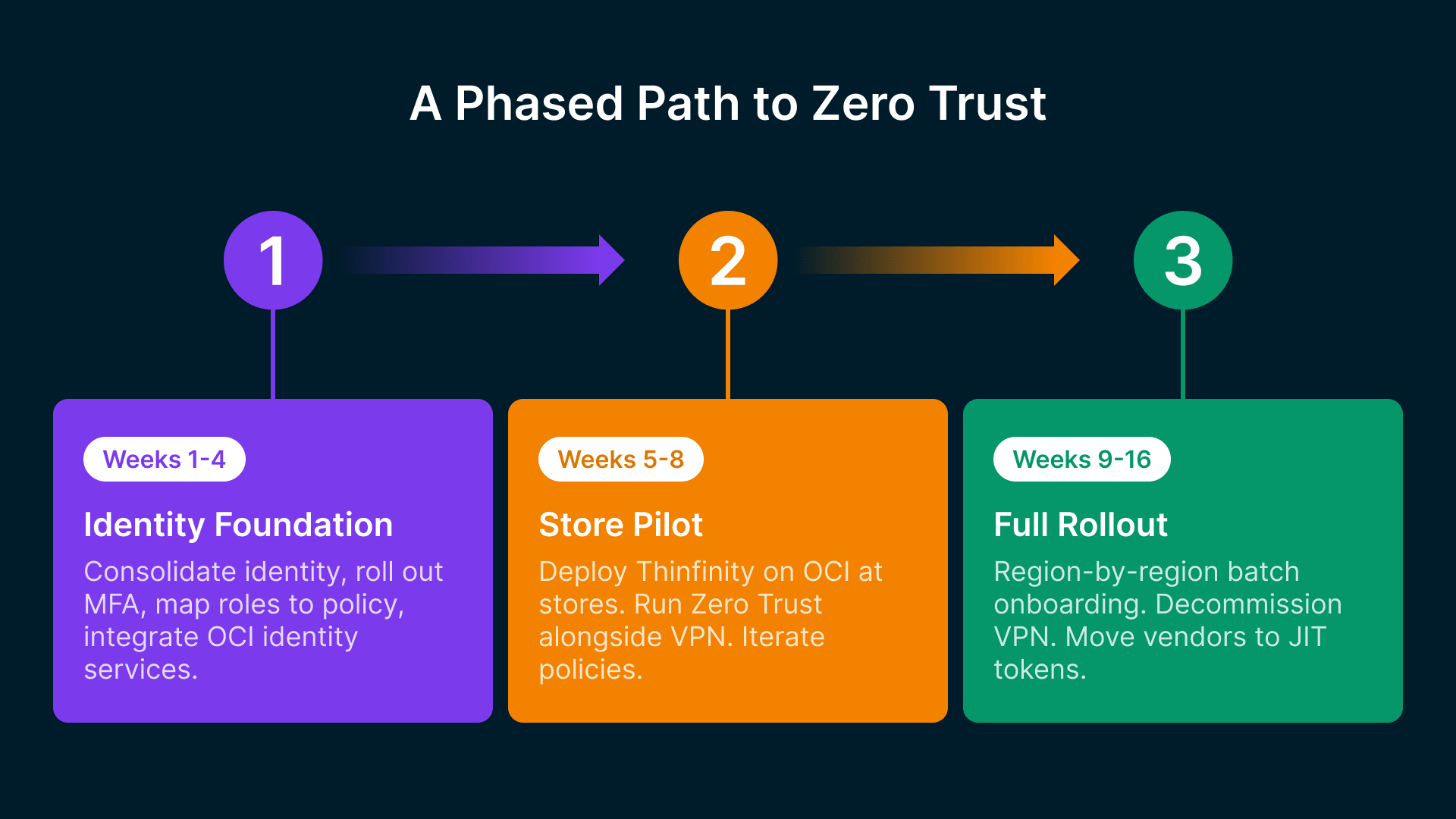
Moving from legacy VPN to Zero Trust is a significant architectural change. But it doesn’t have to be a fork-lift replacement. A phased approach allows you to validate, learn, and reduce risk.
Phase 1: Identity Foundation (Weeks 1-4)
Before you can implement Zero Trust, you need a robust identity layer. This phase focuses on getting identity right:
- Audit current identity sources: Active Directory, HR systems, third-party directories. Consolidate into a single source of truth (or integrate multiple sources with a modern identity provider like Okta).
- Implement MFA: Start with a pilot group (e.g., corporate staff and store managers). Use authenticator apps, hardware tokens, or biometric methods.
- Create role definitions: Map job codes to access roles (cashier, manager, loss prevention, etc.). These are the foundation for policy.
- Set up audit logging: Establish baseline logging for all identity events (login, access request, policy change, token refresh).
- Integrate OCI: Establish connectivity to OCI; deploy identity services (IDCS or integration with external IdP); test federation.
Success metric: All employees have MFA-enabled, auditable identities; OCI identity services are operational; logging is comprehensive.
Phase 2: Store Pilot (Weeks 5-8)
Deploy Thinfinity with Zero Trust policies at 5-10 pilot stores. This phase validates the architecture and identifies operational gaps:
- Deploy Thinfinity Workspace on OCI: Set up regional Thinfinity gateways; configure load balancing; establish secure connectivity to pilot stores.
- Onboard pilot stores: Train store managers and IT contacts. Provide browser-based access to a few applications (e.g., inventory, payroll, reporting). Keep VPN as fallback.
- Define and enforce policies: Implement context-aware access policies for the pilot stores. Start with simple rules; iterate based on real usage.
- Monitor and log: Collect all access logs, session recordings, and policy decisions. Analyze for policy gaps, performance issues, and security events.
- Gather feedback: Weekly check-ins with pilot store managers. Identify friction, training gaps, and operational challenges.
Success metric: 95%+ session success rate; zero security incidents; store staff report access is faster than VPN; policies are working as intended.
Phase 3: Full Rollout (Weeks 9-16)
If pilot is successful, expand to all stores:
- Batch onboarding: Roll out by region or district; train store staff in waves; manage load on Thinfinity infrastructure.
- Decommission VPN: As stores move to Thinfinity, retire VPN clients; reallocate VPN licensing budget.
- Refine policies: Based on pilot data, create more sophisticated policies (e.g., rate limiting for POS access, behavioral anomaly detection).
- Automate offboarding: When an employee leaves, identity system automatically revokes all Thinfinity sessions within seconds.
- Vendor access: Begin onboarding third-party vendors to Thinfinity with JIT tokens instead of persistent VPN credentials.
Success metric: All stores operational on Thinfinity; VPN decommissioned; zero regression in security incidents; operational cost reduced.
For agencies and enterprises building a structured roadmap, CISA’s Zero Trust Maturity Model provides a five-pillar framework (Identity, Devices, Networks, Applications and Workloads, Data) with traditional, initial, advanced, and optimal stages — a useful reference when calibrating where your retail program sits today and where it needs to go.
Table 3: Zero Trust Maturity Model for Retail (4 Stages)
| Maturity Stage | Identity & Auth | Access Control | Monitoring & Logging | Vendor/Third-Party |
|---|---|---|---|---|
| Stage 1: Initial | Username/password; limited MFA | Role-based access; per-store policies | Log aggregation; monthly audit reports | VPN-based; manual provisioning |
| Stage 2: Repeatable | MFA mandatory; federated identity | Context-aware policies; device posture checks | Real-time alerts; anomaly detection | JIT tokens; 90-day audit reviews |
| Stage 3: Managed | Passwordless auth; behavioral analytics | Dynamic policies; ml-driven risk scoring | Continuous monitoring; automated response | Zero-standing privileges; session recording |
| Stage 4: Optimized | Risk-adapted MFA; continuous verification | Predictive access control; real-time policy updates | AI-driven threat detection; instant response | Autonomous vendor trust scoring |
Security Metrics and Zero Trust ROI
One of the challenges with security investments is quantifying the return. Zero Trust, when implemented correctly, generates measurable improvements in both security outcomes and operational efficiency.
Key Security Metrics to Track
After implementing Zero Trust with Thinfinity, CTOs should measure:
- Mean Time to Detect (MTTD): How quickly your security team identifies suspicious behavior. In a Zero Trust model with comprehensive logging and anomaly detection, MTTD typically drops from 200+ days to under 24 hours.
- Mean Time to Respond (MTTR): How quickly you can revoke access or isolate a compromised account. With Thinfinity, revocation is instantaneous (seconds). Traditional VPN-based environments require manual steps and coordination across stores.
- Lateral movement success rate: Post-breach, what percentage of internal systems can an attacker access? In a VPN model, this is often 80%+. In Zero Trust with microsegmentation, it drops to 5-10%.
- Third-party access violations: How many times did a vendor access resources outside their authorization? Zero Trust logs every API call; you can measure this directly. Traditional models have almost no visibility.
- Incident response cost per breach: Average cost to respond to a security incident. Retail breaches average $200K+ to investigate, remediate, and comply with notification requirements. Faster detection and response cuts this significantly. The IBM Cost of a Data Breach Report 2024 pegs the global average breach at $4.88 million, with stolen credentials remaining the costliest initial vector at nearly 10 months to identify and contain.
Businesses are caught in a continuous cycle of breaches, containment and fallout response.
A typical mid-market retailer with 300 stores reports:
- Suspicious login attempts detected within minutes instead of weeks
- Vendor access violations reduced by 85%
- Post-breach lateral movement reduced by 90%
- Overall security incident response cost reduced by 40%
Operational Efficiency and Cost Savings
Beyond security, Zero Trust delivers operational benefits:
- VPN licensing and infrastructure: Eliminate VPN concentrators, licensing fees, and support contracts. Savings: $50K-$300K annually depending on scale.
- Helpdesk load: VPN client troubleshooting, MFA device resets, and access requests drop significantly. One large retailer reported 35% reduction in security-related helpdesk tickets.
- Onboarding time: Seasonal hiring becomes faster. No VPN client installs, no device provisioning delays. Average time-to-productivity drops from 2 hours to 15 minutes.
- Offboarding certainty: Automated access revocation means you don’t have to worry about former employees (or seasonal staff) retaining access. Compliance risk is eliminated.
- Incident remediation: Faster detection and response means smaller blast radius and lower total cost of incident resolution.
Based on retail deployments we’ve tracked, a typical 500-store retailer realizes:
- Year 1: $400K in cost savings from VPN decommissioning and reduced helpdesk load
- Year 2 onwards: $600K+ in annual savings from reduced incidents, faster onboarding, and operational efficiency
- Incident avoidance: One prevented breach pays for three years of Zero Trust infrastructure