
Most manufacturing plants run legacy Win32, VB6, or ActiveX applications that are critical to production but have zero modern security controls — no MFA, no session recording, no audit trail. Rewriting them is rarely an option due to cost, missing source code, and regulatory re-validation requirements. This guide covers four practical approaches to secure these applications at the delivery layer without touching their code: App-V and MSIX packaging, Thinfinity VirtualUI web-enablement, RDC session delivery, and a security control framework that wraps MFA, RBAC, and session recording around any legacy application. Whether you run on OCI, VergeIO, or hybrid infrastructure, the strategy is the same: keep the app, change the delivery, add the security.
Why Do “Untouchable” Apps Still Run Every Plant Floor?
Every manufacturing plant has them. The custom VB6 production scheduler from 2004 that still controls shift output. The Delphi quality tool that only three people know how to maintain. The Win32 MES client whose source code was never delivered. The ActiveX process entry screen the vendor abandoned eight years ago.
These applications share two things: they work — often better than any modern replacement would — and they are serious security liabilities. No multi-factor authentication, no session recording, no audit trail, and no path to Zero Trust controls without either rewriting the code or wrapping it in something that adds security externally.
The numbers tell the story. According to Dragos’s 2026 OT Cybersecurity Year in Review, ransomware groups targeting industrial organizations grew from 80 in 2024 to 119 in 2025, collectively impacting 3,300 organizations. Manufacturing accounted for more than two-thirds of all victims.
Meanwhile, a 2025 survey by Saritasa found that 62% of organizations still rely on legacy software systems, with 43% citing security vulnerabilities as a major concern. In manufacturing, where legacy applications often run on shared terminals with shared Windows accounts, the risk is even higher.
Why Does Rewriting Legacy Manufacturing Apps Almost Always Fail?
Understanding why rewriting doesn’t work is essential context. The reasons are structural, not organizational.
Why Is the Real Cost Always Higher Than Expected?
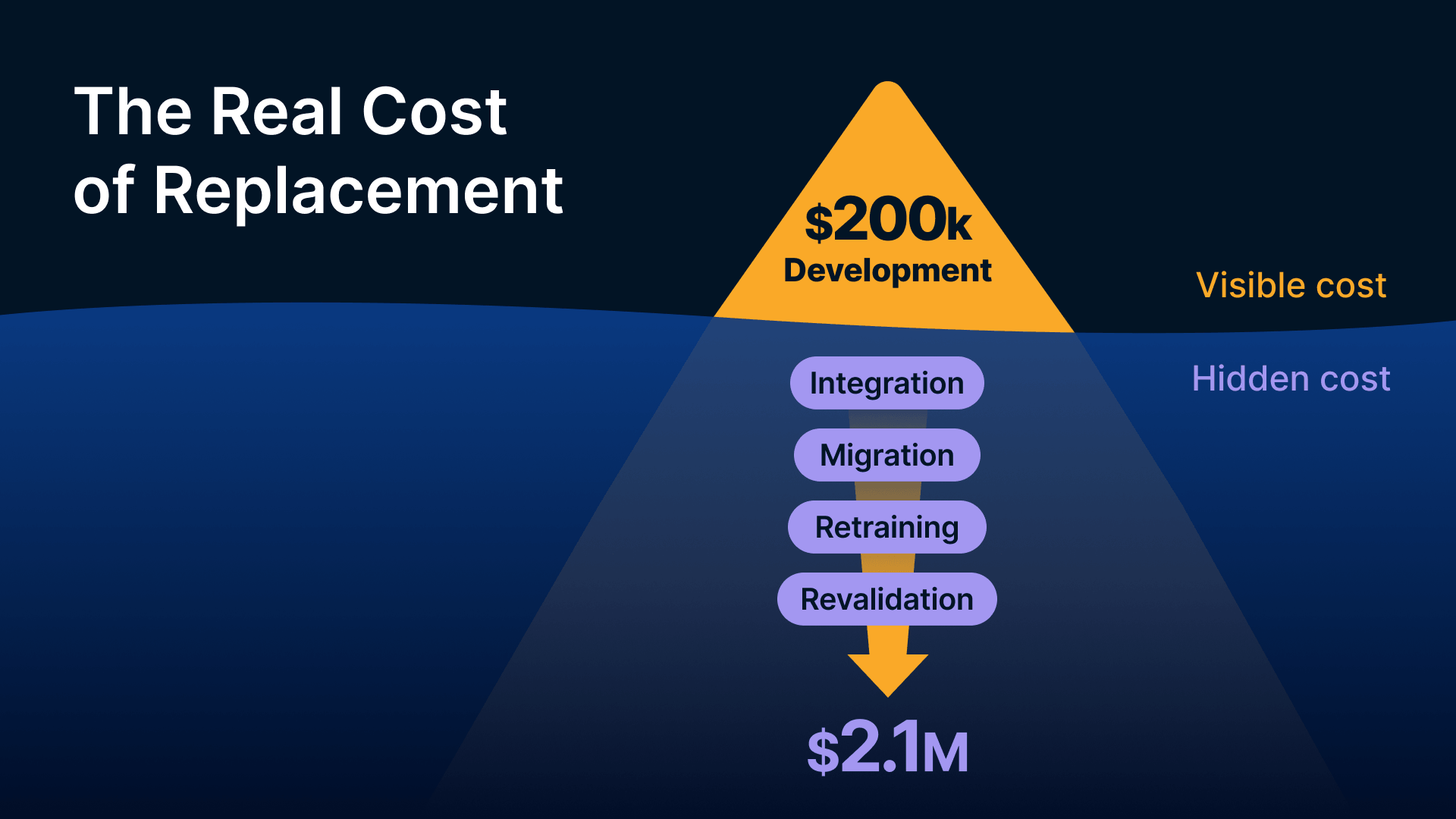
The visible cost of replacing a legacy app is the development cost. The invisible costs — typically 3 to 5 times larger — include integration work (connecting to PLCs, historians, ERP systems, databases), data migration, user retraining (manufacturing workers have deep muscle memory for existing workflows), and validation work for regulated environments. For smaller tools like a shift scheduler or quality parameter screen, the replacement cost-to-value ratio is so unfavorable that it never gets prioritized.
As BayOne’s business case analysis puts it, organizations that completed modernization between 2022–2025 report 25–35% reductions in infrastructure costs and 50% fewer security breaches. But those results come from organizations that could modernize — not from plants running frozen, validated applications with no source code.
What Happens When There Is No Source Code?
A significant number of legacy manufacturing applications were written by vendors who no longer exist, contractors who didn’t deliver source code, or internal developers who left without documentation. A 2023 Forrester survey found that 41% of business-critical manufacturing applications had no accessible source code and no vendor support. When there’s no source code, there’s no rewrite — only replacement, which carries all the same costs plus the risk of swapping known behavior for unknown behavior in a production-critical system.
How Does Regulatory Re-Validation Freeze Application Code?
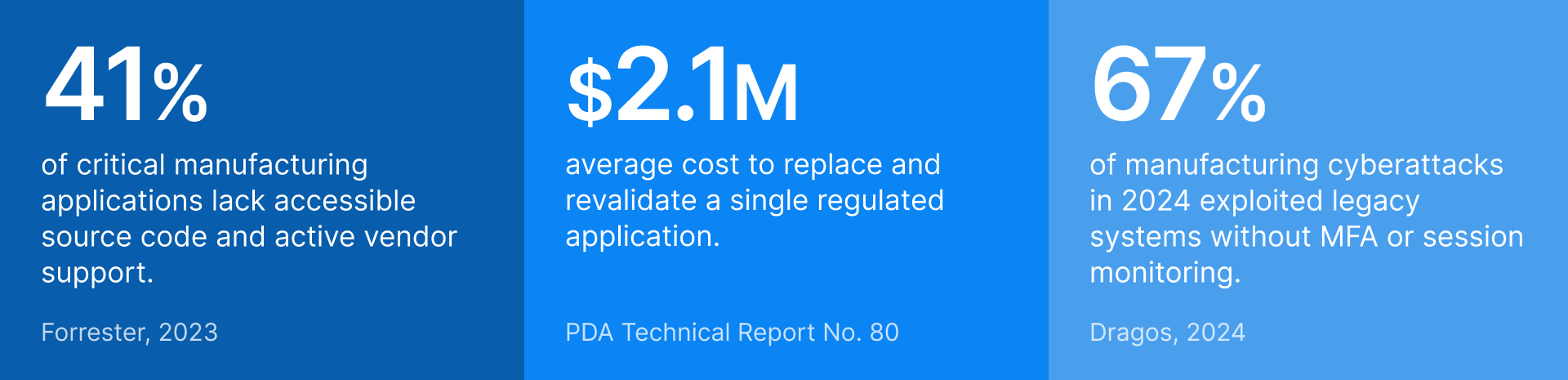
For plants under FDA 21 CFR Part 11, EU GMP Annex 11, or ISO 9001, any change to a validated computer system — including code, OS, or infrastructure changes — requires formal change control and often full re-validation. The average cost of replacing and revalidating a single FDA-regulated manufacturing application exceeds $2.1 million (PDA Technical Report No. 80). Security improvements must be implemented at the infrastructure and access control layer, not inside the application.
As NIST SP 800-207 explains, Zero Trust architecture focuses on protecting resources through continuous verification rather than relying on network perimeters — making it possible to add modern security controls around legacy applications without modifying the applications themselves.
What Security Gaps Do Legacy Apps Create?
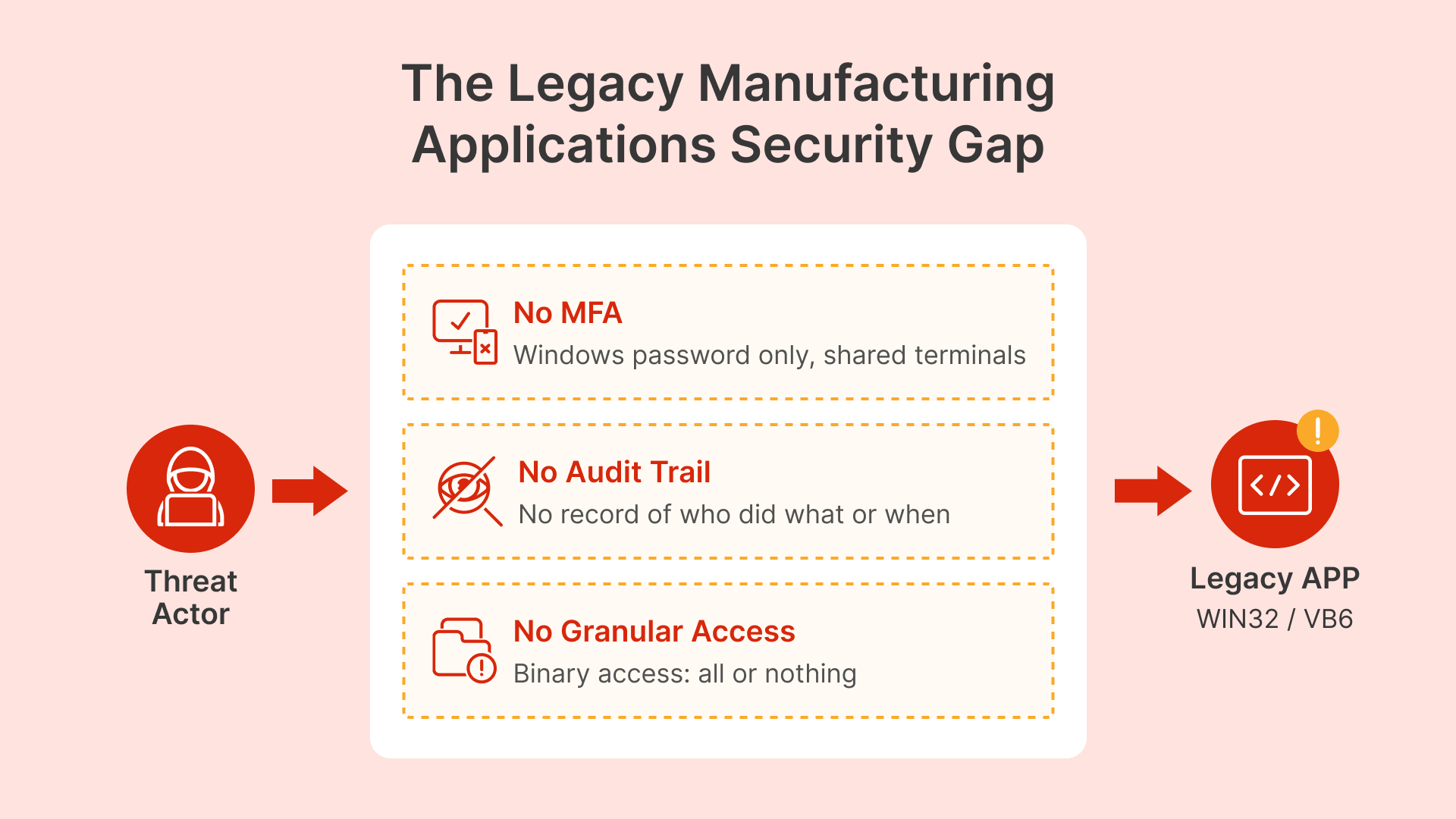
Legacy applications are not just hard to manage — they create specific, exploitable security gaps that attackers understand well.
No authentication layer: Many legacy apps authenticate through Windows session identity. If credentials are compromised, the attacker has full access to every application. On shared terminals — common in manufacturing where shift workers share a logged-in account — anyone with physical access to the terminal has access to everything.
No audit trail: Applications built before modern security standards rarely log who did what, from which device, at what time. This creates compliance risk under 21 CFR Part 11 (which requires individual accountability for electronic records) and forensic blindness when incidents occur.
No granular access control: When access is tied to Windows group membership, it’s binary: full access or no access. No time-based restrictions, no temporary access for maintenance contractors, no way to terminate an application session without killing the Windows session.

It is time to consider MSIX now that it has matured and conversion rates for Win32 software are over 70 percent.
Kevin Kaminski, Live! 360 / Redmondmag
How Can You Secure Legacy Manufacturing Apps Without Rewriting Them?
There is no one-size-fits-all approach. The right choice depends on the application’s architecture, its OS requirements, network dependencies, and the security controls you need. Here are the four approaches that cover the full range of legacy application types in manufacturing.
1. Application Packaging: App-V and MSIX
Application packaging isolates legacy apps from the OS and from each other on the same session host. It fixes DLL conflicts, registry pollution, and multi-version coexistence — the technical problems that block legacy apps from running on modern Windows Server session hosts.
Microsoft App-V captures an application’s files, registry entries, COM components, and environment variables into a self-contained virtual package. Each app runs in its own isolated bubble. This is especially valuable for VB6 apps requiring specific MSVC runtime versions, Delphi apps with conflicting BDE versions, or legacy ActiveX controls that clash with modern browser DLLs. App-V provides complete isolation, making it ideal for apps with complex dependencies that would fail under any other packaging model.
MSIX and MSIX App Attach are Microsoft’s modern replacement, using container-based packaging with VHD/CIM disk images that mount at session startup. As Rimo3’s comprehensive guide explains, MSIX was originally an APPX package with a different file extension, but it now supports Win32 applications and integrates with VDI environments through App Attach. Note: apps with kernel-mode drivers or deep OS hooks cannot be packaged as MSIX and must stay on App-V or direct installation.
Important: packaging alone does not add security. It prepares applications for clean delivery to a session host where security is enforced at the Thinfinity gateway layer.
2. VDI Session Delivery: Thinfinity RDC
With Thinfinity RDC, the application runs on a managed server — not on the user’s device. Users access it through a browser session, with MFA, RBAC, and session recording enforced at the gateway layer. The application binary stays untouched. Security is added at the delivery layer. Session hosts can run a legacy OS for compatibility when needed.
This approach works for most legacy Win32 apps and any application that runs on Windows Server. The user gets a full Windows desktop session with the application inside it.
3. Web-Enablement: Thinfinity VirtualUI
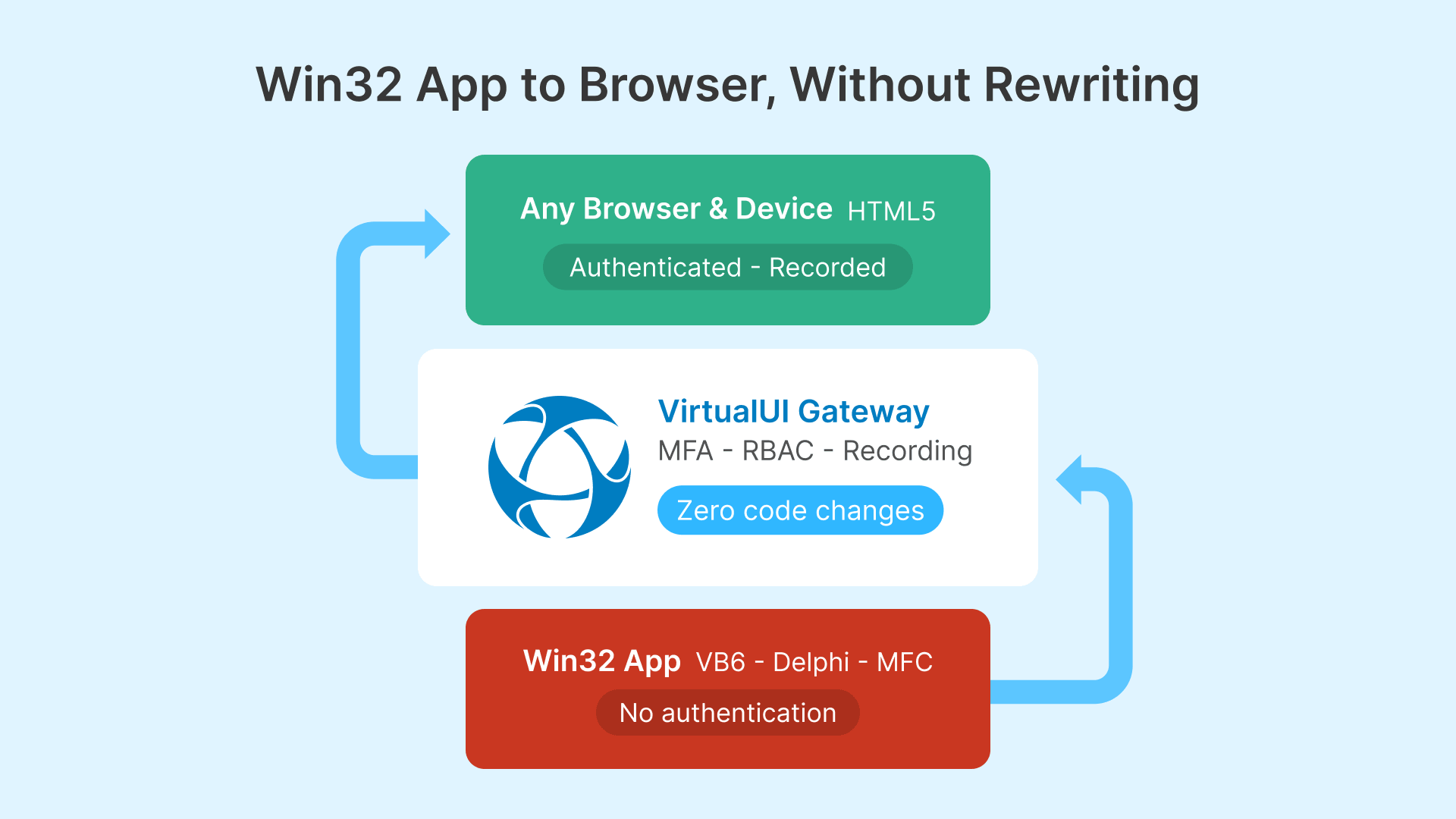
VirtualUI is the most direct answer when you need browser accessibility plus modern security controls. It wraps any Win32, VB6, Delphi, MFC, or .NET WinForms application in an HTML5 web delivery layer without touching the code.
How it works: VirtualUI injects a lightweight display library into the application’s process at launch. This library intercepts GDI and Win32 rendering calls, captures the output, and streams it as compressed HTML5 canvas content to the user’s browser over an encrypted WebSocket connection. User input flows back to the running application. The app believes it’s running normally on a Windows session host; the user sees a responsive web app in their browser.
Unlike RDC session delivery, VirtualUI gives the user only the application window — no Windows desktop, no taskbar. For plant floor operators who need one or two specific applications, this provides a cleaner, less confusing experience.
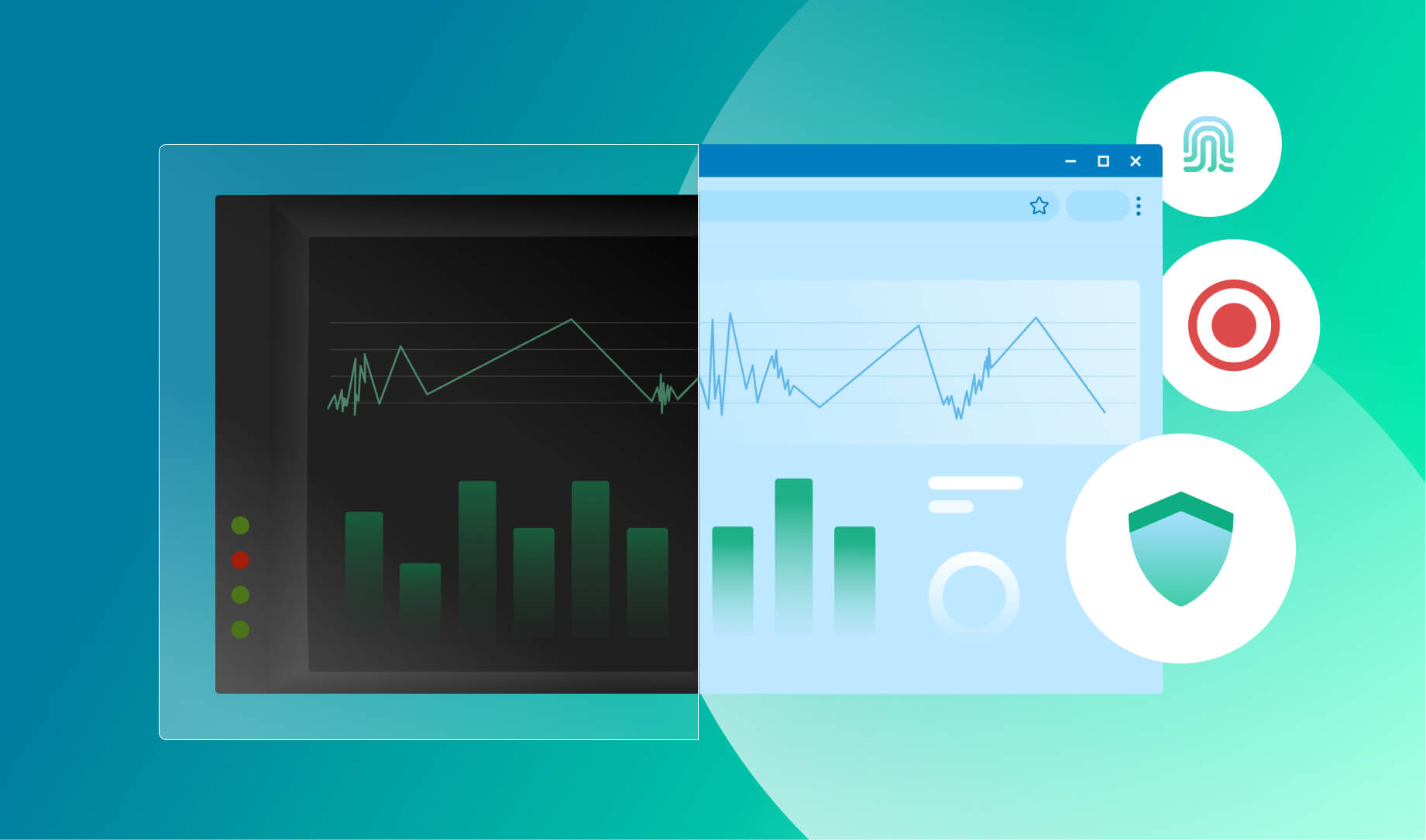
The security layer: Authentication, MFA, and access control are enforced at the Thinfinity Gateway before any connection reaches the application. A VB6 production scheduler that previously had no login screen now requires Okta or Entra ID authentication with MFA before appearing in the browser. Session recording captures everything the user does. RBAC at the gateway allows granular access control the application itself cannot provide.
ActiveX compatibility: Applications built on IE’s Trident engine or ActiveX components cannot run in modern browsers — but they run fine in a VirtualUI session because the session host handles all legacy rendering server-side. The user accesses through Chrome, Firefox, Edge, or Safari. No ActiveX is ever installed on their device. This solves the plant floor tablet problem: tablets can’t run ActiveX natively, but VirtualUI delivers those apps to any browser without compatibility issues.
4. Containerization for Cloud Migration Paths
Windows containers and MSIX App Attach on Thinfinity session hosts allow packaging legacy apps in container images that deploy without touching the session host OS. This works when the app runs on Windows Server 2019+ and you have cloud VDI infrastructure (OCI + VergeIO). It’s a delivery and packaging improvement that complements security controls at the Thinfinity gateway layer — not a standalone security approach.
How Do the Four Approaches Compare?
| Feature | App-V | MSIX App Attach | VirtualUI (Thinfinity) | RDC Session (Thinfinity) |
|---|---|---|---|---|
| Isolation type | Virtual environment overlay | Container + VHD mount | Web delivery wrapper | Full desktop session |
| Code changes needed | No | No | No | No |
| Legacy app support | Excellent | Good (driver/service limits) | Excellent (any Win32) | Excellent |
| Browser delivery | No — needs RDC session | No — needs RDC session | Yes — native HTML5 | Yes — via browser |
| Built-in MFA | No — delivery layer only | No — delivery layer only | Yes — at Gateway | Yes — at Gateway |
| Per-app RBAC | Via AD groups | Via deployment groups | Native in Thinfinity | Native in Thinfinity |
| Session recording | Via Thinfinity session | Via Thinfinity session | Built-in | Built-in |
| Best for | DLL conflicts, multi-version coexistence | Clean hosts on OCI/VergeIO | Browser-access legacy apps, BYOD | Full desktop workflows |
Which Approach Fits Each Legacy App Type?
Before picking an approach, inventory your legacy applications and their technical characteristics. This table maps the most common types found in manufacturing plants to their best-fit delivery method.
| App Type | Examples | Tech Stack | Security Gap | Recommended Approach |
|---|---|---|---|---|
| Custom MES client | Production tracking, WIP management | Win32 / VB6 / .NET 2.0 | No MFA, shared session auth | Thinfinity RDC + MFA + recording; or VirtualUI |
| Process parameter entry | Recipe mgmt, setpoint entry | Win32 / Delphi / LabVIEW | No change audit, shared accounts | Thinfinity RDC + session recording (21 CFR Part 11) |
| Quality reporting tool | SPC, defect entry, CAPA | VB6 / Access / Crystal Reports | No access scoping | VirtualUI + RBAC at gateway |
| Machine HMI software | GE Proficy, Wonderware, iFIX | Win32 / ActiveX | ActiveX needs legacy browser, no MFA | VDI session with IE mode; VirtualUI where compatible |
| CAD/CAM legacy viewer | CATIA V4, ProE, older AutoCAD | Win32, 32-bit | Bitness conflicts, no web delivery | App-V or MSIX; Thinfinity session host |
| ERP thick client | SAP GUI, JD Edwards, Oracle Forms | Java / Win32 | Legacy JRE, complex install | App-V on session host; Thinfinity RDC or VirtualUI |
| Regulatory/compliance tool | Electronic batch records, deviation mgmt | Win32 / .NET 2.0 | No individual accountability, no audit log | Thinfinity session recording to OCI Object Storage |
What Security Controls Can You Add Without Touching the Application?
The following controls work at the Thinfinity delivery layer — at the Gateway and session host level. They apply to any legacy application regardless of delivery method (VirtualUI, RDC, App-V, or MSIX). None require modifying the application.
| Security Control | Legacy Gap It Closes | How It Works |
|---|---|---|
| Multi-factor authentication | No MFA — Windows password or shared account only | Enforced at Thinfinity Gateway via Okta or Entra ID before session starts. App launches only after MFA. |
| Individual user identity | Shared Windows accounts on plant terminals — no accountability | Gateway authenticates each user individually through IdP, even on shared terminals. Each session is isolated. |
| Session recording + audit trail | No internal audit log; 21 CFR Part 11 non-compliant | Full session video recorded to OCI Object Storage with immutable retention. Captures every action with user identity and timestamp. |
| Time-limited access | Permanent standing access for contractors | Access policies define valid windows per user/group. Auto-disabled when service window closes (ServiceNow/Jira integration). |
| Role-based app access | Binary access — all or nothing via Windows groups | Thinfinity RBAC defines which apps each user group can see and launch. Managed in portal, not in the app. |
| Clipboard + file transfer control | Unrestricted copy-paste and downloads | Session policies configure clipboard direction and file transfer per app and user group. Can block all clipboard to local device. |
| Immediate session termination | Cannot terminate app session without killing Windows session | Admins terminate any session from Cloud Manager immediately at protocol layer. |
| Network access scoping | App can reach everything the session host reaches | Dedicated session hosts with firewall rules limiting outbound to only legitimate resources. |
Supporting Infrastructure: FSLogix and Datadog
FSLogix for Legacy App Profile Management
Legacy apps often write user data to locations incompatible with non-persistent VDI pools: registry keys under HKCU, files in %APPDATA%, local database files. Without profile management, non-persistent sessions lose all settings on every logout.
FSLogix Profile Containers solve this by capturing the entire Windows profile in a VHD/VHDX container that mounts at login and unmounts at logout. From the legacy app’s perspective, it’s writing to a normal local profile. FSLogix redirects those writes transparently.
Critical configuration tip: Document each legacy app’s cache locations and exclude them from the FSLogix container. A VB6 scheduler that caches 2 GB of production history locally will create a 2 GB container that mounts slowly and wastes storage. Persist the user’s settings; exclude the ephemeral cache. For OCI session hosts, store containers on OCI File Storage (NFS) or a Windows File Server share. For VergeIO, use shared storage via SMB. Provision adequate IOPS — container mount at login is I/O intensive.
Datadog for Session Host Monitoring
Legacy apps on Thinfinity session hosts need monitoring at two levels: infrastructure (CPU, memory, disk I/O, network) and application behavior (session count, login duration, crash events, availability).
Datadog’s Windows agent collects infrastructure metrics and Event Log entries. Set up monitors to alert when crash events exceed thresholds for specific applications (Event ID 1000 for crashes, Event ID 1001 for WER events). Build dashboards for session host availability by app pool, VirtualUI login time trends (increasing times indicate FSLogix container growth or performance degradation), and session count by hour (validates autoscaling is working before shift start).
How Do You Deploy on OCI and VergeIO Infrastructure?
VirtualUI and RDC session hosts run on the same infrastructure. For Oracle Cloud Infrastructure, use VM.Standard or VM.Standard.E shapes for CPU-bound legacy apps, VM.GPU shapes for GPU dependencies. OCI’s 15 TB/month free egress makes cloud-hosted VirtualUI economically attractive for plants with reliable connectivity.
For VergeIO on-premises, session hosts run as VMs on the hyperconverged cluster. Thinfinity Cloud Manager handles both OCI and VergeIO pools from one console — pre-provisioning sessions before shift start, scaling down after the working day, and managing golden image updates across the fleet.
The hybrid model matters: A legacy MES client that polls a PLC every 500ms needs a network-adjacent session host on VergeIO, not in OCI. Apps that talk to IT-layer systems (ERP, PLM, document management) can run on OCI session hosts. Both pools appear as applications in the same Thinfinity portal.
What Does a Single Portal for Every Manufacturing Application Look Like?
Today, plant floor operators might access their shift tool through a desktop shortcut requiring a separate Windows login, their quality form through a VPN bookmark, and their MES dashboard through a web app with different credentials. Each path has its own friction, authentication, and support burden.
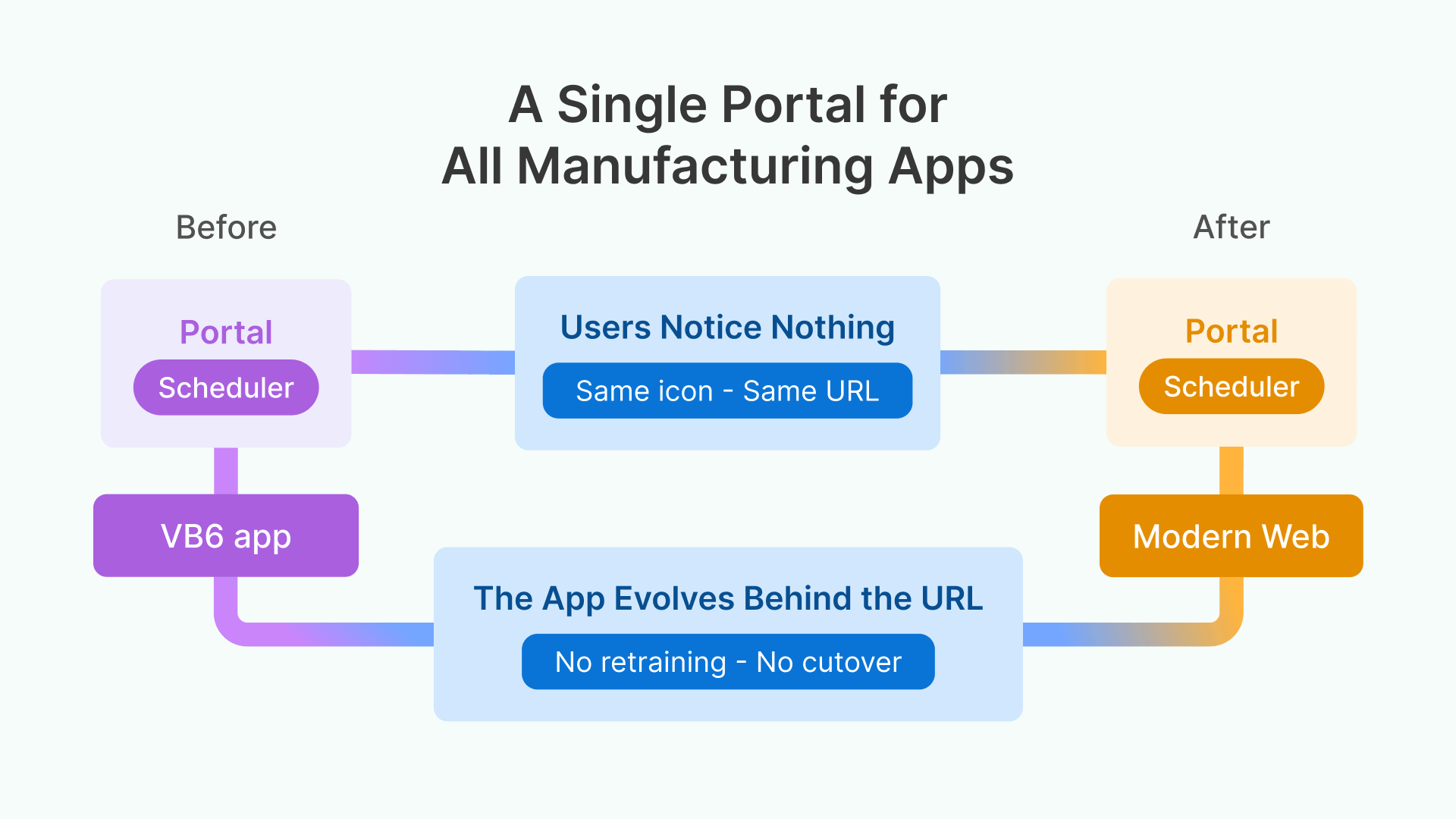
With Thinfinity, every application — the VB6 scheduler via VirtualUI, the full MES client via RDC, the modern web dashboard via WAG, the SCADA client via RBI on OKE — appears in one portal. One login, one MFA prompt, one bookmark. The technology behind each app is invisible to the user; what they see is their applications, accessible from any browser on any device.
How Does Thinfinity Enable Modernization Without a Big Bang?
Thinfinity’s unified delivery creates a practical migration path. Today, deliver the legacy VB6 app through VirtualUI with full security. Next year, when budget exists for a proper web rebuild, the VirtualUI and native web versions coexist in the same portal — same icon, new backend. No migration project, no user retraining, no cutover date.
For applications where a SaaS replacement is being evaluated, the legacy app continues running through VirtualUI during the transition period with full security controls and audit trail. Users don’t run an unsecured application for years while the replacement gets built.
Conclusion
Legacy manufacturing applications don’t need to be rewritten to be secured. By applying security at the delivery layer — through application packaging, VDI session delivery, or web-enablement with VirtualUI — you can wrap MFA, session recording, RBAC, and granular access controls around any application without modifying a single line of code. The strategy is straightforward: keep the applications that work, modernize how they are delivered, and enforce Zero Trust security at the gateway. Thinfinity Workspace makes that possible from a single portal, across OCI, VergeIO, or hybrid infrastructure.