

TL;DR
- The problem: Many VDI deployments are web-centric: an entire Windows desktop exists so a user can run one browser against one internal web app. That is a lot of OS, licensing, and profile machinery for a single browser tab.
- The right-sized answer: Deliver just the browser as an ephemeral, per-session isolated pod on OKE, torn down cleanly at logout.
- Why OKE: Virtual nodes give you serverless Kubernetes with pod-level elasticity and pay-per-pod pricing, HPA autoscaling, mixed node clusters, and Workload Identity that grants each pod least-privilege access to OCI resources via OCI IAM.
- Why it is more secure: The app is rendered remotely and only an encoded pixel stream reaches the endpoint. ZTNA grants least-privilege access to the specific app rather than the network, through a reverse proxy in a DMZ with zero inbound ports.
- Where full VDI still wins: Full desktops and thick-client apps. Browser pods win when the target is genuinely a web application.
If your virtual desktop project exists mostly so that a user can open a locked-down browser and reach one internal web app (an ERP portal, an HR or finance dashboard, an admin console, SharePoint, or a legacy intranet tool), you are over-provisioning. Browser isolation for internal web apps lets you deliver only the browser session that app needs, as an ephemeral, isolated pod on Oracle Container Engine for Kubernetes (OKE), instead of standing up a whole Windows desktop per user. The user gets a rendered stream in any browser; the pod is destroyed at logout; the internal application never touches the endpoint.
This article makes the case for replacing web-centric VDI (full virtual desktops provisioned chiefly to run a browser) with per-session browser-isolation pods brokered by Thinfinity’s HTML5 delivery and Universal ZTNA layer. It also sets out where full VDI remains the correct tool, walks through a reference architecture and request flow, and gives you a decision-ready comparison.
The web-centric VDI problem: a whole desktop to run one browser
Virtual desktop infrastructure was designed to deliver a complete Windows desktop experience. That is the right tool when users need a persistent desktop, multiple thick-client applications, local peripherals, and a full Office stack. But a large share of real-world VDI use looks different: the user logs into a virtual desktop, opens a browser, navigates to a single internal web application, and works there for the entire session. The desktop is scaffolding. The browser is the job.
That scaffolding is expensive. Each user consumes a Windows desktop OS with its licensing, several gigabytes of RAM and multiple vCPUs of compute, and a roaming-profile stack (for example, an FSLogix-style profile container) that has to be stored, mounted, and maintained. You build and patch a golden image, manage profile drift, and size a fleet for peak concurrency, paying for idle desktops during the many hours users are not logged in. All of this to render a web page that a browser could render on its own.
When the workload is a web app (an ERP or HR portal, a finance dashboard, a Kubernetes or firewall admin console, SharePoint or an intranet, a ticketing system, a legacy internal app, or an OT/MES web portal), the full desktop is over-provisioned. The question worth asking is simple: what if you delivered only the browser session to that specific app, and nothing else?
Browser-isolation pods: the right-sized answer
Remote browser isolation (RBI) runs the browser somewhere other than the endpoint and streams a safe representation of the page back to the user. Applied to internal delivery, the model inverts the usual VDI assumption. Instead of provisioning a desktop and hoping the user only opens a browser, you provision only an isolated browser session, one browser per pod, pointed at the internal application the user is entitled to reach.
The economics change immediately. In our own testing, a single-browser pod typically sits in the low hundreds of megabytes of RAM, with well under a full vCPU, and starts in a few seconds from a shared base image: roughly 200 to 500 MB and 0.5 to 1 vCPU for the sessions we measured.
Treat that as a starting point rather than a fixed figure. Actual consumption tracks the application you load: a heavy single-page app with a large client-side bundle will push a session well above a simple internal portal, and the right way to size a deployment is to measure your own target apps. What does not change is the order of magnitude. Even at the upper end of that range, a browser session pod is a fraction of a full Windows desktop with its OS, licensing, and profile container, which is exactly why the sizing exercise is worth doing per application rather than per user.
Why OKE: pay-per-pod elasticity, autoscaling, and pod-level identity
Browser pods are a per-session, bursty, concurrent workload: exactly the shape Kubernetes handles well, and exactly where OKE virtual nodes shine.
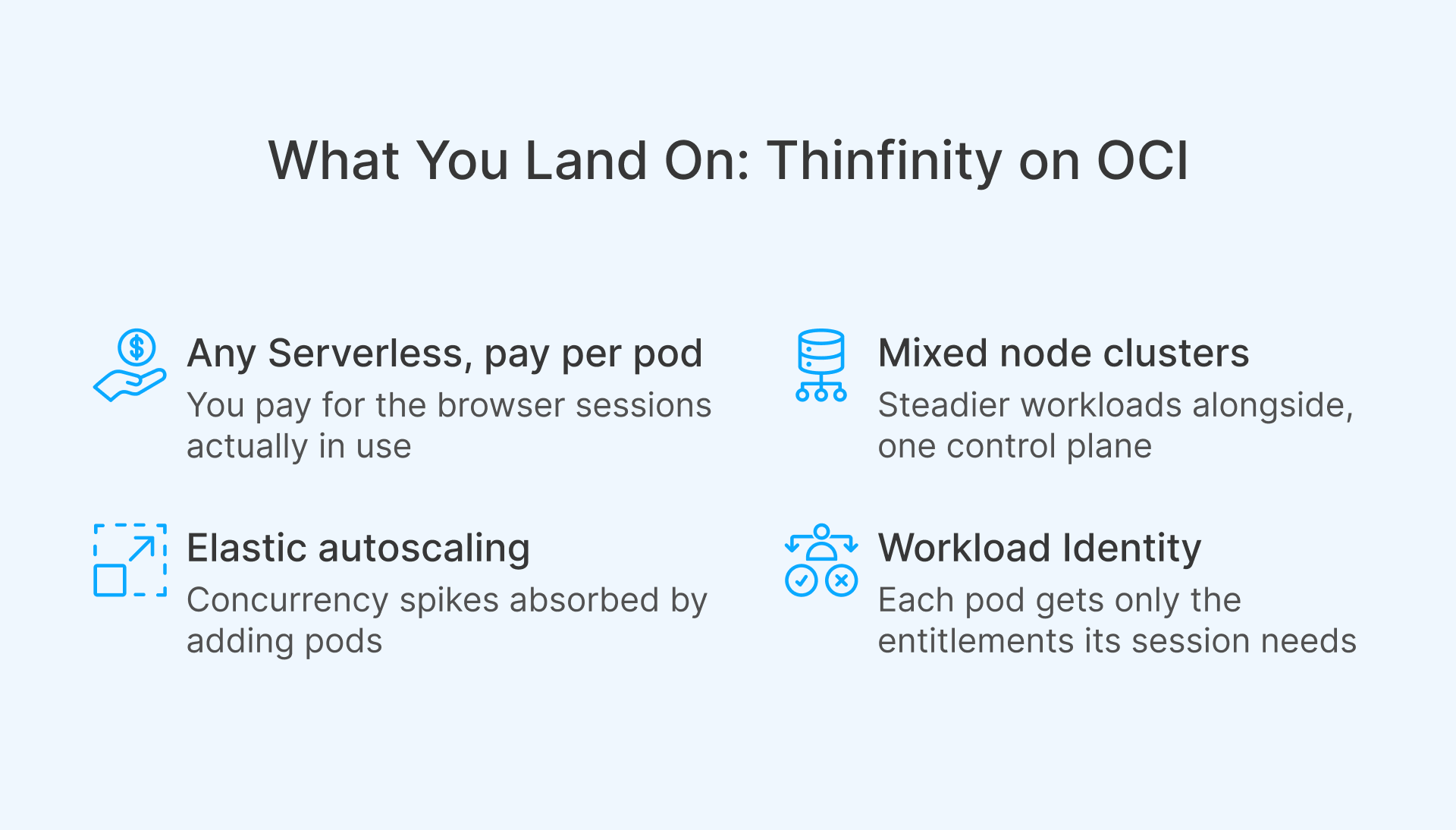
- Serverless, pay-per-pod economics. OKE virtual nodes deliver a serverless Kubernetes experience with granular pod-level elasticity and pay-per-pod pricing, eliminating the operational overhead of managing, scaling, upgrading, and troubleshooting worker-node infrastructure. For browser isolation, that means you pay for the browser sessions actually in use rather than for a fleet of idle desktops sized to peak. When a contractor logs off or a seasonal surge subsides, the pods, and their cost, go away.
- Elastic autoscaling. You can scale browser-pod deployments with the Kubernetes Horizontal Pod Autoscaler (HPA) based on CPU utilization or custom metrics, and OKE also supports the Cluster Autoscaler for node-backed pools. Concurrency spikes such as quarter-end finance access or an onboarding wave of contractors are absorbed by adding pods, not by pre-provisioning desktops.
- Mixed clusters for the whole portfolio. OKE supports mixed node clusters that combine virtual, managed, and self-managed nodes. You can run bursty browser-isolation pods on serverless virtual nodes while keeping steadier or specialized workloads on managed nodes in the same cluster, one control plane, one operational model.
- Pod-level least privilege with Workload Identity. OKE Workload Identity grants individual pods policy-driven access to OCI resources, such as secrets in OCI Vault or an Object Storage bucket, through OCI Identity and Access Management (IAM). Each browser pod gets exactly the entitlements its session needs and nothing more, so a session that must read a secret to reach a backend app can do so without a broad, shared credential. Combined with OCI-native network segmentation and in-region deployment for data residency, the platform gives you least privilege at the pod boundary.

Thinfinity RBI on OKE: reference architecture and request flow
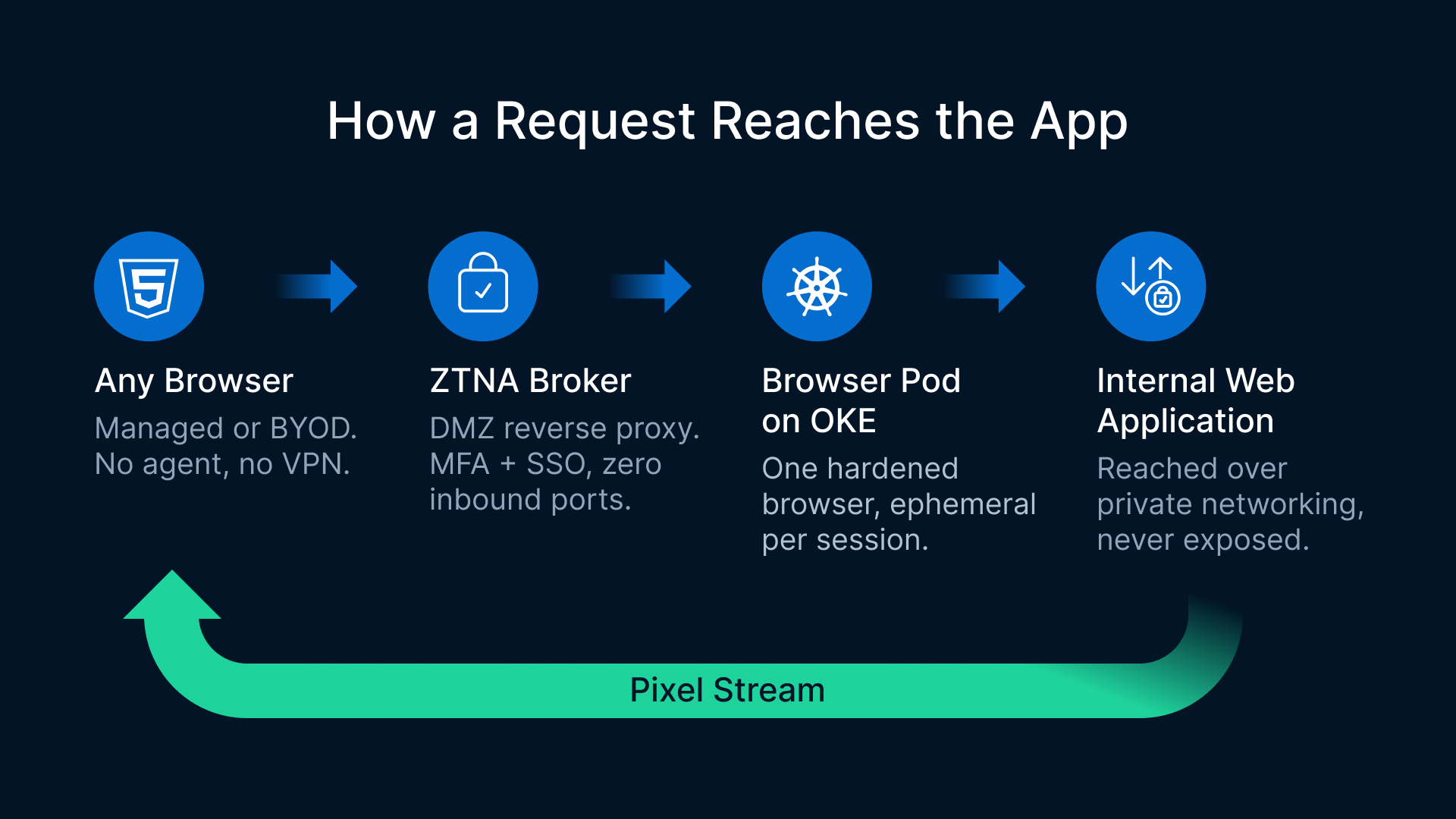
Thinfinity RBI runs isolated browser sessions in containers orchestrated by Kubernetes, and it integrates with Thinfinity Workspace’s HTML5 delivery and Universal ZTNA broker (a reverse proxy that sits in a DMZ, requires zero inbound ports into the protected network, and enforces MFA, SSO/SAML, RBAC, and session recording). On OKE, the result is ephemeral, per-session isolated browser pods that broker users to internal and enterprise web apps.

Zero trust focuses on protecting resources (assets, services, workflows, network accounts, etc.), not network segments, as the network location is no longer seen as the prime component to the security posture of the resource.
Reference architecture (components)
- Any endpoint, any browser: the user needs only an HTML5-capable browser, managed or unmanaged, corporate or BYOD. No agent, no VPN client.
- Thinfinity HTML5 + Universal ZTNA broker (DMZ / reverse proxy): terminates the user connection, authenticates via MFA and SSO/SAML, applies RBAC, and brokers an outbound connection to the isolated session, with no inbound ports opened into the internal network.
- Ephemeral browser-isolation pod on OKE: a single hardened browser instance per pod, launched from a shared base image on a virtual node, scoped by Workload Identity, and destroyed at logout.
- Internal web application: the ERP, HR or finance portal, admin console, intranet, or legacy app, reached by the pod over OCI-native private networking and never exposed to the endpoint.
- Controls plane: OCI IAM policies, Vault secrets, network segmentation, and session recording for audit.
Request flow, step by step
- Authenticate. The user opens a browser and reaches the Thinfinity broker in the DMZ, authenticating with MFA and SSO/SAML.
- Authorize and place. The broker applies RBAC to confirm the user is entitled to the specific internal app, then requests an ephemeral browser pod on OKE, with HPA scaling pods to meet concurrency.
- Isolate and connect. A fresh, per-session browser pod starts from the shared base image. Using its Workload Identity, it retrieves any needed secret from OCI Vault and connects to the internal web application over OCI-native private networking.
- Render remotely. The pod renders the application, and only an encoded pixel stream is sent back through the broker to the user’s browser.
- Interact. Keystrokes and clicks flow to the pod; the rendered stream flows back. The app’s code, cookies, and network never reach the endpoint. Clipboard, upload, download, and print are governed by policy per app and per role.
- Tear down. At logout or timeout, the pod is destroyed. Nothing persists; the next session starts clean.
The flow is deliberately one-directional at the network layer: the endpoint is protected from the app, and the app and network are protected from an unmanaged endpoint.
What actually crosses to the endpoint?
Because Thinfinity RBI uses pixel streaming, nothing of the application itself reaches the device. No HTML, no JavaScript, no cookies, no tokens: only encoded frames. That is what makes the claim precise rather than rhetorical: the app’s code and network truly never touch the endpoint.
What can cross is what you decide should cross. Clipboard, file upload, download, and printing are policy controls, opt-in and off by default, configurable per application and per role, and they can be paired with watermarking and session recording for unmanaged-device access. For contractor access and privileged consoles, that combination is usually the point rather than a limitation.
Inside the session, users get a real browser. Text selection, in-page find, and the context menu all work, because they happen in the remote browser and come back as rendered output. What does not work is the local browser operating on the stream, and that distinction matters most for accessibility, covered below.
Web-centric VDI desktop vs. browser-isolation pod on OKE
| Dimension | Web-centric VDI desktop | Browser-isolation pod on OKE |
|---|---|---|
| What is provisioned | A full Windows virtual desktop per user, mainly to run a browser | A single isolated browser session per pod, scoped to one internal app |
| OS licensing | Windows desktop OS license per user or session | No desktop OS; a lightweight Linux browser base image |
| Profile management | Roaming-profile stack (e.g. FSLogix) to store, mount, maintain | None: ephemeral, stateless sessions; no profile drift |
| Cost / scaling model | Sized for peak concurrency; pay for idle desktops | Pay-per-pod on virtual nodes; HPA scales to sessions in use |
| Patching / maintenance | Golden desktop image plus a fleet of Windows desktops to patch | One browser base image to update; far less surface to maintain |
| Isolation | Desktop-level; persistent profile and local cache | Per-session pod isolation; clean teardown; small, non-persistent surface |
| Access scope | Scoped by desktop entitlement and network policy; least privilege depends on how well the estate is segmented | ZTNA least privilege to the specific app; zero inbound ports via reverse proxy |
| Best-fit workload | Full desktops, multiple thick-client apps, rich local peripherals | A web app: portals, admin consoles, dashboards, intranets, legacy web UIs |
Where do browser pods win?
- Contractor, third-party, and BYOD access without a desktop or VPN. Give an external user a link, enforce MFA and SSO, and broker them into an isolated browser session pointed at exactly the internal app they need. No VPN tunnel onto the network, no full desktop to license, nothing left on their device.
- Privileged access to admin consoles, recorded. Web management UIs for firewalls, hypervisors, Kubernetes dashboards, and database admin are high-value targets. Delivering them through a recorded, isolated pod with ZTNA scoping keeps credentials and the console off the endpoint and produces a session recording for audit.
- Legacy internal web apps that need a specific browser. Some older intranet apps only work with a particular browser version or configuration. You can pin that version and inject the required settings in the base image, standardizing the client centrally without touching a single endpoint.
- Regulated access to intranet portals. When compliance requires that data stay in-region and never land on the endpoint, browser pods keep rendering in-region on OCI and stream only pixels back. Nothing sensitive is cached locally.
- Seasonal and bursty access. Onboarding waves, quarter-end finance crunches, and event-driven spikes are where pay-per-pod economics pay off: pods scale up on demand via HPA and disappear, along with their cost, when the surge ends.
Where full VDI is still the right call
Browser pods are the right-sized option for web-app workloads, not a universal replacement. The boundaries are worth stating plainly.
- Full desktops and thick-client apps: If users need a persistent Windows desktop, multiple installed applications, deep OS integration, or specialized local peripherals, full VDI or DaaS remains the correct tool. The same Thinfinity platform can deliver full VDI/DaaS when a complete desktop is genuinely required, so this is a right-tool-for-the-job choice within one platform, not a rip-and-replace.
- Accessibility requirements: Screen readers on the endpoint cannot read a pixel stream. Where WCAG or Section 508 obligations apply, which is common for public-sector and regulated intranets, validate the assistive-technology path before committing to isolated delivery for those users.
- Heavy in-browser workloads and bandwidth: Very graphics-intensive or download-heavy web apps can stress a minimal pod, and pixel streaming uses more bandwidth than sending markup, with text sharpness degrading at low bitrates. Size the pod class and the link accordingly, or fall back to a desktop session.
- Latency and UX: Remote rendering adds a network round trip. For most business web apps the stream feels native, but latency-sensitive or high-frame-rate interactions benefit from placing pods in-region, close to both users and the target app.
- Peripheral and offline needs: Complex local device redirection or offline use cases are better served by a full desktop model.
For terminal-based systems, Cybele’s z/Scope terminal emulation covers HTML5 access to legacy host applications, a complementary path when the target is a green-screen host rather than a web app.
How do you get started?
A pragmatic path to replace web-centric VDI with browser pods looks like this:
- Inventory your current VDI users and identify the web-centric cohort whose sessions are essentially one browser against one internal app.
- Stand up an OKE cluster with virtual nodes for pay-per-pod elasticity.
- Build a hardened browser base image, pinning versions where legacy apps require it.
- Map OCI IAM policies and Workload Identity so each pod gets least-privilege access to only the secrets and resources it needs.
- Deploy the Thinfinity HTML5 and Universal ZTNA broker in a DMZ, wire up MFA/SSO/SAML and RBAC per application, and enable session recording for privileged targets.
- Pilot with a contained group, such as contractors or a single admin console, before expanding.