

Summary
- Smart card authentication for VDI lets users log in to virtual desktops and published apps with a PKI credential on a physical card (US DoD CAC, federal PIV, or an enterprise PKI badge) instead of a reusable password.
- Smart card redirection and USB redirection require the native client (Windows, Linux, or mobile) or Browser + Agent; printer, audio, and video are the clientless, browser-only exceptions. That redirection is a controlled device channel brokered through the Gateway, not network access to the endpoint.
- Thinfinity Workspace needs no endpoint management: the client or browser connects through the reverse Gateway on 443 (TLS 1.3) and receives only a pixel stream of the desktop or app, while the host agent dials outbound over RDC. The endpoint is never given network or resource access, so unmanaged, personal, or shared devices stay fully isolated and their vulnerabilities can’t reach your network or sensitive systems.
- Universal ZTNA adds MFA/SSO/SAML, broad IdP and cross-forest support, RBAC, and built-in session recording, and the whole platform runs on Oracle Cloud Infrastructure (OCI), including sovereign regions.
- The architecture enables controls that regulated and public-sector teams need; it does not by itself determine compliance. Confirm scope with your compliance and legal counsel.
For regulated and public-sector organizations, smart card authentication for VDI is often not a preference but a mandate. If your workforce logs in with a DoD Common Access Card (CAC), a federal Personal Identity Verification (PIV) card, or an enterprise PKI badge, then the certificate on that card, not a password, is the identity your systems must trust. The engineering question is how to carry that certificate all the way from the reader in a user’s hand to a virtual desktop or a published application running somewhere else, without weakening the Zero-Trust posture that made you adopt smart cards in the first place.
This article walks through how certificate-based login reaches virtual desktops and published apps under Universal ZTNA on Thinfinity Workspace and OCI, where the important technical boundaries sit, and how to plan a rollout that auditors and identity leads can actually reason about.
Why do smart cards matter for Zero-Trust VDI?
A smart card holds a private key that never leaves the card. Authentication happens by the card proving possession of that key through a cryptographic challenge, so there is no shared secret to phish, replay, or leak from a breached database. That property is exactly what a Zero-Trust model wants at the front door: a strong, hardware-bound assertion of who is connecting, evaluated on every session rather than trusted once and forgotten. It is also why CISA groups PKI smart cards alongside FIDO/WebAuthn in its guidance on phishing-resistant multifactor authentication.

CAC, PIV, and enterprise PKI are the same idea, different issuers
A DoD CAC, a federal PIV card, and a commercial enterprise PKI badge all follow the same pattern: an X.509 certificate chained to a certificate authority your organization trusts, backed by a private key on tamper-resistant hardware. The differences are governance and issuance (who runs the CA, how identity is proofed, and which policies apply), not the underlying login mechanic. That is why a platform that handles certificate-based login for one of them can, in principle, handle all three, provided the card, its middleware, and its trust chain are present where the certificate is actually consumed. The issuance and interoperability rules for the federal side are set out in NIST’s Personal Identity Verification standard.
Zero Trust means the credential and the transport both have to hold up
Strong credentials are only half the story. A phishing-resistant card behind a wide-open network path is still an exposure. This is why the transport model matters as much as the login method, and why the two should be designed together rather than bolted on. Cybele’s Universal ZTNA approach treats identity, device posture, and least-privilege access policy as one enforcement layer in front of every desktop and app.
How does certificate-based login actually reach a virtual desktop?
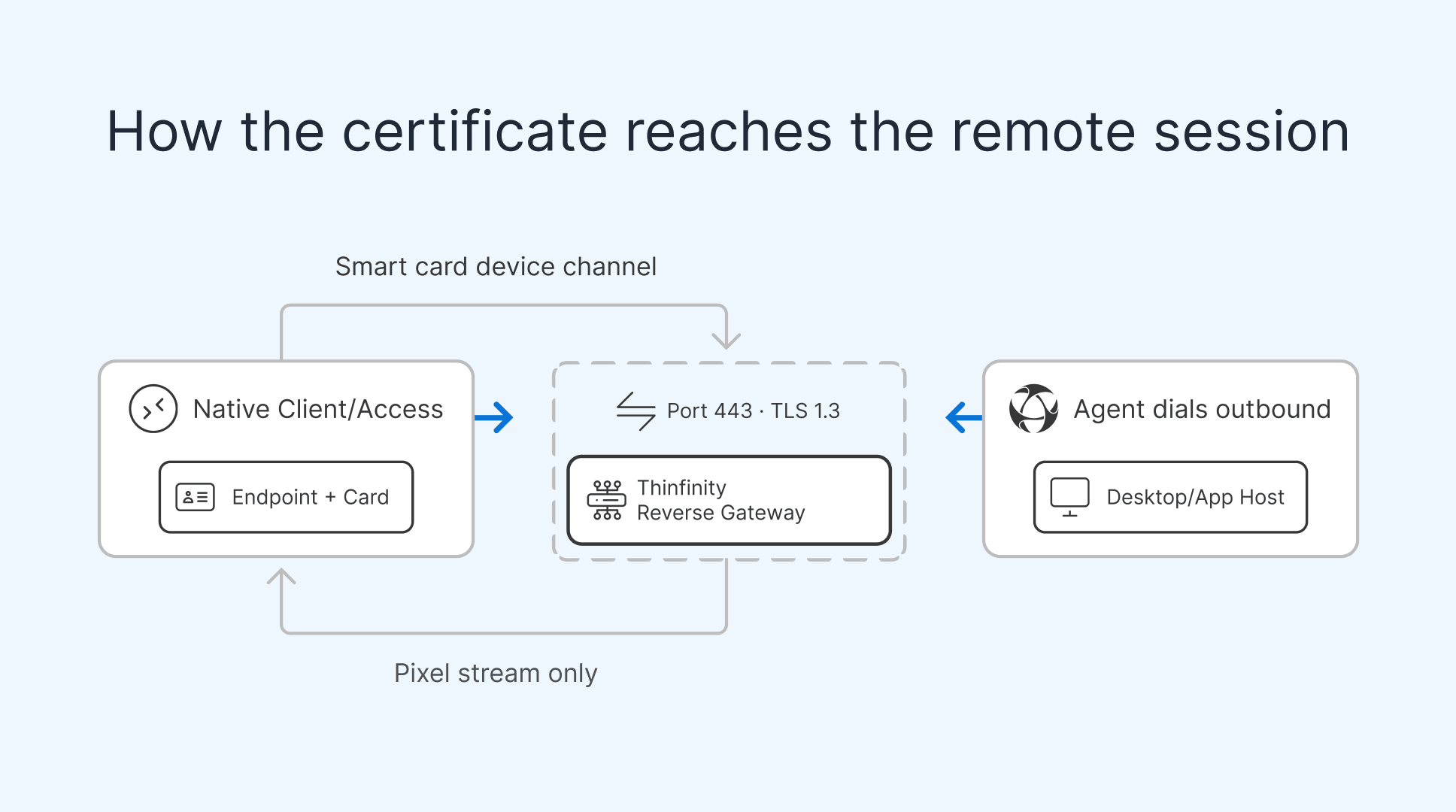
To sign in with a card, the operating system that performs the authentication needs to see the card. In a physical PC that is trivial: the reader is plugged into the same machine you log in to. In VDI and published apps, the desktop or app runs on a host elsewhere, so the card in the user’s hand has to be projected to that remote host. That projection is called smart card redirection, and it is a close cousin of general USB device redirection.
The connection path in Thinfinity Workspace
Thinfinity Workspace delivers VDI desktops and published apps (VDA) from a single platform. The connection path is deliberately one-directional at the edge: the client reaches a reverse Gateway on port 443 over TLS 1.3, and the host agent dials outbound to that Gateway over RDC. No inbound ports are opened on the firewall or on the host itself. From a Zero-Trust standpoint this is significant: there is no listening service on the desktop host for an attacker on the network to reach, and the card’s certificate travels inside an already-authenticated, encrypted channel. Just as important, the endpoint itself never receives network or resource access: it renders only a pixel stream of the remote session, so a personal, shared, or otherwise unmanaged device cannot reach the network or sensitive systems, and any vulnerability on that device stays fully isolated on the far side of the Gateway.

Enterprise resources do not accept arbitrary incoming connections from the internet.
Where the certificate is consumed
The certificate has to be readable at the point where authentication happens, typically the remote Windows session for the desktop or app. For that to work, the card’s presence in the local reader must be redirected up to the host, the same pattern Microsoft documents for smart card sign-in over Remote Desktop Services. And redirection of a device as intimate as a smart card cannot be done from inside a sandboxed browser tab alone. It needs a component running on the endpoint with the access to talk to the local card stack. Crucially, that redirection is a controlled device channel brokered through the Gateway: a governed path for the card only, not a network route from the endpoint into your environment. The endpoint still gets no route to the network or to resources; it exchanges pixels and a single, policy-governed device channel, nothing more.
Which peripherals work in a browser, and which need the native client or an agent?
This is the single most important accuracy point for anyone scoping smart card access, so it is worth stating plainly: smart card redirection and USB redirection require the native client (Windows, Linux, or mobile) or the Browser + Agent option. They do not work in a pure browser tab. Printer, audio, and video redirection are the clientless exceptions that a plain browser can handle on its own.
The reason is architectural. A browser tab renders the remote session through pixel streaming and can pipe generic media, audio out, video, print jobs, without touching privileged device layers. But reaching into the local smart card subsystem or an arbitrary USB device requires host-level access the browser sandbox deliberately withholds. The native client, or an agent installed alongside the browser, supplies that access. It does so by opening a controlled device channel to the Gateway for the card, not by granting the endpoint any network reach; the device stays isolated and only pixels and the governed card channel cross the boundary.
| Peripheral / capability | Clientless (plain browser only) | Native client or Browser + Agent required |
|---|---|---|
| Printer redirection | Yes | Not required |
| Audio redirection | Yes | Not required |
| Video redirection | Yes | Not required |
| Smart card redirection (CAC / PIV / PKI) | No | Yes: native client (Windows / Linux / mobile) or Browser + Agent; a governed device channel through the Gateway, not network access |
| USB device redirection | No | Yes: native client (Windows / Linux / mobile) or Browser + Agent; a governed device channel through the Gateway, not network access |
The practical takeaway: if your login method is a physical card, plan for the native client or Browser + Agent from day one. A pure browser session is fine for a printer, audio, or a video stream, but it is not enough to carry a CAC, PIV, or enterprise PKI credential into the remote session; and either way, the endpoint only ever receives pixels plus, where needed, a governed device channel for the card.
How do you roll out smart card VDI without surprises?
A certificate login rollout succeeds or fails on preparation of the golden image and the endpoints, not on the connection broker. The following order keeps the dependencies straight.
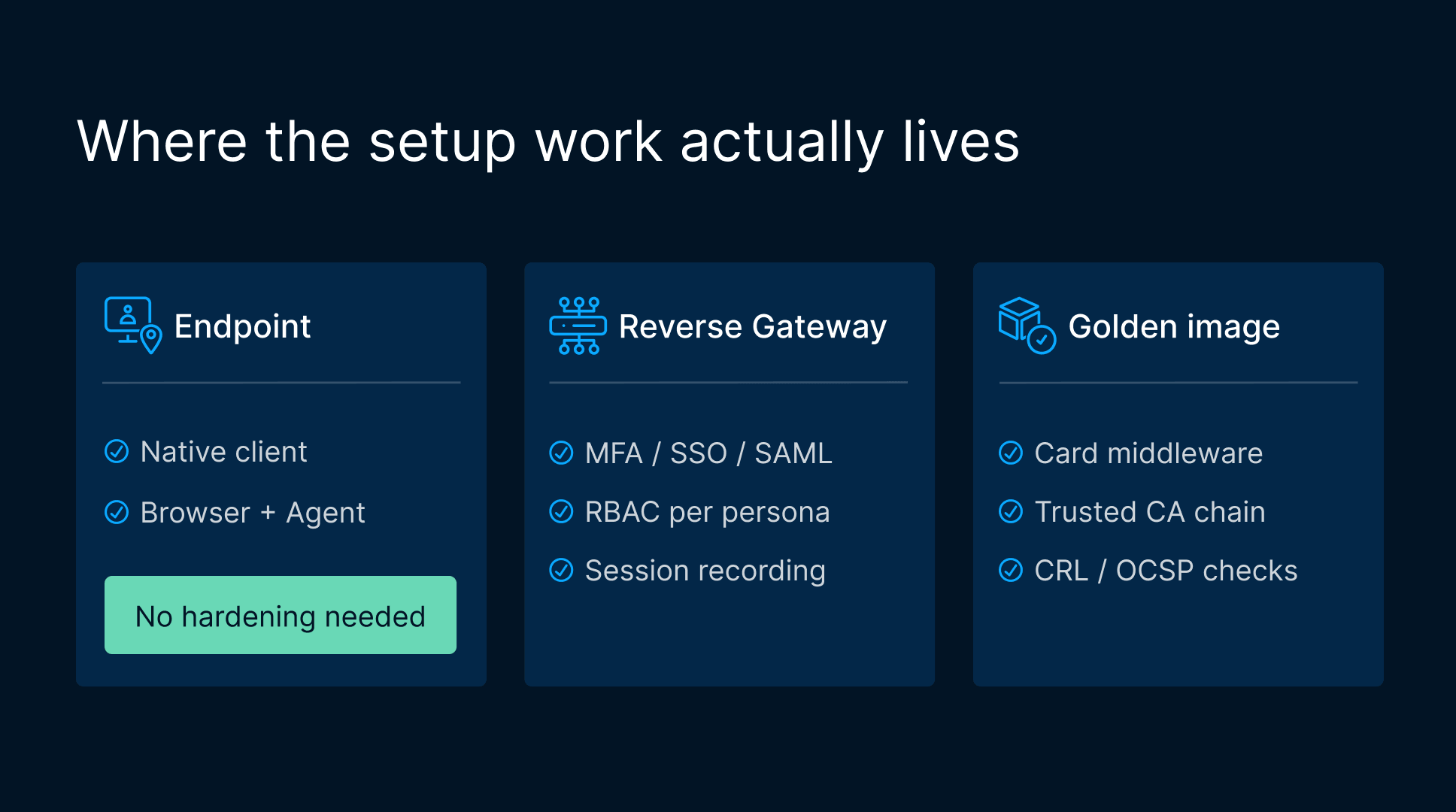
- Prepare PKI and middleware on the golden image. Install the smart card middleware (minidriver or vendor PKCS#11 stack) and any card-specific components on the golden image that backs your virtual desktops and published apps. Make sure the issuing CA and intermediate certificates are in the trusted chain on the host, and that certificate revocation checking (CRL/OCSP) reaches the right endpoints. This is the layer that lets the remote Windows session actually validate the card.
- Map the reader through the native client or Browser + Agent. Deploy the native client (Windows, Linux, or mobile) or the Browser + Agent option to endpoints, and enable smart card redirection so the local reader is projected to the host over the Gateway-brokered device channel. Confirm the card appears in the remote session before layering policy on top: this is the step a plain browser cannot perform.
- Define ZTNA policy and RBAC. With redirection proven, bind access to identity and least privilege. Configure MFA/SSO/SAML against your IdP, apply role-based access control so each persona reaches only its authorized desktops and apps, and use cross-forest and broad IdP support where your directory topology requires it.
- Turn on session recording and audit. Enable built-in session recording for the desktops and apps in scope, verify recordings and access logs land where your audit process expects them, and validate retention against your own requirements. This closes the loop from strong login to accountable use.
What are the limits and edge cases to plan for?
When a pure browser session isn’t enough
Repeating the centerpiece because it drives real deployment decisions: a plain browser tab cannot redirect a smart card or a USB device. If a user needs to authenticate with a CAC, PIV, or PKI card, they must connect through the native client or Browser + Agent. Clientless, browser-only access remains available for use cases that only need printer, audio, or video redirection over pixel streaming, but that is a different scenario from card login, and the two should not be conflated in your rollout plan or your user documentation.
No endpoint management required, device risk stays isolated
Card login depends on an endpoint component to project the card, but that component is not a reason to manage, harden, or secure the device itself. Thinfinity needs no endpoint management. The client or browser connects through the Gateway and receives only a pixel stream of the desktop or app; the endpoint is never given network or resource access: only streams of apps and desktops, plus a controlled device channel for the card that is brokered through the Gateway, not a network route. Because of that, endpoint vulnerabilities stay fully isolated: an unmanaged, personal, or shared device simply cannot reach the network or sensitive systems, which is a security advantage for regulated and public-sector access rather than a burden to plan around. You deploy the native client or Browser + Agent so the card can be carried into the session, but you do not have to lock down the device to protect your environment; the isolation is architectural.
OCI government and defense realm eligibility
Thinfinity Workspace runs on Oracle Cloud Infrastructure, including sovereign regions, which is often exactly what regulated and public-sector buyers want for data residency. Note, however, that OCI government and defense realms carry their own eligibility restrictions: access to those realms is gated by Oracle’s own qualification process, and you should confirm your organization’s eligibility with Oracle before assuming a specific realm is available to you. Commercial and sovereign regions do not have the same gating, but the government/defense realms specifically do.
Compliance: the architecture enables controls, it does not determine compliance
It is worth being precise here. This architecture enables the controls that frameworks such as NIST guidance and FedRAMP expect: phishing-resistant authentication, least-privilege access, no inbound exposure on the host, an isolated endpoint with no network reach, and auditable session recording. It does not, on its own, make any deployment compliant. Compliance depends on your full control environment, your authorization boundary, documentation, and continuous monitoring. Treat any NIST or FedRAMP consideration as factual context, not a certification claim, and confirm scope and applicability with your compliance team and legal counsel.
How does this compare on cost and fit for regulated workloads?
Delivering both desktops and published apps from one platform, rather than stitching together separate brokers, gateways, and recording tools, reduces the moving parts you have to secure and audit. For teams weighing where to run regulated VDI, the economics on OCI can differ meaningfully from other clouds; our breakdown of predictable-cost banking VDI on OCI versus Azure and AWS walks through that comparison for a regulated workload with similar security demands. The same single-platform, outbound-only, session-recorded model that suits banking maps cleanly onto public-sector CAC/PIV requirements.