
Every manufacturing plant depends on external vendors. PLC programmers, SCADA integrators, MES support engineers, industrial equipment OEMs, and process automation consultants all need periodic — sometimes persistent — access to systems inside your operational technology network. And almost none of them should have the level of access they currently have.
The standard approach to vendor access — a shared VPN credential, a jump server with a shared local account, or worse, direct remote access software installed permanently on an HMI — was never a security design. It was an operational shortcut that accumulated over years of ‘just get it working’ decisions. Today, those shortcuts are the paths ransomware actors use to get from an external compromise into the production floor.
This article is written for the IT and OT engineers who are responsible for actually designing and implementing vendor access controls — not for executives looking for a framework summary, but for practitioners who need to understand the network architecture, the tool stack, and the specific control implementation that creates defensible vendor access without breaking the maintenance workflows that keep production running. We will cover why the current approach is broken, how the Purdue Model informs a correct access architecture, the specific controls required by IEC 62443 and NIS2 for third-party access, the ecosystem tools that make this architecture operational, and how Thinfinity Workspace implements the brokered access layer at the center of the design.
Why Third-Party Vendor Access Is Manufacturing’s Most Exploited Attack Vector
Manufacturing is the most attacked industry sector for the fourth consecutive year. Within manufacturing incidents, supply chain and vendor access compromises represent a disproportionate share of initial access vectors — not because manufacturing organizations are uniquely careless, but because the operational requirement to let external parties into OT systems creates a structural attack surface that most organizations have never systematically closed.
How Attackers Move From Vendor Credentials to Production Systems
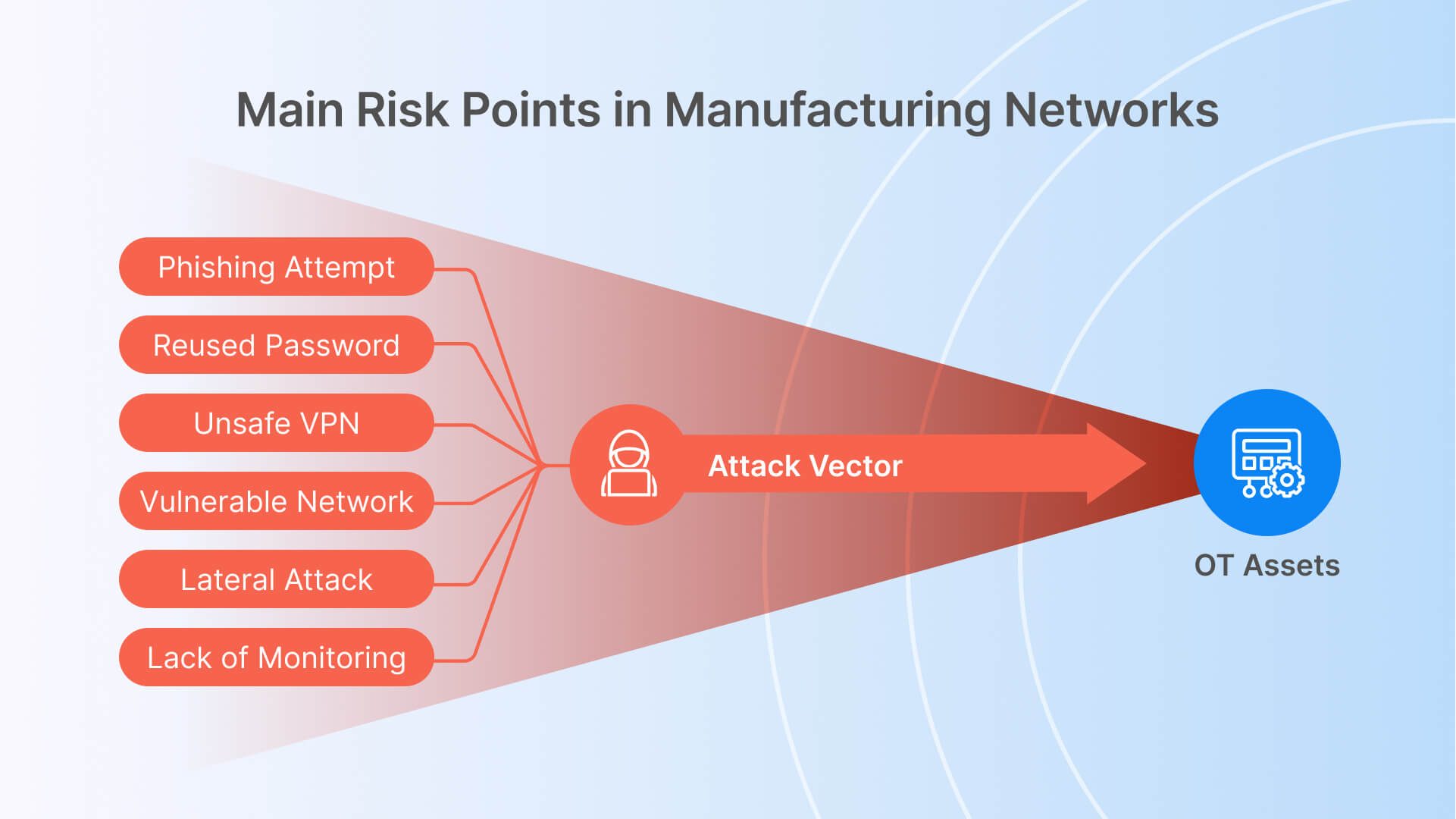
The attack chain is well-documented and consistent across incidents. An attacker compromises a vendor’s employee laptop — through phishing, credential stuffing against a reused password, or a supply chain compromise of the vendor’s own tooling. That compromised device has a VPN client with saved credentials for your network. The VPN connection grants network-level access to the segment the vendor uses for maintenance, which was never properly segmented from the production OT network. Within that segment, the attacker finds a jump server with a shared local administrator account — the same account used by six different vendors for the past three years.
From the jump server, lateral movement is straightforward. OT networks were designed for reliability and deterministic communication, not for adversarial lateral movement resistance. Flat layer-2 networks, broadcast traffic between PLCs, historian servers with unrestricted SMB access, and engineering workstations with local administrator privileges are all common and all exploitable. The attacker does not need sophisticated techniques — the access controls that would stop them were never implemented.
Vendor Access Failures in Real Manufacturing Incidents
The Colonial Pipeline attack in 2021 — which halted fuel distribution across the US East Coast — originated through a compromised VPN account. The Oldsmar water treatment facility incident in the same year involved remote access software (TeamViewer) that had been installed and forgotten, accessible through a shared password. The NotPetya malware spread through supply chain software update mechanisms into manufacturing networks globally, causing billions in damages to organizations that believed their OT environments were air-gapped.
These incidents share a common thread: the access mechanism existed for legitimate operational reasons, was never properly scoped or monitored, and provided a path that security controls were not designed to block. The problem is not that vendors need access — it is that the access was granted in a way that assumes the vendor’s environment and the vendor’s credentials are trustworthy, an assumption that Zero Trust access architecture explicitly rejects.

The Purdue Model and Why Vendor Access Must Respect OT Zone Boundaries
Understanding why vendor access controls are architecturally complex in manufacturing requires understanding the network model that OT environments are built around.
The Purdue Model: What Each Level Means for Access Control
The critical architectural point is this: legitimate vendor access in manufacturing is typically to Level 3 (historian, MES, engineering workstations) or Level 2 (SCADA, HMI) — occasionally to Level 1 for PLC programming during scheduled maintenance windows. The current VPN-and-jump-server model does not enforce which level a vendor can reach. Once the VPN session is established, network reachability depends on whatever firewall rules and routing was configured when the network was built — which in most manufacturing plants means the vendor can reach far more than they need to.
The OT DMZ: The Architectural Control Point for Vendor Access
The correct architecture places an OT DMZ — sometimes called the Industrial DMZ or IDMZ — between the enterprise network (L4/5) and the operations network (L3 and below). The IDMZ is the only zone from which connections to the OT network are permitted. All vendor access, whether from the internet or from the corporate network, terminates in the IDMZ. From the IDMZ, proxied or brokered connections reach the specific OT assets the vendor is authorized to access — and only those assets.
This architecture implements the IEC 62443-3-3 requirement for conduit-based communication between security zones: every connection crossing a zone boundary passes through a defined conduit (the IDMZ and its access control infrastructure), and no direct zone-to-zone connectivity exists. The vendor never has a network-level path to the OT zone — they have a brokered application-level path to specific authorized assets, which is a fundamentally different security posture.
IEC 62443 and NIS2 Requirements for Third-Party OT Access — What Compliance Actually Demands
Two regulatory frameworks define the current compliance landscape for OT vendor access controls in manufacturing: IEC 62443 (the international standard for industrial cybersecurity) and NIS2 (the EU Network and Information Security Directive, mandatory for critical infrastructure operators in EU member states from October 2024). Understanding what each actually requires — rather than a high-level summary — is necessary for designing controls that survive an audit.
IEC 62443 Third-Party Access Control Requirements
| Control Requirement | IEC 62443 Reference | What This Means in Practice |
|---|---|---|
| Authenticator management for external users | SR 1.5 / SL2 | External users (vendors) must use unique, individual credentials — no shared accounts. Credentials must be managed separately from internal user accounts and must be revocable without affecting other users. |
| Remote session establishment authorization | SR 1.1 / SL2 | Every vendor remote session must be individually authorized before it is established. Authorization must be documented and traceable to a specific maintenance request or change ticket. |
| Use control for remote maintenance | SR 2.1 / SL2 | Vendor sessions must be restricted to the specific assets and functions the vendor requires for the current maintenance task. Broad network access is explicitly non-compliant. |
| Session integrity during remote access | SR 3.1 / SL2 | All remote maintenance sessions must be encrypted. Session data in transit must be protected against modification and interception. |
| Remote session termination capability | SR 1.3 / SL2 | The asset owner (your team) must be able to terminate any vendor remote session immediately and without vendor cooperation. This requires a session control mechanism that is independent of the vendor’s access tool. |
| Audit trail for all remote sessions | SR 2.8 / SL2 | All remote maintenance sessions must generate audit records including session initiation, user identity, actions performed, and session termination. Records must be retained and protected against modification. |
| Session recording for high-criticality assets | SR 2.8 / SL3 | For Level 1 and Level 2 OT assets (PLCs, SCADA), session recording — capturing full video or command log of the session — is required at Security Level 3. This is applicable to most manufacturers under critical infrastructure designation. |
| Time-limited access authorization | SR 1.1 / SL2 | Vendor access must be time-bounded. Permanent standing access for vendor accounts is non-compliant. Access should be granted for the duration of a specific maintenance task and revoked when the task is complete. |
NIS2 Supply Chain Security Requirements for Manufacturing
NIS2 Article 21 requires essential and important entities — which includes most large manufacturers — to implement measures addressing ‘the security of the supply chain, including security-related aspects concerning the relationships between each entity and its direct suppliers or service providers.’ For vendor access to OT networks, this translates to specific operational requirements.
- Vendor security assessment: Before granting OT network access, you are required to assess the cybersecurity posture of the vendor. This does not require a full audit of every HVAC contractor, but it does require documented due diligence for vendors who access critical systems — PLC programmers, SCADA integrators, DCS vendors.
- Contractual security requirements: Service agreements with vendors who access OT systems must include cybersecurity obligations: minimum endpoint security requirements, incident notification obligations, and acceptable use policies for the access provided.
- Access control and monitoring obligations: NIS2 Article 21(2)(i) requires access control policies and multi-factor authentication for remote maintenance sessions. This is not a recommendation — it is a mandatory control.
- Incident reporting linkage: If a vendor-related incident occurs that affects your OT environment, NIS2 requires notification to the relevant national authority within 24 hours of becoming aware of the incident. This means your vendor access monitoring must be capable of detecting anomalous vendor behavior in real time, not retrospectively.
A Compliance Note for Non-EU Manufacturers
IEC 62443 is not geographically limited — it is referenced in procurement requirements, insurance policy terms, and customer security questionnaires globally. NIST SP 800-82 (Guide to OT Security) and ISA/IEC 62443 are increasingly cited as baseline requirements in US critical infrastructure sectors including manufacturing. Even organizations outside EU NIS2 jurisdiction are facing these requirements through their customer contracts and cyber insurance carriers. The controls described in this article satisfy requirements across all three frameworks.
Why VPN and Jump Servers Fail as OT Vendor Access Controls
Most manufacturing organizations already have some form of remote access infrastructure for vendor use. The problem is not that the infrastructure does not work — it is that it was never designed to meet the access control requirements described above.
The Five Fundamental Failures of VPN-Based Vendor Access
- Network-level access, not application-level access: A VPN session grants the vendor device membership in a network segment. Everything reachable from that segment is reachable from the vendor’s device — including assets the vendor has no business reason to access. VPN cannot enforce least-privilege access at the asset or protocol level.
- No session recording capability: VPN tunnels carry encrypted traffic between endpoints. There is no mechanism to capture a human-readable record of what the vendor did during the session — which commands were run, which files were accessed, which configurations were changed. This fails IEC 62443 SR 2.8 audit trail requirements directly.
- No real-time session termination at the protocol level: Dropping a VPN connection terminates the network session, but if the vendor has an RDP session or remote software session active inside the VPN, terminating the VPN may not cleanly terminate those inner sessions. IEC 62443 SR 1.3 requires the ability to terminate the vendor’s capability to act — not just their network connectivity.
- Credential sprawl and shared account risk: VPN credentials for vendors are typically managed separately from your identity provider, with long rotation cycles and frequent sharing within vendor organizations. A VPN credential issued to one engineer routinely gets used by five others. Individual accountability — a core requirement of IEC 62443 SR 1.1 — is impossible to enforce.
- No integration with access request and approval workflow: VPN access is typically always-on or always-available to a vendor with credentials. There is no mechanism to require that a vendor submit a maintenance request, receive approval, and have access granted only for the approved window. Permanent standing access for external parties is explicitly non-compliant with IEC 62443.
Why Jump Servers With Shared Accounts Make OT Compromises Worse
A jump server (or bastion host) provides a single point of entry into an OT segment, which is architecturally correct. The problem is almost always the access control layer on top of it. Jump servers in manufacturing OT environments typically have three characteristics that undermine their security value:
- Shared local accounts: The jump server has a local ‘admin’ or ‘maintenance’ account that is shared across all vendors and internal engineers. Individual accountability is impossible to enforce. When an incident occurs, the audit log shows the shared account name, not the individual user.
- Persistent credentials: Vendors know the shared account password indefinitely. When a vendor relationship ends or a vendor employee leaves, the credential is rarely rotated because doing so requires coordinating with every other party that uses it.
- No session isolation between vendors: Multiple vendors may be simultaneously connected to the same jump server. If one vendor’s session is compromised, the attacker has lateral movement opportunities to reach sessions and file shares that belong to other vendor engagements.
The Correct Architecture in One Sentence
Vendor access to OT assets should be granted through a brokered access layer in the OT DMZ that enforces individual identity, time-limited authorization, least-privilege asset targeting, encrypted session transport, full session recording, and real-time termination capability — with no direct network path from the vendor’s device to the OT network segment.
Zero Trust Vendor Access Architecture: The Components You Need
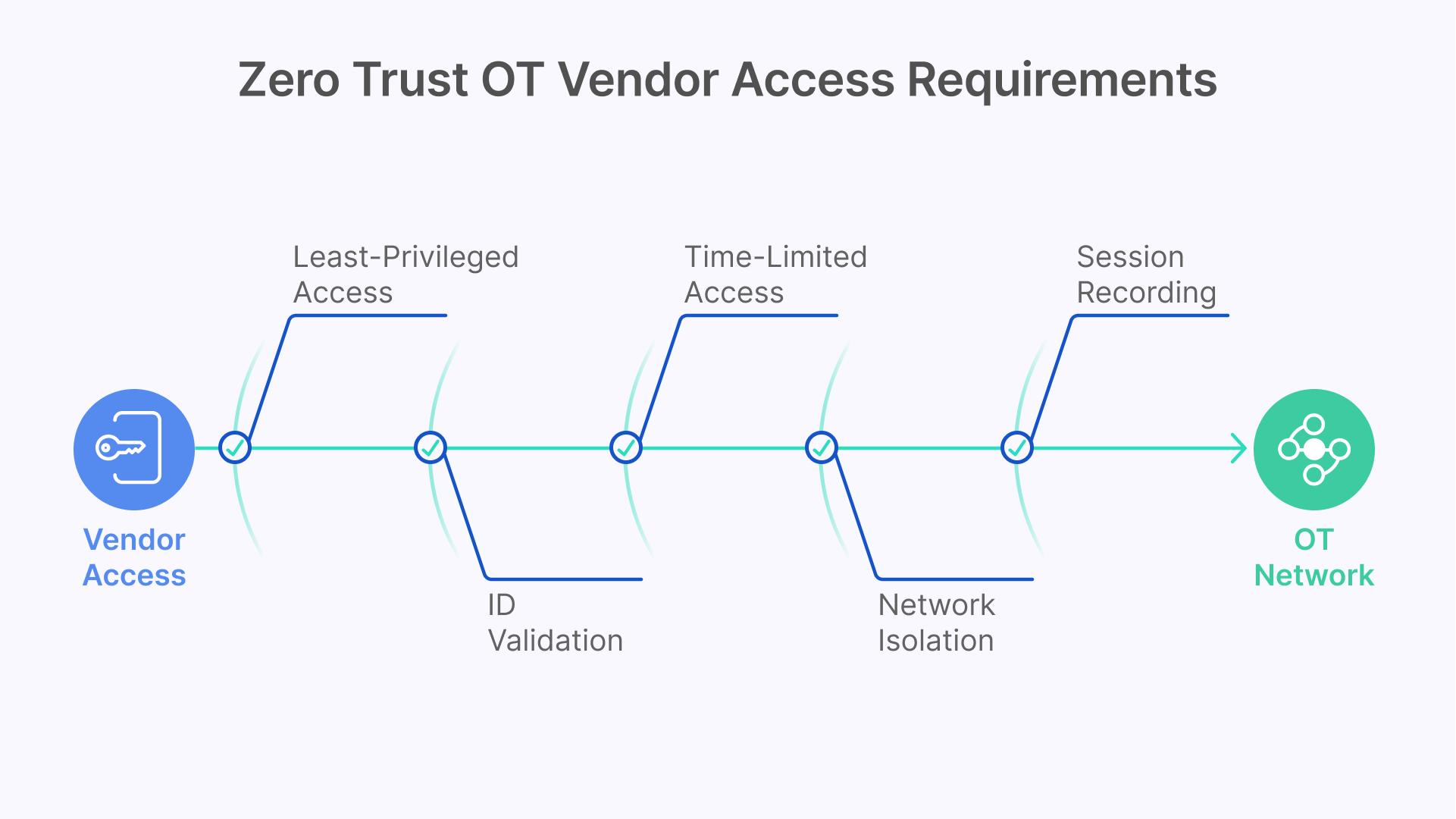
A production-grade Zero Trust architecture for OT vendor access requires coordination across five functional layers. Each layer addresses specific requirements from IEC 62443 and NIS2, and each requires specific tooling. The following covers what each layer must do and which tools address it.
Layer 1 — OT Asset Visibility: Know What Vendors Are Accessing Before You Control It
You cannot apply least-privilege access to OT assets you have not inventoried. Before designing vendor access controls, you need a complete and current inventory of every OT asset in scope: PLCs, RTUs, SCADA servers, HMI panels, historian servers, engineering workstations, and smart field devices. This inventory must include asset type, vendor, firmware version, network address, Purdue level assignment, and communication protocols in use.
Claroty and Dragos are the two most widely deployed OT asset discovery and network monitoring platforms in manufacturing. Both use passive network monitoring — analyzing industrial protocol traffic (Modbus, EtherNet/IP, PROFINET, DNP3, OPC-UA) to fingerprint assets without sending active probes that could disrupt sensitive PLC communications. The output is a continuously updated asset inventory with network communication baseline that serves two purposes: it defines the specific assets each vendor needs access to (the basis for least-privilege access policy), and it provides the behavioral baseline against which anomalous vendor activity is detected.
Dragos specifically includes threat intelligence for industrial control system adversary groups — the Platform identifies known ICS-targeting threat actor behaviors and maps them to the MITRE ATT&CK for ICS framework. For vendor access monitoring specifically, Dragos can identify when a vendor session is performing actions inconsistent with the declared maintenance purpose: accessing assets outside the approved scope, running reconnaissance tools, or exfiltrating configuration files.
Layer 2 — Identity and Authentication: Individual Accounts and MFA for Every Vendor Session
Every vendor who accesses your OT network must authenticate with an individual identity — no shared accounts. This requires an identity architecture that can onboard and offboard external users (vendors, contractors, temporary staff) without giving them access to your corporate identity directory.
The standard approach is a federated identity model: vendor employees authenticate through your identity provider using credentials managed in your system (rather than relying on the vendor’s IdP), with multi-factor authentication enforced for every OT network access session. Okta Workforce Identity and Microsoft Entra ID External Identities are both widely used for this purpose. Both support the creation of guest or external user accounts with MFA enforcement, conditional access policies, and automated account expiration based on contract end dates.
For high-criticality OT access — PLC programming sessions and DCS modifications at Level 1 — consider a privileged access workflow on top of basic MFA: the vendor submits a time-limited access request that requires dual authorization (one from the vendor’s project manager, one from your operations team) before the session is enabled. CyberArk Privileged Access Manager and BeyondTrust Privileged Remote Access both implement this workflow with OT-specific session recording integration. These are not mandatory for every vendor access scenario, but they are the appropriate control level for access to safety-critical systems.
Layer 3 — Access Request and Approval Workflow: Time-Limited, Ticket-Linked Authorization
Permanent standing access for vendor accounts — where a vendor can initiate a remote session at any time with no authorization step — is non-compliant with IEC 62443 and represents an unnecessary standing attack surface. The correct model is Just-in-Time (JIT) access: the vendor submits a maintenance request, the request is reviewed and approved, access is enabled for the specific approved window, and access is automatically revoked when the window closes.
This workflow can be implemented through your ITSM platform (ServiceNow, Jira Service Management) with an integration that enables and disables the vendor’s access credentials based on ticket state. The access window should be specific: not ‘this week’ but ‘Tuesday 14:00–18:00 UTC for firmware update on PLC-07 in Cell 3.’ The specificity enforces the least-privilege time dimension and creates an audit trail that directly satisfies IEC 62443 SR 1.1 authorization requirements.
Layer 4 — Session Delivery: Brokered Access That Never Exposes the OT Network
The session delivery layer is where the vendor’s authorized access actually flows — and it is the layer that determines whether your access controls are enforceable or merely advisory. The two common architectures are:
- VPN + RDP to jump server (legacy model): As described earlier, this model provides network-level access that cannot enforce least-privilege at the asset level, cannot provide session recording at the application layer, and cannot be terminated cleanly at the session level. It is the architecture you are moving away from.
- Brokered session delivery through OT DMZ (correct model): A session broker deployed in the OT DMZ accepts authenticated, authorized connections from vendors and proxies them to specific authorized OT assets. The vendor’s device never has a network path to the OT segment — it has an application-level session to specific authorized endpoints, through an intermediary that can record, monitor, and terminate the session in real time.
The brokered model requires that the session broker can speak the protocols used in OT environments: RDP for Windows-based HMI and SCADA workstations, VNC for Unix-based or embedded HMI systems, SSH for Linux-based systems and network devices, and Telnet for legacy serial-over-IP terminal servers. It also requires that the broker can be deployed in the OT DMZ in a configuration that initiates outbound connections to the gateway, rather than accepting inbound connections from the vendor network — preserving the OT network isolation.
Layer 5 — Session Recording and Audit: The Evidence Layer Required by IEC 62443
Session recording for OT vendor access is not a convenience feature — it is a compliance requirement under IEC 62443 SR 2.8 at Security Level 2 and above, and it is the primary forensic resource when a vendor-related incident needs to be investigated. A session record that captures the full visual output of the session — equivalent to a screen recording — allows your security team to reconstruct exactly what the vendor did during a maintenance visit, which assets were accessed, which configurations were changed, and whether any behavior was inconsistent with the declared maintenance purpose.
Session recording must be stored in a location that the vendor cannot access or modify — not on the jump server the vendor can reach, but on a write-protected log store in a separate segment. Retention policies should align with your regulatory requirements: IEC 62443 does not specify a retention period, but NIS2 audit requirements and most cyber insurance policies suggest a minimum of 12 months for OT session recordings.
Monitoring Vendor Sessions in Real Time: OT Visibility and SOC Integration

Implementing the access controls described above creates the architecture. Operating those controls effectively requires a monitoring layer that can detect anomalous vendor behavior during an active session — not just retrospectively after an incident.
Using Claroty or Dragos to Detect Anomalous Vendor Behavior in OT Sessions
Both Claroty and Dragos monitor OT network traffic passively. When a vendor session is active, the traffic from the brokered session to the target OT asset is visible on the OT network segment. Claroty and Dragos baseline normal communication patterns for each asset type — the typical command set for a Siemens PLC during routine maintenance, for example — and alert on deviations: commands outside the normal set, access to assets outside the approved scope, file transfers that exceed normal size thresholds, or communication to OT assets that were not included in the approved access window.
The alert output from these platforms should flow into your Security Operations Center (SOC) through a SIEM integration. For manufacturing organizations without a dedicated OT SOC, the alerts should at minimum flow to the operations team lead who can initiate session termination if anomalous behavior is detected. The goal is not to detect incidents after the fact but to interrupt active vendor sessions that are exhibiting suspicious behavior before damage reaches the process control layer.
Datadog for Unified Visibility Across IT and OT Vendor Access Infrastructure
Dragos and Claroty provide deep OT-specific visibility. Datadog provides the unified observability layer that connects OT session metrics with IT infrastructure metrics in a single operational view. For vendor access specifically, Datadog dashboards can surface: active vendor session count by vendor and by OT zone, session duration against approved window, failed authentication attempts by vendor identity, and infrastructure health of the IDMZ session broker components.
The practical value of this unified view is incident response speed. When Claroty or Dragos fires an alert on anomalous vendor behavior, the on-call engineer needs to identify which session is generating the alert, verify the infrastructure state of the broker and its connection to the target asset, and initiate session termination — all in under 5 minutes. A Datadog dashboard that surfaces session identity, infrastructure state, and OT alert correlation in a single view reduces the cognitive load of that response sequence significantly.
How Thinfinity Workspace Implements Zero Trust Vendor Access for OT Networks
The architecture described in this article — OT DMZ session broker, individual identity enforcement, time-limited authorization, multi-protocol session delivery, session recording, and real-time termination — is the architecture that Thinfinity Workspace was specifically designed to support in manufacturing environments. Here is how each component of that architecture maps to Thinfinity functionality.
The Secondary Broker Architecture: How Thinfinity Reaches Air-Gapped OT Networks
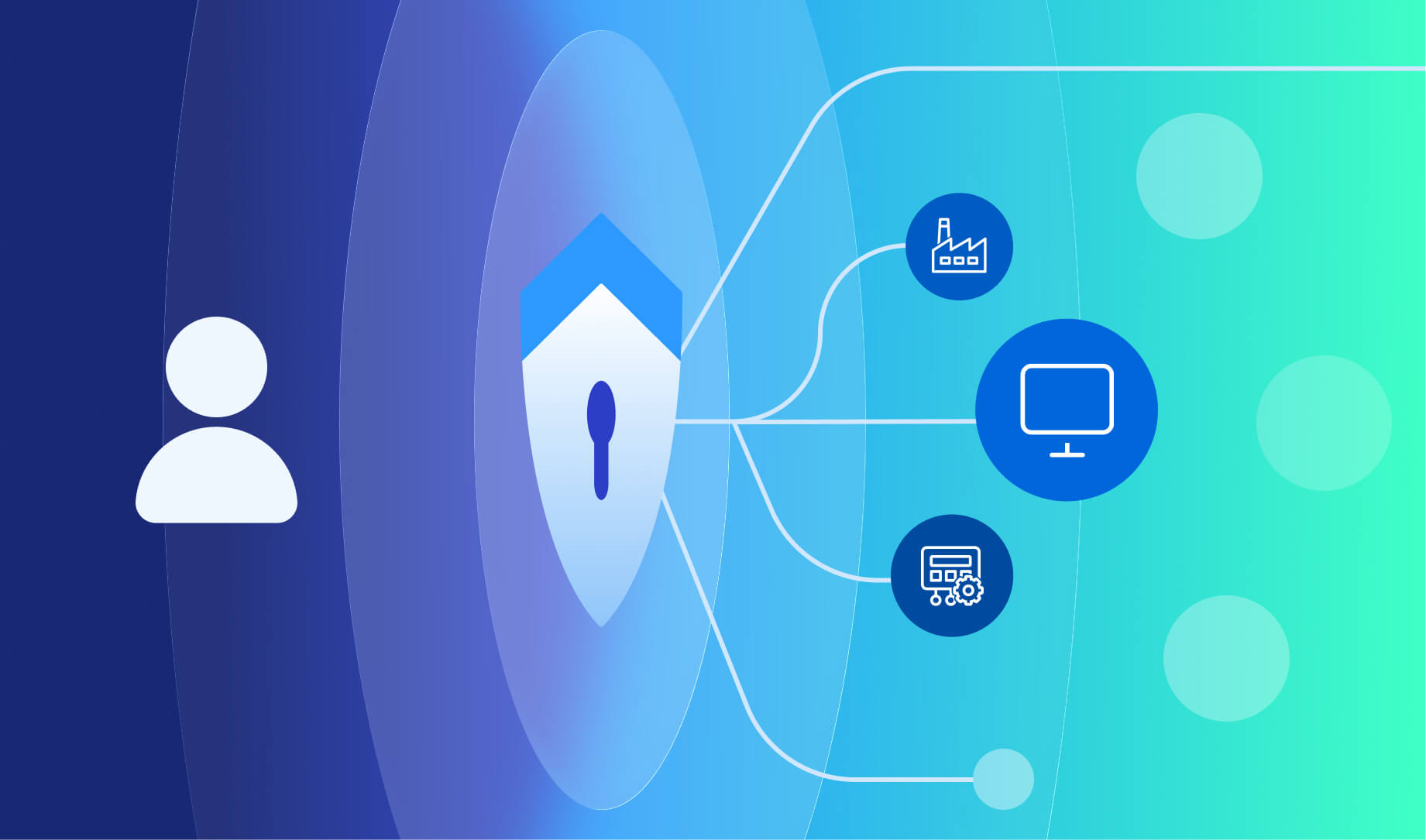
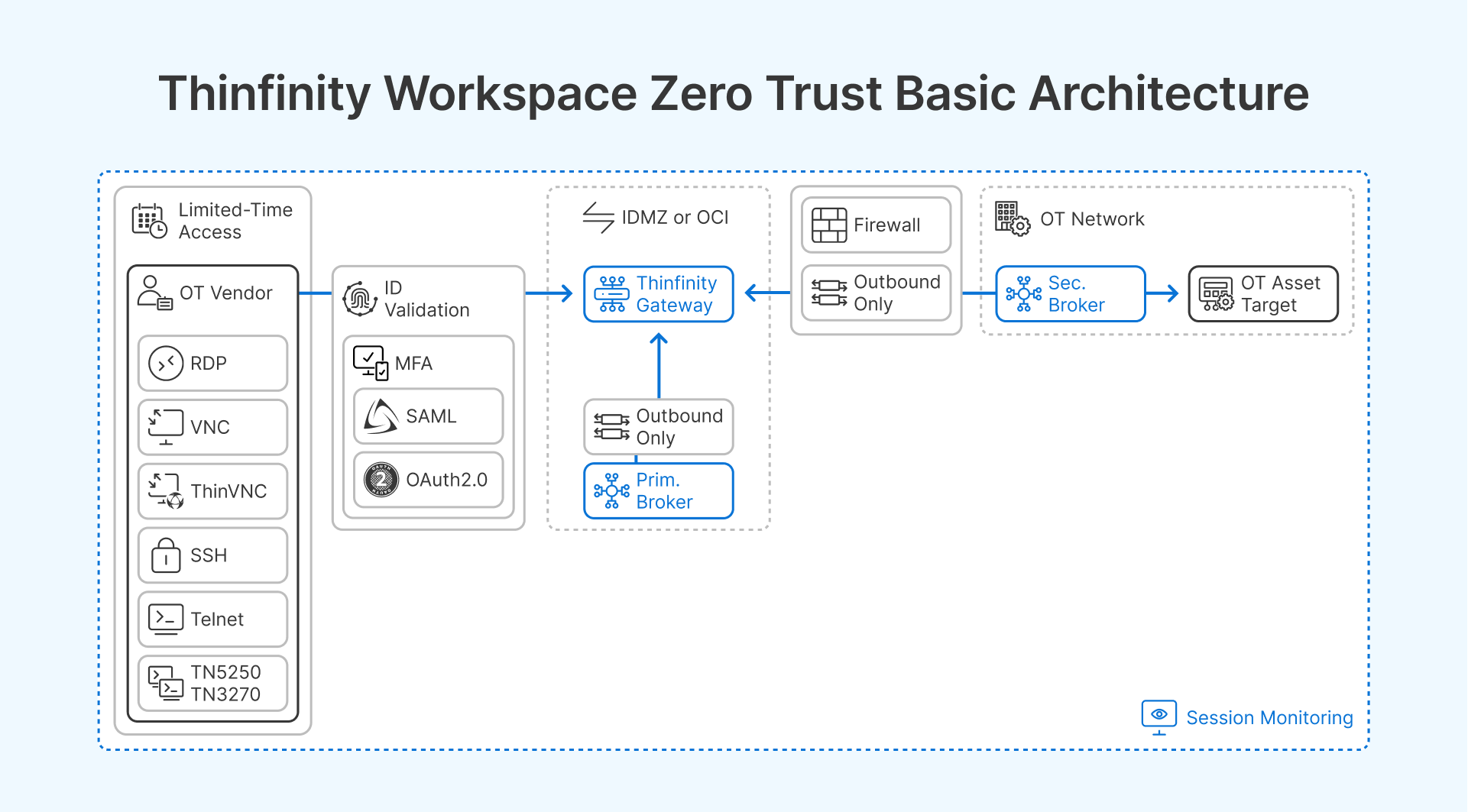
Thinfinity’s secondary broker (or Relay Gateway) is a lightweight component deployable inside the OT DMZ or directly within the OT network segment. It initiates an outbound connection to the primary Thinfinity Gateway — which sits in the IDMZ or in OCI — and maintains a persistent, encrypted tunnel through which sessions are proxied. No inbound ports need to be opened on the OT network firewall. The OT network boundary does not change — the broker simply creates a controlled, audited corridor through it.
When a vendor is granted a time-limited session to a specific OT asset, the session flows: vendor device -> Thinfinity Gateway (IDMZ or OCI) -> secondary broker (OT DMZ) -> target OT asset. The vendor’s device has no network path to the OT segment at any point. The gateway enforces authentication and authorization at the session entry point. The secondary broker enforces that only authorized asset targets are reachable from any given session. The target OT asset sees an inbound connection from the secondary broker, not from the vendor’s device.
Multi-Protocol Support for Diverse OT Asset Types
OT environments use a wider range of remote access protocols than standard IT environments. Thinfinity supports RDP (Windows-based SCADA and HMI workstations), VNC (Linux-based and embedded HMI panels), SSH (Linux systems, network devices, and industrial PCs), Telnet and TN3270/5250 (legacy terminal servers and AS/400-connected plant systems), and Thinfinity VNC (a lightweight VNC-compatible protocol for embedded systems with limited resources).
This protocol coverage means that a single Thinfinity deployment can broker vendor access to the full range of OT asset types in a manufacturing environment — from a Windows Server 2022 SCADA workstation to a legacy Motorola terminal emulation session — through the same access control layer, with the same identity enforcement, the same session recording, and the same audit trail. You do not need separate access tools for different protocol types, which eliminates the management complexity of running parallel access systems.
Session Recording, Audit Logs, and Compliance Evidence
Thinfinity records vendor sessions — capturing full session video or action logs — and stores recordings in a configurable location separate from the session broker. For cloud-brokered sessions (IDMZ or OCI), recordings can be stored in OCI Object Storage with immutable retention policies that prevent modification or deletion. For on-premises brokered sessions, recordings can be stored on a write-protected NFS share in a segment inaccessible to vendor accounts.
Audit logs capture session initiation time, authenticated user identity, target asset, session duration, and termination method (normal end or administrator termination). These logs satisfy IEC 62443 SR 2.8 audit trail requirements and provide the evidentiary record required for NIS2 incident investigations. Logs export to standard SIEM formats (CEF, JSON) for ingestion into Datadog, Splunk, IBM QRadar, or your SOC platform.
RBAC, Time-Limited Access, and JIT Authorization Integration
Thinfinity’s role-based access control (RBAC) layer allows you to define which assets each vendor identity can reach, which protocols they can use, and which time windows their access is valid. A PLC vendor authorized for Tuesday maintenance on Cell 3 PLCs gets exactly that scope — no other assets, no other protocol, no access outside that window.
For JIT authorization integration, Thinfinity’s access policies can be driven by external authorization sources — a ServiceNow ticket in ‘Approved’ state enables a vendor’s access profile; when the ticket moves to ‘Closed’ or ‘Resolved,’ the access profile is disabled. This integration requires a webhook or API call from your ITSM to the Thinfinity API, but it closes the gap between your maintenance approval process and your access control enforcement. The access that was approved in your change management system is exactly the access that exists in the network.
Identity Provider Integration for Vendor Account Management
Thinfinity integrates with SAML 2.0, OAuth 2.0, and LDAP identity providers. For vendor access, the recommended configuration is Microsoft Entra ID External Identities or Okta with a dedicated vendor identity domain: vendor employees are onboarded as external guest accounts with MFA enforced, account expiration set to contract end date, and conditional access policies that restrict logins to the Thinfinity portal only — no access to any other corporate resource. When the vendor contract ends, account expiration automatically revokes access without requiring manual deprovisioning.
For high-criticality access scenarios, CyberArk or BeyondTrust can sit between the identity provider and the Thinfinity session — adding privileged access workflow (dual authorization, credential vaulting, session check-in/check-out) for Level 1 OT access. Thinfinity sessions can be launched from within CyberArk or BeyondTrust’s privileged access portal, inheriting the approval workflow and additional audit trail from the PAM layer.