
Scaling a telecom contact center is a math problem masquerading as a customer experience challenge. A mid-sized carrier operates 3,000–5,000 agent seats across 10–15 geographically distributed locations. Each seat consumes $1500–$2500 per year in physical desktop hardware, software, and support labor. At 30–45% annual agent turnover—a reality in BPO and contact center operations—that is 900–2,250 agents onboarded per year, each requiring 2–3 days of desktop provisioning and training before they can take their first call.
The financial and operational burden is staggering. A $47 million annual desktop bill. Weekend maintenance windows to patch 3,000+ machines in parallel. Energy consumption from 3,000 always-on workstations, regardless of actual call volume (seasonal peaks vs. winter troughs). Data compliance nightmares: physical desktops scattered across distributed sites make it nearly impossible to enforce PCI-DSS controls or prevent payment data leakage.
Thinfinity Workspace on Oracle Cloud Infrastructure solves this problem with virtualized, non-persistent agent desktops. Agents provision in minutes instead of days. Every desktop is identically configured, instantly. Energy costs drop 80% because compute scales with actual demand. Patching becomes a 30-minute rollout, not a weekend affair. PCI-DSS compliance shifts from a nightmare to a checkbox: all payment data stays in the cloud, and agents have zero access to sensitive credentials.
This guide takes you through the strategic, operational, and technical case for VDI-powered contact centers. You will learn how to architect omnichannel agent desktops that integrate voice, chat, email, social, and video. You will see the business case at different scales (1,000 agents, 5,000 agents, 10,000+ agents). And you will follow a realistic 20-week deployment roadmap from proof-of-concept to full-scale production.
The Contact Center’s $47 Million Desktop Problem
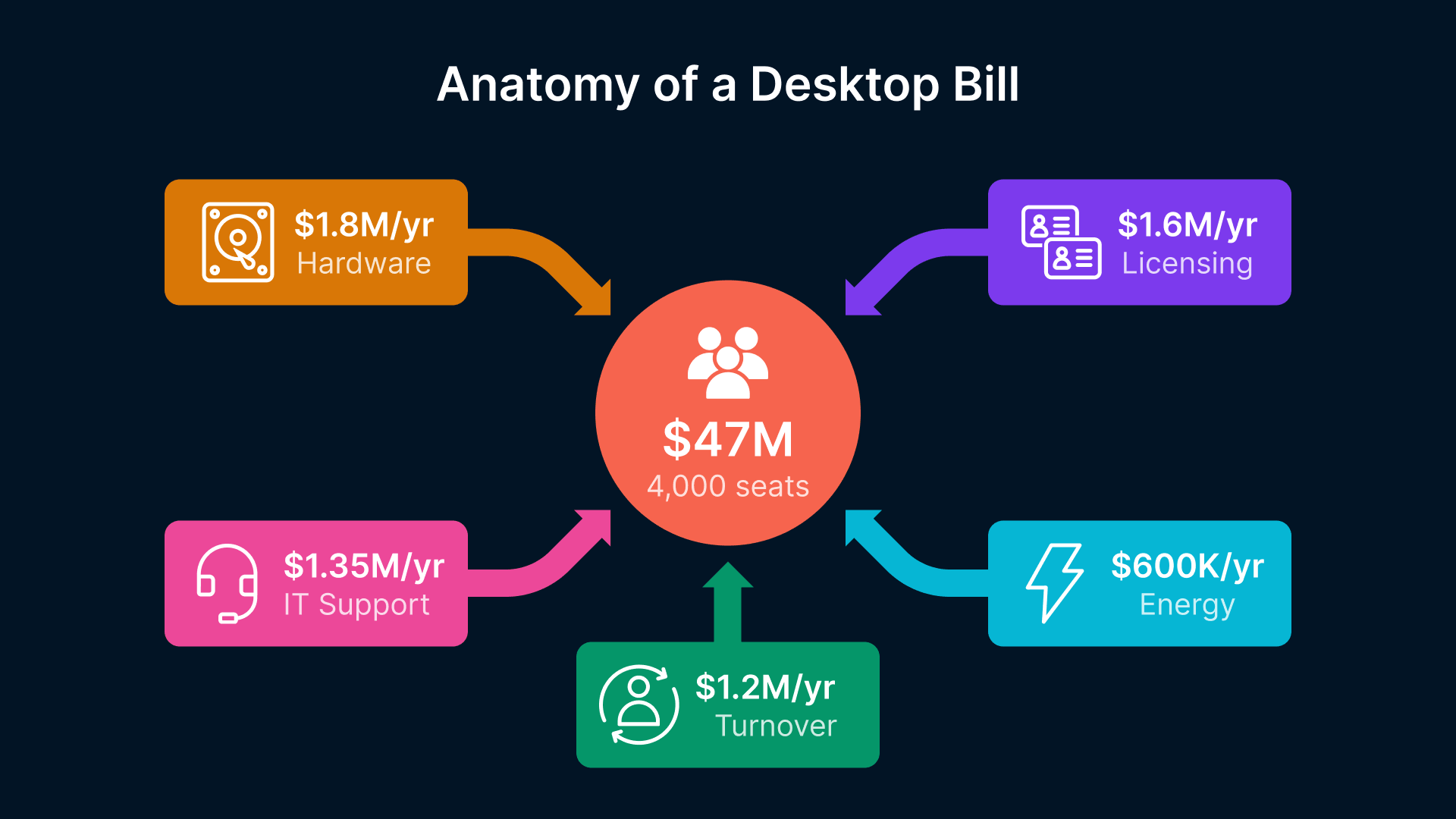
Consider the financials of a Tier-1 telecom contact center operating 4,000 agent seats:
- Hardware cost: $1,800 per seat times 4,000 agents = $7.2M capex every 4 years. Amortized annually: $1.8M.
- Software licensing: Unified Communications (UC) per-seat licensing, CRM, phone systems, omnichannel platforms: $300–$500 per agent per year. At 4,000 agents: $1.2M–$2M annually.
- Support and management: IT staff for provisioning, patching, hardware replacement, troubleshooting, and helpdesk support. Conservative estimate: 8–10 FTEs at $150K fully loaded = $1.2M–$1.5M annually.
- Energy and facilities: Always-on desktop hardware consuming 150–200W per machine. At 4,000 desktops running 24/7: 600–800 kW continuous load. Annual electricity: $500K–$700K. Plus physical space and cooling infrastructure.
- Turnover and onboarding: At 40% annual turnover, 1,600 agents departing and arriving yearly. Each new hire requires 2–3 days of IT provisioning ($600–$900 labor cost) before training begins. Turnover provisioning cost: $960K–$1.4M annually.
Total annual cost: $6.7M–$8.6M for desktop infrastructure alone, not including contact center software, facilities, or agent salaries.

Call center turnover rates average 40-45% annually in 2026, with high-stress sectors reaching 55-60%.

Why CIOs Are Rethinking the Agent Desktop
CIOs are under pressure to reduce cost per agent, improve time-to-productivity, and maintain compliance across fragmented locations. The physical desktop model breaks on all three fronts:
- Cost per seat: Locked into capex cycles and energy spend, with little ability to scale down during seasonal troughs. A 10% reduction in agent headcount still requires 90% of the infrastructure spend.
- Onboarding velocity: New hires cannot take calls until their desktop is imaged, configured, and tested. This takes 2–3 days, delaying revenue-generating activities.
- Compliance and control: Physical desktops at 15 different sites are nearly impossible to audit. USB devices leak payment card data. Unencrypted chat logs sit in agent local storage. Regulatory exposure is substantial.
Virtualization on OCI flips each constraint:
- Cost per seat: Non-persistent VDI means you provision new sessions on-demand and retire them when agents log off. Idle capacity is minimal. In seasonal troughs, you reduce instance count automatically; in peaks, you scale up in minutes.
- Onboarding velocity: Cloud Manager pre-configures an agent desktop from a golden image in under 5 minutes. The agent is productive by minute 10.
- Compliance and control: All sessions run on OCI infrastructure with centralized policy enforcement. Payment data stays in encrypted vaults; agents never touch it. Session recordings enable forensic audit.
The Hardware Refresh Cycle Is Bleeding Cash
If the numbers above look familiar, you’re not alone. The telecom contact center desktop crisis — $7.5M–$15M hardware refresh cycles, 30–45% agent turnover draining provisioning budgets, and security gaps that no amount of endpoint patching can close — is an industry-wide reckoning. For a full breakdown of why the 3-year hardware refresh model is collapsing and what the TCO math really looks like, start with our deep-dive: “The Telecom Contact Center Desktop Crisis: Why Your 3-Year Hardware Refresh Cycle Is Bleeding Cash and Creating Security Holes.”
The Omnichannel Complexity Multiplier
Modern contact centers do not just handle voice calls. They manage voice, chat, email, social media, and video—often in a single customer interaction. An agent might be on a voice call while responding to a chat inquiry, looking up the customer email history, and monitoring a Twitter mention, all in parallel. The desktop must provide unified access to all these channels.
Physical desktops often handle this through a scattered array of applications: Avaya or Genesys for voice, Zendesk or Salesforce for chat/email, Twitter native app for social, and custom integrations gluing them together. It is messy and costly.
Thinfinity on OCI enables a unified desktop experience: a single agent session running all omnichannel applications, with context shared seamlessly. An agent switches between voice and chat without logging in or out. Thinfinity multi-monitor support (if agents use 2–3 screens) allows parallel channels to be visible simultaneously.
VDI Architecture for Omnichannel Agent Desktops
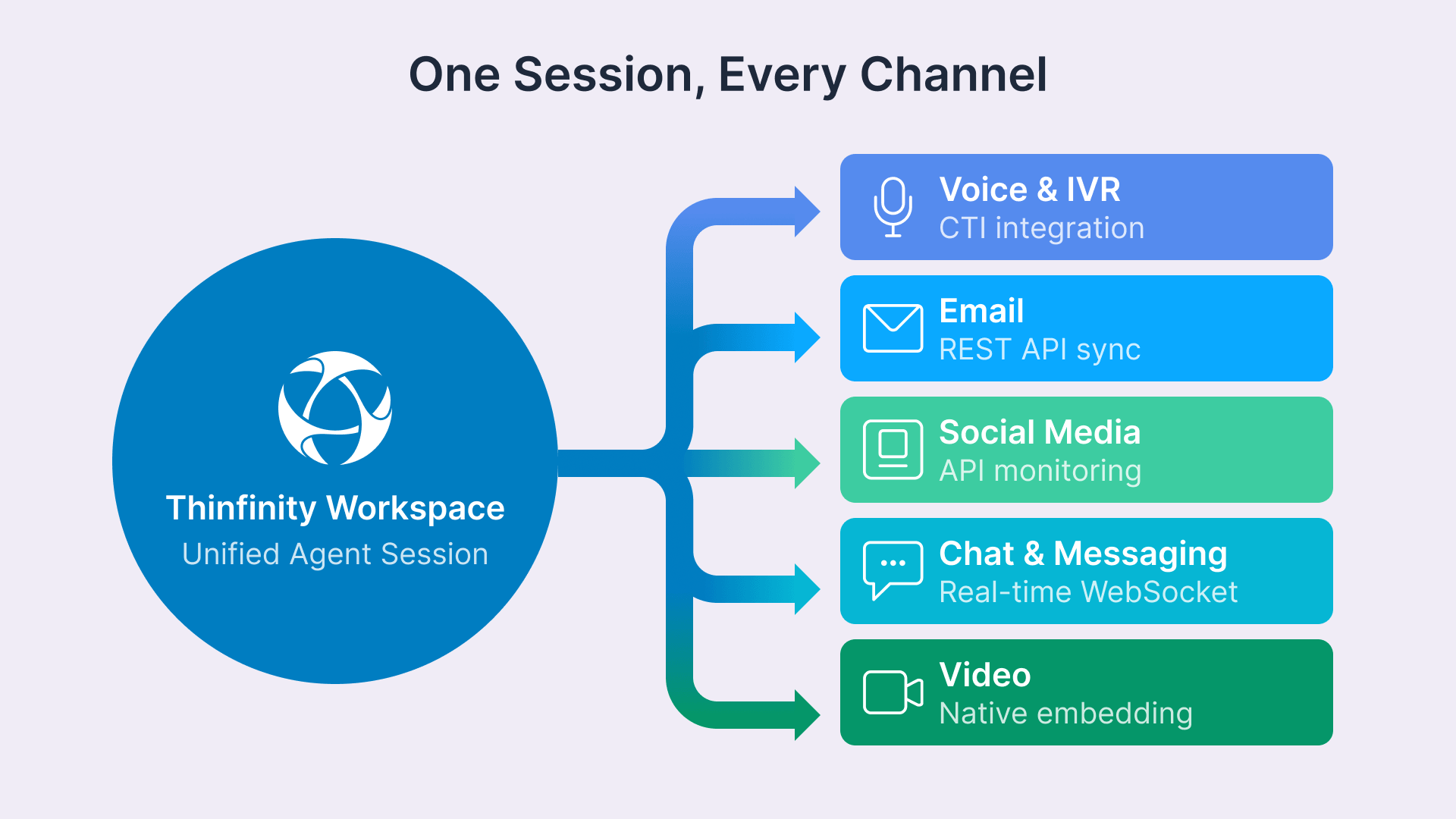
An omnichannel contact center desktop must integrate voice, chat, email, social, video, customer data, and business applications—all accessible from a single unified interface. Unlike a traditional call center (which might support one or two channels), an omnichannel architecture is inherently complex.
The Unified Desktop — Voice + Chat + Email + Social + Video in One Session
Thinfinity Workspace delivers a unified desktop that consolidates all customer interaction channels. Here is how it works:
- Session foundation: Each agent session runs a modern Windows 10/11 or Linux desktop, deployed from a golden image on OCI Block Storage.
- Channel integration: Thinfinity orchestrates integrations with voice (Avaya, Genesys, or Cisco), chat and email (Salesforce, Zendesk, Intercom), social (Twitter, Facebook APIs), and video (Cisco WebEx, Zoom, Teams via app).
- Unified customer context: A CRM integration (Salesforce, Dynamics, custom APIs) provides a single “customer 360” view accessible from any channel. An agent answering a voice call can instantly see the customer chat and email history.
- Non-persistent pool: Agents log in, work, and log off. The virtual desktop session is discarded at logout (non-persistent), and a fresh instance is provisioned for the next agent. This ensures zero carryover of agent customizations or data.
From the agent perspective, it is a seamless desktop experience. From the operations perspective, it is a highly efficient, stateless architecture that scales and patches effortlessly.
| Channel / Category | Sample Applications | Integration Type | Priority |
|---|---|---|---|
| Voice / IVR | Avaya Aura, Genesys PureCloud, Cisco UCM | CTI Integration (ACD event sync) | Critical |
| Chat / Messaging | Zendesk, Intercom, custom WebSocket | REST API + WebSocket | High |
| Salesforce Service Cloud, Gmail, Outlook | IMAP/REST API | High | |
| Social Media | Twitter, Facebook, TikTok Business (APIs) | Social media APIs / Hootsuite | Medium |
| Video | Cisco WebEx, Zoom, Google Meet | App native embedding | Medium |
| CRM / Customer Data | Salesforce, Dynamics 365, Oracle CX | REST API (single sign-on) | Critical |
| Workforce Management | Genesys WFM, Nice WFO, custom dashboards | Real-time dashboards (Grafana, Tableau) | High |
| Knowledge Base / Scripts | Salesforce Knowledge, custom wiki, learning portal | Web access (read-only, cached) | Medium |
Non-Persistent Pools and Rapid Provisioning
Non-persistent VDI is the secret sauce of high-scale contact center operations. Unlike persistent desktops (which are stateful and tied to a user), non-persistent desktops are disposable. Each agent logs in, works, logs off—and the desktop is destroyed.
Benefits are substantial:
- Instant provisioning: New agent arrives for training → Cloud Manager allocates a session from the pool → Agent is productive in 5 minutes. No multi-day hardware procurement or imaging.
- Identical desktops: Every agent has the exact same configuration, applications, and performance profile. No “my desktop is slow” variance.
- Instant patching: Apply a security patch to the golden image → new sessions use the patched version. Existing sessions continue until they log off.
- Stateless scale: Capacity is a pool of identical instances. Scale up by adding instances; scale down by retiring idle instances. Automatic based on queue depth or time of day.
Agent Onboarding in Minutes, Not Days
Compare the old vs. new onboarding experience:
Physical desktop model:
- Day 1: New hire arrives. IT creates account in Active Directory.
- Day 1: IT ships physical desktop from stock (or orders new one if out of stock).
- Day 2: Desktop arrives. IT unpacks, racks, configures network, images OS.
- Day 3: IT installs applications, configures voice phone, tests CRM access. Agent begins training.
- Day 5: Agent takes first call.
VDI model with Thinfinity on OCI:
- Day 1: New hire arrives. HR creates account in Active Directory.
- Day 1: Cloud Manager provisions VDI session from golden image (approximately 3 minutes). Agent receives login credentials.
- Day 1: Agent logs in, sees fully configured desktop with all omnichannel applications ready. Begins training.
- Day 2: Agent takes first call.
The reduction: 3 days of IT labor per hire, and 3 days faster time-to-productivity. At 40% annual turnover, that is 1,200 agent-days per year of accelerated revenue generation.
The Business Case — TCO Comparison
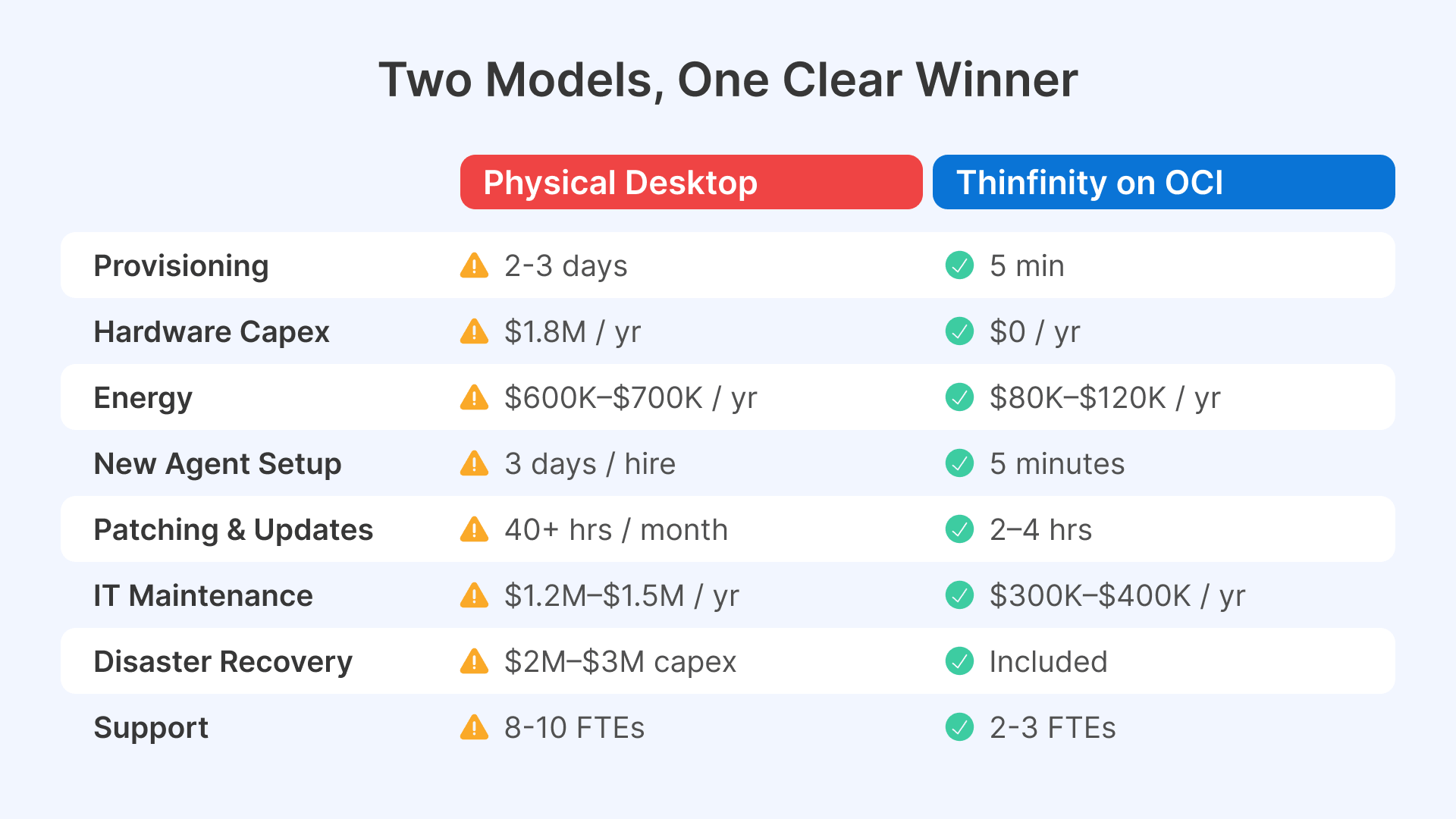
The financial case for VDI contact centers is compelling, especially at scale. Here is a detailed 3-year TCO comparison for a 4,000-seat contact center:
| Cost Component | Physical Desktop | VDI on OCI |
|---|---|---|
| Provisioning Time / New Hire | 2–3 days IT labor ($600–$900) | Under 5 minutes, automated ($25) |
| Hardware Capex (3-year) | $7.2M ($1.8M/year) | $0 (opex model) |
| Energy (annual) | $600K–$700K for always-on | $80K–$120K (elastic scale) |
| Patching & Updates (labor) | 40+ hours weekend labor/month | 2–4 hours one-time (to golden image) |
| Maintenance & Support (annual) | $1.2M–$1.5M (8–10 FTEs) | $300K–$400K (Cloud Manager + minor support) |
| Software Licensing (annual) | $1.2M–$2M per-seat | $800K–$1.2M (lower per-user rate on OCI) |
| Disaster Recovery (capex) | $2M–$3M secondary site | Included in OCI (multi-region replication) |
| Onboarding Velocity | Slow (3 days per agent) | Fast (under 5 minutes per agent) |
ROI at Scale — 1,000, 5,000, 10,000 Agents
The financial benefit varies by scale:
- 1,000 agents: Physical annual cost: $1.7M–$2.1M. VDI annual cost (OCI + Thinfinity): $900K–$1.1M. Year 1 savings: $800K–$1.2M. Payback: 6–8 months.
- 5,000 agents: Physical annual cost: $8.5M–$10.5M. VDI annual cost: $4M–$5M. Year 1 savings: $4.5M–$6.5M. Payback: 3–4 months.
- 10,000 agents: Physical annual cost: $17M–$21M. VDI annual cost: $7.5M–$9M. Year 1 savings: $9.5M–$13.5M. Payback: 2–3 months.
The larger the scale, the faster the payback. At 10,000+ agents, the annual savings exceed $10M, and the payback period is under 3 months.
Contact Center VDI Profiles
Different agent roles require different resource profiles. Cloud Manager supports role-based pool assignments, ensuring each agent type gets appropriate compute and memory:
| Agent Role | Primary Channels | Typical Load | OCI Compute Shape |
|---|---|---|---|
| Voice-Only Agent | Inbound/Outbound voice calls | Low (single active call) | VM.Standard.E4.Flex (1 vCPU, 4 GB RAM) |
| Omnichannel Generalist | Voice + Chat + Email (3 concurrent interactions) | Medium (parallel channels) | VM.Standard.E4.Flex (2 vCPU, 8 GB RAM) |
| Chat-Focused Agent | Chat + Email + Knowledge Base | Medium (10–15 concurrent chats) | VM.Standard.E4.Flex (1 vCPU, 4 GB RAM) |
| Social Media Specialist | Twitter, Facebook, TikTok monitoring + responses | Low (async monitoring) | VM.Standard.E4.Flex (1 vCPU, 4 GB RAM) |
| Supervisor / Team Lead | Monitoring team queues, coaching, QA, escalations | High (dashboard + video) | VM.Standard.E4.Flex (4 vCPU, 16 GB RAM) |
| Quality Analyst | Call recordings, sentiment analysis, compliance review | Medium (data analysis) | VM.Standard.E4.Flex (2 vCPU, 8 GB RAM) |
Compliance for CX Operations
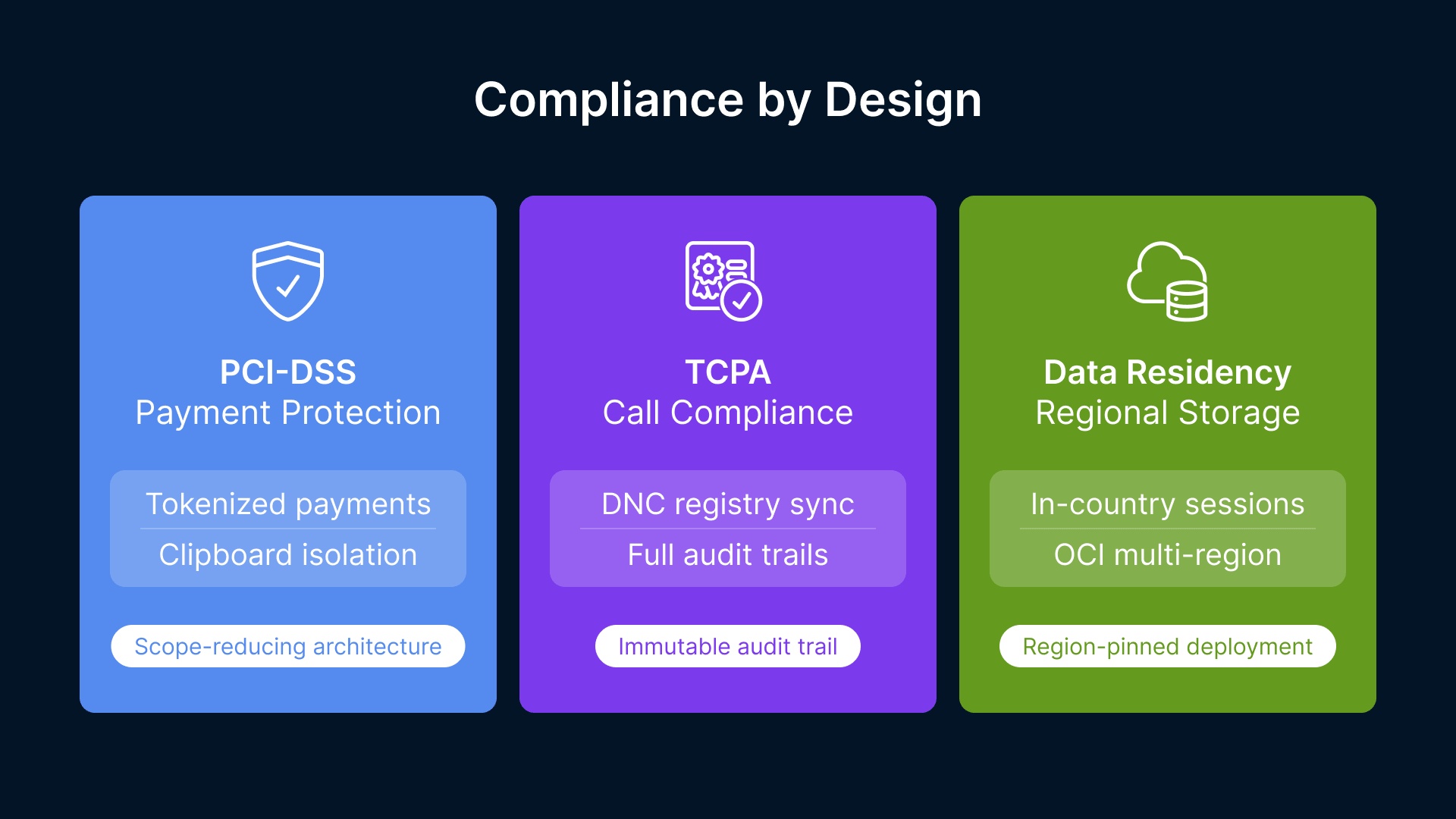
Contact centers handle sensitive data: payment cards, personal identification, account details, and health information (in telehealth use cases). Regulatory compliance is non-negotiable.
PCI-DSS for Payment, TCPA for Outbound, Data Residency
- PCI-DSS (Payment Card Data): Agents must never see, type, or store payment card numbers. Thinfinity enables this through payment gateway integration: the agent session is connected to a payment terminal or secure token service, not to raw card data. Call recordings and session transcripts are automatically masked of card numbers (using PCI-compliant redaction APIs).
- TCPA (Outbound Calling): Telecom carriers face strict TCPA compliance requirements for outbound campaigns. Thinfinity tracks and logs all outbound interactions, integrates with do-not-call registries, and provides audit trails for compliance review. Session recordings capture agent adherence to call scripts and compliance procedures.
- Data Residency: Some jurisdictions require data to remain in-country (e.g., GDPR in EU, India Act in India). Thinfinity on OCI allows deployment to region-specific instances. All agent sessions, recordings, and data are stored in the designated region, ensuring compliance.
Cloud Manager enforces compliance policies at the session level:
- Clipboard isolation: Agents cannot copy card data from a chat or email to local applications.
- USB redirection: Block USB drives and removable media to prevent data exfiltration.
- Screen recording: All agent interactions are recorded and timestamped, providing an audit trail for compliance audits.
Deployment Roadmap (3 Phases, 20 Weeks)
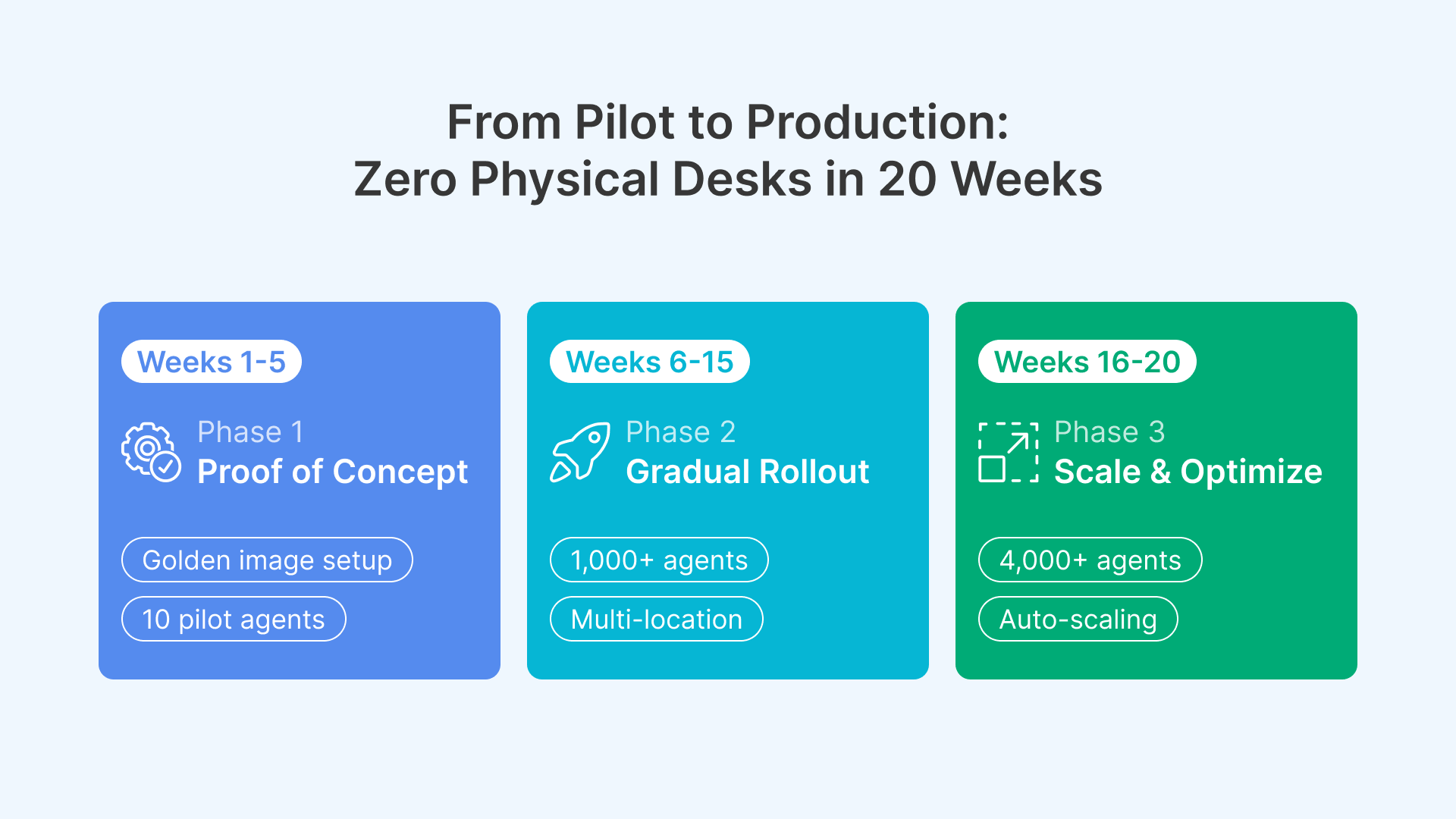
Deploying contact center VDI at scale is a methodical process. Rushing risks agent adoption and operational stability. Here is a realistic 20-week roadmap:
Phase 1: Proof of Concept (Weeks 1–5)
- Week 1: OCI environment provisioning: VCN, subnets, VPN, and initial Thinfinity Workspace cluster (2 x VM.Standard.E4.Flex instances). Golden image creation: Windows 10, voice soft client (Avaya, Genesys), Salesforce CRM, Zendesk chat, Zoom video. Cloud Manager setup and role-based policy configuration.
- Week 2: Enroll 10 pilot agents from different teams (voice, chat, omnichannel). Configure their profiles in Cloud Manager. Run parallel production: pilots on VDI, legacy desktops as backup.
- Week 3: Monitor pilot performance: login times, call handling, latency, audio quality on voice calls, chat responsiveness. Gather feedback from agents and supervisors.
- Week 4: Optimize: adjust voice codec settings, increase RAM allocation if needed, fine-tune CRM API response times, configure session recording.
- Week 5: Success gate: if pilots report satisfaction and no production issues, move to Phase 2. If problems emerge, extend pilot and refine.
Success criteria: 10 pilots run full production shifts on VDI for 1 week with zero dropped calls, under 100ms latency, and agent satisfaction greater than 8/10.
Phase 2: Gradual Rollout (Weeks 6–15)
- Week 6: Expand Thinfinity cluster to 5 instances (capacity for 50+ concurrent sessions). Enroll Tier 1 of agents (200 agents across all shifts in one location). Use Cloud Manager to automate provisioning and role-based assignment.
- Week 7–8: Run parallel production. Monitor queue depth, call abandonment rates, average handle time, and agent satisfaction. Tweak configurations based on real load.
- Week 9: Enroll Tier 2 (300 more agents, two more locations). Scale Thinfinity to 8 instances. Test failover and multi-location load balancing.
- Week 10–11: Deploy omnichannel integrations: chat (Zendesk), social (Twitter API), and video (Zoom integration). Test multi-channel agent workflows.
- Week 12: Enroll Tier 3 (remaining agents from Phase 1 locations). Decommission legacy physical desktops from enrolled locations.
- Week 13–15: Expand to additional locations: provision Thinfinity instances in secondary data centers, configure multi-location failover and load balancing through Cloud Manager.
Success criteria: 1,000+ agents across 3+ locations on VDI. Production metrics stable: call quality unaffected, agent productivity maintained or improved, IT support tickets reduced 50%.
Phase 3: Scale and Optimize (Weeks 16–20)
- Week 16: Analyze Phase 2 metrics: per-agent cost, energy savings, onboarding time, support overhead. Document lessons learned.
- Week 17–18: Deploy multi-region redundancy: replicate OCI instances and storage to secondary region. Test automated failover and session recovery.
- Week 19: Enroll remaining agents (all 4,000+). Auto-scaling policies configured: scale up during peak hours (8am–6pm), scale down at night and weekends. Implement cost tracking dashboards.
- Week 20: Final optimization, knowledge transfer to operations, sunset legacy physical desktops. Full production handoff.
Success criteria: All agents on VDI. Annual cost reduced 50% vs. physical baseline. Provisioning time reduced to under 5 minutes per agent. Support overhead reduced 70%. Ready to scale to 10,000+ agents with minimal additional effort.
80% Energy Savings at Scale
A 4,000-seat contact center with always-on physical desktops consumes 600–800 kW continuously. OCI VDI with elastic scaling reduces this to 80–120 kW average (elastic scaling down at night, on weekends, and during low-call-volume periods). Annual electricity savings: $500K–$600K. Plus, elimination of local cooling infrastructure means another $100K–$200K in facility savings. Total energy and facilities savings: $600K–$800K annually.
Telecom contact centers operate in an era of rising agent costs, increasing compliance burdens, and relentless pressure to deliver better customer experiences faster. Physical desktops simply cannot keep pace. Virtualization on OCI with Thinfinity Workspace fundamentally changes the equation: faster onboarding, lower costs per agent, elastic scaling for peaks and troughs, and compliance-ready architectures.
The business case is compelling. A 5,000-seat contact center moving to VDI realizes $4.5M+ in annual savings, with payback in 3–4 months. Agents become more productive (less time on desktop issues, more time on customer interactions). The IT team workload drops dramatically: no more weekend patch windows, no more hardware procurement delays, no more escalations about slow desktops.
If you are a CIO evaluating contact center infrastructure, now is the time to pilot VDI. The technology is mature, the financial case is clear, and the competitive advantage of faster time-to-first-call and lower cost per customer interaction is substantial.
Advanced Omnichannel Integration Patterns
Enterprise contact centers often operate with complex, legacy integrations that must be preserved during migration to VDI. Thinfinity on OCI supports multiple integration patterns to ensure smooth omnichannel operation across voice, digital, and data channels.
Voice Integration via SIP Trunking
Modern contact centers operate with SIP-based voice infrastructure (Genesys, Avaya, Cisco). Thinfinity agents connect to voice systems via SIP soft clients or CTI integrations. Unlike physical desktops that anchor voice to a specific desk phone, virtualized agents can receive calls from any location. Cloud Manager manages call routing via Automatic Call Distributor (ACD) integration: agents register as available in their VDI session, and the ACD routes incoming calls directly to their session.
Thinfinity optimizes voice quality through dedicated voice codecs (G.722 wideband) and separate audio/video streams, ensuring voice clarity even on bandwidth-constrained networks. For agents working from home via VPN, voice quality remains equivalent to office-based operation.
Real-Time Supervisor Coaching and Recording
Thinfinity session recording enables supervisors to coach agents in real time (whisper-to-agent feature) or record calls for QA and compliance review. Recordings are stored encrypted in OCI, indexed by agent ID, call date/time, and customer account, making audit and regulatory review straightforward.
For quality assurance teams, Thinfinity provides session playback with synchronized desktop and voice data, allowing auditors to see exactly what the agent saw while they handled the call.
Organizational Change Management
Moving a large contact center (1,000+ agents) from physical desktops to VDI is as much a change management effort as a technical one. Agents expect their desktops to work intuitively and perform well. VDI introduces new concepts (non-persistent sessions, golden images, role-based profiles) that require explanation and training.
Agent Training and Acceptance
Schedule hands-on training for pilots and early adopters before rolling out to all shifts. Key topics: how to log into VDI, understanding why their session disappears after logout (non-persistent design), troubleshooting common connection issues, and proper session cleanup before logging off.
Establish a feedback channel: pilot agents report issues weekly. Address complaints rapidly—slow login times or poor voice quality will doom adoption. Agent satisfaction is the metric that matters most.
Supervisor and Management Alignment
Supervisors need to understand that session recording is not punitive—it is a tool for coaching and compliance. Brief them on how to use Thinfinity session playback for QA. Discuss expected improvements: faster onboarding, reduced desktop-related escalations, and lower IT support overhead.
Align financial incentives: savings from reduced hardware and IT labor can be reinvested in agent training, tools, or retention programs. Make VDI adoption a win-win for agents, supervisors, and the organization.
Measuring Success: Key Performance Indicators
After deploying VDI, track these KPIs to justify the investment and identify optimization opportunities:
- Time-to-productivity (TTP): Days from hire to first customer interaction. Target: reduce from 5–7 days to 2–3 days.
- Agent satisfaction: Survey agents monthly on desktop performance, application speed, and support quality. Target: score greater than 8/10.
- IT support tickets: Track desktop-related support requests (slow login, audio issues, etc.). Target: reduce by 60% vs. physical baseline.
- Average handle time (AHT): Ensure VDI does not degrade call handling speed. Expect no change or slight improvement due to faster application load times.
- First-call resolution (FCR): VDI should not degrade FCR. With faster access to customer data and CRM, FCR may improve slightly.
- Energy consumption: Monitor OCI compute costs and compare to baseline. Target: 50% reduction in infrastructure costs after accounting for licensing.
- Cost per agent: Calculate annual total cost divided by number of agents. Track year-over-year reduction as infrastructure scales and one-time costs are amortized.
Future-Ready Contact Center Infrastructure
A VDI-based contact center on OCI is positioned for future growth: AI-powered agent coaching, sentiment analysis integration, advanced workforce analytics, and omnichannel expansion. The elastic, cloud-native architecture adapts to new channels and technologies without requiring physical desktop replacement.
For CIOs, the message is clear: the cost of staying on physical desktops far exceeds the cost of moving to VDI. The competitive advantage, operational efficiency, and employee experience gains make VDI the inevitable choice for modern contact center operations.