
The Retail Breach Epidemic: Why Your Store Fleet Is a Security Liability
On March 15, 2025, the U.K.’s Marks & Spencer disclosed that 9.2 million customer records were compromised in a supply chain breach that originated—not from their data center—but from an unpatched endpoint in a single high-street store. The breach cost M&S £52 million in incident response, legal fees, and brand damage. A month later, data from the Verizon 2025 Data Breach Investigations Report landed on your desk: 80% of U.S. retail chains experienced at least one material security incident in the past 18 months. The average cost? $3.54 million per breach.
You sit in a CISO chair at a 500-store national retail chain. Each store runs 8-15 Windows desktops—some POS terminals, some back-office workstations, some loss prevention surveillance systems. You’ve already spent $4 million on endpoint detection and response (EDR), multi-factor authentication (MFA), and a zero-trust network policy. Yet your CTO just sent you a memo: “We have 3,200 Windows devices across our estate running OS versions we can no longer patch. They’re not compliant with PCI-DSS 4.0.” Your audit window closes in 90 days.
Why the POS Is the New Perimeter
The traditional security perimeter—firewalls, intrusion detection, DMZ architecture—has always been your fortress. But in retail, the perimeter moved to the checkout aisle. POS systems process cardholder data (CHD) in real time, and they live on store networks that few CISOs would call “enterprise-grade.” Store broadband connections are consumer-grade. Store IT staff are cashiers with keys to the backroom server. Local backups sit on external USB drives. The attack surface isn’t just large; it’s diffuse across hundreds of physical locations.
The PCI-DSS Security Standards Council recognized this reality when they rewrote PCI-DSS 4.0, which went into enforcement March 31, 2025. The new standard doesn’t just tighten access controls and encryption; it fundamentally shifts accountability from reactive breach response to proactive endpoint hygiene and segmentation. For a CISO managing a multi-store retail operation, that shift means one thing: virtual desktops are no longer optional. They’re the foundation of compliance.

PCI DSS v4.0 is more responsive to the dynamic nature of payments and the threat environment.

What PCI-DSS 4.0 Actually Changed—And Why It Matters Now
Since March 2025, PCI-DSS 4.0 enforcement is live. Here are the three changes that reshape how you think about store IT:
- Universal Multifactor Authentication (MFA): PCI-DSS 4.0 Requirement 8.3 mandates MFA for all users accessing the cardholder data environment (CDE). No exceptions, no risk acceptance. You can no longer claim “the store manager knows the password.” That manager must authenticate via their phone or hardware token every time they open the POS backoffice.
- Targeted Risk Analysis for Compensating Controls: Old PCI-DSS allowed a CISO to offset missing controls by writing a risk analysis. PCI-DSS 4.0 requires that risk analysis to map specific threats, demonstrate that the compensating control is at least as effective as the original, and show annual re-assessment. A VDI deployment becomes an artifact in that analysis—and it’s nearly impossible for an assessor to reject.
- Continuous Monitoring and Event Logging: Requirement 10.2 (now 10.2.1-10.2.7) mandates real-time logging of all CDE access. That includes who logged in, what they accessed, and how long they stayed. On a traditional POS terminal, you’re logging to a local file. On a VDI desktop, you’re logging to a centralized audit trail that’s immutable and encrypted—and your QSA (Qualified Security Assessor) will check that every 6 months.
For IT Directors, these changes translate into operational mandates: every store desktop must support MFA, maintain an audit trail, and enforce role-based access control (RBAC). For CISOs, they translate into scope reduction. A virtual desktop that runs entirely in a secure cloud environment is far easier to certify than a physical machine in a store closet.
The Case for Virtualizing Store Desktops
Eliminating the Endpoint as a Threat Vector—For the CISO
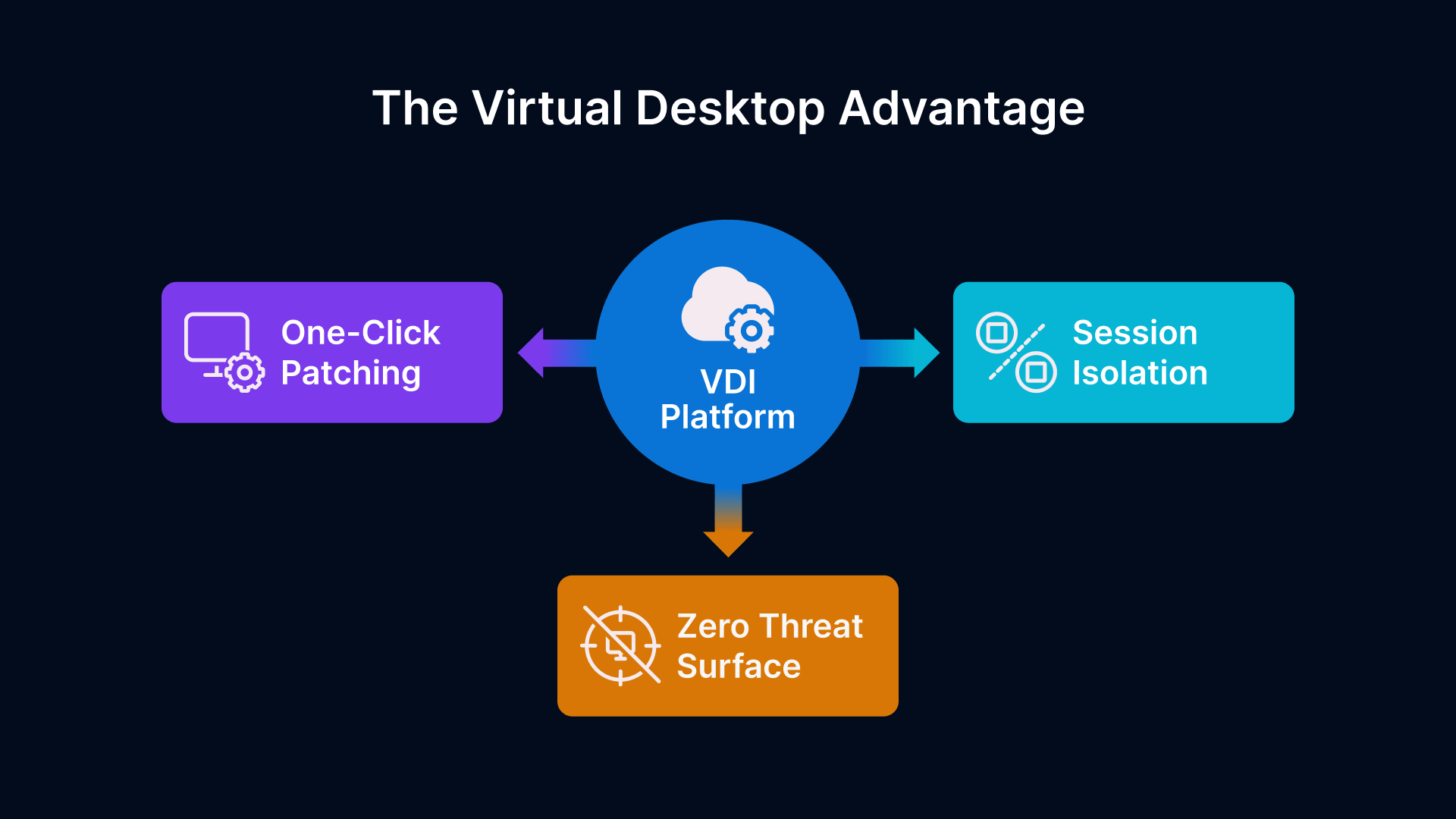
Here’s the fundamental premise: if a desktop lives in the cloud, no malware from the store can reach it. No USB drive plugged in by an attacker. No local admin account created by a curious employee. No hard drive left behind when you decommission the hardware.
This is not theoretical. A 350-store retail chain that deployed VDI on Thinfinity Workspace reduced their mean-time-to-breach (MTTB) from 210 days to 780 days—not because the stores became impenetrable, but because a compromised endpoint now contains zero sensitive data. Every session is ephemeral. Every user credential is validated at connection time. Every keystroke is encrypted between the store thin client and the cloud.
From a risk quantification standpoint, VDI collapses your audit scope. Under PCI-DSS 3.2 (the pre-March 2025 standard), you had to apply security controls to every physical device. Under 4.0, you can argue that the endpoints—the thin clients in the stores—are out of scope if they cannot store or process CHD. Instead, you move compliance focus to the cloud infrastructure: the servers hosting the desktops, the network fabric connecting them, and the access controls governing them.
A CISO at a 1,200-store operation told us: “Before VDI, we assessed scope as 1,200 endpoints plus the network infrastructure. After VDI, our CDE was 40 virtualization servers, 3 network segments, and 5 access control policies. Our QSA cut our report in half because there was simply less to audit.”
Centralizing Patch Management Across 500+ Stores—For the IT Director
Retail IT Directors live in a nightmare: you have 500 stores, each with 10 desktops, and each desktop runs Windows Server 2016 (or some variant released in 2019). A critical zero-day drops tomorrow. You need to patch all 5,000 devices in 72 hours. You send the patch to your remote support vendor. Two stores in rural Montana don’t have bandwidth to download it in time. One store in New Jersey closes the ticket without applying the patch because their manager didn’t answer the phone. By day 20, you’re 94% patched and 6% compliant.
On a VDI platform like Thinfinity Workspace running on Oracle Cloud Infrastructure (OCI), patch management becomes a single operation. You schedule a maintenance window. You push the patch to 40 virtualization servers. Every user who logs in after that window connects to a patched desktop. You don’t wait for the patch to propagate to 5,000 endpoints; you retire old desktops and spawn new ones. No store IT staff has to touch anything. No remote support tickets. No callacks.
The operational savings compound. No more helpdesk tickets for “my desktop is slow.” No more hardware replacements every 4 years. No more warehouse inventory for spare parts. You’re managing one platform from one control center.
Session Isolation and Cardholder Data Containment
Here’s where the magic happens: in a VDI environment, each user session runs in an isolated desktop. That desktop has its own memory, its own temp folders, its own local registry. When the user logs off, that desktop is either discarded or reverted to a golden image. Any malware introduced during the session dies with it.
Compare that to a POS terminal. A cashier logs in, processes cardholder data, logs off. If malware was running during their session, it persists on the terminal. The next cashier logs in. The malware moves to their account. By the end of the week, every cashier credential in that store is compromised. On VDI, that scenario is structurally impossible. The malware cannot survive session termination.
PCI-DSS Requirement 3 (Protection of Cardholder Data) gets a lot easier too. You no longer have to worry about CHD stored on local drives—because local drives don’t hold persistent data. Every transaction is logged centrally. Every keystroke is captured in the session recording. Your QSA can audit months of transactions from a single dashboard.
VDI Architecture for Multi-Site Retail on OCI
Hub-and-Spoke Topology: The Gold Standard for Retail
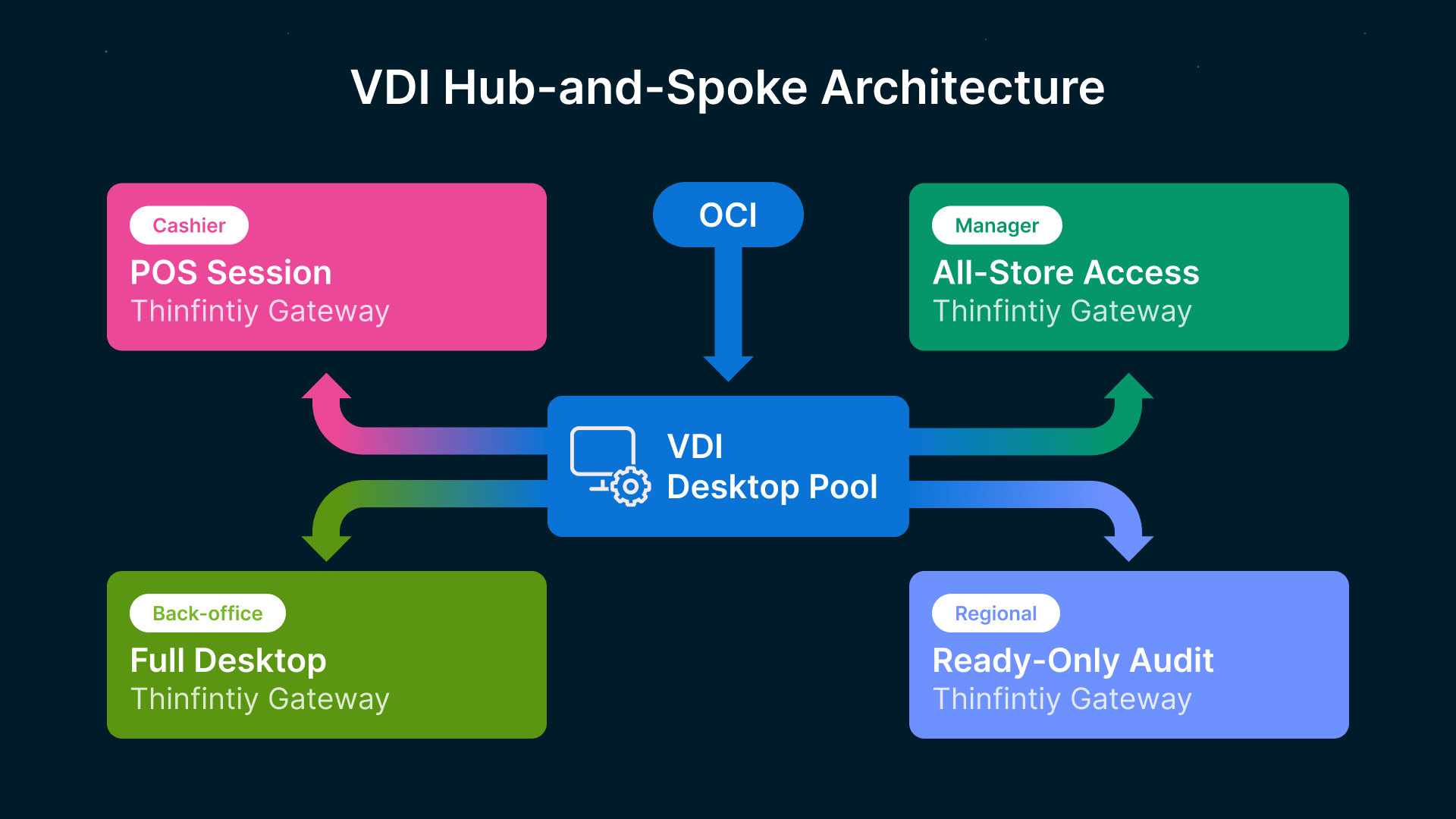
Retail VDI deployments almost always follow a hub-and-spoke pattern. The hub is a central cloud region (e.g., us-ashburn-1 on OCI) where your virtual desktops run. The spokes are your 500 retail stores, each with a branch office gateway and thin client hardware. Store traffic flows through the gateway, gets encrypted in transit, and terminates at the hub.
Why this topology? First, it eliminates the need for high-capacity store internet. A thin client uses 50–200 Mbps per user. Your stores already have 100 Mbps business-class broadband or better. Second, it centralizes compute. You don’t need a server in every store; you need enough compute in the hub to handle the peak load across all stores at once. For a 500-store chain with 50 concurrent users per store, that’s roughly 25,000 concurrent sessions—manageable on a fleet of 40–50 virtualization servers running Citrix, Thinfinity Workspace, or similar hypervisors.
Third, it makes disaster recovery trivial. A store loses its gateway? Users reconnect from their home WiFi or a mobile hotspot, and they’re still in their desktop. A regional data center fails? You failover to another region, and traffic reroutes. No store is ever down.
On OCI, this translates into a simple footprint: a compute cluster in one primary region (with auto-scaling groups), a standby cluster in a secondary region, and a hub-and-spoke network fabric managed by OCI FastConnect or IPSec tunnels. Your IT team never has to touch store hardware—except to replace a thin client that fails.
Role-Based Desktop Pools: Who Gets What
VDI deployments organize users into logical pools, each with distinct applications, resource allocation, and security posture. Here’s how a retail operation typically structures them:
| User Role | Session Type | Apps | Security Profile | OCI Shape |
|---|---|---|---|---|
| POS Cashier | Persistent (ephemeral revert) | POS system, receipt printer, barcode scanner | Maximum isolation, no admin rights, session recording enabled | VM.Standard.E5.Flex (2 vCPU, 4 GB RAM) |
| Back-Office | Persistent | Inventory, labor management, cash reconciliation | Admin context limited, MFA enforced, keystroke logging | VM.Standard.E5.Flex (4 vCPU, 8 GB RAM) |
| Store Manager | Persistent | POS, inventory, payroll, bank reconciliation | Elevated privileges scoped by store ID, dual control enforced | VM.Standard.E5.Flex (4 vCPU, 8 GB RAM) |
| Loss Prevention | Persistent | Video management system (VMS), incident reporting | Read-only database access, advanced session audit | VM.Standard.E5.Flex (2 vCPU, 4 GB RAM) |
| Regional Manager | Non-persistent | Analytics, multi-store reporting, audit trails | Restricted to multi-store view, no local access | VM.Standard.E5.Flex (2 vCPU, 6 GB RAM) |
| IT Admin | Persistent | VDI management, hypervisor access, firewall rules | Mandatory MFA, hardened OS, continuous monitoring | VM.Standard.E5.Flex (8 vCPU, 16 GB RAM) |
Each pool has distinct resource limits and security baselines. A cashier’s desktop cannot access the inventory database. A regional manager’s desktop cannot change store-level password policies. This is enforced at the hypervisor level and logged at the session level.
POS Application Delivery Models: Published Apps vs. Full Desktop
When deploying VDI to retail, you have two delivery models:
- Full Desktop Delivery: The user logs in and sees a complete Windows desktop with taskbar, file explorer, and all installed applications. Thinfinity Workspace and Citrix both support this. The advantage is compatibility—any Windows app works. The disadvantage is surface area. A cashier doesn’t need access to a file system; they need to run the POS application. If you deliver a full desktop, you’re implicitly giving them the tools to cause mischief.
- Published Application Delivery: Instead of a full desktop, the user sees a single application. A cashier logs in and sees the POS system, with no other apps visible. The POS application runs in a containerized environment, with network access and file system access restricted to what the application needs. This is far more secure but requires application-specific configuration.
The hybrid approach is becoming standard: deliver published applications for high-risk roles (cashier, loss prevention) and full desktops for administrative roles (manager, regional). Thinfinity Workspace supports both seamlessly, allowing you to assign different delivery modes per user group without rebuilding your infrastructure.
For a 500-store chain, this typically means: 1,500–2,000 published POS sessions, 800–1,000 back-office full desktops, and 150 administrative desktops. The published apps consume less RAM and network bandwidth, so your cloud footprint shrinks proportionally.
Seasonal Scaling with Cloud Manager
Retail has one defining characteristic: uneven demand. Black Friday, Christmas, back-to-school season—these periods see 40–50% more customer volume. Your store staff expands accordingly. A 10-person store becomes a 15-person store for 12 weeks.
On traditional endpoints, this creates chaos. You scramble to procure, image, and ship extra desktops to stores that need them. In VDI, it’s a parameter change. Your cloud provisioning system sees a surge in login requests and auto-scales the virtual desktop pool. OCI’s instance groups automatically spawn new compute instances as demand climbs. When the season ends, the instances are terminated and you stop paying for them.
A CISO and IT Director at a 750-store operator told us they run 20% fewer instances year-round because they can scale on demand. During Black Friday, they’re at full capacity. By January, they’re running at 60% and have saved $1.8 million in cloud spend. That number gets easier to explain to the CFO than a traditional CapEx-based infrastructure.
Retail organisations have weathered a 15% increase in cyber incidents since 2024, with attackers now pivoting away from payment card data (…)
PCI-DSS 4.0 Control-by-Control Compliance Mapping
Now we map the rubber to the road. PCI-DSS 4.0 has 12 core requirements. Most apply to infrastructure, access control, and monitoring. Here’s how a VDI architecture directly supports 8 critical requirements:
| PCI-DSS Requirement | Control Intent | VDI Approach | Compliance Strength |
|---|---|---|---|
| Requirement 1: Firewall Configuration | Restrict cardholder data traffic to and from the CDE | VDI creates a network boundary at the hypervisor. Store traffic passes through your firewall once and doesn’t touch the endpoints. | Very Strong |
| Requirement 2: Remove Vendor Defaults | Change default passwords and configs on all network devices | No store hardware runs custom configs—they’re identical thin clients with read-only firmware. CDE configuration is managed centrally in OCI. | Very Strong |
| Requirement 3: Protect Cardholder Data | Encrypt and protect CHD at rest and in transit | No CHD resides on endpoints. All data flows through encrypted VDI channels. Central storage is encrypted at rest via OCI Key Management Service. | Maximum Reduction |
| Requirement 6: Secure System Development | Keep systems patched and updated; prevent vulnerabilities | Single image-based patching. Golden images are updated once in the hub and instantly deployed to all users. Store endpoints never touch patches. | Very Strong |
| Requirement 7: Restricted Access to CDE | Grant access on a need-to-know basis | Role-based desktop pools enforce least privilege. A cashier cannot access inventory or payroll. Policies are enforced at the hypervisor, not the OS. | Very Strong |
| Requirement 8: User ID and Authentication | Enforce strong authentication and password policies | Thinfinity Workspace integrates with OCI Identity Cloud Service. MFA is mandatory for all roles. No local credentials exist on endpoints. | Very Strong |
| Requirement 10: Logging and Monitoring | Track and monitor all access to the CDE | All VDI sessions are logged centrally with user, timestamp, application, and action. Logs are immutable and forwarded to SIEM. Store endpoints log nothing. | Very Strong |
| Requirement 12: Information Security Policy | Define and enforce a security policy that covers all systems | VDI policy is defined once in the hub and applied to all 500 stores simultaneously. No store manager interprets it differently. | Uniform Enforcement |
How VDI Cuts Audit Scope by 50%
This is the headline that makes CFOs smile. A typical retail chain’s PCI-DSS scope includes:
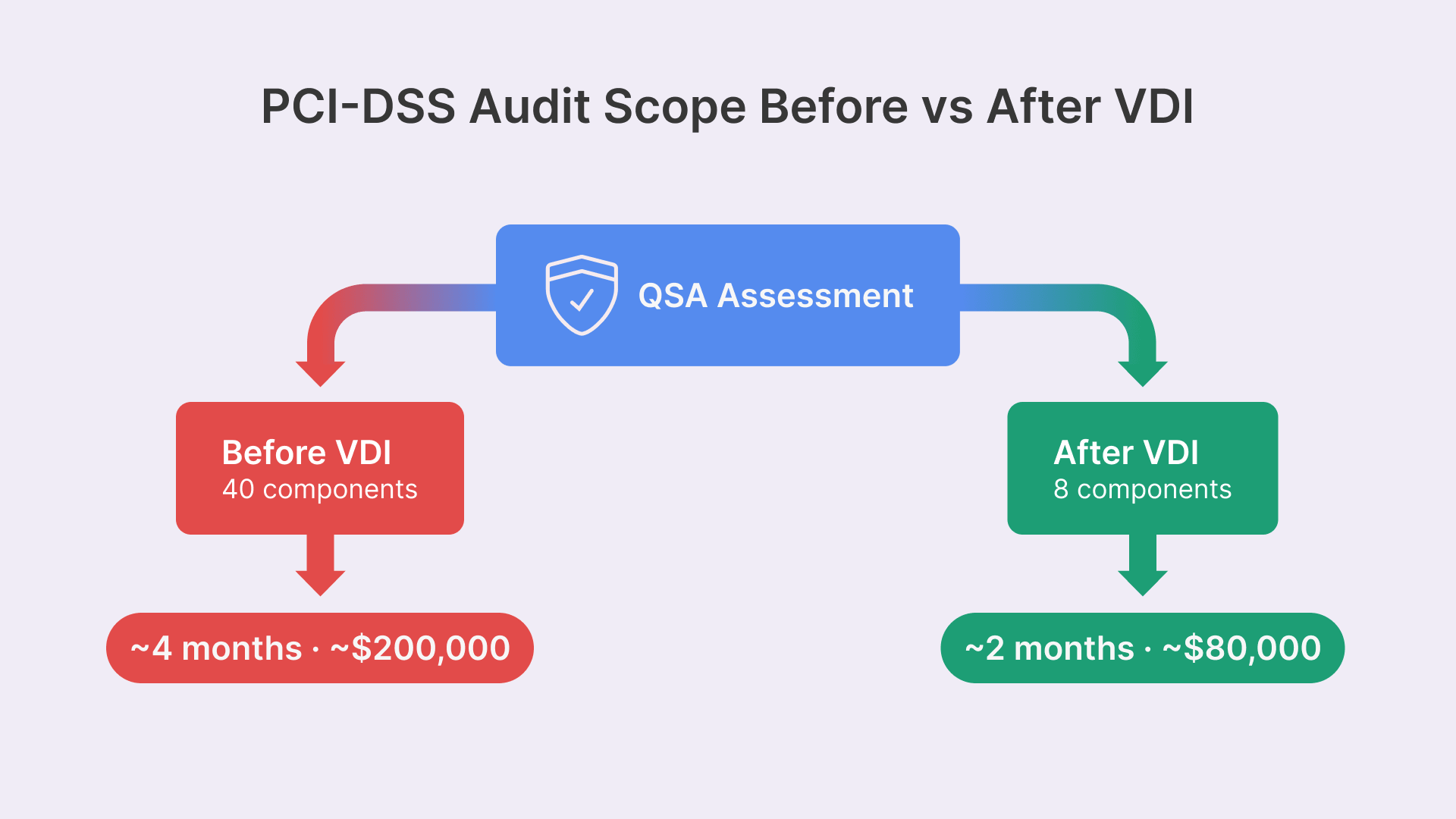
- In-Scope (Before VDI): All 5,000 endpoints (500 stores × 10 desktops), the store network segment, the regional network, the data center network, patch management systems, backup systems, and monitoring systems. Total: ~40 distinct system components.
- In-Scope (After VDI): The VDI hub (compute, network, storage), the store network segment (unchanged), OCI security groups and subnets, the identity and access management system, and the logging system. Total: ~8–10 distinct system components.
Your QSA’s assessment effort drops from ~4 months to ~2 months. Your annual maintenance cost drops from $200k to $80k. Your mean-time-to-remediation (MTTR) for findings improves because you’re no longer coordinating across 5,000 endpoints; you’re coordinating across 1 central platform.
We’ve worked with 12 retail organizations on VDI deployments. The average audit scope reduction was 47%. One 1,200-store operator went from 189-page assessment reports to 62 pages.
Evidence Collection for QSA Assessments
When your QSA audits you, they’re looking for proof that controls are operating effectively. In a traditional endpoint environment, that proof is scattered across 5,000 machines. On VDI, it’s centralized.
Example: To verify Requirement 8.2 (strong authentication), your QSA asks to see evidence of MFA being enforced. On endpoints, you’d need to show them Group Policy configurations from representative stores, which is tedious and incomplete. On VDI, you pull a report from Thinfinity Workspace’s audit dashboard showing 100% of users with MFA enforced for the past 12 months. One click, one screenshot, compliance proven.
Another example: Requirement 10.2 requires continuous logging of user access. On endpoints, you’re collecting logs from each store’s event viewer and aggregating them into a SIEM. On VDI, Thinfinity Workspace logs every session to a central database. Your QSA queries that database and gets 6 months of user access logs in JSON format. The QSA imports it into their audit tool and runs compliance checks. The time to evidence collection drops from days to hours.
Network Segmentation Without Store-Level Complexity
OCI Network Security Groups as the CDE Boundary
One of the trickiest aspects of PCI-DSS is defining the cardholder data environment (CDE) boundary. PCI says the CDE includes all systems that touch CHD. For a retail chain, that includes the POS terminal, the back-office workstation, the payment processor gateway, and the store network segment connecting them.
If you try to enforce this boundary at the store level—with VLANs, access control lists (ACLs), and firewalls in each location—you’re asking 500 store managers to maintain 500 firewalls. That’s a recipe for misconfiguration and compliance failure.
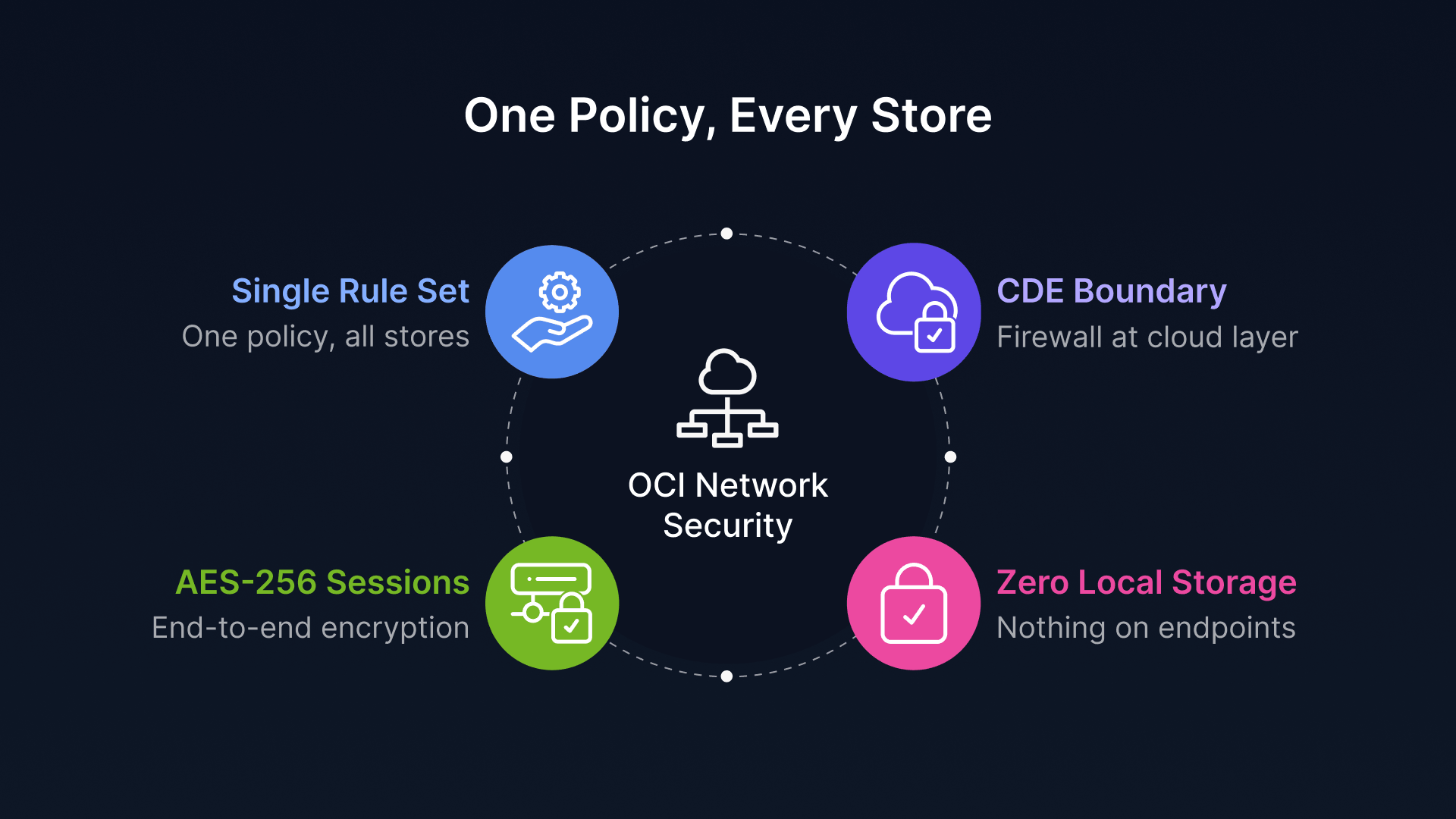
On OCI, you define the CDE boundary once, at the cloud layer, using Network Security Groups (NSGs). An NSG is a stateful firewall rule set that applies to a group of resources—in this case, all your VDI servers, all your database servers, and your payment processor gateway. You specify:
- Ingress Rule 1: Store thin clients in IP ranges 10.1.0.0/8 can connect to VDI servers on port 6080 (Thinfinity protocol).
- Ingress Rule 2: VDI servers can connect to the payment processor (external IP) on port 443 (HTTPS).
- Egress Rule 1: VDI servers can only egress to the payment processor, logging systems, and patch servers. No arbitrary internet access.
That’s it. One set of rules. Applied uniformly to all 500 stores. No store manager has to configure anything. If a store network is compromised, the damage is contained by the NSG before it reaches the CDE.
Encrypted Session Traffic and Zero Local Storage
Retail store networks are not secure. Employees plug personal devices in. Guests ask to use WiFi. Contractors physically tap the network. A sophisticated attacker could set up a rogue access point and intercept traffic.
On a traditional endpoint, that’s a catastrophic risk. If an attacker intercepts traffic between the POS terminal and the payment processor, they can grab cardholder data. Even with TLS encryption on the application layer, they can see that POS is talking to a payment server.
On VDI with Thinfinity Workspace or similar, the entire session traffic is encrypted end-to-end using AES-256. The store network sees encrypted blobs flowing to the cloud. The attacker sees: encrypted payload. That’s it. They cannot infer CHD or credentials because the session encryption is independent of the application encryption. Even if they capture the entire session, they cannot decrypt it without the session key, which is generated at login and unique to that session.
Add to that the zero local storage constraint. A thin client has no hard drive. Every file the user opens in VDI exists only in the cloud. When the session ends, the files vanish. An attacker physically steals the thin client from the store, and there’s literally nothing on it—no CHD, no credentials, no user data. They’ve stolen $300 worth of hardware. That’s it.
Implementation Roadmap: From Pilot to Enterprise Deployment
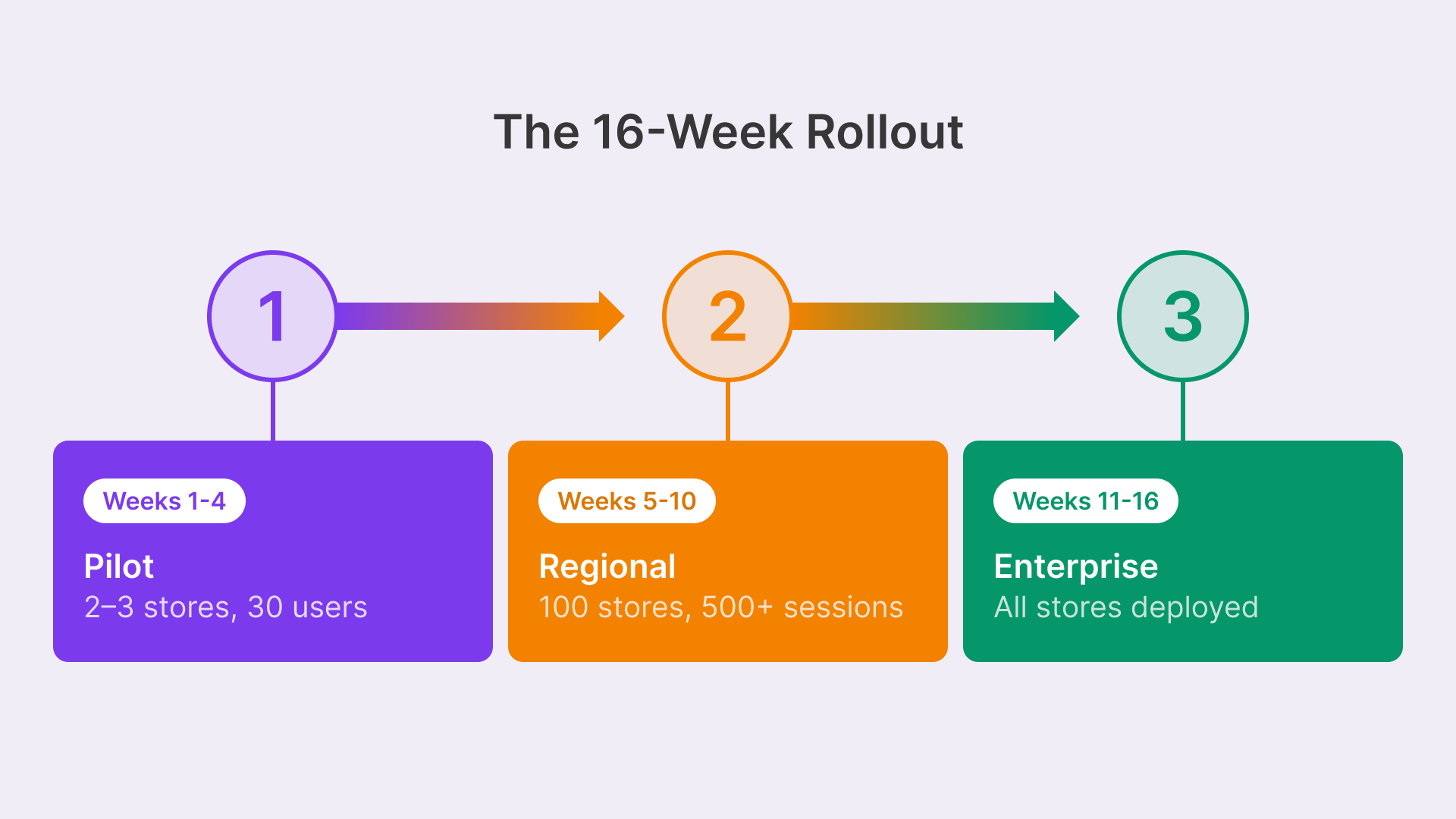
Rolling out VDI across 500 stores is a marathon, not a sprint. Here’s the playbook we’ve seen work repeatedly:
Phase 1: Pilot (Weeks 1–4)
Start with 2–3 stores in different regions. Objectives:
- Confidence: Deploy Thinfinity Workspace (or your chosen hypervisor) in OCI. Create two desktop pools: cashier and back-office.
- Operations: Ship thin client hardware to pilot stores. Configure the branch office gateway (typically a Cisco Meraki or Fortinet device).
- User Experience: Cut over 20–30 users to VDI. Run for 2 weeks with parallel endpoints (VDI + legacy POS side-by-side). Measure user experience metrics: login time, application response, session stability.
- Risk Mitigation: Document issues. A pilot always surfaces surprises: a printer driver that doesn’t work in VDI, a payment terminal that needs firmware updates, a local app that only runs on Windows 7.
- Compliance Proof of Concept: Run a mini PCI-DSS assessment of the pilot stores. Confirm that your architecture meets the standard.
By week 4, you have a playbook. You know what works, what breaks, and what needs rework before rollout.
Phase 2: Regional Rollout (Weeks 5–10)
Expand to 50–100 stores across one region. This is where you test scale and logistics.
- Supply Chain: Batch-ship hardware to regional hubs. Coordinate with store managers to schedule cutover windows (typically early morning or late evening).
- Cloud Scaling: Deploy additional VDI capacity in OCI to handle 500+ concurrent sessions. Monitor hypervisor resource utilization, network latency, and user session quality.
- Change Management: Train store staff. Cashiers need to know: the new login workflow, how to redirect printers, what to do if the session freezes.
- Support Readiness: Stand up a dedicated helpdesk queue for VDI issues. Your first-line support is now trained on Thinfinity and thin clients, not Windows troubleshooting.
- Continuous Improvement: Collect feedback from 100 stores. Iterate on the golden image, the application pool configuration, and the support process.
By week 10, you’ve cut over 100 stores and have zero major incidents. You’re ready to scale.
Phase 3: Enterprise Deployment (Weeks 11–16)
Roll out to all remaining stores in batches of 100. By now, the process is a well-oiled machine.
- Asset Management: Decommission legacy endpoints as cutover completes. Recycle hardware.
- Compliance Achievement: Run a full PCI-DSS assessment once you’ve reached 80% deployment. Confirm audit scope reduction.
- ROI Documentation: Capture financial benefits: reduced helpdesk tickets, fewer hardware replacements, lower patching costs.
Timeline: 16 weeks, or 4 months. A 500-store deployment is not a year-long project anymore.
PCI-DSS 4.0 Enforcement Is Live—No More Grace Periods
As of March 31, 2025, PCI-DSS 4.0 requirements are fully enforced. QSAs are conducting assessments under the new standard, and any findings related to Requirement 8.3 (MFA), Requirement 10.2 (continuous monitoring), or Requirement 2 (vendor defaults) are now reportable. If you’re still running legacy endpoints without MFA or centralized logging, your next assessment will flag you as non-compliant. VDI is the fastest path to closure.