
TL;DR
- Retail warehouse IT is broken by device sprawl (RF scanners, tablets, kiosks, forklifts, legacy workstations), seasonal headcount swings of 200–500 workers, legacy WMS that can’t be retired, and catastrophic ransomware exposure.
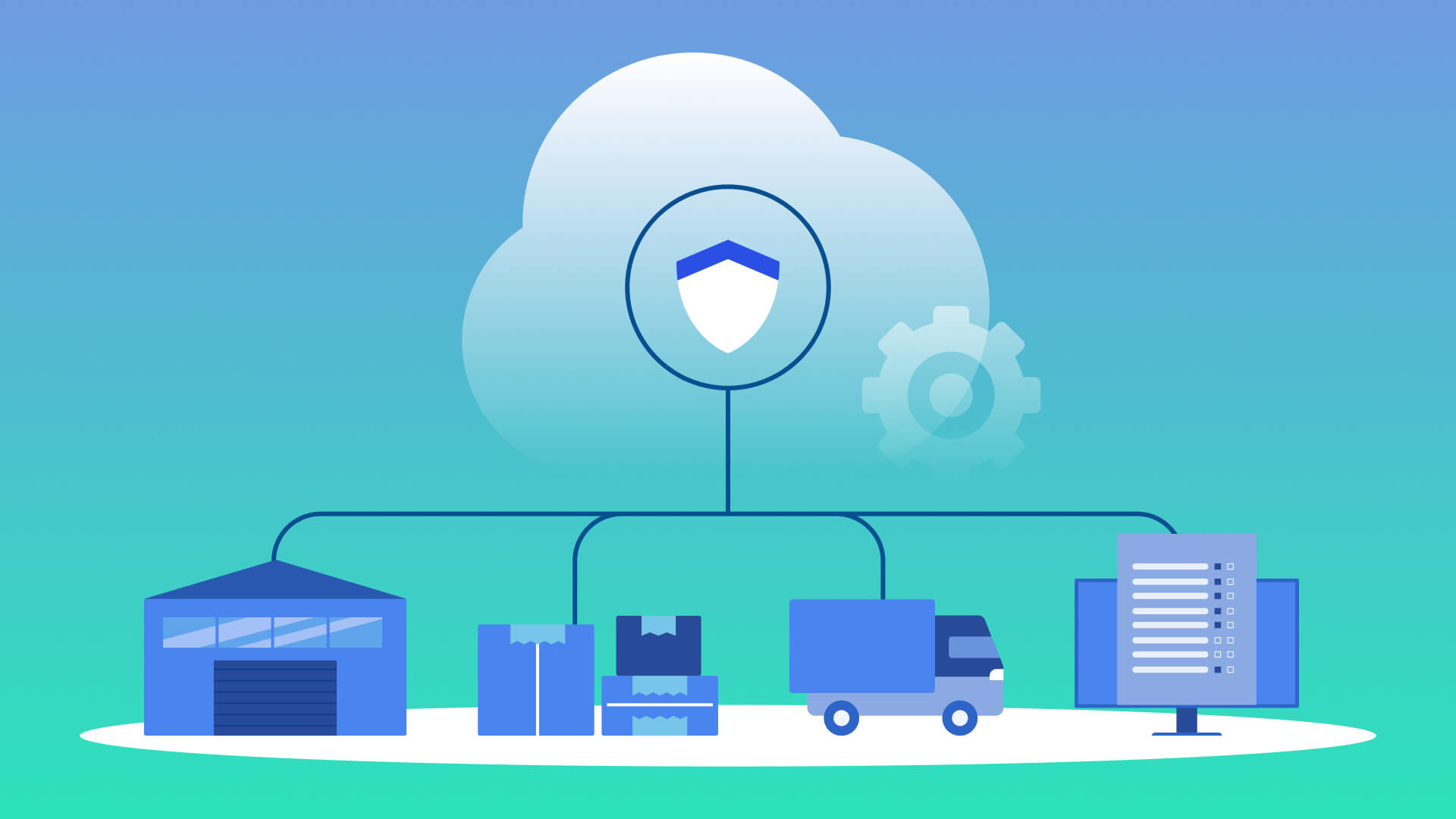
- Thinfinity Workspace VDI on Oracle Cloud Infrastructure (OCI) delivers browser-based access to Manhattan, Blue Yonder, Oracle WMS Cloud, Dynamics 365, SAP EWM, or any legacy WMS — one golden image, every device, every site.
- Seasonal provisioning collapses from 5 days and $600–800 per worker to under 15 minutes and ~$30–50 in cloud licensing; decommissioning takes seconds.
- Ransomware blast radius drops dramatically: stateless thin-client sessions, isolated OCI subnets, immutable backups, and PCI-DSS-aligned controls (Req 1, 2, 4, 6, 8, 10) baked into the architecture.
- Proven rollout in 16 weeks: primary DC pilot (Wks 1–5) → multi-site expansion (Wks 6–12) → auto-scaling for peak season (Wks 13–16).
Introduction
You manage warehouses across three states. One week, you’re provisioning 200 seasonal workers for holiday surge. The next week, 150 of them are gone. Your WMS platform runs on aging servers you can’t upgrade without downtime. RF scanners, tablets, zebra printers, and handheld kiosks all need access to inventory systems. Every device is a potential infection vector for ransomware that costs you millions in recovery and lost throughput.
If this sounds familiar, you’re running a warehouse IT operation without a net. Most retail IT Directors face this reality every peak season—and they handle it the way IT has for decades: installing software locally, managing hardware sprawl, scrambling through seasonal hiring chaos, and hoping ransomware doesn’t turn your distribution center into a smoking crater.
Virtual Desktop Infrastructure (VDI) changes the game. Not the heavy, slow, desktop-replacement VDI of the past, but browser-based VDI on Oracle Cloud Infrastructure (OCI)—where your entire warehouse workforce can access WMS, inventory, and logistics applications from any device, anywhere, in seconds. Thinfinity Workspace delivers this for retail, and this playbook shows you exactly how IT Directors like you deploy it.
The Warehouse IT Mess Nobody Talks About
Warehouse and distribution center IT doesn’t look like corporate IT. You’re not managing office workers on standard laptops. You’re managing chaos: seasonal workforce spikes, legacy applications that won’t retire, device diversity that spreads from bar-code scanners to forklifts with tablets, all running mission-critical inventory and fulfillment workloads. And you’re doing it with fewer resources, tighter budgets, and less patience for downtime than any other IT environment.
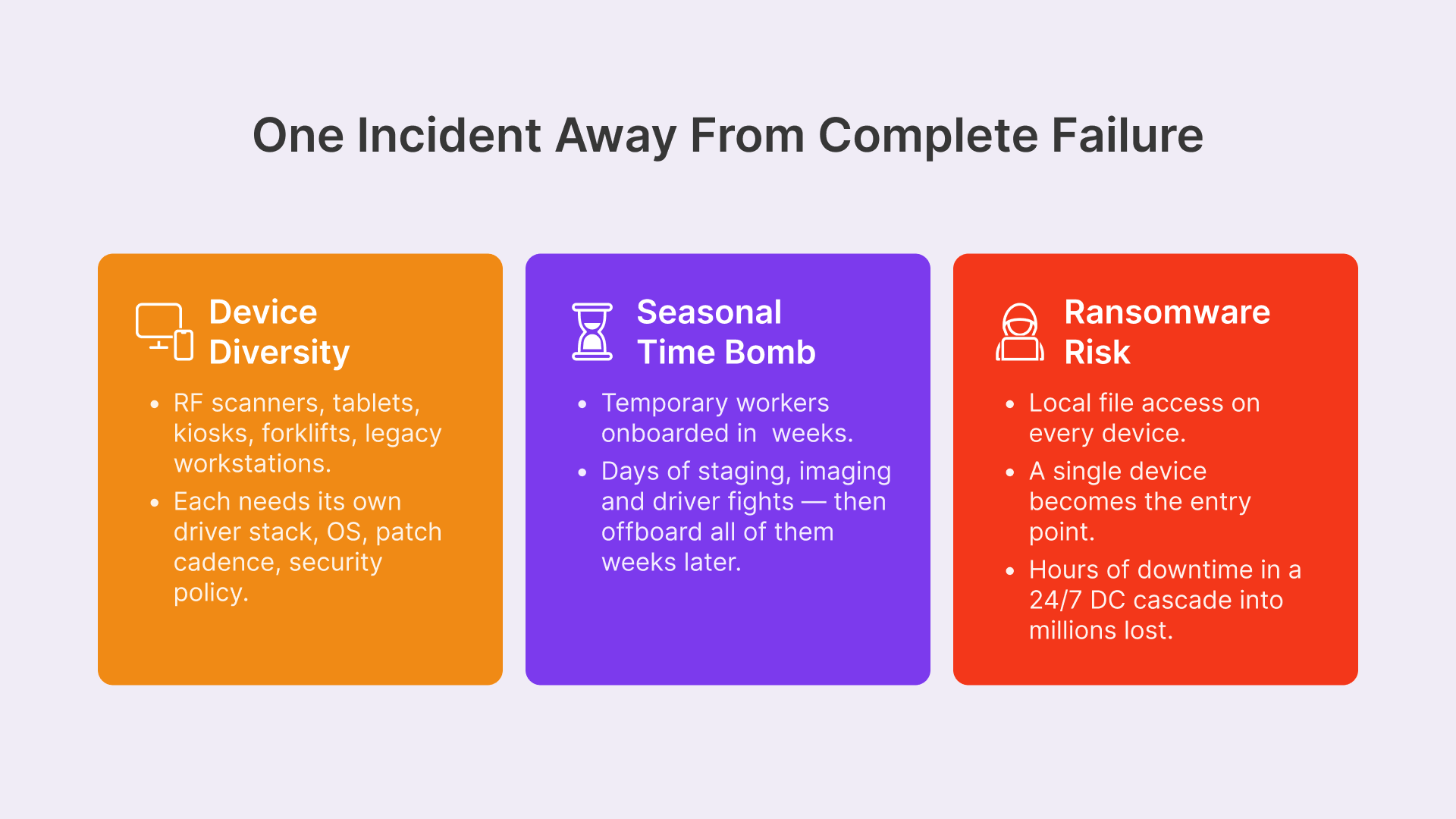
The classic approach—local installs, hardware management, device provisioning—breaks under this pressure. Retail IT Directors are caught between impossible demands: secure a sprawling logistics network, support device types that shouldn’t work together, onboard and offboard hundreds of workers in weeks, manage applications that are too old to upgrade, and do it all without breaking inventory, fulfillment, or shipping operations. Most warehouse IT teams are one ransomware incident or seasonal surge away from complete failure. Here’s why:
The Device Diversity Challenge — RF Scanners, Tablets, Kiosks, Forklifts, Workstations
Your warehouse doesn’t run on standard desktops. Your team uses:
- RF scanners: Zebra TC25 and MC3300 devices running custom WMS frontends
- Tablets: iPad and Android tablets for receiving, put-away, and cycle counts
- Handheld kiosks: Stationary pick-and-pack workstations at packing stations
- Forklift terminals: Vehicle-mounted RF scanners and display terminals
- Legacy workstations: Older Windows boxes that can’t run new OS versions but run critical legacy WMS integrations
Each device type requires different configurations, security policies, and access rules. A Zebra scanner needs lightweight battery-efficient access; a packing station needs persistent sessions with larger screen real estate. A legacy WMS client might require a Windows 7 or Server 2012 environment. Managing these as local installs means multiplying your provisioning and patching burden across device classes, OS versions, and platforms.
Thinfinity Workspace eliminates device-specific provisioning. Whether someone connects on a Zebra scanner, iPad, Windows kiosk, or aging workstation, they access the same browser-based VDI session. One configuration per user role. No more porting drivers or resolving platform conflicts.
The Seasonal Workforce Time Bomb — 200 Temp Workers in 2 Weeks, Gone in 8
Peak season hiring is relentless. You onboard 200 temporary workers in two weeks for Black Friday, holiday surge, or fulfillment peaks. These aren’t office workers; they’re warehouse floor staff who need access to WMS, inventory systems, and logistics platforms immediately. Traditional IT responses look like this:
- Day 1: Submit hardware request to procurement; wait 3–5 days for delivery of devices
- Day 5–10: Unbox, image, and configure 200+ mixed-platform devices; stage them in a secure holding area; test driver compatibility
- Day 11: Distribute to fulfillment floor; watch 10% have imaging issues, driver mismatches, or licensing conflicts
- Day 12: Spend 8 hours with escalations and remote support; get 190 devices fully operational
- Week 2–8: Manage updates, security patches, and device issues as workers use the fleet
- Week 9: Collect devices from departing workers; decommission accounts; wipe drives; re-image for the next season; return to stock
The cost is staggering. Each device costs $600–1200 to procure, image, and maintain for one season. For 200 workers, that’s $120K–240K. Even worse, if a driver breaks in week 4 and you can’t get a replacement device, that worker is idle on the clock. Your warehouse loses throughput on peak fulfillment days.
Compare that to Thinfinity VDI on OCI: New worker arrives Monday morning. HR creates account in Active Directory (30 seconds). Worker authenticates to Thinfinity via browser URL (10 seconds). Four seconds later, they’re on the WMS and ready to work. No hardware staging. No imaging. No driver nightmares. When seasonal contracts end, you disable accounts (10 seconds). Sessions terminate. Devices go back to the pool. No data lingers; no config debt. The device can be re-provisioned for the next worker in seconds.
For a retail operation running 200–500 person seasonal surges, this shifts provisioning from days to minutes, and decommissioning from hours to seconds. The cost per temporary worker drops from $600–800 to roughly $30–50 in cloud VDI licensing.
The Ransomware Risk Every Warehouse Faces
Ransomware in a warehouse is catastrophic. A distribution center runs 24/7. Inventory systems offline for even an hour cascades into missed shipments, delayed orders, and revenue loss. A typical warehouse ransomware incident costs $2–5M in recovery, overtime, and lost throughput.

Traditional warehouse IT is a vector goldmine for attackers. Hundreds of local devices, each with local file access, USB ports, and no centralized monitoring. Seasonal workers with minimal security training. Legacy WMS platforms running outdated frameworks. Third-party vendor access to RF scanners and integrated systems.
Thinfinity VDI on OCI locks this down. Sessions run in the cloud. Local devices have zero access to sensitive files or network resources. Ransomware can’t encrypt inventory systems from a tablet; it can’t spread through the warehouse network if that tablet is just a thin client. Every interaction is logged. Every session is isolated.
Why VDI Changes Everything for Warehouse IT
Browser-Based WMS Access — No Local Install, No Local Risk
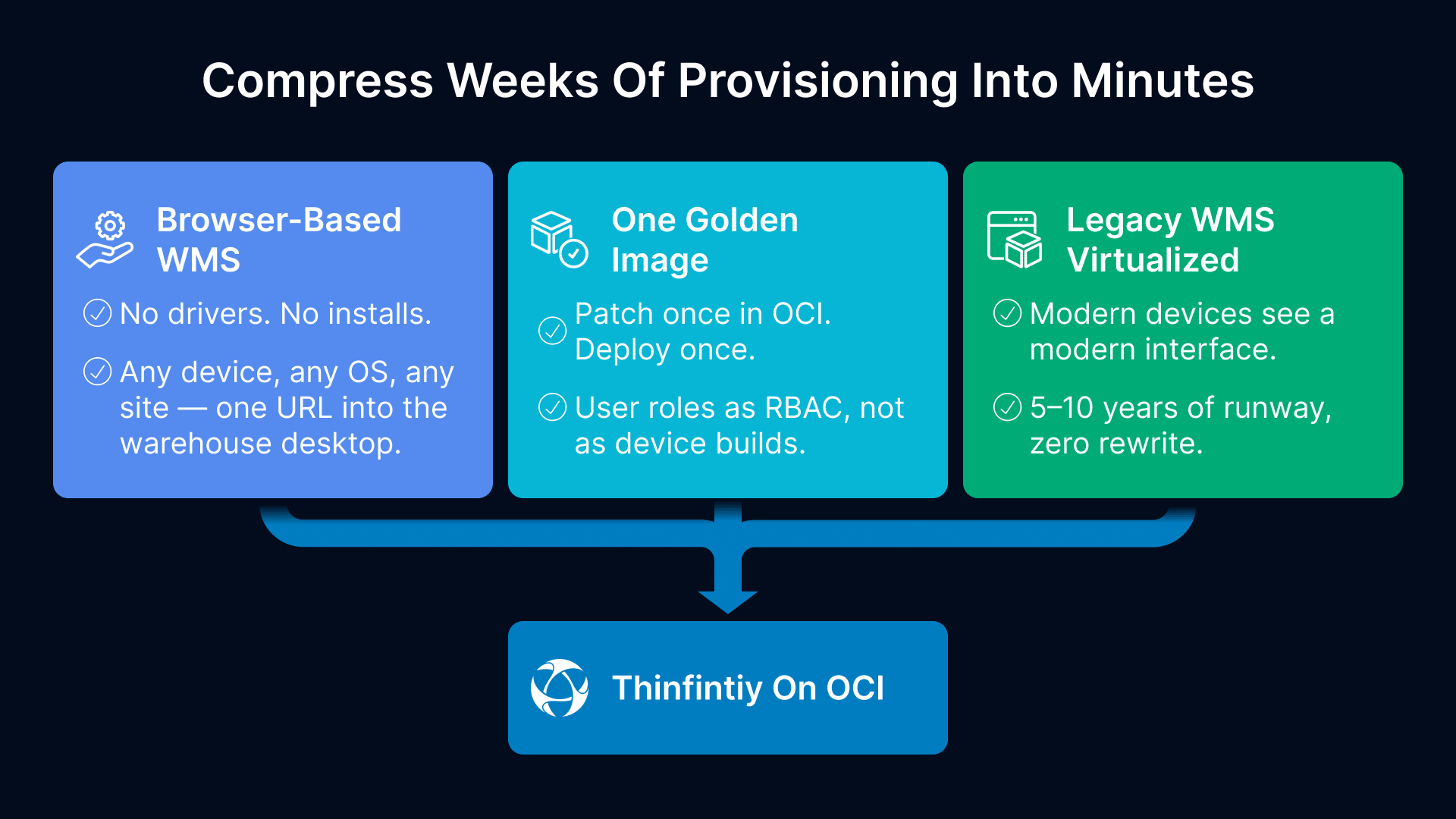
Thinfinity Workspace runs VDI in the browser. Your WMS—whether it’s Manhattan, Blue Yonder, Dynamics 365, Oracle WMS Cloud, or a custom legacy system—lives in an OCI desktop session. Workers connect via Thinfinity’s HTML5 gateway. That’s it. No software to install. No drivers to manage. No licensing complexity. No version conflicts.
The moment a temporary worker is onboarded, their device gets a secure browser URL. They log in with your warehouse identity provider (Active Directory, Okta, Google Workspace). Thinfinity authenticates, bridges them to the OCI session pool, and they see their warehouse desktop. WMS, inventory, logistics tools—all there. All isolated from the local device. No way for malware on the tablet to reach the WMS database. No way for a disgruntled worker to steal WMS credentials or inventory data.
For IT Directors managing 300–1000 devices across multiple sites, this eliminates weeks of deployment overhead. For legacy WMS platforms running on EOL Windows or old application servers, Thinfinity lets you virtualize the entire environment without rewriting code. You’re not modernizing; you’re securing and stabilizing legacy systems for the next 5–10 years while you plan true modernization.
This is especially critical for retail chains with global operations. A warehouse in Mexico City, a fulfillment center in São Paulo, and a distribution hub in Toronto all connect to the same Thinfinity gateway. Same version of the WMS. Same access policies. Same security posture. Language and locale adapt per user, but the WMS experience is consistent globally.
One Golden Image for Every Device Type
Traditional VDI tries to replace the user’s desktop—you deploy a thick client to every device, manage OS versions, patch locally, and hope drivers work across models. Thinfinity Workspace doesn’t. It’s a remote session gateway running in the browser. One golden image—one OCI instance or instance pool—serves all your warehouse workers simultaneously. Zebra scanners, tablets, kiosks, laptops, legacy workstations, and even forklifts with embedded RF terminals all connect to the same session pool. Thinfinity handles the device-specific rendering and protocol translation automatically.

For cloud computing systems in particular, full virtualization can increase operational efficiency because it can optimize computer workloads and adjust the number of servers in use to match demand, thereby conserving energy and information technology resources.
This radically simplifies your architecture and cuts your maintenance burden in half. You’re not managing 200 unique device configurations, 5 different OS versions, 15 printer driver conflicts, and licensing for each device. You’re managing one warehouse desktop image, centralized on OCI, with role-based access controls (RBAC) for different job functions. One configuration per role (Picker, Packer, Receiver, Supervisor), not per device.
Patching? You patch once in OCI. Security update to the WMS client? Deploy once. New compliance policy for PCI-DSS? Apply once to the golden image. Everyone sees it within minutes. No device-by-device rollout. No waiting for hardware to restart. No ‘Joe hasn’t updated yet’ syndrome. The entire warehouse gets the update simultaneously.
For IT teams stretched thin, this is transformational. You move from reactive device management to proactive warehouse infrastructure stewardship. Instead of troubleshooting why a Zebra driver doesn’t work with a Windows 10 update, you’re planning how to integrate new logistics platforms or expand to new warehouses.
Legacy WMS Applications That Won’t Die — Virtualizing Them Instead
Every warehouse IT Director knows this: your WMS probably runs on legacy infrastructure. Maybe it’s Windows Server 2012 with Oracle 11g running a 2008-era WMS application. Maybe it’s a 2005-era application server that won’t run on modern .NET. Maybe it’s a custom client-server app built in-house that’s been maintained by only one person for 15 years (and that person is retiring soon).
You can’t upgrade without months of testing and downtime. You can’t retire it because the replacement costs $500K–2M and takes a year to implement. You can’t patch it because patches break compatibility. So you’re stuck: maintaining expensive hardware for an ancient system, applying security patches only when forced, and hoping ransomware doesn’t target it.
Thinfinity VDI lets you virtualize the entire legacy WMS environment on OCI without rewriting a single line of code. Spin up a Windows Server 2012 instance, install your legacy WMS client exactly as it is, and publish it through Thinfinity. Modern devices (new tablets, RF scanners, kiosks) access the legacy WMS through the browser without ever seeing or needing to understand the ancient OS. Workers don’t care what OS runs the WMS. They see a modern interface. The WMS works. They move inventory.
You’ve bought time—5–10 years—to plan a real modernization without emergency pressure. You’ve locked down a mission-critical system in OCI where security is managed centrally. And you’re not maintaining hardware for a 2005 app stack anymore—OCI handles infrastructure patches, updates, and capacity.
This is especially powerful for retail chains managing multiple warehouse systems with different platforms. One DC runs Manhattan Associates. Another runs Blue Yonder (JDA). A third still uses a custom in-house system built on 1990s architecture. Thinfinity unifies all of them behind a single gateway, single authentication (Active Directory or Okta), and single security model. Workers see their role-specific desktop. One interface works across all systems. IT manages one security perimeter instead of three incompatible systems.
Supply Chain VDI Architecture on OCI
Multi-Site Distribution Network Topology
Most retail chains run 3–15 distribution centers across regions: East Coast, Midwest, Southwest, West Coast, and maybe international (Canada, Mexico, Europe). Each DC has different throughput (peak vs. off-season), seasonal demand patterns, and network characteristics. Some DCs run 24/7; others operate M–F with reduced staffing.
A single-region VDI deployment doesn’t work. Workers in California waiting for sessions rendered in Virginia experience 200ms latency, sluggish RF scanning, and dropped Thinfinity connections. International DCs experience even worse latency and bandwidth constraints.
Thinfinity on OCI handles this with a distributed architecture:
- Regional OCI instances: Deploy OCI desktop pools in each region (US-East, US-West, EU, APAC) to minimize latency for local workers. A West Coast DC worker’s session runs in OCI US-West, not across the country
- Thinfinity edge gateways: Run Thinfinity gateway servers in each region or use OCI’s distributed cloud architecture for edge processing. Local devices connect to nearby gateways, reducing protocol overhead
- Central identity and security: Centralized Active Directory, Okta, or LDAP in the primary data center; replicated read-only copies to regional gateways. Faster authentication, no cross-region latency
- Shared WMS and inventory backend: Core systems (WMS database, ERP, inventory service) run in primary DC or shared database (OCI Autonomous Database available globally). Regional OCI pools connect back with optimized, redundant links (Direct Connect, SD-WAN)
- Failover and redundancy: If a regional OCI instance fails, workers reconnect to the next nearest region. If a DC’s internet connection fails completely, local Thinfinity gateway caches enable read-only access to recently accessed data
This topology keeps sessions local and fast, distributes load across regions (no single point of failure), and ensures that even if one DC’s internet fails temporarily, critical warehouse operations continue. For a retail operation managing peak holiday traffic across multiple time zones, this multi-region architecture is essential.
Device VDI Matrix
| Device Type | Use Case | Session Profile | Bandwidth | Authentication |
|---|---|---|---|---|
| Zebra RF Scanner | Picking, receiving, cycle count | Lightweight (480p, 8 FPS) | 2–4 Mbps peak | Certificate + PIN |
| iPad / Tablet | Put-away, quality checks | Medium (720p, 24 FPS) | 4–8 Mbps peak | AD SSO + biometric |
| Handheld Kiosk | Packing, shipping, staging | Standard (1080p, 30 FPS) | 6–12 Mbps peak | AD + MFA |
| Forklift Terminal | Route optimization, dock mgmt | Compact (640p, 12 FPS) | 1–3 Mbps peak | Certificate-based |
| Legacy Workstation | Legacy WMS, reporting | Full (1920×1080, 30 FPS) | 8–15 Mbps peak | AD + certificates |
| Seasonal Worker Laptop | Fulfillment, returns, cycle count | Medium (720p, 24 FPS) | 4–8 Mbps peak | LDAP + 2FA |
OCI Shape Selection for Warehouse Workloads
OCI Compute shapes for Thinfinity VDI warehouse deployments depend on worker density and WMS application intensity. Here’s what IT Directors typically deploy:
| Warehouse Role | Apps & Workload | OCI Shape | Session Type | Access Policy |
|---|---|---|---|---|
| Receiving & Put-Away | WMS, barcode scanning | VM.Standard3.Flex (2–4 OCPUs) | Lightweight, 15–20 per instance | RBAC: Receive only |
| Picking & Packing | Waveform, pick lists, label print | VM.Standard3.Flex (4–6 OCPUs) | Standard, 20–30 per instance | RBAC: Picking + packing scope |
| Shipping & Dock | Manifest, BOL, carrier integration | VM.Standard3.Flex (2–4 OCPUs) | Standard with printing, 8–12 per instance | RBAC: Shipping only |
| Cycle Count & Audit | Inventory verification, corrections | VM.Standard2.2 (2 OCPUs) | Medium, 5–8 per instance | RBAC: Read + limited write |
| Manager / Supervisor | Labor tracking, dashboards, KPIs | VM.Standard3.Flex (2 OCPUs) | Full session (multi-monitor) | RBAC: Full visibility + MFA |
| Legacy WMS Integration | Legacy clients, 3rd-party tools | VM.DenseIO2.24 | Full session per app, 2–4 per instance | RBAC: Isolated, elevated logging |
WMS Platform Compatibility
Thinfinity Workspace runs any WMS platform accessible via Windows or Linux desktop clients or web browsers. There’s no proprietary WMS requirement. Retail chains with enterprise WMS deployments commonly use:
- Manhattan Associates SCALE: Broker for Order Management, Inventory, Labor Management, and Task Interleaving; Thinfinity publishes the Windows WM client and web portal
- Blue Yonder (formerly JDA): JDA WMS, Logistics, Workforce Optimization, and Supply Chain Planning; full client and web portal support via Thinfinity; Red Prairie legacy deployments also supported
- Oracle WMS Cloud: SaaS WMS module within Oracle Cloud ERP; accessed via browser from Thinfinity desktop or direct federation into OCI identity
- Dynamics 365 Supply Chain Management: Microsoft ERP + WMS module; accessed via web portal or Windows Dynamics client from Thinfinity session
- SAP Extended Warehouse Management (EWM): SAP’s cloud and on-premises WMS; accessed via web or SAP GUI from Thinfinity
- Legacy In-House Systems: Custom WMS built on Windows/.NET, Unix/Java, Perl, or mainframe legacy frameworks; virtualized on OCI and published through Thinfinity; no code changes required
For each WMS platform, Thinfinity handles device diversity and session management transparently. Whether a worker connects on a Zebra scanner with a 2 Mbps connection, an iPad over 4G, or a Windows 10 kiosk with 12 Mbps corporate WiFi, the WMS client or web interface renders consistently. Thinfinity adapts compression, frame rate, and protocol based on device and network conditions automatically. IT doesn’t need to manage platform-specific VDI configurations.
Securing the Supply Chain Attack Surface
Third-Party Vendor Access Control
Warehouses and distribution centers rely on dozens of third parties: shipping carriers (UPS, FedEx, DHL), WMS vendors, RF scanner manufacturers (Zebra, Honeywell, Symbol), label printing services, carton erectors, inventory auditors, and network integrators. Each one traditionally needed direct access to your warehouse network, your WMS, your RF scanner firmware, or your device infrastructure. Opening those doors is a security nightmare. Not opening them is an operational nightmare.
With Thinfinity VDI, you control every third-party interaction granularly:
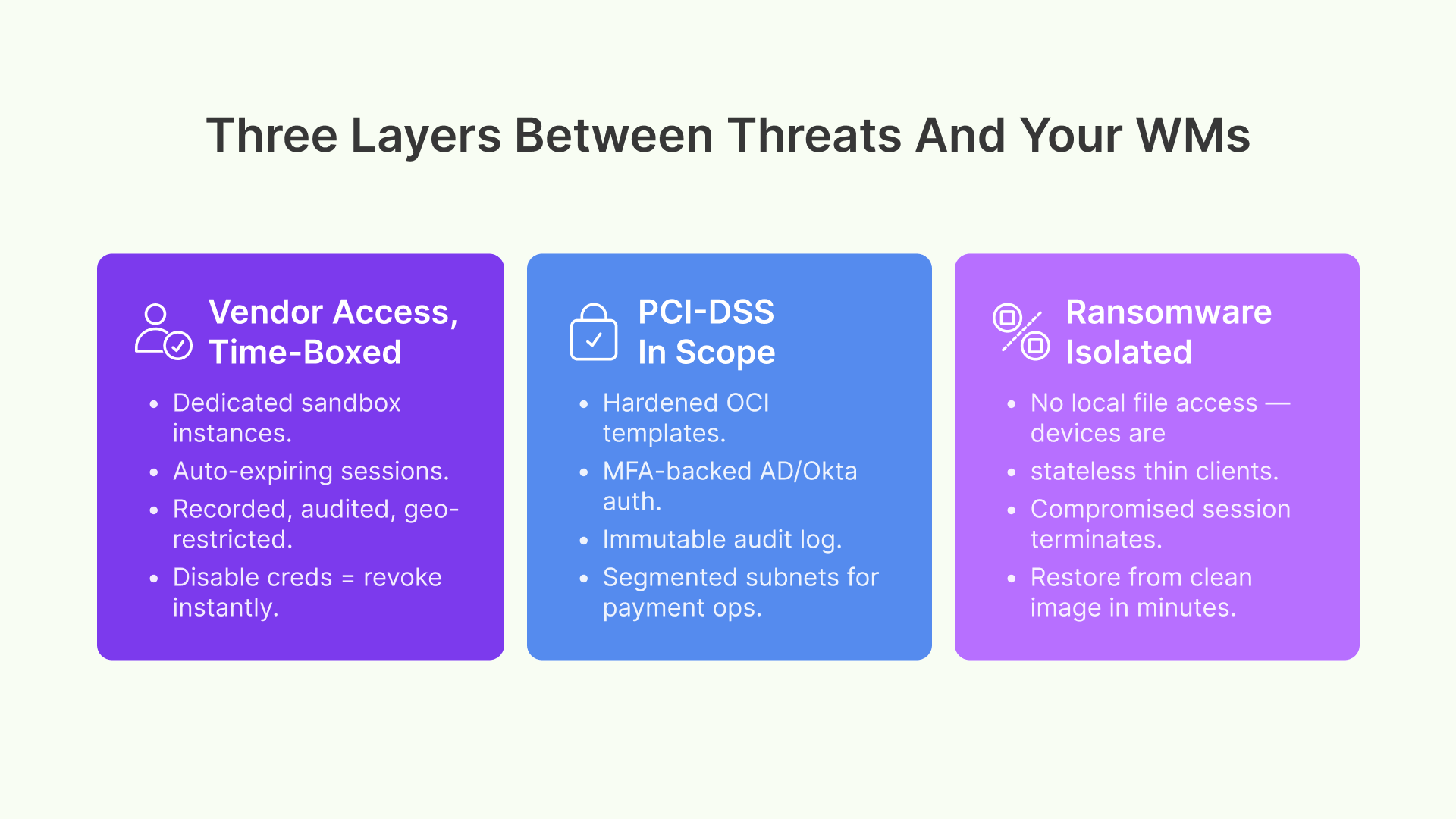
- Vendor isolation: Create dedicated OCI instances for vendor access. WMS vendor gets a sandbox instance for testing and integration; they don’t see production inventory data or live transactions. RF scanner vendor gets a test fleet of Thinfinity-published scanner images; they can’t access the WMS or picking systems
- Session auditing and recording: Every vendor session is logged, timestamped, and fully auditable. Downloads, file transfers, system changes, WMS queries—all recorded and retained for 90 days minimum. Compliance teams can review any vendor interaction
- Time-bound access with auto-expiry: Thinfinity policies enforce session time limits. Vendor access starts Monday 9 AM, expires Friday 5 PM. Sessions auto-terminate at expiration. No manual cleanup. No forgotten access. No chance of unauthorized post-project access
- Restricted application access: Vendors access only what they need. RF scanner firmware vendor accesses scanner configuration tools and Thinfinity session management, not the WMS, inventory, or labor systems. Shipping carrier integration vendor accesses shipment APIs and manifest tools, not fulfillment logic
- Geolocation and IP restrictions: Thinfinity policies can enforce that vendor sessions must originate from specific IP ranges or geographic regions. A vendor in Ohio can’t access systems from China. Prevents credential theft or account takeover
This model eliminates the traditional ‘open the firewall for 3 days, hope nothing bad happens’ problem. Vendors get secure, time-limited, audited, role-restricted access to exactly what they need. Your IT team and security team know exactly what they touched, when, and from where. If a vendor’s credentials are compromised, you disable their account and revoke access instantly—no network reconfiguration or firewall changes required.
PCI-DSS in the Distribution Chain
If your warehouse handles payment processing, returns credit cards, or stores payment-related data (e.g., gift card inventory, customer refunds via stored payment methods), PCI-DSS compliance is mandatory. Many retail warehouses overlook this: they think PCI only applies to point-of-sale terminals, not to back-office and logistics operations. But if your warehouse manages returns processing that touches payment systems, or if you store payment card data in your inventory system, you’re in PCI scope.
Non-compliance carries steep penalties: $5K–100K per month per violation, mandatory security audits (expensive), and reputational damage. Thinfinity VDI on OCI helps you achieve and maintain PCI-DSS Requirement 2 (no default credentials), Requirement 6 (security patches timely), Requirement 8 (strong authentication and access controls), and Requirement 10 (comprehensive audit logging):
- No default credentials (Req 2): OCI instances boot with hardened templates. Thinfinity enforces strong authentication (AD/Okta with MFA) for all sessions. No default passwords. No shared accounts
- Patch management (Req 6): OCI Compute provides automated patching and scheduled updates. Thinfinity sessions inherit the base system’s security posture. Windows and Linux patches applied regularly without warehouse downtime
- Strong authentication (Req 8): Multi-factor authentication enforced for all users. Thinfinity integrates with enterprise identity providers (AD, Okta) to ensure password policies, complexity, and rotation requirements are enforced
- Audit logging (Req 10): Every session, every action, every file access is logged to OCI’s immutable audit service. All failed access attempts logged. Who accessed which systems, when, what they changed. Compliance teams get readable logs in CSV or JSON format for annual audit reviews
- Network segmentation (Req 1): VDI sessions can be segregated by function and sensitivity. Payment-related operations run on isolated OCI subnets with restricted egress. RF scanning operations run on separate subnets. A warehouse worker in picking can’t access payment systems
- Encryption in transit (Req 4): Thinfinity sessions use encrypted protocols (TLS 1.2+). All data transmitted between tablet/scanner and OCI encrypted. No plaintext WMS queries over the network
For retail chains managing multiple DCs with varying compliance requirements (some handle payments, some don’t), Thinfinity’s policy-driven approach lets you enforce stricter controls in sensitive areas without bottlenecking other operations. A returns DC handles payments and requires PCI-DSS. A pure fulfillment DC doesn’t, so it uses lighter security policies. Both run on the same Thinfinity architecture.
PCI-DSS compliance in the warehouse is just one piece of the puzzle — your store fleet faces the same requirements with even broader scope. For a deep dive into PCI-DSS 4.0 control mapping, CDE boundary design with OCI Network Security Groups, and audit scope reduction strategies across 500+ retail locations, read: “Retail VDI Under PCI-DSS 4.0: A CISO’s Architecture Guide for Multi-Site Store Security.”
Ransomware Isolation for Logistics Networks
A ransomware infection in a warehouse is usually terminal for uptime and revenue. A distribution center is a 24/7 operation. Inventory systems down for even 4 hours cascade into missed shipments, delayed orders, customer service nightmares, and $500K+ in lost revenue. Local device attacks spread laterally across network file shares, backup systems, NAS arrays, and adjacent devices. A single infected Zebra scanner or kiosk can encrypt your entire warehouse network.
Thinfinity VDI on OCI mitigates ransomware risk through architectural isolation:
- No local file access: Thinfinity sessions run in the cloud. Session data and code never touch the local device. A tablet, scanner, or kiosk can’t access, encrypt, or steal files from a local storage because there are no files to steal. The device is a stateless thin client. Even if malware infects the device, it can’t spread to network shares, backups, or the WMS
- Session sandboxing and termination: Each worker’s session runs in isolation within the OCI instance. If one session is compromised (e.g., a worker clicks a phishing email and gets credential-stealing malware), Thinfinity isolates and terminates that session. Other workers’ sessions remain unaffected. The compromised user is logged out
- Zero-trust re-authentication for high-risk operations: For sensitive operations (shipping label approval, inventory adjustment, receiving confirmation), Thinfinity enforces per-action re-authentication. An attacker can’t stay logged in long enough to spread. After 30 minutes of inactivity, sessions auto-lock. Suspicious activities trigger immediate re-auth
- Immutable backups and rapid recovery: Your WMS data lives in OCI’s immutable backup service. Thinfinity sessions are ephemeral—they don’t store data. If ransomware somehow encrypts an active session, you terminate it and spin up a fresh one from a clean backup in 5–10 minutes. No data is lost because session data is never persisted locally
- Lateral movement prevention: Thinfinity sessions run on isolated OCI subnets. A compromised session can’t reach other OCI instances, the WMS database, or the backup network. Network ACLs enforce zero-trust: sessions can reach only the WMS and necessary inventory services, nothing else
- Rapid incident response: If ransomware is detected, IT disables affected user accounts. Sessions terminate immediately. No network lockdown or firewall reconfiguration needed. Workers reconnect with fresh accounts within minutes
This architecture doesn’t prevent ransomware entirely—social engineering and credential theft still happen. But it limits impact catastrophically. A traditional warehouse might be down for days, losing millions. A Thinfinity warehouse experiences brief session termination and recovers in hours with minimal revenue impact. The WMS keeps running. Inventory keeps moving. Core operations continue.
Ransomware isolation is a critical layer, but it’s only one component of a complete Zero Trust posture for retail. If you want the full blueprint — identity-first access, microsegmentation without store-level firewalls, BYOD governance, and vendor access controls — see: Zero Trust Retail: A CTO’s Multi-Site Security Blueprint.
Deployment Strategy
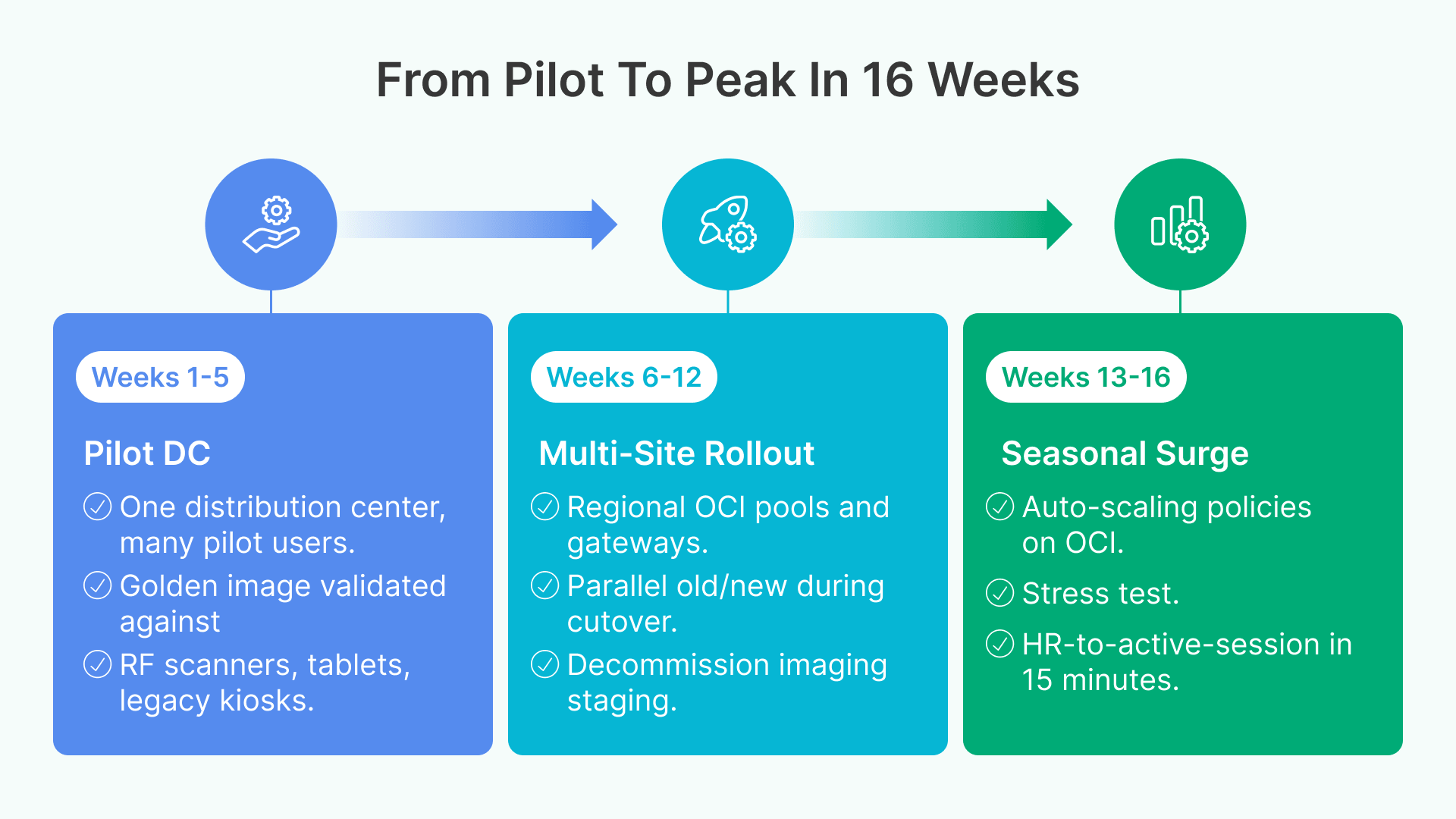
Deploying Thinfinity VDI on OCI across a multi-site warehouse network requires phased planning. Here’s the IT Director playbook:
Phase 1 — Primary DC Pilot (Weeks 1–5)
Start with your busiest or most technically mature distribution center. This pilot proves the concept before rolling out across the chain.
- Week 1: Infrastructure Setup — Deploy OCI compartment, network, identity federation (AD/Okta), and initial Thinfinity gateway. Provision 2–4 OCI instances (VM.Standard3.Flex shape) for 50–100 pilot users.
- Week 2: Golden Image Creation — Install WMS client, standard tools (Excel, Notepad, imaging software), and security agents on the golden image. Test against Zebra scanners, iPad remote access, and legacy Windows kiosks.
- Week 3: Pilot User Enrollment — Onboard 50 pilot users (mix of picking, receiving, packing, and supervisory roles). Set up Thinfinity session pools per role.
- Week 4: Validation & Tuning — Monitor session performance, bandwidth utilization, and user feedback. Adjust OCI shapes, session compression settings, and authentication policies based on real workload.
- Week 5: Security Audit & Documentation — Run security scan, confirm PCI-DSS or compliance requirements are met, document architecture and runbook for ops team.
Phase 2 — Multi-Site Rollout (Weeks 6–12)
Expand to the remaining distribution centers using the golden image and architecture from Phase 1.
- Week 6: Regional Infrastructure — Deploy OCI instances and Thinfinity gateways in each region. Establish redundancy and backup policies.
- Week 7–10: Site-by-Site Migration — Migrate one DC per week. Thinfinity handles parallel old/new systems; workers can switch without disruption.
- Week 11: Decommission Legacy Infrastructure — Shut down old device imaging, local WMS clients, and legacy hardware staging processes.
- Week 12: Operations Handoff — Train warehouse ops and IT support teams on Thinfinity management, session troubleshooting, and new provisioning workflows.
Phase 3 — Seasonal Surge Scaling (Weeks 13–16)
Prepare for your next peak season (Black Friday, holiday, or peak fulfillment). Thinfinity’s elastic architecture makes seasonal hiring frictionless.
- Week 13: Auto-Scaling Policy Setup — Configure OCI auto-scaling rules. Session pools automatically expand when demand exceeds thresholds.
- Week 14: Seasonal User Onboarding Process — HR and IT agree on onboarding flow: HR creates user in AD → Thinfinity auto-provisions account → Worker logs in → Session ready.
- Week 15: Stress Test — Simulate 500+ concurrent workers. Verify OCI scaling, session distribution, and network capacity under peak load.
- Week 16: Go Live for Peak Season — Launch seasonal hiring. Workers are productive within 15 minutes of onboarding.
Seasonal Scaling Model
| Peak Period | Headcount | VDI Sessions | OCI Provisioning | Devices |
|---|---|---|---|---|
| Off-season (Q2–Q3) | 150–200 permanent | 150–200 sessions | 2–4 instances | 50–100 shared |
| Early peak (Sep–Oct) | 250–350 workers | 250–350 sessions | 6–8 instances | 100–150 + seasonal |
| Holiday peak (Nov–Dec) | 400–700 workers | 400–700 sessions | 12–18 instances (auto) | 150–250 + emergency |
| Post-holiday (Jan) | 180–220 workers | 180–220 sessions | Auto scale-down 2–4 | Secure storage/re-image |
| Fulfillment peak (Spring) | 300–450 workers | 300–450 sessions | 8–12 instances | 120–180 + overflow |
60% of Retail WMS Deployments Are Now Hybrid Cloud
According to Gartner, 60% of retail supply chain operations run on hybrid or multi-cloud infrastructure by 2025. Thinfinity VDI on OCI enables this shift without replacing legacy applications. Your warehouse continues to use Manhattan, Blue Yonder, or homegrown WMS—just accessed securely through a cloud-delivered VDI gateway.
Conclusion: The New Standard for Warehouse IT
Managing warehouse IT in 2026 means balancing legacy systems that won’t die, device sprawl across incompatible platforms, seasonal chaos that requires hiring 300 workers in 2 weeks, security threats that grow more sophisticated daily, and regulatory requirements that keep expanding. Traditional IT approaches—local software installs on hundreds of devices, hardware staging and imaging, manual device provisioning, local file access—don’t just fail to scale; they create security vulnerabilities and operational debt.
Thinfinity VDI on OCI changes the equation entirely. Your warehouse workforce accesses WMS, inventory, and logistics systems from any device—Zebra scanner, iPad, kiosk, legacy workstation, or BYOD tablet—within seconds. No driver installation. No imaging. No version conflicts. Seasonal hiring shrinks from days of hardware procurement and imaging to minutes of account provisioning. Ransomware impact drops from mission-critical (days of downtime, millions in recovery costs) to manageable (hours at most, sessions rebuilt from clean templates). Your IT team shifts from reactive device management firefighting to strategic supply chain enablement.
The implementation playbook is proven: pilot at your primary DC (weeks 1–5), expand to multi-site (weeks 6–12), prepare for seasonal surge with OCI auto-scaling (weeks 13–16). By peak season, you’re provisioning temporary workers in 15 minutes instead of 5 days. By year-end, you’ve cut device management overhead by 60–75%, reduced security incidents by accelerating patch deployment and eliminating local attack surface, and positioned your warehouse for the next decade of supply chain innovation.
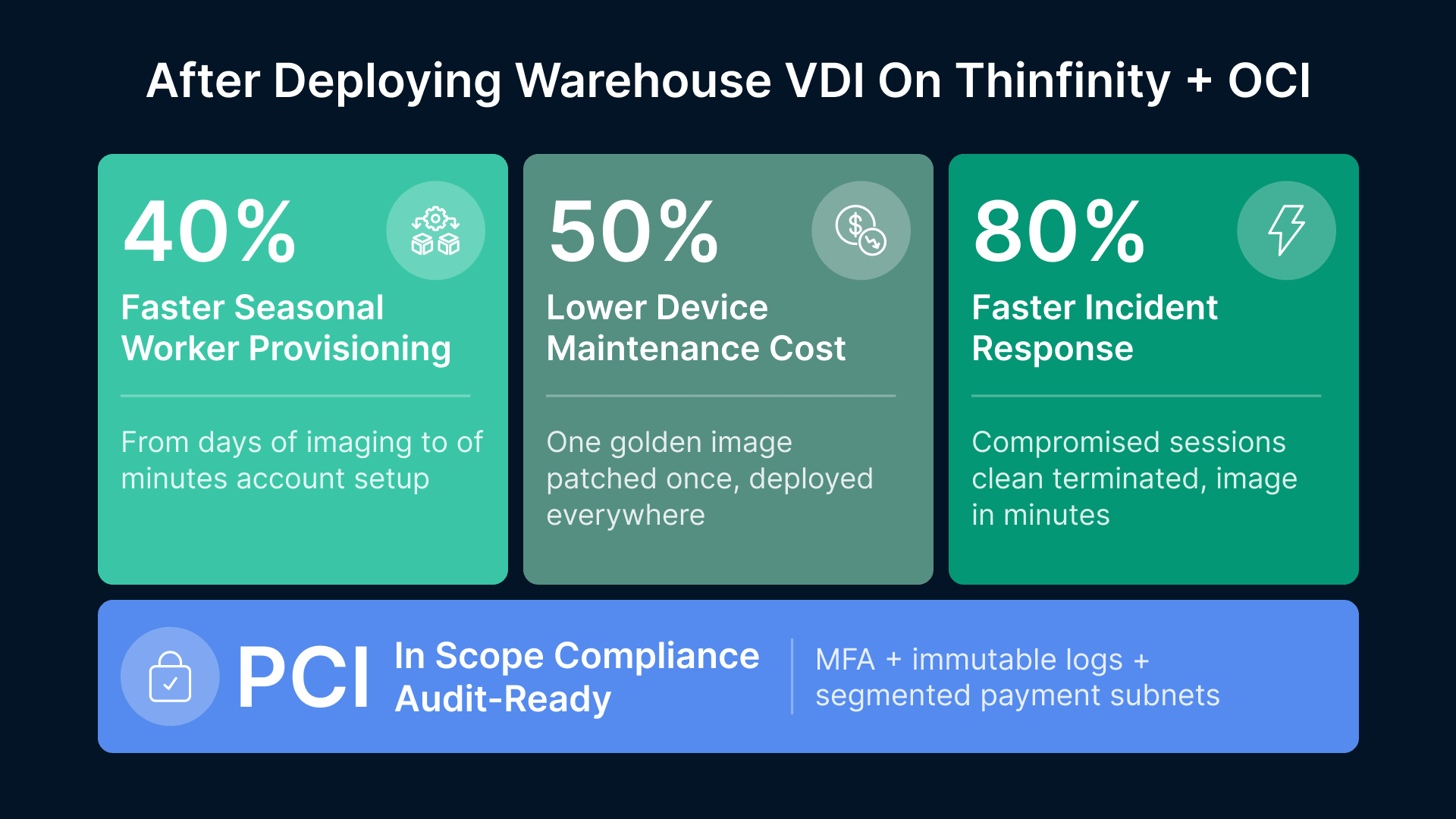
The competitive advantage is real. Retail chains deploying warehouse VDI report: 40% faster seasonal provisioning, 50% reduction in device maintenance costs, 80% faster incident response, and significant compliance improvements. Your warehouse doesn’t have to run on chaos, reactive firefighting, and aging infrastructure. Thinfinity Workspace on Oracle Cloud Infrastructure gives you the secure, scalable, device-agnostic warehouse IT infrastructure IT Directors have been asking for. Deploy it. Measure the impact. Scale it. The warehouse IT transformation starts now.