
TL;DR
- Telecom NOC/SOC operators need 4–6 monitor desktops, sub-100ms latency, and zero context loss across shift changes — physical desktops can’t deliver this at 5G/IoT scale.
- Shift handoffs on physical desks cost 20+ minutes of context recovery per shift; Thinfinity Workspace on OCI reduces that to seconds via persistent sessions and hot-desk reconnect.
- A unified Thinfinity + Cloud Manager architecture on OCI delivers centralized image management, role-based clipboard/USB/print policies, encrypted session recording, and multi-region failover.
- A typical 60-operator NOC migration runs 16 weeks across three phases: pilot (5 ops) → limited production rollout (40 ops) → full production with multi-region DR and SOC expansion.
- Cost model: 60-operator virtual NOC runs ~$210K–$340K first-year vs. ~$292K–$317K for physical desktops; cumulative 3-year savings reach $300K–$500K alongside stronger security and DR posture.
The 24/7 network operations center is the backbone of modern telecom. Every millisecond counts. A single misconfigured route affects millions of subscribers. A SOC analyst missing a critical security alert could open the door to breach. Yet most IT Directors and system administrators manage these mission-critical operations using desktop infrastructure designed in 2005 — physical workstations bolted to shift operators, manual handoffs between shifts, and monolithic patch cycles that consume every weekend.
Today, that model breaks under the weight of 5G, IoT explosion, and the relentless growth of distributed network sites. Thinfinity Workspace on Oracle Cloud Infrastructure (OCI) changes that equation. A virtualized NOC/SOC architecture delivers the multi-screen desktop experience that ops teams demand, with session persistence that survives shift changes, centralized security controls that prevent intelligence leakage, and the elasticity to scale from a single site to 50 distributed locations.
This guide walks IT Directors and system administrators through the strategic, technical, and operational case for VDI-powered NOC and SOC operations. You will learn how to architect multi-screen desktops for real-time monitoring, manage hot-desk operations across shift teams, automate desktop lifecycle at scale, and chart a 16-week deployment roadmap on OCI.
The NOC That Never Sleeps
The 5G and IoT explosions have redrawn the map of telecom operations. A single carrier now manages millions of connected endpoints, dozens of cloud regions, and hundreds of network segments—all generating real-time alarms, metrics, and alerts. The traditional NOC, designed for legacy circuit switching and centralized switching centers, was not built for this volume or complexity.
Consider the scale: a Tier-1 telecom operator might have 5 to 10 primary NOC sites, each with 20–50 full-time operators working 24/7 across three shifts. Each operator monitors 15–30 different network domains—RAN, Core, IP Backbone, CDN, Cloud Services. Tools are scattered: Cisco Prime, Nokia Nfvi, open-source monitoring stacks, vendor-specific dashboards, and proprietary billing systems. Many operators work from physical desks connected to a central KVM (keyboard-video-mouse) switch or a tangle of dual and triple monitor setups. A shift change means re-authenticating, resetting window layouts, and often losing context from the outgoing shift.


The cost is immense. Desktop hardware refreshes cycle every 3–5 years. Patch management consumes weekends and creates maintenance windows that conflict with peak traffic periods. Disaster recovery is a nightmare: if the NOC site is flooded, fire, or suffers network damage, operations failover to a secondary site using days of manual configuration. Data leakage is a chronic risk: operators screenshot dashboards, email them to team members, sometimes forward them to vendors—inadvertently exposing carrier routing details, subscriber counts, or network topology to unintended recipients.
Why Telecom NOCs Are the Hardest Desktop Problem in IT
NOCs demand a combination of desktop capabilities that few enterprise IT environments require: ultra-low latency, extreme real-time responsiveness, persistent session context, and extreme visual clarity. Operators routinely use 4 to 6 monitors running dashboard applications that refresh every 2–5 seconds. Lag—even 50 milliseconds—becomes noticeable and frustrating. If a network alarm alert appears 200ms late, that is the difference between proactive remediation and customer impact.
Multi-screen VDI delivery compounds the challenge. Each additional monitor requires additional bandwidth, GPU resources, and codec optimization. Thinfinity Workspace optimizes for this exact scenario with adaptive compression, hardware-accelerated encoding, and intelligent session multiplexing—allowing operators to maintain 4–6 screens at 60 FPS without saturation.
Zero-downtime operations are non-negotiable. Unlike a data entry operator who can afford a 2-minute login delay, a NOC operator must resume exactly where they left off. This requires session persistence, context recovery, and hot-desk capability—the ability to walk to a different physical desk (or log into a virtual desktop from a different location) and find the same applications, windows, and layout waiting.
The Shift Handoff Nightmare on Physical Desktops
Three-shift operations mean three handoffs per day. On a physical desktop model, this looks like:
- 15:00 shift ends: The outgoing operator scrambles to document their current work state—network alarms resolved, issues escalated, pending tasks. They print or screenshot dashboards and leave notes on the desk.
- 15:05 shift begins: The incoming operator arrives, reads hastily scrawled notes, logs into systems with individual credentials, recreates window layouts, and re-authenticates to 8–12 different applications.
- 15:20 operations resume: By the time the new operator achieves situational awareness, 20 minutes have elapsed. Alarms are backlogged. Critical notifications may have been missed.
With Thinfinity Workspace, shift handoff becomes seamless:
- 14:55 shift ends: The outgoing operator logs off. The virtual desktop session persists in the hypervisor, all windows and contexts intact.
- 15:00 shift begins: The incoming operator logs into any available desk, and Thinfinity connects them to their assigned NOC profile. All previous windows, applications, and context are immediately visible.
- 15:05 operations resume: The operator steps into a ready-to-go environment, with all alarms and dashboards immediately visible.
The operational gain is significant: 20 minutes of lost context per shift becomes 0. Across three shifts and 40+ operators, that is a cumulative recovery of 2,400+ operator-minutes per week.
VDI Architecture for Network Operations
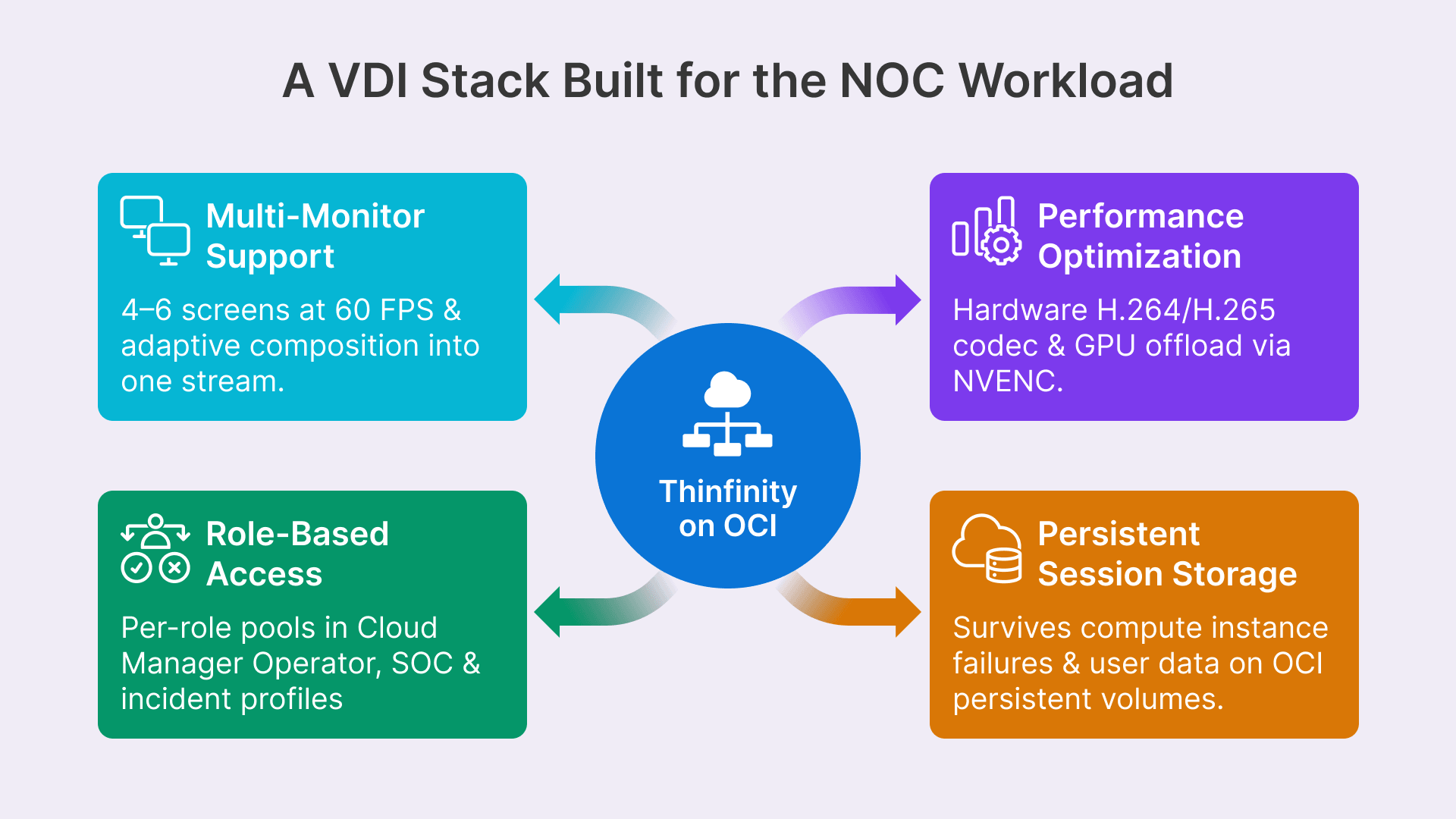
Virtualizing a NOC or SOC is not simply deploying a standard VDI pool and assigning operators to it. These environments demand specialized configuration: multi-monitor support, performance optimization for real-time dashboards, role-based access controls, and persistent session storage that survive infrastructure failures.
Multi-Screen Desktop Delivery
A typical NOC operator works with 4 to 6 monitors. The primary monitor displays alarms and network topology. Secondary monitors show performance dashboards, billing systems, customer escalation queues, and communication tools. Delivering 6 streams of video from a virtualized desktop requires intelligent architecture.
Thinfinity Workspace handles multi-monitor scenarios through adaptive video composition and intelligent codec selection. Rather than streaming 6 independent 1920×1080 feeds (totaling ~200 Mbps raw), Thinfinity composes multiple monitors into a single adaptive stream, applies hardware-accelerated H.264 or H.265 encoding, and dynamically adjusts quality based on network conditions. Operators maintain 50–80 Mbps per connection while sustaining 60 FPS on all screens.
OCI bare-metal compute instances (BM.GPU.A100 or BM.DenseIO shapes) provide the GPU acceleration needed for this workload. A single BM.GPU.A100 instance can host 8–12 concurrent NOC operator sessions, each running 4 monitors at full fidelity.
| Role | Monitors | Primary Apps | OCI Compute Shape |
|---|---|---|---|
| Network Operator | 5 | Cisco Prime, Splunk, Custom Topology | VM.Standard.E4.Flex (2 vCPU, 16 GB) |
| Alarm Manager | 6 | Nagios, PagerDuty, Slack, SMS Gateway | VM.Standard.E4.Flex (2 vCPU, 16 GB) |
| Security Analyst (SOC) | 5 | Splunk ES, ArcSight, CrowdStrike, Threat Intel | VM.Standard.E4.Flex (2 vCPU, 16 GB) |
| Incident Commander | 4 | Jira Service Management, Slack, Dashboard | VM.Standard.E4.Flex (1 vCPU, 8 GB) |
| Performance Analyst | 6 | Grafana, Prometheus, Custom APM | VM.Standard.E4.Flex (2 vCPU, 16 GB) |
| Compliance Officer | 3 | ServiceNow, Splunk, Audit Logs | VM.Standard.E4.Flex (1 vCPU, 8 GB) |
Session Persistence Across Shift Changes
Session persistence is the linchpin of shift-based operations. When an operator logs off, all active windows, application state, network connections, and even clipboard contents must survive long enough for the next operator to reconnect. Thinfinity Workspace manages this through persistent user session storage and instant reconnection logic.
Hot-Desk Operations — Any Seat, Same Desktop
Traditional NOCs assign operators to fixed physical desks. An operator always sits at Desk 5. If Desk 5 fails, they move to Desk 6—but Desk 6 lacks their window configurations and application preferences.
Thinfinity Workspace enables true hot-desk operations. Operators do not log into a desk; they log into a VDI profile. Upon authentication, Thinfinity connects them to their persistent virtual desktop, regardless of which physical endpoint they use. The operator could log in from the main NOC terminal, a spare desk in the war room, or even a laptop during a maintenance window—and see exactly the same environment.
This is implemented through Cloud Manager, Thinfinity central management console on OCI. Cloud Manager stores user profiles, role-based VDI pool assignments, and session affinity rules. When an operator authenticates, Cloud Manager looks up their profile, assigns them to an available virtual desktop in their role-based pool, and routes the session through Thinfinity protocol optimizer.
Traditional NOC vs. Virtualized NOC
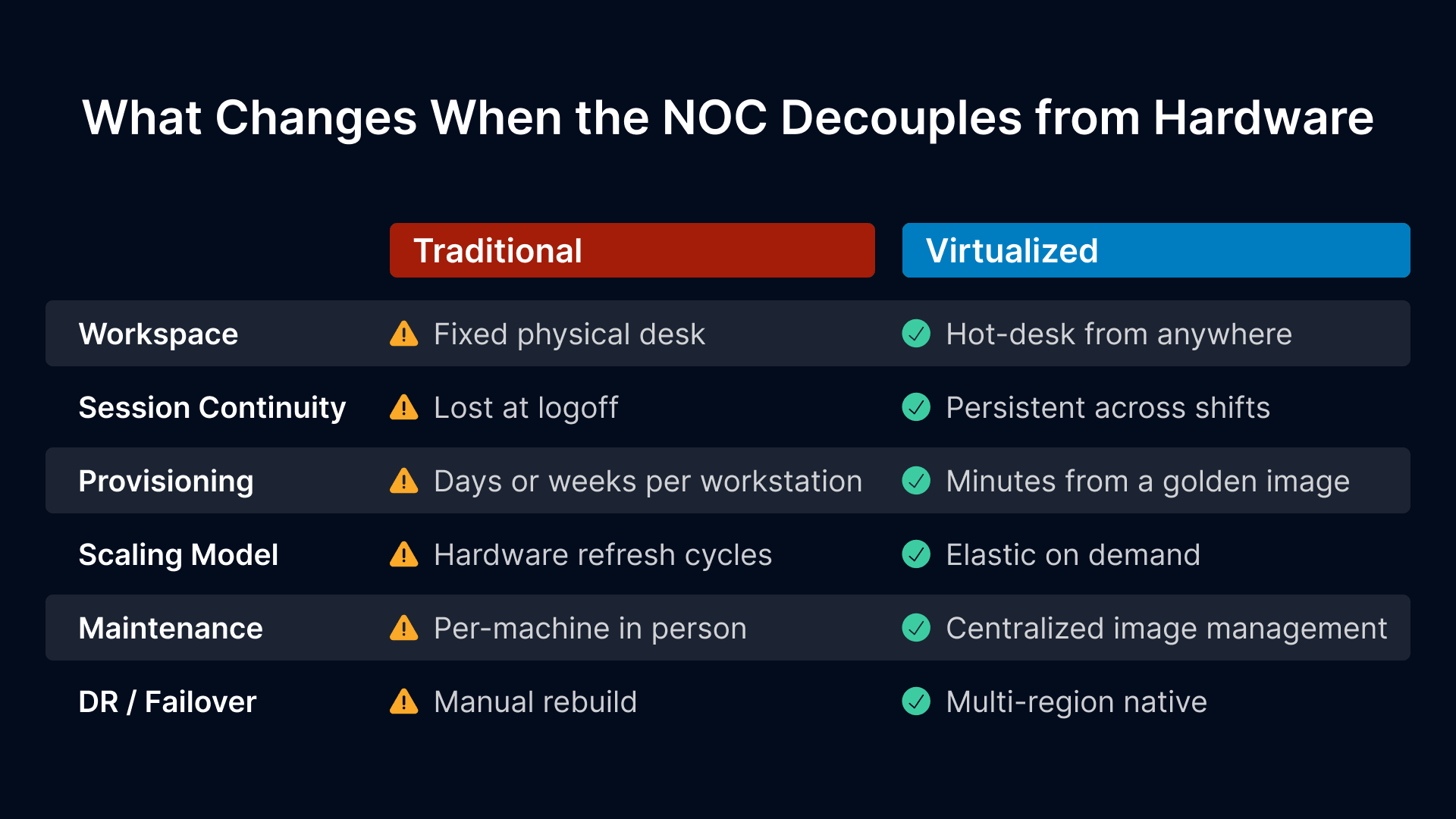
A side-by-side comparison illustrates the operational and financial case for virtualizing NOC and SOC infrastructure:
| Dimension | Physical NOC | Virtualized NOC on OCI |
|---|---|---|
| Desktop Management | Per-device patching, updates, and config management (labor-intensive) | Centralized image management; patches deployed to all user sessions in minutes |
| Shift Handoff | 15–30 min context loss per shift; manual note-taking and re-authentication | Zero context loss; hot-desk reconnect under 30 seconds |
| Patching & Updates | Maintenance windows every 4–8 weeks; requires downtime coordination | Non-disruptive rolling updates; users migrate to updated pools automatically |
| Data Leakage | Screenshot-to-email; USB drives; uncontrolled clipboard; no audit trail | Thinfinity session recording; clipboard redirection controls; all operator actions logged |
| Scalability | Adding 5 new operators equals procurement, configuration, hardware delivery (4–6 weeks) | Adds 5 new VDI sessions to OCI pool (30 minutes); auto-scale based on headcount |
| Disaster Recovery | Secondary NOC site requires manual failover and extensive reconfiguration (8–12 hours) | OCI multi-region replication; failover in under 15 minutes with session resumption |
| Multi-Screen Support | 3–4 monitors via KVM or local hardware; complex cable management | 6 monitors with adaptive bandwidth optimization; no local hardware required |
| Incident Response Speed | Operator isolation on single desktop; limited parallel incident analysis | Multiple operator sessions in shared context; real-time collaboration and escalation |
Desktop Lifecycle Management at Scale
Managing 100+ physical NOC desktops across multiple shifts is operationally expensive. Each device requires:
- Initial configuration: 2–4 hours per desktop for driver installation, network setup, and application configuration.
- Monthly patching: 2 hours per desktop times 100 desktops = 200 hours per month of IT labor.
- Hardware refreshes: Every 4–5 years, 100 desktops = $400K–$600K in capex and 6–8 weeks of migration effort.
- Incident recovery: A failed hard drive = ship in replacement hardware, rebuild from image, reconfigure (2–3 days downtime).
Thinfinity on OCI flips this model:
- Golden image: A single base image containing all standard applications, drivers, and configurations is versioned and stored in OCI.
- Auto-provisioning: New operator joins — Cloud Manager auto-provisions a VDI session from the latest golden image in under 5 minutes.
- Rolling updates: A new OS patch or application update is applied to the golden image, and new sessions use the updated version. Existing sessions continue; old sessions are retired as operators log off.
- Zero data loss: User data and session state are stored in persistent volumes in OCI, separated from compute. A compute instance failure does not affect user sessions.
The result: 200 hours per month of desktop patching labor becomes 4–8 hours of image testing and release. Hardware refreshes become non-events (you are simply running OCI instances on newer hardware).
Security Operations Center Considerations
A SOC is, in many ways, a specialized NOC. Analysts hunt threats, investigate incidents, and coordinate responses across multiple tools: SIEM, EDR, threat intelligence feeds, communication platforms, and incident management systems. The multi-screen desktop pattern is identical; the security posture is even more critical.
SOC Desktop Isolation — Preventing Intel Leakage
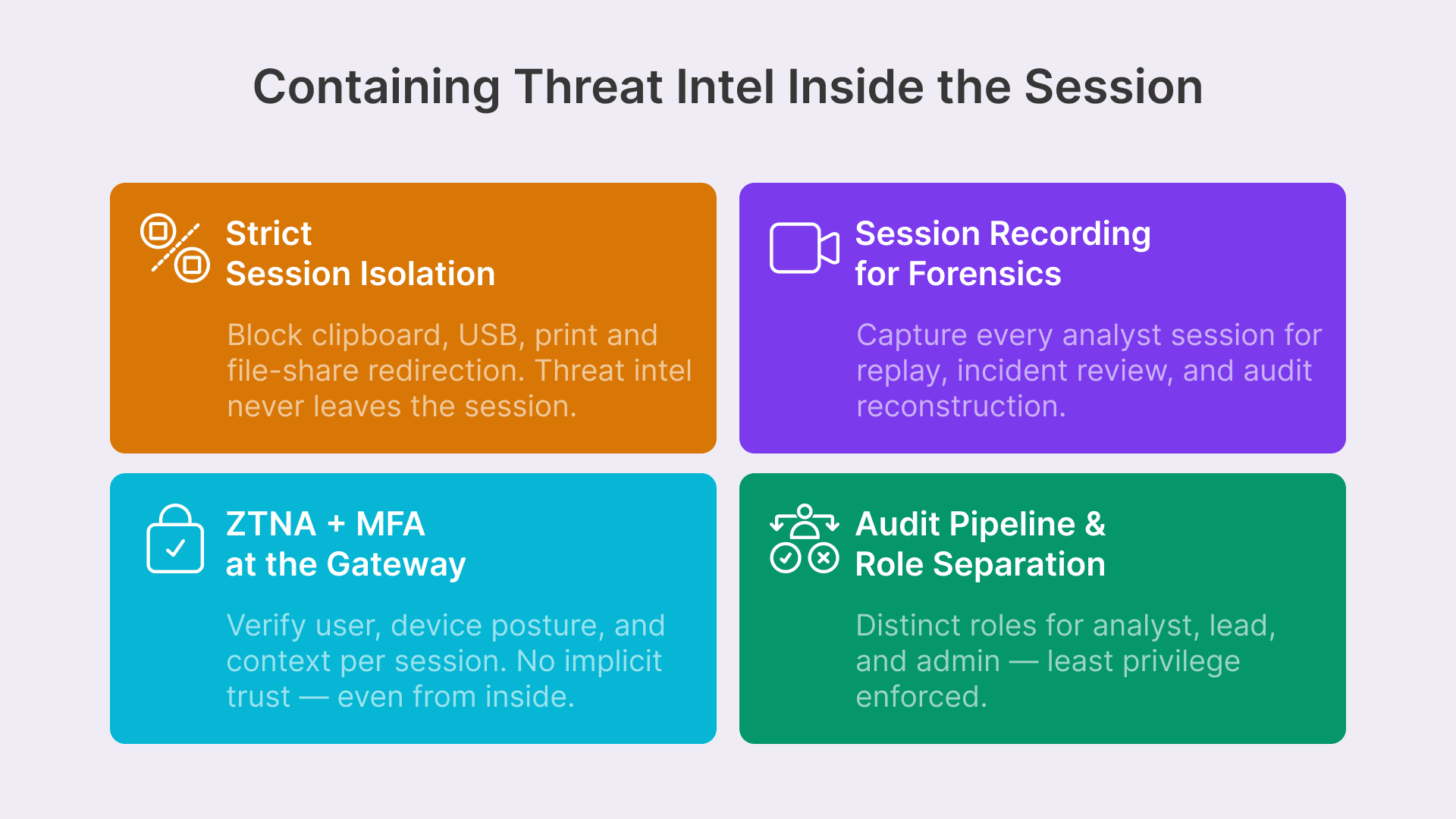
A SOC analyst might work with sensitive indicators of compromise, threat actor profiles, or unreleased vulnerability details. These cannot leave the SOC desktop. Thinfinity provides granular controls to prevent data exfiltration:
- Clipboard redirection: Block copy-paste from the virtual desktop to the local client machine; allow copy within the session only.
- Print redirection: Disable printing entirely, or allow print-to-PDF only within the session.
- USB redirection: Block USB drives and removable media completely.
- File share access: Restrict network shares to only sanctioned repositories (e.g., SOC-only shared folders on OCI).
Cloud Manager enforces these policies per user role and session type. A senior SOC analyst might have clipboard enabled for internal communications; a junior analyst might have all redirection blocked. All policy changes are logged and auditable.
Session Recording for Forensic Review
When a security incident occurs, the ability to replay what an analyst saw and did is invaluable. Thinfinity Workspace supports native session recording: all video, keyboard, and mouse input is captured and encrypted on OCI. In the event of a data breach or anomalous analyst activity, security and compliance teams can:
- Retrieve the recorded sessions in question.
- Play back the session at normal or variable speed to see exactly what the analyst saw.
- Review keyboard input and mouse clicks to understand action sequences.
- Export the recording and metadata to external systems for forensic analysis or regulatory review.
Session recordings are encrypted at rest and in transit, and retention policies are enforced through Cloud Manager. A financial services SOC might retain recordings for 90 days; a government contractor might retain indefinitely.
Reference Architecture on OCI
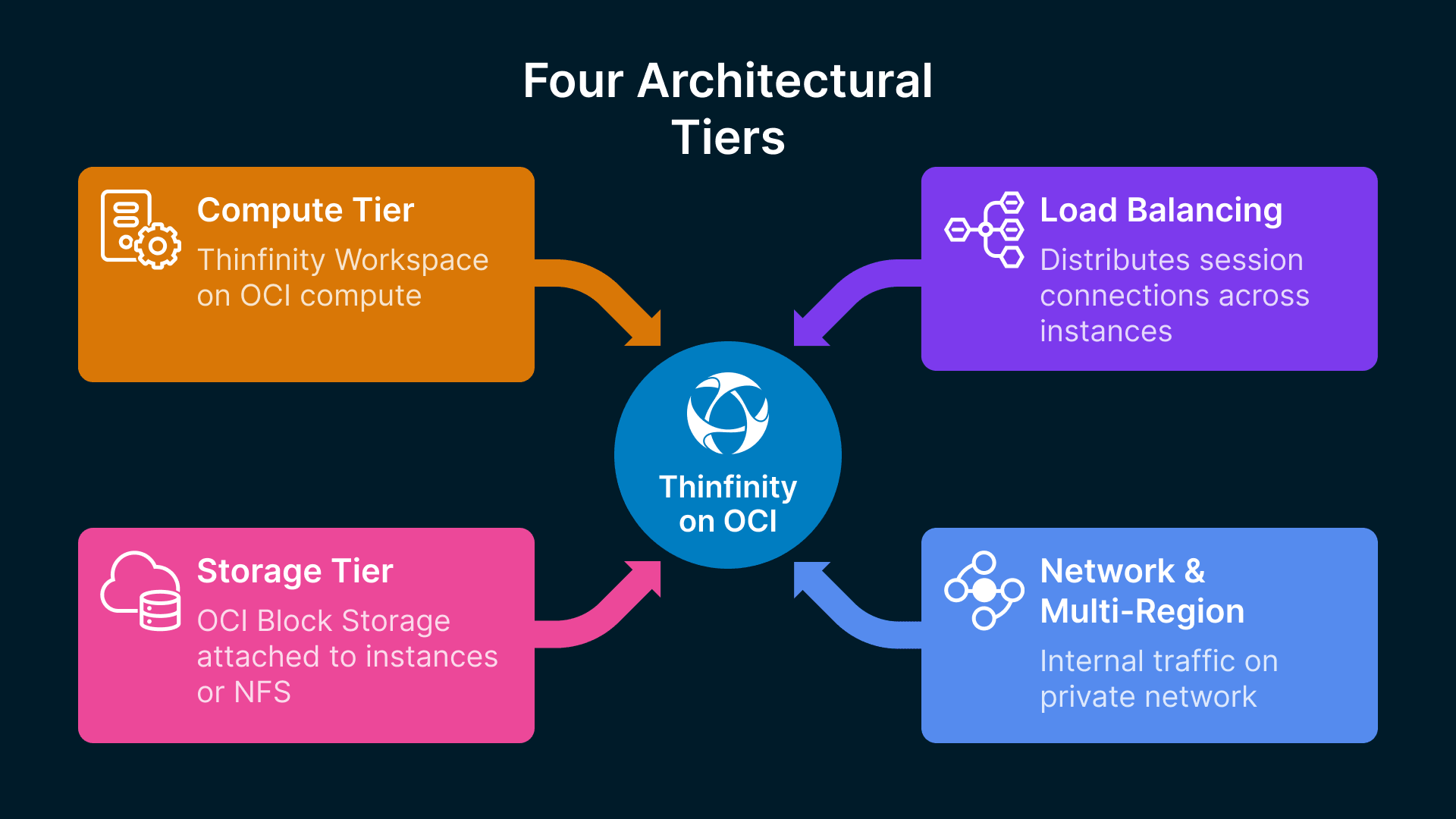
Deploying a production NOC/SOC on OCI requires careful planning of compute, storage, networking, and session orchestration. Here is a reference architecture suitable for a mid-sized telecom operator (50–100 concurrent NOC operators, 20–30 SOC analysts):
Compute and Network Topology
The core of the architecture consists of:
- Compute Tier: Thinfinity Workspace deployed on OCI compute instances (mix of VM.Standard.E4.Flex and BM.GPU.A100 for multi-monitor support). Each instance hosts 8–12 concurrent operator sessions.
- Load Balancing: OCI Load Balancer distributes incoming session connections across Thinfinity instances. Cloud Manager handles session affinity and failover.
- Storage Tier: User home directories, session recordings, and application state stored on OCI Block Storage (attached to Thinfinity instances) or OCI File Storage Service (NFS).
- Network Tier: VCN (Virtual Cloud Network) with public and private subnets. NOC endpoints connect via IPSec or Cisco AnyConnect VPN to the private subnet. Internal Thinfinity instances communicate over private network.
For geographic distribution, additional VCNs are deployed in secondary OCI regions (e.g., us-phoenix-1 and eu-frankfurt-1). Site-to-site VPN or OCI FastConnect links the regions, and Cloud Manager orchestrates multi-region session failover.
GPU Acceleration for Dashboard Rendering
NOC dashboards (Grafana, Kibana, custom web apps) refresh frequently and demand GPU-accelerated rendering. OCI BM.GPU.A100 instances provide NVIDIA A100 GPUs, which Thinfinity can leverage for:
- Hardware video encoding: NVENC accelerates H.264/H.265 encoding, reducing CPU overhead and improving frame rates.
- Dashboard rendering: Complex Grafana dashboards with many graphs can offload rendering to GPU, reducing latency.
- Multi-monitor composition: GPU handles real-time composition of 6 monitor streams into adaptive video output.
A single BM.GPU.A100 instance can support 16–20 concurrent NOC operator sessions while maintaining 60 FPS on all monitors. This represents a 50% efficiency gain compared to CPU-only instances.
Deployment Roadmap (3 Phases, 16 Weeks)
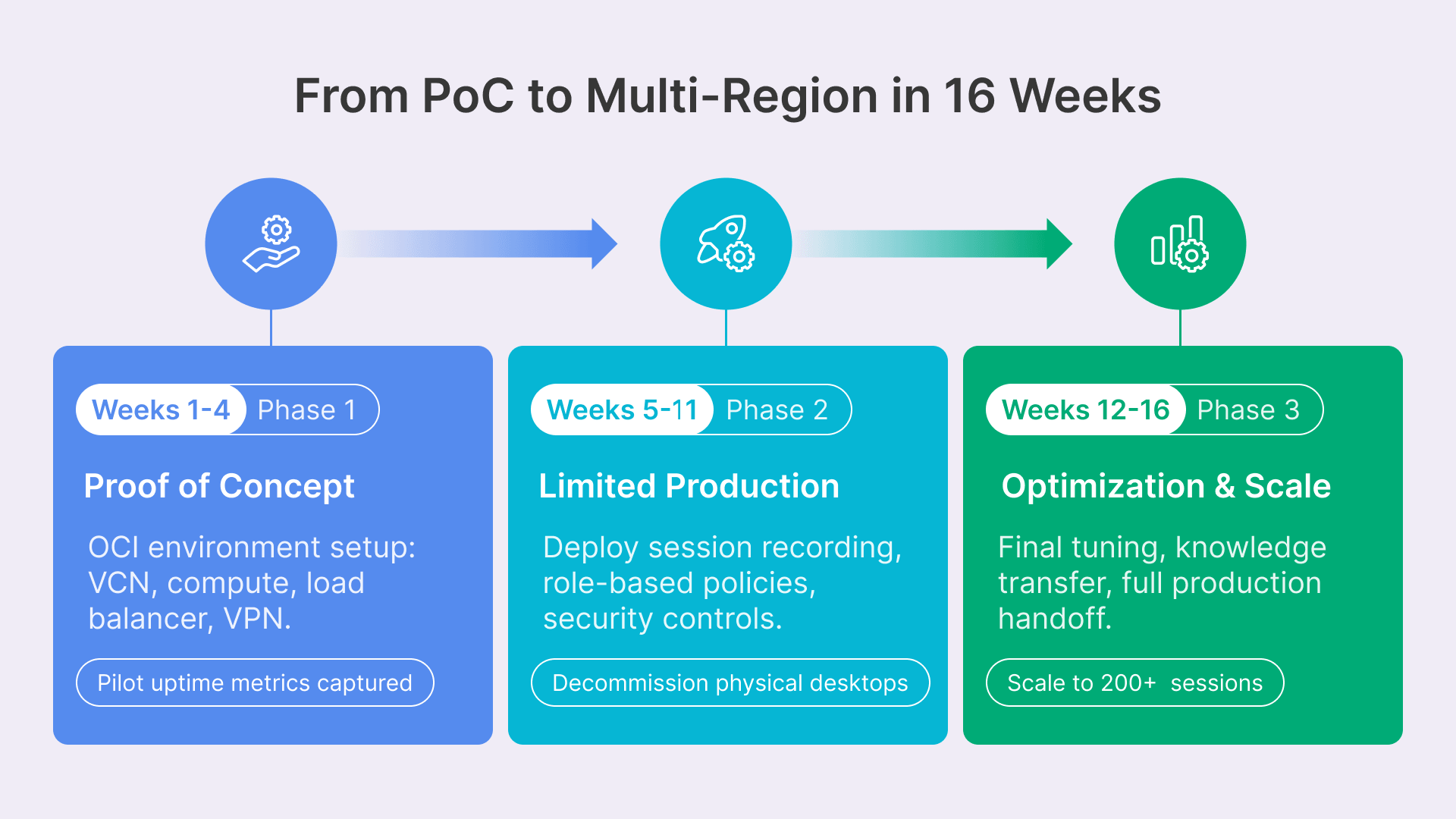
Virtualizing an entire NOC or SOC is a significant undertaking. A phased approach minimizes risk and allows for iterative refinement. Here is a realistic 16-week roadmap:
Phase 1: Proof of Concept (Weeks 1–4)
- Week 1: OCI environment setup: VCN, compute instances, load balancer, VPN. Deploy initial Thinfinity Workspace cluster on 2 x VM.Standard.E4.Flex instances. Install Golden Image (Windows Server 2022, required applications).
- Week 2: Enroll 5 pilot operators from the NOC. Configure their VDI profiles and multi-monitor setup. Test dashboard rendering, latency, and FPS under real-world conditions.
- Week 3: Gather feedback on pilot experience. Optimize Thinfinity configuration, adjust bandwidth limits, test shift handoff and hot-desk reconnection.
- Week 4: Document findings, refine architecture, brief stakeholders on Phase 2 scope.
Success criteria: 5 pilot operators run production workloads on Thinfinity for 1 full week with over 95% uptime and no complaints about latency or feature gaps.
Phase 2: Limited Production Rollout (Weeks 5–11)
- Week 5: Expand Thinfinity cluster to 5 instances. Enroll 20 additional operators (shift 1 of the NOC). Configure Cloud Manager policies for role-based access.
- Week 6–7: Live monitoring of the 20-operator cohort. Fine-tune performance, test incident response workflows, validate backup and failover paths.
- Week 8: Enroll shift 2 (20 more operators). Deploy session recording for audit and forensics. Brief management on cost and operational benefits observed.
- Week 9–10: Run parallel operations: all 40 operators on Thinfinity, with legacy physical desks as backup. Monitor for 2 weeks; if no issues, decommission physical desktops.
- Week 11: Enroll shift 3 (remaining operators). Deploy security controls (clipboard isolation, USB redirection, policy enforcement). Complete transition to virtual NOC.
Success criteria: 60 operators running 24/7 with over 98% uptime, under 100ms latency, and measurable operational gains in shift handoff and patch deployment.
Phase 3: Optimization and Scale (Weeks 12–16)
- Week 12: Analyze metrics from Phase 2: operator satisfaction, CPU/memory utilization, network bandwidth, cost per operator.
- Week 13–14: Deploy multi-region failover: replicate Thinfinity and storage to secondary OCI region. Test failover drills.
- Week 15: Plan SOC expansion: enroll initial SOC cohort (10 analysts) using same architecture with role-based session recording.
- Week 16: Final tuning, knowledge transfer to operations team, full production handoff.
Success criteria: Multi-region redundancy tested; SOC pilot deployed; IT operations team confident in scaling to 200+ concurrent sessions.
5G and IoT NOC Demands
A Tier-1 carrier NOC monitors 50+ million connected devices, 1000+ cell sites, and 10+ cloud regions. Legacy NOCs built for circuit switching cannot scale. Virtualization on OCI allows operators to add capacity elastically: deploy new Thinfinity instances in hours, auto-provision 50 new operator sessions without capital investment.