TL;DR
- In April 2026, the Everest ransomware group claimed up to 3.65M Citizens and Frost records stolen from a shared statement-printing and tax-document vendor, not from either bank’s own network.
- Six class-action lawsuits were filed within weeks, against the banks, not the vendor: liability flows upstream regardless of where the compromise happened.
- The root cause is data location — the data was stolen from the vendor because it lived on the vendor’s systems; every file shipped to a vendor inherits that vendor’s security posture.
- The durable fix is to invert the model: host the vendor’s working environment inside your tenancy as a virtual desktop behind a ZTNA gateway, so only pixels leave and no data reaches the vendor’s endpoint.
- On OCI, vendor desktops run on private subnets with no public IPs, time-boxed access, full session recording and MFA at the gateway aligned with GLBA, FFIEC and DORA expectations.
The Banks Were Clean. They’re Still the Ones Being Sued.
On April 20, 2026, the Everest ransomware group listed Citizens Bank and Frost Bank on its leak site, claiming up to 3.65 million records: roughly 3.4 million tied to Citizens customers and about 250,000 Frost records including Social Security numbers. Neither bank’s network was breached. The entry point was a shared third-party vendor handling statement printing and tax documents.
Here’s the part that should reorganize your security budget: within a week of disclosure — by late April, six class-action lawsuits had been filed — against the banks, not the vendor. Liability flows upstream regardless of where the compromise happened. And here’s the architectural lesson buried in the incident: the data was stolen from the vendor’s environment because the data was in the vendor’s environment. Every file you transfer to a vendor’s endpoint inherits that vendor’s security posture, forever. The only durable fix is to stop moving the data and start moving the vendor into a virtual desktop hosted where the data already lives. The perimeter has to sit where the data is, and for vendor work, that perimeter is the VDI session itself.
What Actually Happened
- April 20, 2026: Everest lists both banks on its leak site with sample data, claiming 3.65M records sourced from a shared document-services vendor.
- Late April: Both banks confirm their own environments were not compromised; the vendor relationship is the common denominator. Six class actions filed against Citizens and Frost. Plaintiffs argue the banks failed to vet and constrain vendor access to customer data.
The pattern is now the dominant one in banking incidents: the institution hardens its own perimeter, then ships customer data or hands a soft network path to a supplier who never had a perimeter worth the name. Verizon’s DBIR has tracked third-party involvement in breaches doubling year over year, and banks sit at the top of the target list because that’s where the records are.
The Real Failure: Your Data Was on Someone Else’s Disk
Look past the ransomware branding and the Citizens/Frost incident is a data-location problem. A printing vendor needed customer statements, so customer statements were delivered to the vendor’s systems. From that moment, the bank’s controls the EDR, the segmentation, the SOC protected an environment the data was no longer in.
The same failure shows up in interactive vendor access, just slower. Most vendor access in banking still looks like employee access with a different email domain:
- Standing VPN credentials: The vendor gets an account that works at 3 a.m. on a Sunday, twelve months after the project ended. Credential theft at the vendor becomes network presence at the bank.
- Network-level reach: Once the tunnel is up, the vendor’s unmanaged laptop is on your network. Lateral movement is a flat-network problem you inherited from someone else’s endpoint.
- Local copies as a workflow: Vendors pull files down to work on them — extracts, reports, statement batches. Every copy is a future breach notification you can’t scope.
- No session evidence: When regulators ask what the vendor did inside your systems, the honest answer is a firewall log of an encrypted tunnel. That is not an answer.
Each pattern has the same root cause: the architecture treats the vendor’s device as a place where bank data is allowed to exist.
Move the Perimeter to Where the Data Is
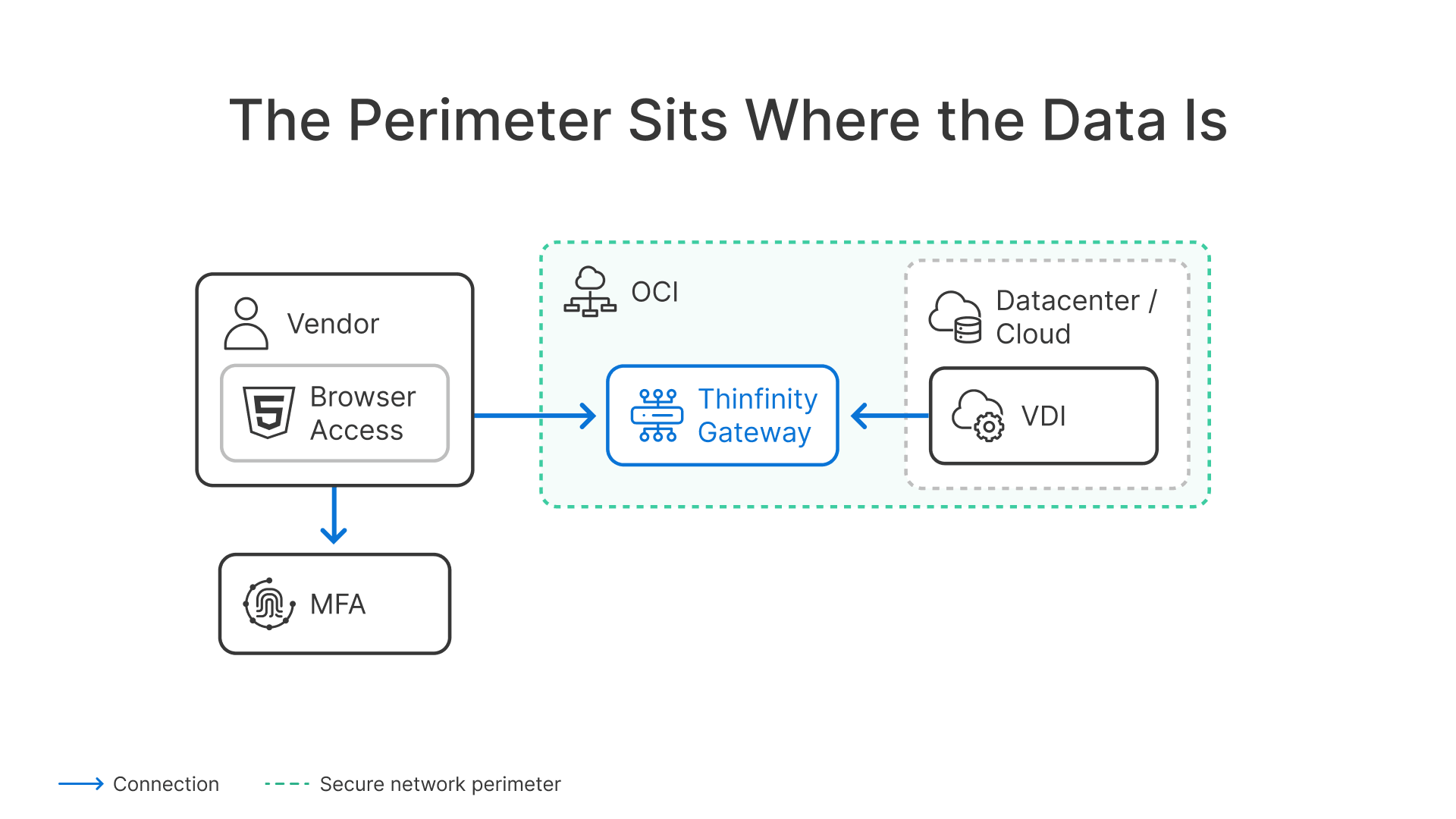
The fix is to invert the model. Instead of extending your network to the vendor, host the vendor’s entire working environment inside yours: a virtual desktop running in your datacenter or cloud tenancy, reached through a zero trust gateway in a browser. The vendor authenticates with MFA, lands in a desktop or single published application, and works against the data in place. What crosses the wire to the vendor’s laptop is a pixel stream. No files, no drive mappings, no cached extracts. The data never leaves the datacenter only pixels leave.
This is ZTNA doing what it was designed to do identity-checked, per-application access with no network admission (our CISO guide to ZTNA covers the model in depth) combined with VDI as the enforcement point. The virtual desktop is the perimeter:
| Control | VPN / network access | Virtual desktop behind a ZTNA gateway |
|---|---|---|
| Scope | Entire network segment reachable | One desktop or published app, nothing else |
| Data location | Files traverse to vendor endpoint | Data stays in the datacenter; pixels only |
| Credentials | Standing account, often shared | Per-person identity, MFA at the gateway |
| Duration | Until someone remembers to revoke | Time-boxed; expires automatically |
| Endpoint risk | Vendor laptop is on your network | Vendor laptop never touches your network |
| Exfiltration paths | Copy, sync, screenshot at will | Clipboard, file transfer, printing disabled by policy |
| Audit | Tunnel metadata | Full session recording, per-user, replayable |
| Revocation | Ticket to the firewall team | Instant, one click, mid-session if needed |
In Thinfinity Workspace, a vendor access profile is declarative the controls are the configuration, not a procedure someone has to remember:
# Vendor profile: "DocPrint Corp" — statement reconciliation desktop only
profile: vendor-docprint
deliver:
type: virtual-desktop # hosted in bank tenancy, not vendor endpoint
published_apps: ["StatementRecon"]
identity:
idp: docprint-saml # vendor's external IdP, federated
mfa: required # enforced at the ZTNA gateway
access_window:
schedule: Mon-Fri 09:00-18:00 ET
expires: 2026-09-30 # access dies with the contract
session:
recording: full # video + metadata, retained 12 months
clipboard: disabled
file_transfer: disabled
drive_mapping: disabled
printing: disabled
revocation: immediate # kills live sessions, not just new logins
When the contract ends, the desktop is deprovisioned and there is nothing to claw back from the vendor’s laptop because nothing was ever on it.
Why Host It on OCI
The objection to VDI-for-vendors is usually cost and operational drag: nobody wants to expand an on-prem VDI farm for third parties. Hosting the vendor desktop pool on Oracle Cloud Infrastructure changes that math, and the architecture is concrete:
- Private subnets, no public IPs: Vendor desktops run on VMs in a private OCI subnet. The only internet-facing component is the Thinfinity ZTNA gateway; the desktops themselves have no inbound exposure, consistent with the zero-inbound-port architecture we’ve described for SSL VPN replacement (see FortiGate SSL VPN replacement: zero-inbound-port architecture).
- Region and data-residency fit: Pick the OCI region that matches your regulatory footprint, keep the vendor desktop pool adjacent to the data it works against, and stay inside the residency boundaries that GLBA, DORA, or LGPD impose (see the global banking compliance architecture: GLBA, DORA & LGPD).
- Elastic, per-engagement capacity: Spin up flexible-shape VMs for a six-week vendor engagement, tear them down after. You pay for the engagement, not for a standing farm sized for peak.
- Economics: OCI’s compute and egress pricing makes a vendor desktop pool meaningfully cheaper to run than the equivalent on the larger hyperscalers — and since the vendor session is pixels, egress stays small anyway. For banks whose vendors maintain mainframe-adjacent systems, the same pool serves TN3270/TN5250 access through the browser (see the TN3270/TN5250 + VDI banking TCO analysis).
Thinfinity Workspace is the delivery layer across all of it: browser-based access with nothing to install on the vendor’s machine, MFA at the front door, recording and policy enforcement per session.
The Regulators Already Wrote This Requirement
None of this is exotic. FFIEC third-party risk guidance expects banks to control and monitor vendor access commensurate with the data involved; the GLBA Safeguards Rule expects access controls and monitoring around customer information — we’ve mapped those expectations onto a banking VDI reference architecture in our GLBA & FFIEC compliance guide. In the EU, DORA’s ICT third-party risk provisions are now actively enforced, with fines reaching 2% of worldwide turnover. Six class actions in six weeks suggests the plaintiffs’ bar reads the same guidance. A session recording showing exactly what a vendor saw and touched is the difference between an evidence-backed response and a settlement.
A 30-Day Plan That Survives Contact With Your Vendor List
- Week 1 — Inventory: List every third party with remote access or recurring data deliveries. For each: what data can they reach or receive, with what credentials, expiring when? Expect surprises — the Citizens/Frost vendor was a printing company.
- Week 2 — Kill standing access: Disable every vendor account idle for more than 30 days. Convert the rest to time-boxed windows tied to tickets. Flag every workflow that ships files to a vendor endpoint.
- Week 3 — Stand up a vendor desktop pool: Deploy a Thinfinity-fronted pool in a private OCI subnet and move your five highest-risk vendors from VPN and file delivery into browser-based virtual desktops with MFA and recording. If you’re already replacing aging VPN concentrators, fold this into that project it’s the same zero trust architecture.
- Week 4 — Evidence: Run a tabletop: ‘Our document vendor was just listed by Everest.’ If the answer is ‘their desktops are in our tenancy and we have recordings of every session,’ the tabletop is short. If you can’t produce that, you’ve found next quarter’s project.
Stop Shipping Data to Vendors. Ship Them a Desktop.
Thinfinity Workspace delivers vendor access as a recorded, time-limited virtual desktop in the browser hosted in your OCI tenancy, MFA at the ZTNA gateway, zero inbound ports, data never leaves your datacenter. See it on your own apps in a 30-minute demo.
Frequently Asked Questions
What happened in the Citizens and Frost Bank breach?
In April 2026 the Everest ransomware group claimed up to 3.65 million records from Citizens Bank and Frost Bank. Both banks reported their own networks were not compromised; the data was taken from a shared third-party vendor that processed statements and tax documents. Six class-action lawsuits have since been filed against the banks.
Why are the banks liable if the vendor was breached?
Regulators — the GLBA Safeguards Rule, FFIEC third-party guidance, DORA in the EU hold financial institutions responsible for protecting customer data wherever it flows, including at third parties. Litigation follows the same logic: plaintiffs sue the institution that chose and supervised the vendor.
How does VDI keep vendor data inside the bank?
The vendor works inside a virtual desktop hosted in the bank’s datacenter or cloud tenancy, reached through a browser via a ZTNA gateway. Only the rendered display — pixels — travels to the vendor’s device. Clipboard, file transfer, and printing are disabled by policy, so no copy of the data ever exists on the vendor’s endpoint to be stolen later.
Can vendors still work effectively in a browser-based virtual desktop?
Yes. For the overwhelming majority of vendor tasks — reconciliation, system maintenance, document processing, support — a virtual desktop in the browser is functionally identical to working locally, with nothing to install. What changes is the blast radius: a compromised vendor laptop yields a login attempt against an MFA-protected gateway instead of a folder full of customer files.