
TL;DR
FortiOS 7.6.3 removed SSL VPN tunnel mode from every FortiGate model. The three replacement paths Fortinet recommends (IPsec over TCP 443, Agentless VPN, FortiSASE) each cover part of the surface and leave a gap for RDP, file shares, and thick-client access. A clientless reverse-tunnel architecture — like the one Thinfinity Workspace uses — closes that gap with zero inbound ports on any protected host. This guide explains what changed, why it changed now, where each Fortinet replacement falls short, and how to plan your FortiGate SSL VPN replacement by user population.
What FortiOS 7.6.3 changed for SSL VPN
In the FortiOS 7.6.3 release notes, Fortinet shipped a single sentence that resets remote-access architecture across the entire FortiGate installed base: “SSL VPN tunnel mode is no longer available in the GUI and CLI.” Settings do not migrate from previous versions. The feature is removed — not deprecated, not behind a CLI flag, not warned about. The change applies to every model, from the desktop 40F to the 7000-series datacenter chassis.
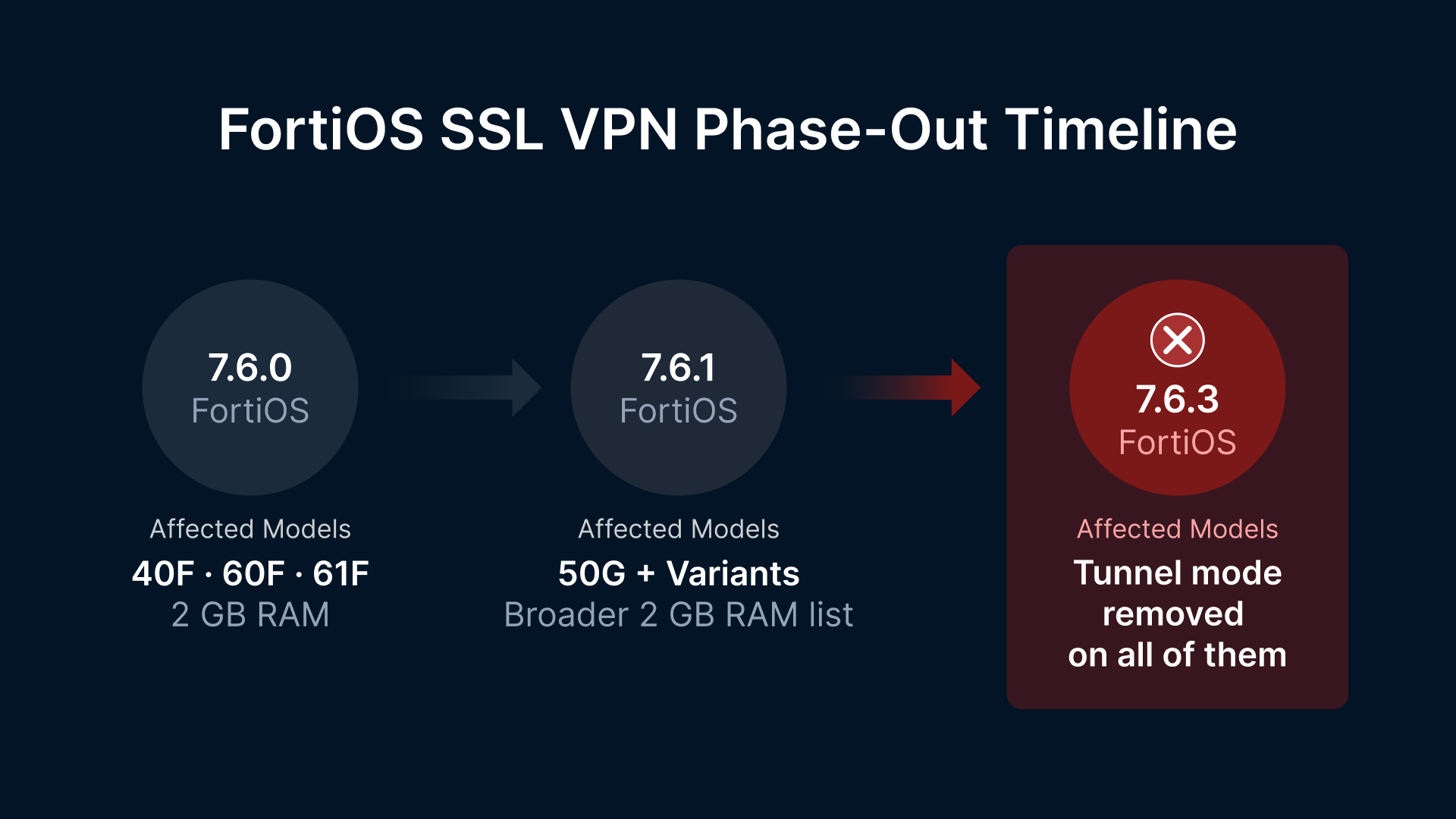
The phase-out played out across three releases:
- FortiOS 7.6.0 removed SSL VPN entirely from FortiGate models with 2 GB of RAM or less (40F, 60F, 61F families).
- FortiOS 7.6.1 broadened the affected model list to include the 50G and related variants.
- FortiOS 7.6.3 finished the job for tunnel mode across every model.
SSL VPN web mode survives — renamed Agentless VPN — but its function is narrow: HTTPS reverse-proxy to internal web applications, no client tunnel, no mapped drives, no thick-client access.
The context behind the decision is the CVE record. On January 2, 2026, the Shadowserver Foundation reported more than 10,000 FortiGate instances still exposed on the public internet unpatched against CVE-2020-12812, a 2FA-bypass flaw Fortinet had just warned (December 24, 2025) was being actively abused in the wild again — more than five years after the patch shipped. CVE-2024-55591, an admin-plane authentication bypass that hands attackers super-admin on FortiOS, was added to CISA’s Known Exploited Vulnerabilities catalog in January 2025 after weeks of in-the-wild zero-day activity. Three pre-authentication remote-code-execution flaws in the same SSL VPN parser in three consecutive years, plus a super-admin auth bypass on the management plane — the cost of defending the surface had crossed the line where removing it was cheaper than keeping it.
So what: If you run a FortiGate and your remote workforce depends on SSL VPN tunnel mode, you face a forced FortiGate SSL VPN replacement decision before your next firmware cycle. Fortinet’s three replacement paths each cover part of the surface — and leave a real gap for organizations that used tunnel mode to deliver RDP, file shares, and thick-client access. This article walks through what 7.6.3 actually shipped, why it shipped now, where each replacement falls short, and how a clientless reverse-tunnel architecture — built on Thinfinity Workspace’s Web Application Gateway (WAG), RDC, ThinVNC, and WebDAV over TLS 1.3 — closes the gap without exposing a single inbound port on the protected network.
What exactly did FortiOS 7.6.3 remove (and what survived)?
The scope of the removal matters, because it changes which user populations are affected and which replacement path covers which use case.
Fortinet did not discontinue “SSL VPN” as a category. They discontinued SSL VPN tunnel mode — the Layer 3 tunnel that puts a remote user’s traffic onto the corporate network with a virtual interface, mapped drives, broadcast discovery, and any-port-any-protocol access.
FortiOS SSL VPN phase-out timeline
| FortiOS release | What was removed | Models affected |
|---|---|---|
| 7.6.0 | SSL VPN tunnel and web mode | FortiGate 40F, 60F, 61F families and other 2 GB RAM models |
| 7.6.1 | SSL VPN tunnel and web mode | Broader 2 GB RAM model list (50G and related variants) |
| 7.6.3 | SSL VPN tunnel mode | Every FortiGate model |
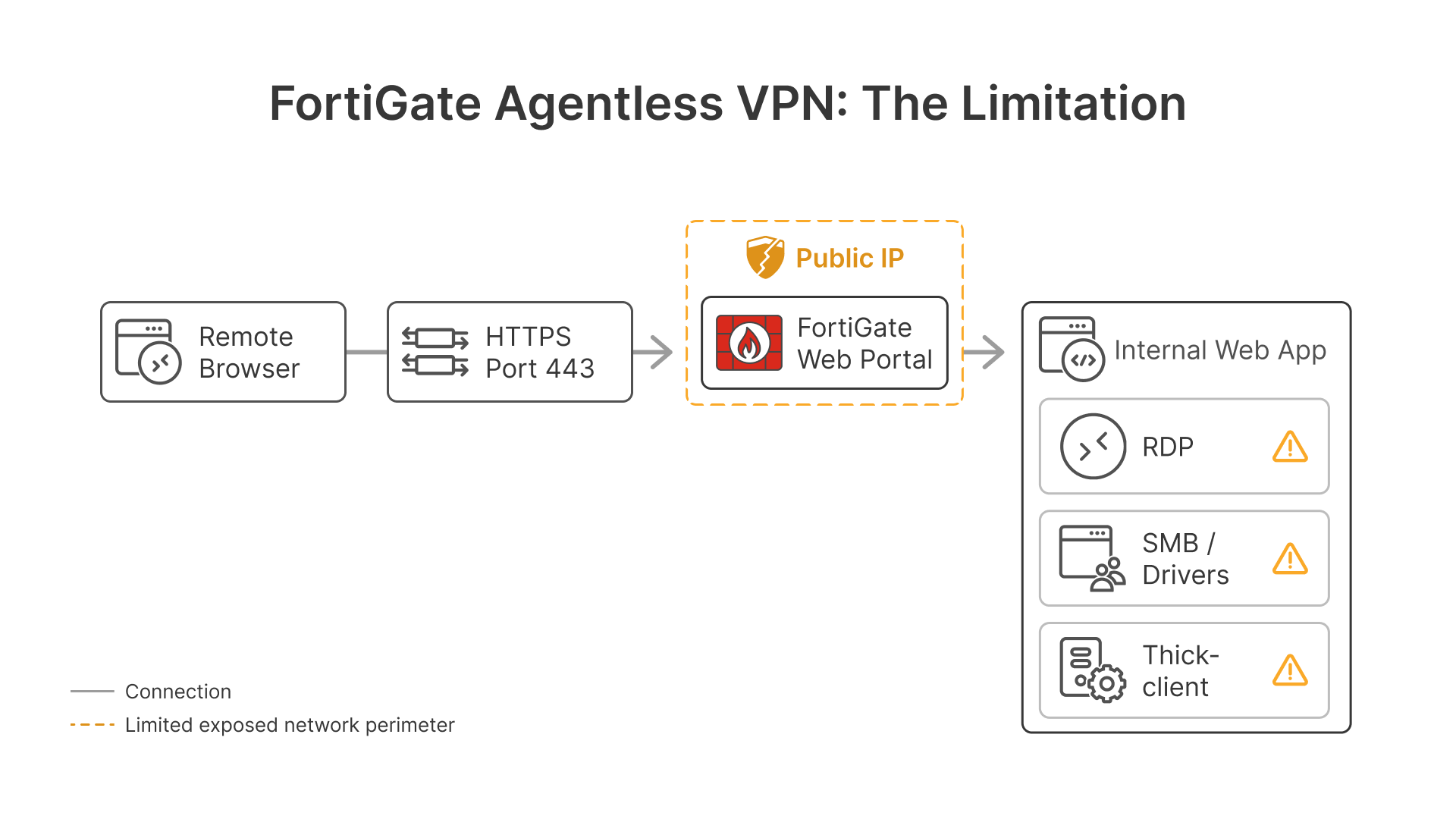
What survives is SSL VPN web mode, renamed Agentless VPN — a reverse-proxy portal that publishes specific internal web applications to a browser. It brokers RDP, SMB/CIFS, VNC, FTP, Telnet and SSH through the web portal — but with documented limitations: unsupported shortcut keys, significant CPU and memory consumption on the FortiGate, performance degradation at scale, and no support for native thick-client applications. Fortinet’s own documentation explicitly recommends moving to IPsec VPN to overcome these limitations.
The replacement Fortinet officially steers customers toward for those use cases is IPsec VPN configured to traverse TCP port 443, with IKE and ESP encapsulated inside the TCP stream by FortiClient 7.4.1 or later.
Why IPsec over TCP 443 inherits SSL VPN’s biggest performance flaw
The TCP-443 IPsec path solves the “IPsec gets blocked on hotel Wi-Fi” objection that originally pushed customers toward SSL VPN. It does not solve the engineering trade-off that drove SSL VPN adoption in the first place: when you tunnel TCP inside TCP, the inner TCP’s retransmission timer often fires before the outer TCP has recovered the lost segment. The two stacks pile retransmissions on top of each other, congestion control on both layers backs off independently, and throughput collapses.
This is the well-documented TCP-over-TCP meltdown problem — described by Olaf Titz in 2001, quantified by Honda et al. in 2005, and acknowledged by Fortinet themselves in their own community knowledge base. Whatever advantage IPsec has at Layer 3 disappears once it is buried inside an outer TCP session. For users on lossy mobile networks, hotel Wi-Fi, or international links, IPsec over TCP 443 performs no better than the SSL VPN it replaces.
Why is Fortinet removing SSL VPN now? The CVE record tells the story
The official framing is security and performance. The CVE record is the security framing.
FortiGate SSL VPN critical vulnerabilities (2020–2024)
| CVE | Year | CVSS | Surface | Mechanism |
|---|---|---|---|---|
| CVE-2020-12812 | 2020 | 9.8 (NVD) | SSL VPN auth | 2FA bypass via username casing — LDAP login succeeds without second factor when the case differs from the local user entry |
| CVE-2022-42475 | 2022 | 9.8 Critical | sslvpnd (SSL VPN parser) | Pre-auth heap-based buffer overflow → remote code execution |
| CVE-2023-27997 (XORtigate) | 2023 | 9.8 Critical | sslvpnd (SSL VPN parser) | Pre-auth heap-based buffer overflow → remote code execution |
| CVE-2024-21762 | 2024 | 9.8 Critical | sslvpnd (SSL VPN parser) | Pre-auth out-of-bounds write → remote code execution |
| CVE-2024-55591 | 2024 | 9.8 Critical | Admin Node.js websocket | Auth bypass in admin WebSocket handler → super-admin via `local_access_token` |
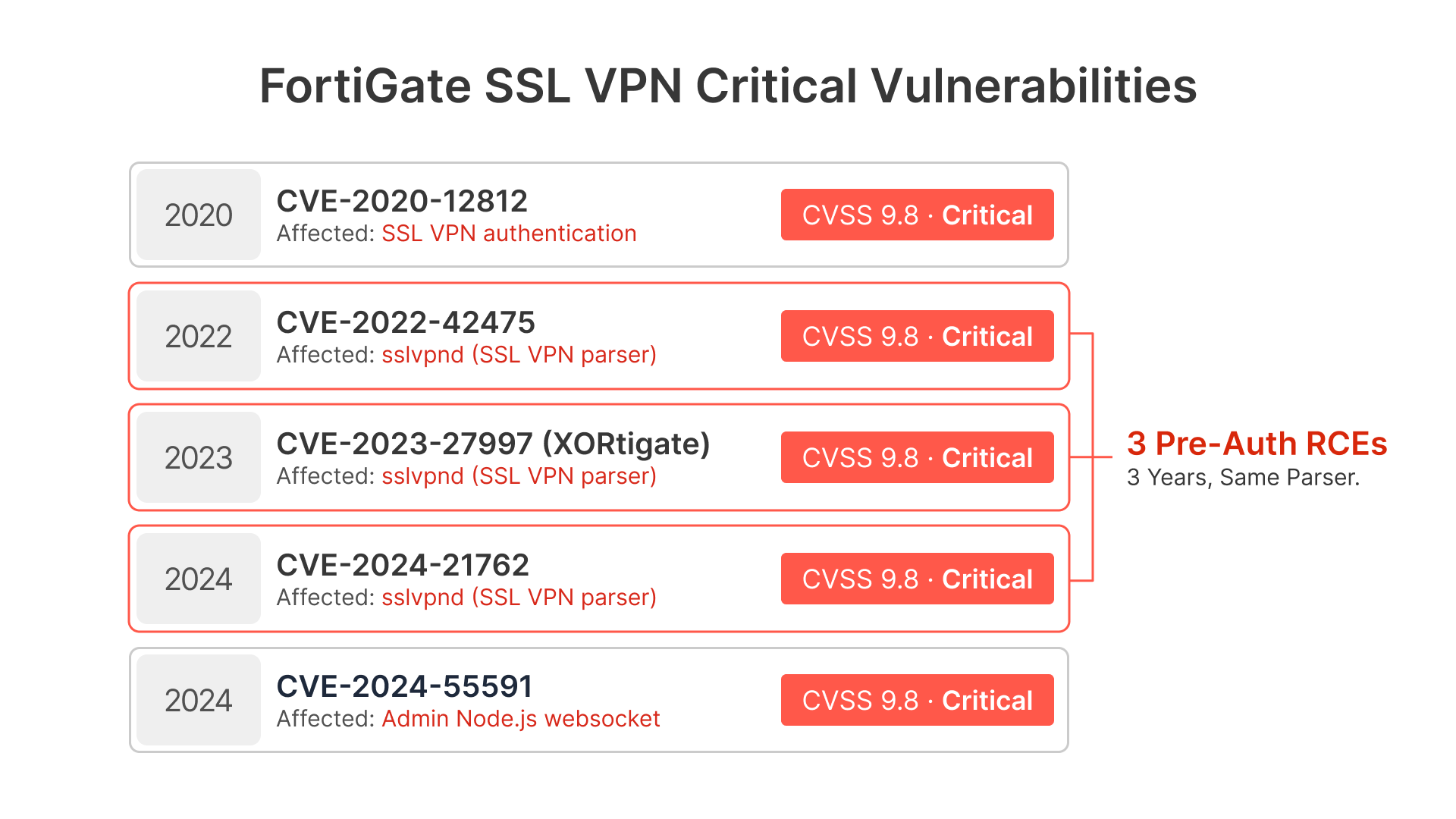
Three pre-auth remote-code-execution flaws in the same parser (sslvpnd) in three consecutive years. CVE-2022-42475 was attributed by Mandiant to suspected China-nexus actors who paired it with custom BOLDMOVE malware variants for both Windows and Linux/FortiGate, used in campaigns against government targets. CVE-2024-21762 was added to the CISA Known Exploited Vulnerabilities catalog within days of disclosure. CVE-2024-55591 was actively exploited as a zero-day from mid-November 2024, with attackers using it to create attacker-controlled admin accounts, attach them to existing SSL VPN user groups, and pivot into internal networks.
Three pre-auth RCEs and a super-admin auth bypass in four years, on services sitting on every FortiGate’s public IP. That is the case for removing the surface rather than continuing to patch it.
The performance framing is real but smaller. SSL VPN tunnel mode is heavy on lower-RAM FortiGate models because the parser, the TLS termination, and the user-mode tunnel encapsulation share the data path. That is why the 2 GB models lost SSL VPN first — and why Fortinet eventually concluded the same architectural debt applied across the entire FortiGate line.
The three Fortinet replacement paths
After FortiOS 7.6.3, a FortiGate customer has three remote-access paths. Each covers a specific surface and leaves a specific gap.
Side-by-side: FortiGate SSL VPN replacement options
| Replacement path | What it gives you | What it leaves out |
|---|---|---|
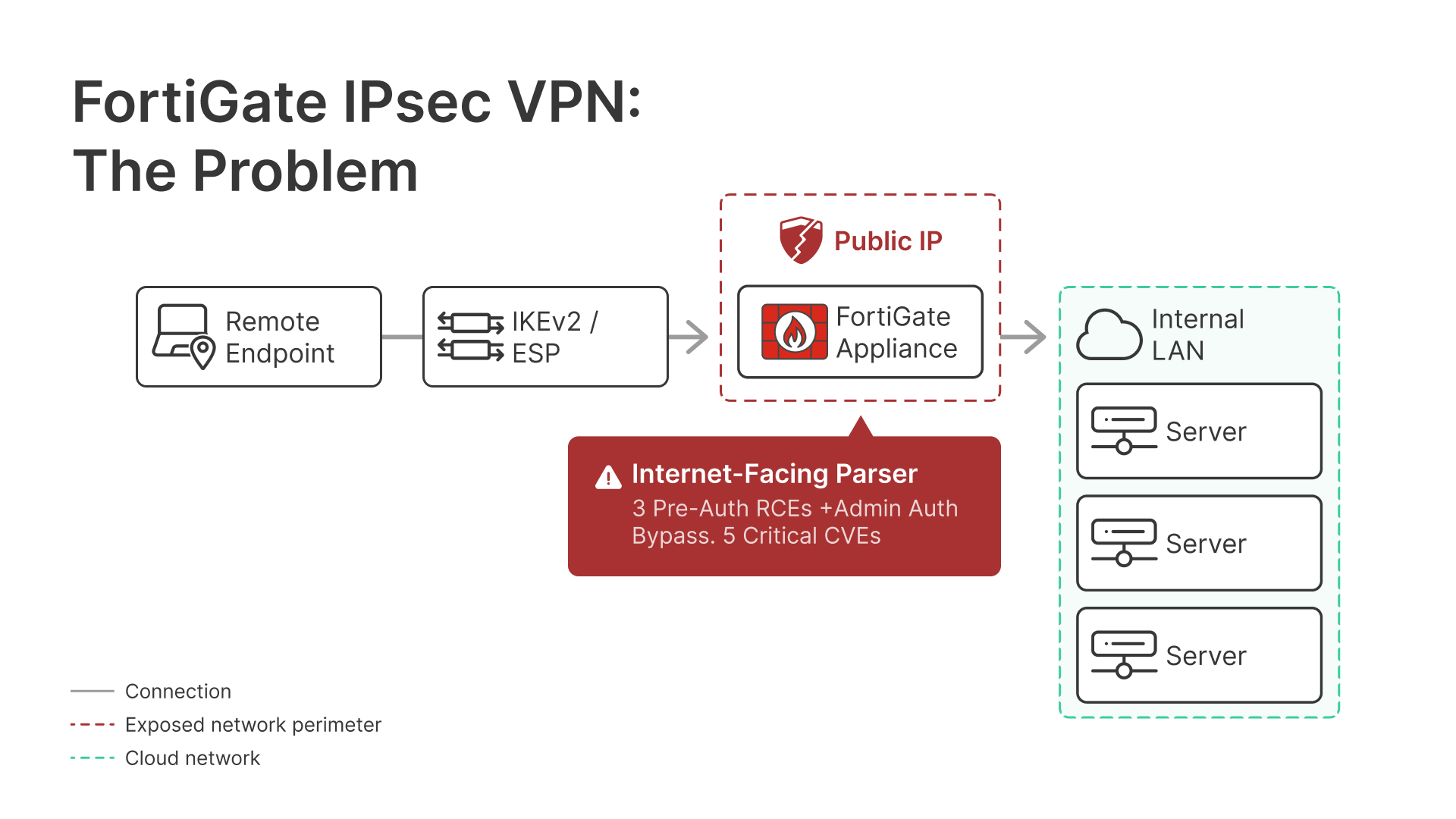
| IPsec VPN (IKEv2 over UDP 500/4500, or TCP 443 fallback) | Full L3 tunnel, any-port internal reachability | FortiClient required on every endpoint; TCP-in-TCP throughput penalty when 443 is used; full network access on stolen creds |
| Agentless VPN (ex-SSL VPN web mode) | Clientless HTTPS reverse-proxy to internal web apps | Brokers RDP/SMB/VNC with documented limitations (high FortiGate CPU/memory, unsupported shortcuts, performance degrades at scale); no L3 reachability; no native thick-client support — Fortinet itself recommends IPsec for these workloads |
| FortiSASE / FortiZTNA | Identity-aware app-level brokered access | SASE platform commitment, FortiClient EMS required, additional licensing, vendor lock-in |
The middle row is the gap that matters most for many FortiGate customers. The disrupted population is not the road warrior who used SSL VPN to read internal SharePoint — Agentless VPN handles that. The disrupted population is:
- The help desk that needs to RDP into user desktops.
- The contractor who needs a thick-client ERP session.
- The auditor who needs WebDAV access to a file share.
- The developer who needs jump-host RDP or SSH.
Agentless VPN can broker some of those, but with limitations Fortinet itself acknowledges — to the point of recommending IPsec for the same workloads. IPsec delivers them all — but at the cost of running FortiClient on every endpoint, which itself has been the subject of CVEs and is its own operational burden. FortiSASE/FortiZTNA works, but commits you to FortiClient EMS, additional licensing, and platform lock-in. For a customer who simply wanted RDP-over-VPN to keep working, that is a substantial decision triggered by a firmware patch.
The deeper architecture problem: insecure by design vs. double-reverse
The issue underneath the CVE record is architectural. SSL VPN and IPsec VPN are insecure by design — not because the vendor is careless, but because the architecture itself depends on a public-facing appliance accepting inbound connections from the internet, terminating untrusted user traffic, and then placing that user onto the corporate network.
Every CVE in sslvpnd and every WebSocket auth bypass in the admin plane is a different way of exploiting the same architectural fact: the door is open, and the only thing closing it is the parser’s quality on patch day. Three pre-auth RCEs in three consecutive years tells you exactly how reliable that is in practice.
Once the user is “on the network” via L3 tunnel, the problem compounds. Any RDP-able host, any SMB share, any internal management interface the tunnel can reach is now reachable from a compromised endpoint. The Verizon DBIR has documented this in incident after incident: stolen VPN credentials → SSL VPN portal → internal subnet → lateral movement → ransomware. The tunnel that was supposed to be a perimeter became the highway.
Thinfinity Workspace inverts this in two places at once — not just one reverse connection, but two, stacked, with the user’s session terminating against a canvas rather than a network.
Layer 1: Broker → Gateway (outbound only)
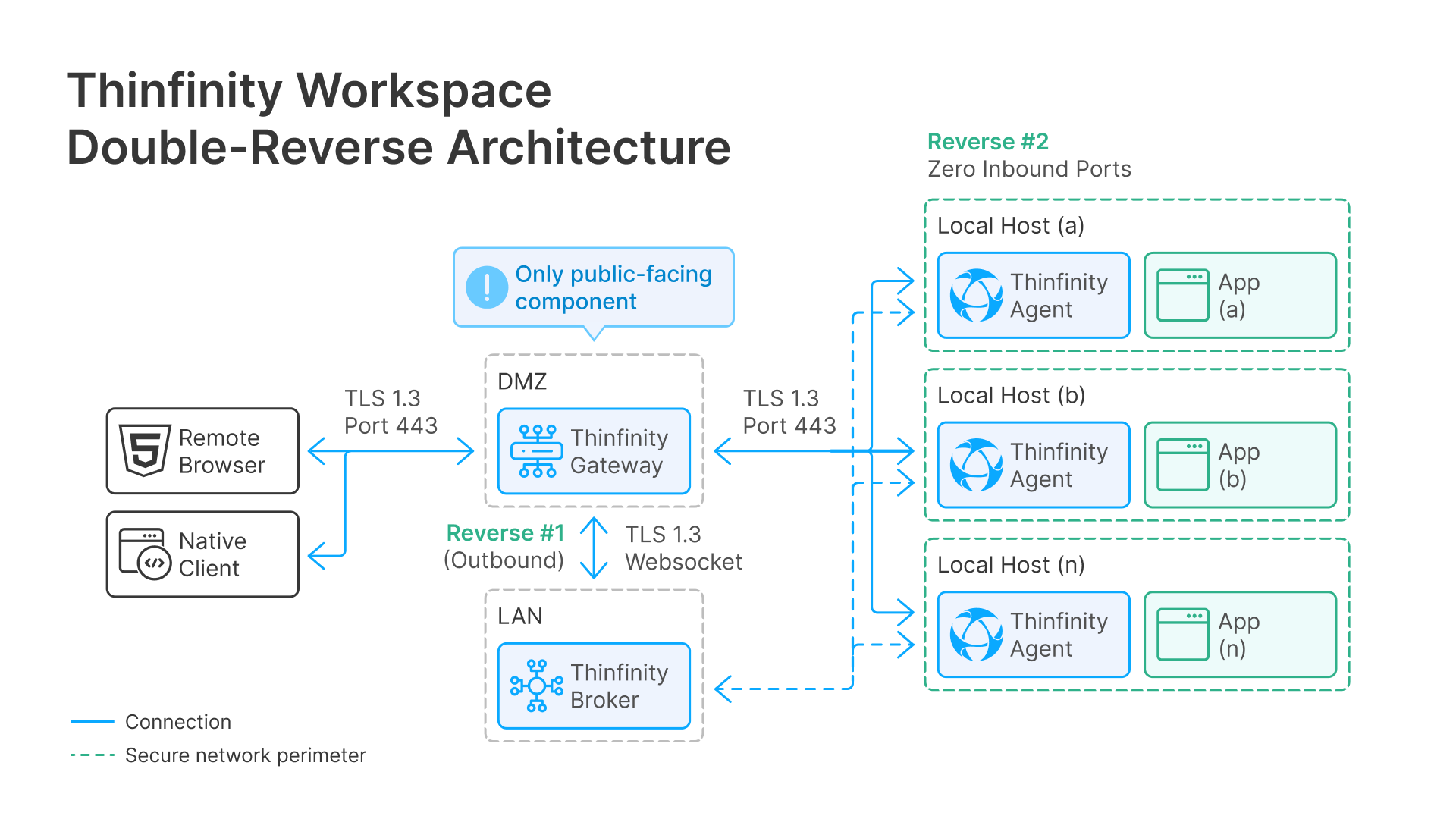
A Gateway sits in a DMZ or in the cloud and holds the public-facing TLS 1.3 endpoint. Inside the protected network, a Broker (Primary or Secondary) establishes a persistent outbound TLS 1.3 WebSocket connection up to the Gateway. The protected network advertises no inbound port to the public internet. A port scan of the perimeter from outside finds nothing listening.
Layer 2: Agent on host → Broker (outbound only)
This is the layer that changes the security posture entirely. On every target machine — the RDP host, the application server, the VDI desktop, the file server — a Thinfinity Agent runs as a local process. The Agent connects to the target application locally on the same machine, on localhost, and then opens an outbound reverse connection up to the Broker.
The target machine never has to accept an inbound connection — not even from inside the corporate LAN. Port 3389 does not need to be open. SMB does not need to be open. There is no listener on the host for anything except the local loopback the Agent uses to talk to the application.
The user terminates against a canvas, not a network
When a remote user opens the Workspace URL in a browser, the Gateway accepts the TLS 1.3 connection, routes it down through the existing reverse tunnels to the right Agent, and streams the application’s pixels (and keyboard/mouse events) back through the same path. The user is not “on the network.” The user is interacting with a rendered surface that is being painted from an Agent that has the application running locally. This applies identically to the browser client and to the native Thinfinity Desktop Client — both terminate against the canvas, not against the host.
The security consequence is structural. A compromised endpoint cannot pivot through the session to other internal hosts, because the session does not give the endpoint network reachability. The endpoint receives a pixel stream and sends back input events; it has no IP-level route to anything on the LAN. The “VPN credential theft → internal subnet → lateral movement” chain that drove the DBIR’s most common breach pattern is broken at step three, because step three has nowhere to go.
Threat models compared, honestly
| Threat scenario | FortiGate IPsec / SSL VPN | Thinfinity double-reverse |
|---|---|---|
| Pre-auth RCE on internet-facing parser | Direct LAN access — appliance sits on public IP | No internet-facing parser on the protected network; only the Gateway in the DMZ is exposed, and the protected LAN has no inbound port at all |
| Stolen user credentials | User lands on the internal subnet with L3 reachability to any internal host policy allows | User lands on a canvas for one specific published resource; no network reachability beyond what that Agent locally serves |
| Compromised endpoint with valid tunnel | Endpoint can scan and pivot across the LAN | Endpoint receives pixels; no IP route to scan or pivot anywhere |
| Insider with admin on a target host | Already inside; lateral movement is trivial | Insider cannot use the remote-access channel to reach other hosts; each Agent is isolated to its own machine |
| Future CVE on the gateway component | Compromises FortiGate → compromises LAN | Compromises Gateway in DMZ → no path forward, because no inbound listener exists on any LAN host |
The Thinfinity architecture does not depend on patch cadence to stay safe. It depends on the topology — outbound-only at every layer, no listener on any internal host, user terminates against a canvas. That is a different kind of security posture than “patch the SSL VPN parser fast enough.”
Inside the Thinfinity Workspace protocol stack
Thinfinity Workspace is not a “VPN replacement” in the sense of a single tunnel. It is a multi-protocol publishing platform built on the double-reverse architecture above: a Gateway in the DMZ, a Broker inside the protected network that dials out to the Gateway, and a Thinfinity Agent on every target host that dials out to the Broker. The Agent reaches each application on localhost — the host machine never has to expose 3389, 5900, 22, 445, or any other application port to anyone, not even to other machines on the LAN. Every protocol below traverses the same outbound TLS 1.3 path, and every protocol delivers a stream to the user rather than network reachability.
WAG — Web Application Gateway (clientless SSL VPN alternative)
A reverse proxy that publishes internal web applications to the browser. The user authenticates against the Gateway, the Gateway forwards the HTTP/HTTPS request through the reverse tunnel to the Broker, and the Broker reaches the internal web app. The user’s browser only ever talks to the Gateway over TLS 1.3 HTTPS. The internal web app never sees the public internet. Learn more in our guide on securely accessing internal web applications without a VPN.
RDC — Reverse-Connection Remote Desktop (browser-based RDP)
Thinfinity’s proprietary RDP-like protocol. RDC establishes the remote-desktop session through an outbound TLS 1.3 WebSocket from inside the protected network. The user’s browser receives the desktop stream. No 3389 exposed, no RDP listener on the public internet, no inbound port. RDC is the protocol used for both full-desktop and published-application (“RemoteApp”-style) delivery — including the use cases Fortinet’s Agentless VPN cannot serve. See our definitive guide to Zero Trust RDP for the full breakdown.
VNC — Standard VNC, reverse-tunneled
Thinfinity Workspace can also broker standard VNC servers (TightVNC, RealVNC, UltraVNC) when the target already runs VNC. The VNC traffic rides the same reverse tunnel from the Broker out to the Gateway.
ThinVNC — Proprietary reverse-connection VNC
Cybele’s proprietary VNC-class protocol, designed for clientless HTML5 delivery without the bandwidth and codec limitations of legacy VNC. Like RDC, ThinVNC initiates outbound from the protected network and renders in the browser. Useful where Windows RDS/RDP licensing is not the right fit or where the target is macOS/Linux. Full details in our secure Zero Trust VNC alternative guide.
WebDAV — Files and folders without SMB exposure
Delivered as Thinfinity Web Folders: a WebDAV interface to shared or private drives, brokered through the same reverse tunnel. Users upload, download, and modify files in the browser as if working with a local folder. No SMB exposure, no separate file-transfer protocol opened on the perimeter, no public file server.
All four protocols traverse the same outbound TLS 1.3 HTTPS connection from the Broker to the Gateway. The Gateway is the only public-facing endpoint, and it is decoupled from every protected resource by the reverse tunnel.
Network architecture: side-by-side comparison
FortiGate with IPsec VPN (post-7.6.3) — FortiClient required
FortiGate with Agentless VPN (post-7.6.3) — browser only, web apps only
Thinfinity Workspace (double-reverse: Gateway + Agent) — zero inbound ports on the protected side
Feature-by-feature comparison: FortiGate IPsec vs. Agentless VPN vs. Thinfinity Workspace
| Dimension | FortiOS 7.6.3 IPsec VPN | FortiOS 7.6.3 Agentless VPN | Thinfinity Workspace |
|---|---|---|---|
| Endpoint software | FortiClient 7.4.1 or later | Browser only | Browser or Thinfinity Desktop Client |
| Transport | IKEv2 over UDP 500/4500 or TCP 443 | TLS over 443 | TLS 1.3 over 443 |
| Access model | Network-level (L3) | App-level (web apps only) | Per-resource ZTNA (canvas streaming) |
| Web app delivery | Yes (via L3 reach) | Yes (reverse proxy) | Yes (WAG reverse proxy) |
| Remote desktop / RDP | Yes (via L3 to RDP host) | ⚠️ Brokered with limitations | Yes — RDC reverse-connection |
| VNC access | Yes (via L3) | ⚠️ Brokered with limitations | Yes — standard VNC reverse-tunneled |
| Low-overhead proprietary VNC | No | No | Yes — ThinVNC |
| File / folder access | Yes (via SMB over L3) | ⚠️ Brokered with limitations | Yes — WebDAV (Thinfinity Web Folders) |
| Full VDI / virtual desktops | Endpoint reaches what L3 allows | No | Yes — VMware, Hyper-V, Proxmox, OCI |
| Inbound exposure on protected LAN | FortiGate public IP, inbound port | FortiGate public IP, inbound port | None — Broker dials out |
| Hardware coupling | FortiGate firmware cycle | FortiGate firmware cycle | Hardware-agnostic (on-prem / cloud / hybrid) |
| Session recording / audit | Limited | Limited | Built-in session monitoring, audit logs, RPAM |
| Identity / federation | FortiClient / FortiAuthenticator | FortiGate auth profiles | SAML 2.0, OIDC, SSO, MFA, IdP federation |
| Encryption | IPsec ESP (typically AES-256-GCM) | TLS | TLS 1.3 + AES-256 on session payload |
How to migrate from FortiGate SSL VPN: a population-based plan
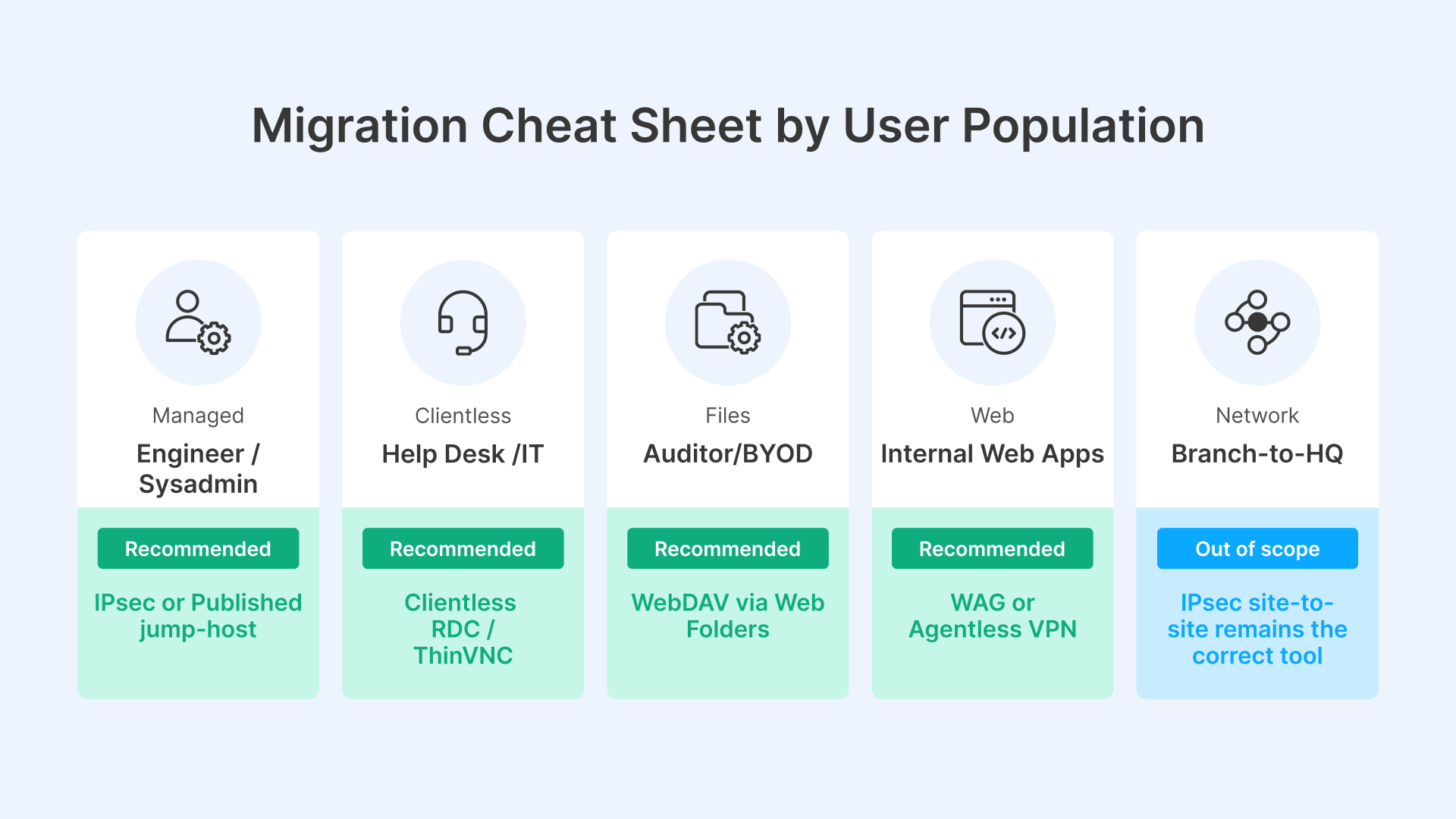
For a FortiGate customer running 7.4.x or 7.6.0–7.6.2 today, the practical migration choices break down by user population, not by company-wide architecture. A single-architecture answer is almost always wrong. Splitting the architecture by user population is consistently cheaper and more secure than forcing one architecture onto everyone.
Engineers, sysadmins, full-time remote employees with broad internal access
Two architecturally valid options. The legacy path is FortiClient 7.4.1+ with IKEv2 over UDP 4500 (TCP 443 fallback) — same network-trust model, same lateral-movement risk, but it works. The architecturally superior path is a published jump-host or engineering desktop in Thinfinity Workspace: the engineer logs into a managed Windows or Linux desktop delivered via RDC or ThinVNC, all admin tooling lives on that desktop, and the engineer’s own endpoint never receives a route to the internal network. Same productivity, zero inbound exposure on the production jump hosts, and the laptop being stolen at the airport stops being a network-pivot risk because the laptop never had a tunnel.
Help desk, IT support, jump-host users, contractors
A clientless reverse-tunnel gateway is the correct path. Thinfinity Workspace publishes a browser-delivered desktop (RDC or ThinVNC) without putting the help desk on FortiClient and without exposing RDP on the perimeter. This is exactly the population Fortinet’s Agentless VPN serves badly enough that Fortinet itself recommends IPsec instead.
Auditors, BYOD users, third parties needing only file access
WebDAV through Thinfinity Web Folders, delivered through the same reverse tunnel, replaces both VPN-mounted SMB shares and ad-hoc file-transfer workflows. No SMB ports exposed, no full network access for users who only need a folder.
Internal SaaS-style web apps (intranet, ticketing, dashboards)
Either Agentless VPN or Thinfinity WAG works. The deciding factor is whether you want the appliance internet-exposed or not. For high-sensitivity apps, WAG behind a reverse tunnel has the smaller attack surface.
Branch-to-headquarters site connectivity
Out of scope for this decision. IPsec site-to-site remains the correct tool.
Recommended migration sequence: classify your population by need → replace the FortiGate-bound segment first for the high-risk groups (admin-plane users, third parties, BYOD) → keep the IPsec path for the segment that genuinely needs L3 reachability → re-evaluate the L3 segment in 6–12 months once the rest of the architecture has stabilized.
What this means for remote-access architecture in 2026
Fortinet just performed an unusual move: the vendor with one of the largest installed bases of SSL VPN concentrators in the world removed the feature from the firmware. That is not the action of a vendor milking a legacy revenue stream. That is the action of a vendor that has concluded the parser is unfixable at the price they want to pay. More than 10,000 FortiGates on the internet — still unpatched against a 2020 issue, more than five years after the fix shipped — is the empirical evidence behind the decision.
The replacement Fortinet is steering customers toward — IPsec, encapsulated in TCP 443 when restrictive networks force it, with FortiClient on every endpoint — is the same architectural model with a different parser. The appliance still listens on a public IP. The user still terminates onto an internal subnet. The lateral-movement chain is still intact. The only thing that changed is which CVE class shows up next quarter. SSL VPN was insecure by design, and IPsec configured in the way Fortinet is recommending inherits the same design flaw: a listener on a public IP, a tunnel that places the user “on the network.”
The architecturally honest answer is to stop accepting inbound connections to protected resources at all. Thinfinity Workspace does this twice: at the perimeter (Broker dials outbound to the Gateway) and on every target host (Agent dials outbound to the Broker, application is reached on localhost, user receives a canvas). The protected machines have no inbound port open — not from the internet, not from the LAN, not from a compromised endpoint. The user is never given network reachability; the user is given a stream. Whatever happens to that stream, it cannot become a network pivot, because there is no network to pivot to.
For a FortiGate customer in May 2026, the choice is not “IPsec or Agentless or FortiSASE.” It is whether to keep the insecure-by-design architecture under a different protocol name, or to move to an architecture where the security posture does not depend on getting next quarter’s patch deployed before the next exploit drops.