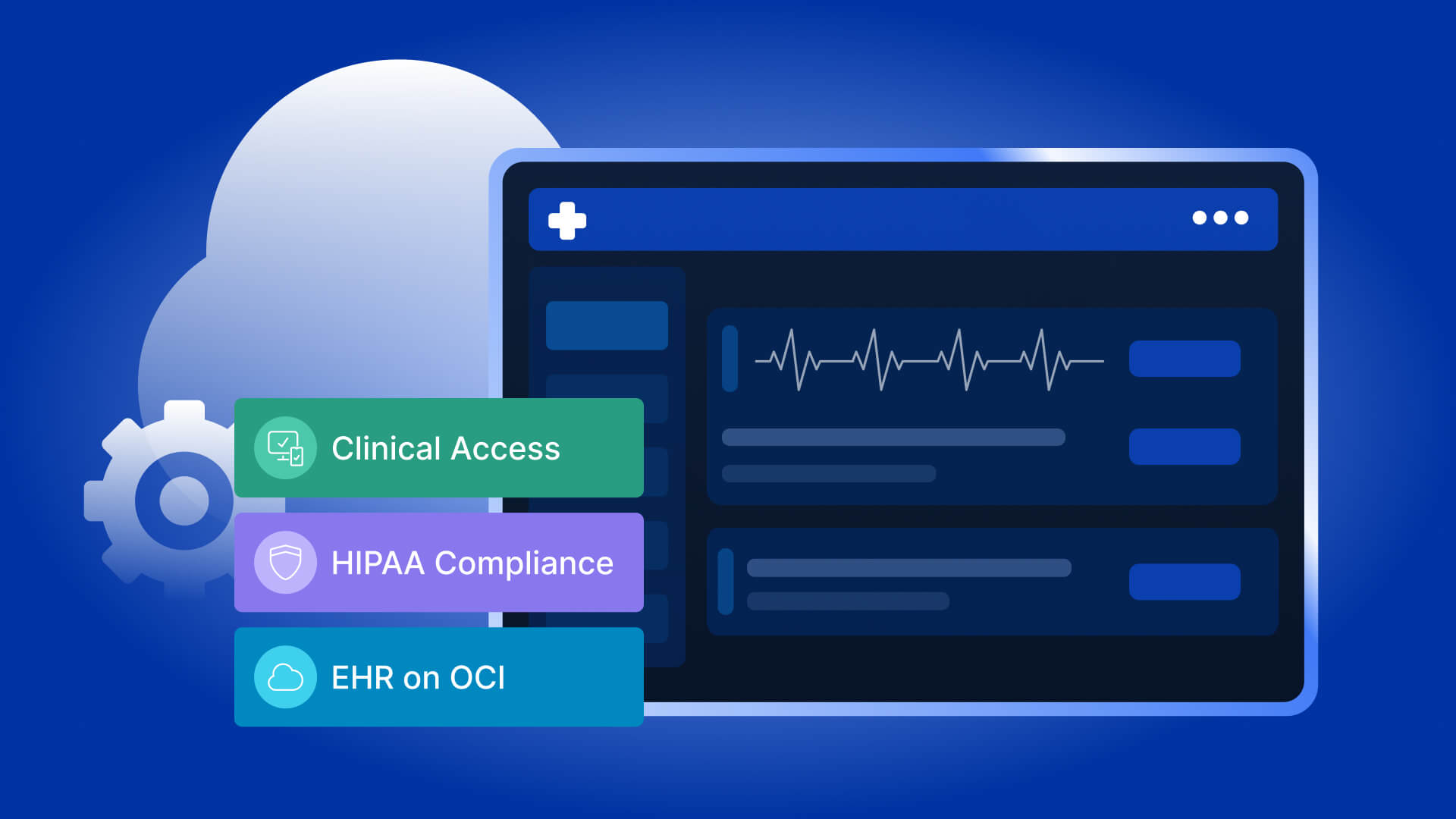

Healthcare IT teams operate at the intersection of three competing demands. Clinicians require seamless, instant access to electronic health records (EHRs) across every room, floor, and campus location during their shifts. Compliance and security teams must enforce provable HIPAA controls on every endpoint that touches electronic protected health information (ePHI) — and that regulatory burden is intensifying as the Department of Health and Human Services Office for Civil Rights (OCR) finalizes the first major update to the HIPAA Security Rule since 2013. IT operations leaders need to manage the clinical desktop environment centrally, patch it consistently, and scale it elastically for seasonal fluctuations, new department launches, and facility expansion — all with lean staffing and constrained capital budgets.
Virtual Desktop Infrastructure (VDI) on Oracle Cloud Infrastructure (OCI) addresses all three demands within a single architecture. By centralizing the clinical desktop environment on OCI compute infrastructure and delivering it to any device over the network, healthcare organizations eliminate the per-device ePHI exposure that drives the majority of HIPAA breach notifications, reduce EHR login times by up to 39%, and create a manageable, scalable endpoint strategy that grows with organizational demand without linear increases in management overhead.
This comprehensive guide covers the practical business case for VDI in healthcare, how it maps to the 2026 HIPAA Security Rule regulatory environment, how it delivers major EHR platforms including Epic, Oracle Health, and MEDITECH, what deployment architecture looks like on OCI, and why the convergence of regulatory urgency and clinical workflow pressure makes 2026 a critical inflection point for healthcare endpoint strategy.
Why 2026 is a Critical Year for Healthcare Endpoint Strategy
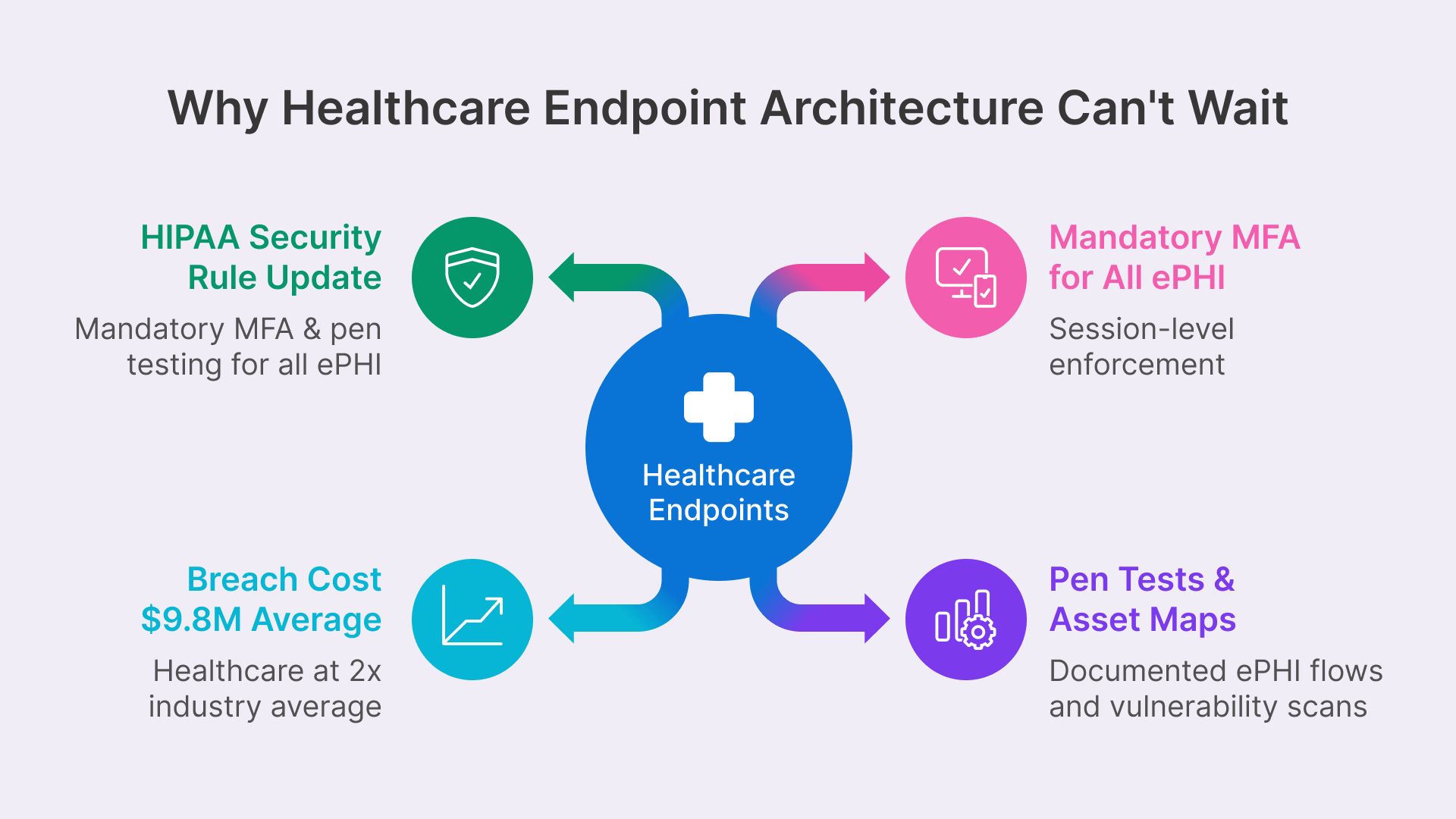
Two forces are converging in 2026 that create unprecedented urgency around healthcare endpoint architecture. The first is regulatory: the proposed 2026 HIPAA Security Rule update will fundamentally reshape the compliance obligations around ePHI access and device management. The second is operational: the healthcare breach landscape is accelerating faster than endpoint security controls are improving, and the cost of a single breach — now averaging $9.8 million for healthcare organizations — creates a business case for structural endpoint redesign that extends far beyond compliance checkboxes.
The 2026 HIPAA Security Rule Update: What’s Changing
In December 2024, the Department of Health and Human Services Office for Civil Rights published a proposed update to the HIPAA Security Rule. The proposed rule is targeted for finalization in May 2026, with an effective date likely in July or August 2026, and a 180-day compliance window that would push full implementation deadlines into late 2026 or early 2027.
For healthcare IT teams evaluating endpoint architecture, the proposed changes are both specific and consequential. The most impactful requirements for VDI deployment decisions include:
- Mandatory Multi-Factor Authentication: MFA will transition from an ‘addressable’ requirement (which allowed organizations to defer implementation or implement equivalent controls) to a required control for all users accessing systems that create, receive, maintain, or transmit ePHI. In clinical environments where physicians may authenticate dozens of times per shift across multiple physical workstations, this creates real workflow friction unless MFA is implemented at the session level rather than the device level. VDI solves this by enforcing MFA once at the Thinfinity Gateway session initiation — covering access from every device type without requiring re-authentication as the clinician moves between rooms.
- Annual Penetration Testing & Semi-Annual Vulnerability Scans: Organizations must conduct formal security testing on schedule and maintain an up-to-date inventory of all technology assets — including AI tools — that process ePHI. Healthcare systems have historically struggled with asset inventory accuracy across distributed device populations; centralized VDI infrastructure on OCI simplifies both penetration testing scope and asset accountability.
- Documented ePHI Network Flow Maps: Organizations must maintain detailed documentation of how ePHI moves through information systems, updated at least annually. Distributed endpoint architectures create sprawling, complex ePHI flows that are difficult to map and validate. VDI funnels all ePHI flows through a single gateway layer that can be precisely documented and monitored.
- Elimination of ‘Required vs. Addressable’ Distinction: The proposed rule removes the two-tier specification system that allowed organizations to substitute equivalent controls for addressable requirements. All specifications become required with no substitution pathways, eliminating the compliance flexibility that larger organizations have historically leveraged.
The convergence of these four changes creates a regulatory landscape where endpoint architecture — not just endpoint security tools — becomes a compliance requirement. VDI is not a nice-to-have modernization initiative; it becomes the most practical path to satisfying the 2026 HIPAA ruleset.

Cyberattacks continue to impact the health care sector, with rampant escalation in ransomware and hacking causing significant increases in the number of large breaches reported to OCR annually.

The Healthcare Breach Landscape: Why Endpoint Architecture Matters
The proposed HIPAA Security Rule update is a direct regulatory response to an accelerating breach trend. In 2023 alone, 725 large data breaches were reported to OCR, compromising more than 133 million patient records. By 2024, the average cost of a healthcare data breach had reached $9.77 million — nearly double the cross-industry average of $4.88 million — reflecting compounded costs of regulatory penalties, patient notification, forensic investigation, legal fees, and reputational recovery in an industry built on patient trust.
The overwhelming majority of these breaches — consistently exceeding 70% in OCR breach reports — involve endpoint devices: stolen or lost laptops containing unencrypted patient data, unsecured workstations left logged in during shift changes, and remote access sessions that lack MFA enforcement or session isolation controls. The endpoint is the weakest link in healthcare security architecture, and traditional approaches to endpoint protection (device encryption, antivirus, MDM) have not substantially reduced breach frequency because they address symptoms rather than the fundamental vulnerability: the presence of ePHI on the device itself.
VDI eliminates this vector structurally. No ePHI data is stored on the endpoint. The session terminates when the clinician walks away or closes the session. Access is controlled at a single gateway layer that applies consistent security policy regardless of which device, location, or network the user connects from. The endpoint becomes an interchangeable, stateless device that could be stolen, lost, or compromised without exposing patient data — because it contains none.
Businesses are caught in a continuous cycle of breaches, containment and fallout response.
What VDI Solves for Healthcare: The Clinical Workflow Case
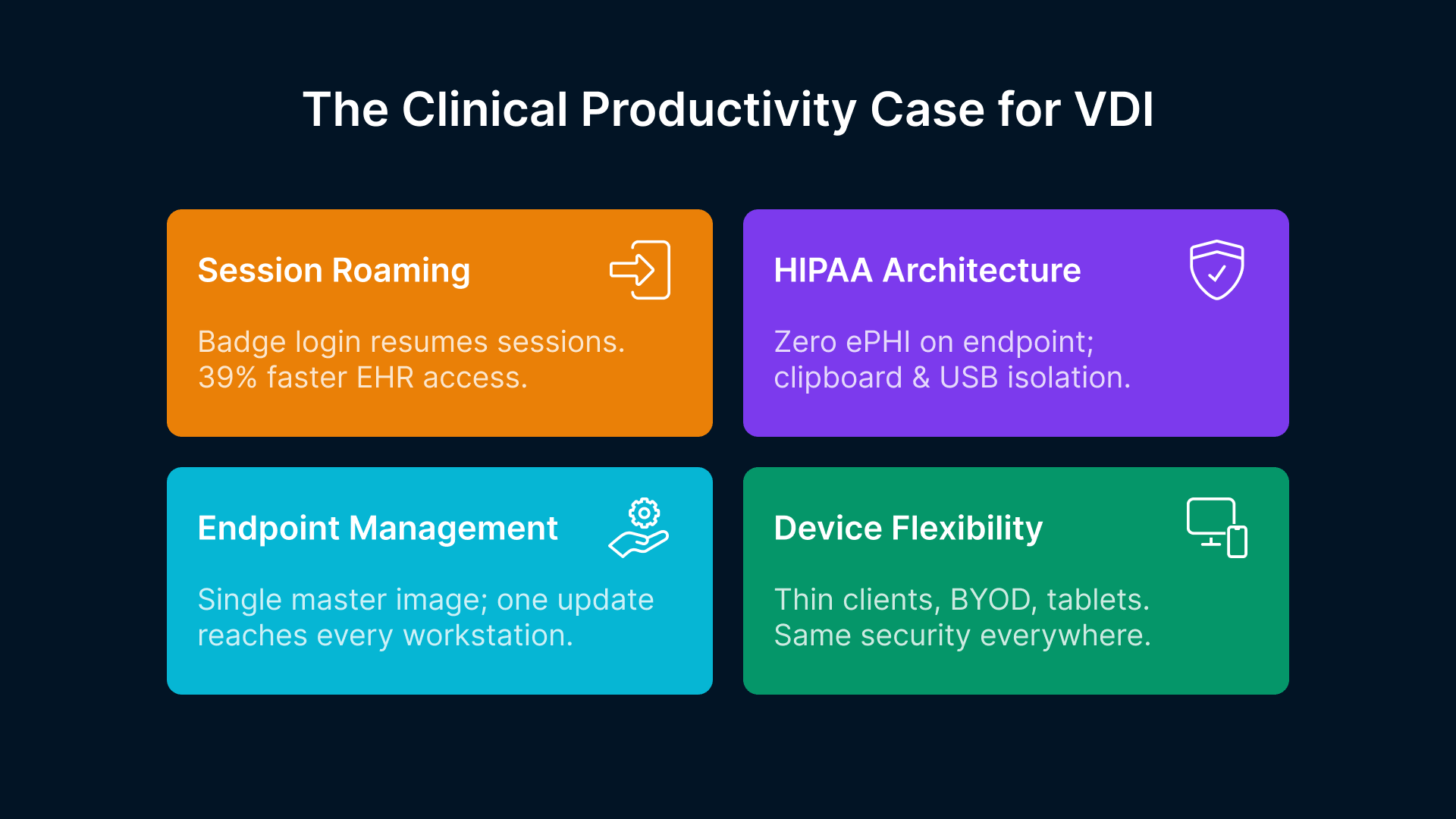
The regulatory case for healthcare VDI is powerful, but the operational case — made by real clinical workflow improvements and measurable clinician productivity gains — is equally compelling. In healthcare, where patient care quality is directly correlated with clinician efficiency and satisfaction, workflow improvements are not nice-to-have operational metrics; they are critical care quality indicators.
Faster EHR Access Across Locations: Session Roaming & Badge Login
In traditional thick-client environments, a physician moving between patient rooms, nursing stations, and care team workrooms must log in and out of physical computers multiple times per shift. Published research consistently shows that clinicians spend an average of 10 minutes per shift on authentication-related delays — initial login, waiting for applications to load, re-entering credentials when sessions time out, and navigating to the right workstation for the right patient care function.
VDI with persistent session roaming reduces EHR login times by 39% and improves overall clinician productivity by 26% by eliminating this friction. Thinfinity Workspace supports badge-activated login integration — a standard deployment model in US hospitals where proximity cards (RFID or NFC credentials) trigger session launch and auto-lock when the badge is removed. A physician swipes their badge at any connected workstation and their virtual desktop resumes exactly where they left off, with the EHR chart they were reviewing open and accessible, without requiring re-entry of credentials or re-loading of applications.
For nursing staff moving between patient rooms in rapid succession, session roaming eliminates the per-room re-login cycle entirely. The nurse’s session remains active on the OCI session host while the nurse is in the room. When moving to the next room, the nurse swipes their badge at the next workstation and reconnects to the same active session — all open documentation, recent lab results, and in-progress charting remain exactly as they were left. No application reload. No EHR re-login. No loss of unsaved work. No workflow disruption.
HIPAA Compliance at the Architecture Layer
The most consequential compliance property of VDI in healthcare — and also the simplest — is that ePHI never reaches the endpoint device. Patient charts, imaging reports, lab results, clinical notes, and all other protected health information are rendered on OCI compute infrastructure and delivered as an encrypted H.264 video stream to the endpoint device. The physical workstation stores zero patient data in its local storage, browser cache, or temporary file directories. A stolen laptop from a nursing station contains nothing worth breaching. A lost iPad left in a patient waiting area contains no ePHI. This structural property eliminates the endpoint data residency risk that is the primary source of HIPAA breach notifications and the focus of OCR enforcement actions.
Thinfinity Workspace implements additional HIPAA-required controls at the session layer:
- Automatic Session Timeout: Configurable idle-timeout policies (typically 15-30 minutes) automatically lock sessions when clinicians are away from workstations, preventing unauthorized access to open EHR sessions.
- Clipboard Isolation: Copy-paste operations are blocked between the virtual session and the endpoint device, preventing ePHI from being transferred to unsecured local applications.
- USB and Removable Media Block: USB ports and removable media are disabled at the Thinfinity Gateway layer, preventing ePHI from being transferred to USB drives, external hard drives, or other data exfiltration vectors.
- Session Recording & Audit Trail: Session activity can be recorded for forensic investigation and compliance audit purposes, and all session access events (login, logout, application launch, data access) are logged with full audit trail export capabilities for HIPAA Security Rule examination procedures.
- SIEM Integration: Access logs are exportable to security information and event management (SIEM) platforms for real-time monitoring and compliance documentation.
Simplified Endpoint Management and Device Flexibility
Over 58% of US hospitals already use VDI — not primarily for compliance reasons, but for operational efficiency. A VDI environment is a single set of Windows application images managed centrally on OCI, rather than thousands of physical workstations each requiring individual patch management, application updates, configuration standardization, and hardware refresh cycles. When Epic releases a new version of Hyperdrive or a hospital installs a new clinical plugin, the update is deployed to a single set of master images rather than pushed to hundreds of individual devices.
Clinical settings particularly benefit from device flexibility. Thin clients — low-cost ($150–$300 per device), fanless, diskless hardware with no local storage — replace expensive medical-grade clinical workstations and are significantly easier to disinfect, replace, and manage in patient-facing environments. Personal devices (BYOD laptops, tablets) can access the same VDI environment with the same security controls, enabling telehealth providers, hybrid clinical staff, and remote work scenarios without requiring employer-managed hardware. A physician on call can log into their personal laptop from home, access their Thinfinity session, and work within the same HIPAA-controlled environment as if they were at the hospital.
EHR Delivery on Virtual Desktops: Platform Compatibility & Implementation
The most critical technical question for any healthcare VDI deployment is straightforward: how does the organization’s primary EHR platform run in the virtual environment, and what modifications or optimizations are required? The good news is that Thinfinity Workspace delivers Windows-based and web-based EHR applications as standard installations on OCI session hosts — the EHR vendor does not need to certify a special VDI mode, and no application-level modifications are required.
Here’s how the major EHR platforms integrate with Thinfinity VDI on OCI:
Epic Hyperdrive: The Market-Leading EHR on Virtual Desktops
Epic’s Hyperdrive client is the current-generation web-based interface that has replaced the legacy Hyperspace Windows client for the majority of Epic workflows. Hyperdrive runs natively in modern browser environments (Chrome, Edge, Firefox) and is delivered through Thinfinity Workspace’s browser isolation layer with full session security controls, MFA enforcement, clipboard isolation, and audit logging.
Epic holds approximately 39% of the US hospital EHR market and over 54% of US hospital beds, making VDI compatibility with Epic a deployment prerequisite for the majority of US health systems. Epic publishes UserWeb documentation that addresses best practices for running Hyperdrive in virtual desktop environments, including keyboard shortcut compatibility and screen rendering optimization. The Thinfinity session delivery layer has been validated with Epic Hyperdrive in production healthcare environments, and Epic-specific workflows including In Basket, SmartForms, clinician order entry, and documentation modules function identically to local browser deployments.
Oracle Health (formerly Cerner): OCI-Native EHR Alignment
Oracle’s newly released Oracle Health platform — debuted in August 2025 and built from the ground up on Oracle Cloud Infrastructure — creates a unique native alignment between the EHR system and the infrastructure layer that Thinfinity VDI runs on. Organizations deploying Oracle Health on OCI and adding Thinfinity Workspace run the entire clinical stack — EHR backend database, application servers, and clinical desktop delivery layer — on a single certified cloud tenancy with unified access control, logging, and compliance documentation.
This alignment provides three operational advantages: first, simplified migration paths for Cerner customers transitioning to Oracle Health on OCI; second, HIPAA-compliant infrastructure that Oracle certifies specifically for healthcare workloads; and third, operational consolidation that reduces the number of cloud vendors and support relationships healthcare teams must manage. Oracle Health holds approximately 22% of the US acute-care EHR market and is projected to expand its OCI-first deployments significantly through 2027 as more health systems migrate from legacy Cerner environments.
MEDITECH, athenahealth, and Community Hospital Platforms
MEDITECH Expanse — the current-generation web-based MEDITECH platform used by many community hospitals and critical access hospitals — runs as a browser application within Thinfinity virtual sessions without modification. MEDITECH holds approximately 17% of the US hospital EHR market, with particular strength in the community and rural hospital segment where staff resources for IT infrastructure management are constrained. athenahealth, used primarily in ambulatory and physician practice settings, is also browser-based and fully compatible with VDI delivery.
Legacy client-server EHR systems that require Windows client installation (older MEDITECH Magic versions, legacy MEDITECH 6.x, older Allscripts, McKesson Paragon) continue to run as standard Windows application installations on the VDI session host. While these legacy platforms are not ideal candidates for VDI modernization from a simplicity perspective, they function identically to local installations and continue to be supported on Windows session hosts until the organization is ready for a full EHR upgrade cycle.
| EHR Platform | VDI Compatibility | Session Type | Certification Status |
|---|---|---|---|
| Epic Hyperdrive | Native browser (H.264 optimized) | Web-based | Epic-validated for virtual environments |
| Oracle Health | OCI-native alignment | Web-based + native APIs | Built for OCI infrastructure |
| MEDITECH Expanse | Browser-based full compatibility | Web-based | Web-enabled community hospital standard |
| athenahealth | Cloud-native SaaS integration | Browser-based | Fully compatible with VDI session delivery |
| Legacy client-server | Windows app installation supported | Native Windows app | Case-by-case validation required |
Oracle Cloud Infrastructure: The Purpose-Built Healthcare Platform
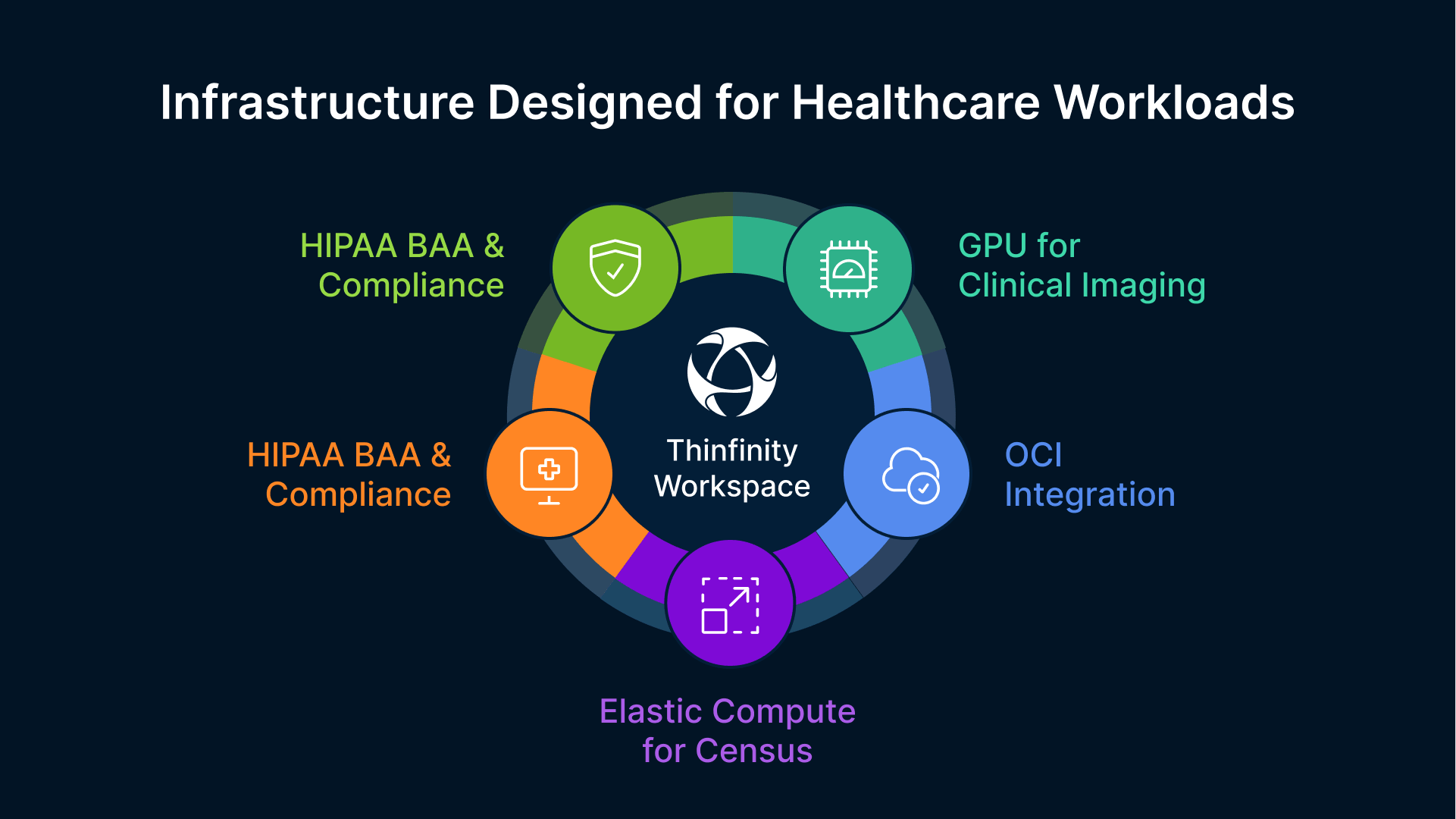
Oracle Cloud Infrastructure is not a generic cloud platform incidentally used in healthcare environments. It is a platform Oracle has strategically positioned for healthcare workloads, with active product investment aligned to its Oracle Health EHR strategy and proven certifications for healthcare compliance requirements.
HIPAA Business Associate Agreement & Compliance Certifications
Oracle provides a HIPAA Business Associate Agreement (BAA) for OCI, which is a contractual requirement for any cloud infrastructure vendor processing ePHI on behalf of a covered entity or business associate. OCI maintains SOC 2 Type II certification, ISO 27001 certification, and FedRAMP High authorization. For healthcare organizations subject to HIPAA and evaluating infrastructure vendors, these independent certifications provide audit-ready evidence packages that satisfy OCR vendor due diligence requirements outlined in HIPAA Security Rule examination procedures.
The HIPAA BAA is not a paperwork formality; it is a legal requirement. Any cloud vendor processing ePHI without a BAA in place creates contractual HIPAA violation exposure for the covered entity. Organizations should verify that their cloud vendor has a published, executed HIPAA BAA before deploying ePHI to the platform.
Healthcare-Specific OCI Capabilities
Beyond baseline compliance certifications, OCI provides several healthcare-specific capabilities that align uniquely with clinical requirements:
- HIPAA-Compliant Compute Regions: OCI US regions (Ashburn VA, Chicago IL, Phoenix AZ) are covered under Oracle’s HIPAA BAA, providing covered entities with certified compute environments for VDI session hosts without requiring specialized government cloud provisioning (FedRAMP, GovCloud) that adds complexity and cost. A typical 500-user clinical VDI deployment can run entirely on standard OCI US regions.
- Oracle Health EHR Native Alignment: Oracle Health’s new EHR platform is built on OCI and uses Oracle’s cloud-native database and application services. Organizations deploying Oracle Health on OCI and adding Thinfinity VDI run the entire clinical stack — EHR backend and clinical desktop delivery — on a single certified cloud tenancy with unified access control, logging, compliance audit trails, and disaster recovery.
- GPU Shapes for Clinical Imaging: OCI VM.GPU.A10 shapes provide GPU-accelerated sessions for radiology, cardiology, and pathology workstations requiring PACS viewer rendering, DICOM 3D reconstruction, multi-planar reformation (MPR), AI-assisted diagnostic tools, and high-resolution display support. A single A10 GPU shape can support 8–12 radiologist sessions simultaneously, with each session capable of rendering complex 3D imaging datasets at interactive speeds.
- Scalable Compute for Census Fluctuations: OCI’s elastic compute model allows healthcare organizations to scale VDI session host capacity up and down for patient census peaks, seasonal flu admissions, and disaster response scenarios without procurement cycles. Capacity increases are provisioned in minutes, not weeks, and surge capacity can be deprovisioned when no longer needed, optimizing cloud spend to match actual clinical demand.
- Oracle Identity Governance Integration: Oracle Identity Governance (OIG) integrates with Oracle Health EHR for automated user provisioning and deprovisioning. For VDI deployments on OCI, OIG’s lifecycle management feeds directly into Thinfinity’s session policy engine — a new agency nurse is onboarded in the EHR and automatically receives the appropriate VDI session profile with role-based permissions, and deprovisioned within hours of contract end with no manual IT intervention.
Mapping VDI Architecture to 2026 HIPAA Security Rule Requirements
Understanding how VDI architecture addresses specific HIPAA Security Rule requirements is essential for healthcare IT leaders making endpoint architecture decisions. Here’s how Thinfinity Workspace on OCI maps to the most consequential 2026 proposed requirements:
| 2026 HIPAA Requirement | Traditional Endpoint Approach | VDI Architecture Benefit |
|---|---|---|
| Mandatory MFA for ePHI access | Per-device MFA enforces re-auth on every workstation transition | Session-level MFA enforced once per session; device transitions require no re-authentication |
| Annual penetration testing | Physical devices scattered across facilities; difficult to inventory | Centralized OCI infrastructure; unified security testing and asset management |
| Network ePHI flow documentation | Distributed endpoints make flow mapping complex and error-prone | Single gateway layer simplifies ePHI flow diagrams and audit evidence |
| ePHI endpoint storage prohibition | Data residency risk on every physical workstation | Zero ePHI on endpoint by architecture; screen stream encryption only |
| Device inventory and control | Thousands of individual devices requiring manual tracking | Centralized session host inventory; automated asset management via OCI |
The pattern across all four requirements is consistent: VDI architecture converts distributed, difficult-to-control endpoint problems into centralized, architecturally-controlled properties that are inherently easier to document, audit, and maintain.
Healthcare VDI Use Cases by Clinical Role: Pool Configuration & Requirements
Not all clinical roles have identical VDI requirements. A well-designed healthcare VDI deployment uses role-based pool configurations to match compute resources and session policies to actual workflow patterns and clinical requirements. This approach optimizes costs (not every clinician needs GPU-accelerated compute), improves performance (high-demand roles get dedicated capacity), and simplifies support (different roles have different policy requirements).
| Clinical Role | Session Configuration | Key Requirements | Typical Deployment |
|---|---|---|---|
| Physicians/Hospitalists | Persistent roaming pool | Badge login, multi-floor access, full EHR scope | Dedicated compute; persistent session preservation |
| Nursing/Clinical Staff | Persistent or shared pool | Fast login, session roaming, auto-lock on badge removal | Mixed persistent/non-persistent; auto-timeout |
| Radiologists/Specialists | Persistent GPU-enabled pool | PACS/DICOM rendering, high-resolution displays, 3D reconstruction | OCI A10 GPU shapes; session pinning to dedicated nodes |
| Administrative/Billing | Non-persistent shared pool | EHR billing module, standard office applications | Cost-optimized shared pool; 4-hour session timeout |
| Telehealth/Remote Providers | Persistent remote-access pool | Low-latency video, mobile app integration, BYOD compatibility | Remote gateway; session codec optimization |
| Agency/Temporary Staff | Non-persistent just-in-time | Rapid provisioning, auto-decommission, role-limited access | OIG-automated lifecycle; contract-end auto-removal |
The diversity of clinical roles highlights why Thinfinity Workspace is particularly well-suited to healthcare environments: the same platform delivers persistent sessions for physicians, shared non-persistent pools for temporary staff, GPU-accelerated sessions for radiologists, and low-latency remote delivery for telehealth providers — all within a single architecture without requiring separate VDI vendors or specialized product variants.
Healthcare VDI Deployment: Phased Approach from Assessment to Production
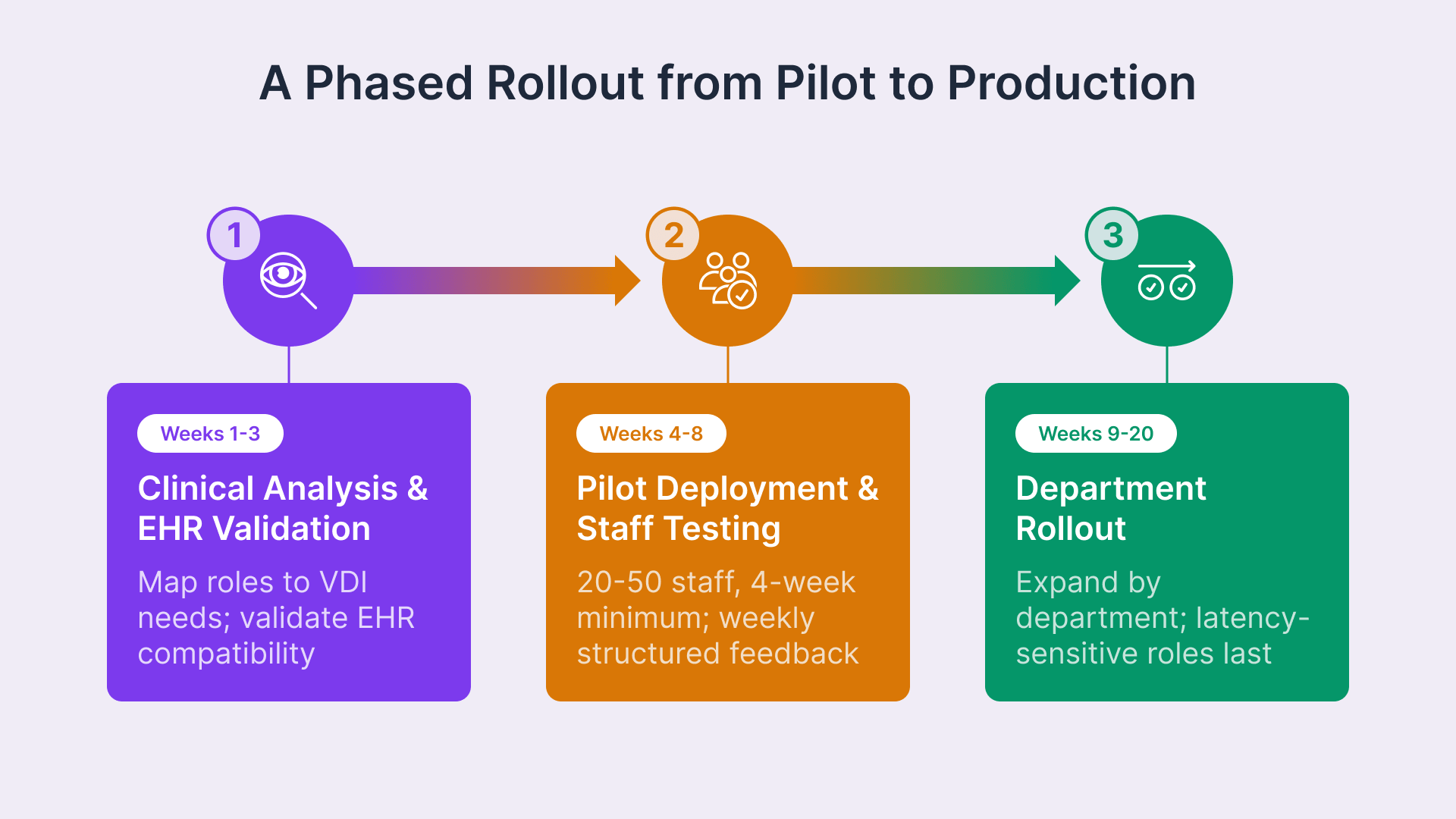
Healthcare VDI deployments succeed when they are sequenced to validate clinical acceptance and operational readiness before committing to full deployment across the organization. Unlike enterprise productivity environments, healthcare VDI must satisfy clinical staff acceptance and workflow validation criteria before IT performance benchmarks become the limiting factor.
Phase 1: Clinical Role Analysis and EHR Compatibility Validation (Weeks 1–3)
Map all clinical user roles to their specific VDI session requirements. Document which clinicians require persistent sessions versus non-persistent shared pools, which require GPU compute for imaging applications, which require badge login integration, and which require multi-floor session roaming. Concurrently, deploy a non-production pilot VDI environment and validate EHR platform compatibility: confirm that Epic Hyperdrive, Oracle Health, MEDITECH, or whatever the primary EHR is, runs identically to production including keyboard shortcuts, screen rendering speed, session timeout behavior, and application switching. Any gaps identified during this phase are addressed before clinical staff involvement.
Phase 2: Pilot Deployment with Clinical Staff Acceptance Testing (Weeks 4–8)
Deploy a production-equivalent VDI pilot environment targeting 20–50 clinical staff in one department — typically nursing or administrative staff as a starting point, not the most latency-sensitive clinical role. Run the pilot for a minimum of four weeks (longer than two weeks is necessary to capture real workflow patterns and edge cases). Collect structured weekly feedback on login speed, application performance, session roaming behavior, badge login integration, auto-timeout behavior, and any workflow disruptions. Document lessons learned and adjust session configuration, timeout policies, or compute allocation based on clinical feedback before expanding to other departments.
Phase 3: Department-by-Department Rollout (Weeks 9–20)
Expand VDI deployment by department or unit, sequencing the most latency-sensitive and demanding roles (physicians, specialists, radiologists) last and running the longest parallel operation period — typically 4 weeks of coexistence between physical and virtual workstations to ensure clinicians can fall back if issues arise. Thin client hardware procurement is sequenced to arrive shortly before each department’s cutover date, preventing hardware from sitting idle. This phased rollout approach reduces organizational disruption, allows IT to scale operational support, and ensures that any issues identified in one department’s rollout can be addressed before the next department transitions.
Design Your Healthcare VDI Architecture
Thinfinity’s delivery team works with hospital IT teams to design VDI deployments that satisfy HIPAA Security Rule requirements and integrate with Epic, Oracle Health, and MEDITECH environments. Schedule a 30-minute consultation and receive a HIPAA control mapping document specific to your organization.