


Summary
- Smart card redirection for VDI plus fingerprint (biometric) redirection is what makes clinical “tap-and-go” fast user switching possible: a clinician taps a badge or touches a reader and lands in the EHR in seconds.
- Critical mechanics: smart card redirection and USB device redirection (including fingerprint/biometric readers) require the native client (Windows, Linux, or mobile) or the Browser + Agent, not a plain HTML5 browser tab.
- By contrast, printer, audio, and video redirection work over a pure HTML5 browser (clientless), so many everyday peripherals need no install.
- Thinfinity needs no endpoint management. The client or browser connects through the Gateway and receives only a pixel stream, so the endpoint is never given network or resource access: a compromised, personal, or unmanaged device can only render pixels, keeping endpoint risk isolated from PHI/EHR. Smart-card and biometric redirection ride a controlled device channel brokered through the Gateway, not network access; on OCI, PHI also stays in-region while RBAC and built-in session recording produce the audit trail.
- The architecture enables HIPAA access-control and audit-control requirements; it does not by itself determine compliance. Confirm your configuration with qualified counsel and your compliance team.
Why do clinicians need tap-and-go fast user switching?
Smart card redirection for VDI exists to solve a problem every hospital floor knows well: a shared workstation, a line of clinicians, and an electronic health record (EHR) that must be reached in seconds, not minutes. When a nurse or physician roams between exam rooms, med carts, and nursing stations, retyping a username and password at each stop is both a workflow tax and a security risk; it pushes people toward password sharing and unlocked sessions. Tap-and-go authentication, driven by smart-card badges and fingerprint (biometric) readers, replaces that friction with a single gesture: tap in, work, tap out.
In a virtual desktop model, the physical reader is attached to the endpoint, but the EHR and the desktop session live in the data center or cloud. For the badge tap or fingerprint scan to actually reach the virtual session, the peripheral has to be redirected from the local device into the remote desktop. That redirection is the technical heart of clinical fast user switching, and, as we will see, how it is delivered depends entirely on which peripheral you are talking about.
Thinfinity VDI delivers both full virtual desktops and published applications (VDA) from a single platform, reachable from any HTML5 browser and from native clients under the same Universal ZTNA. That flexibility matters here, because the right access method for a given clinical device is not always the browser.
How does smart card and fingerprint redirection actually work?
Redirection is the mechanism that presents a locally connected peripheral to the remote session as if it were plugged into the virtual desktop itself. When a clinician taps a smart-card badge, the card’s certificate is presented into the session so the EHR (or the OS) can authenticate the user. When they touch a fingerprint reader, the biometric device is exposed to the session so the enrolled template can be matched and the identity resolved. The certificate on the card is the same class of credential described in NIST SP 800-73-5, which specifies how identity credentials stored on a smart card are retrieved and used.
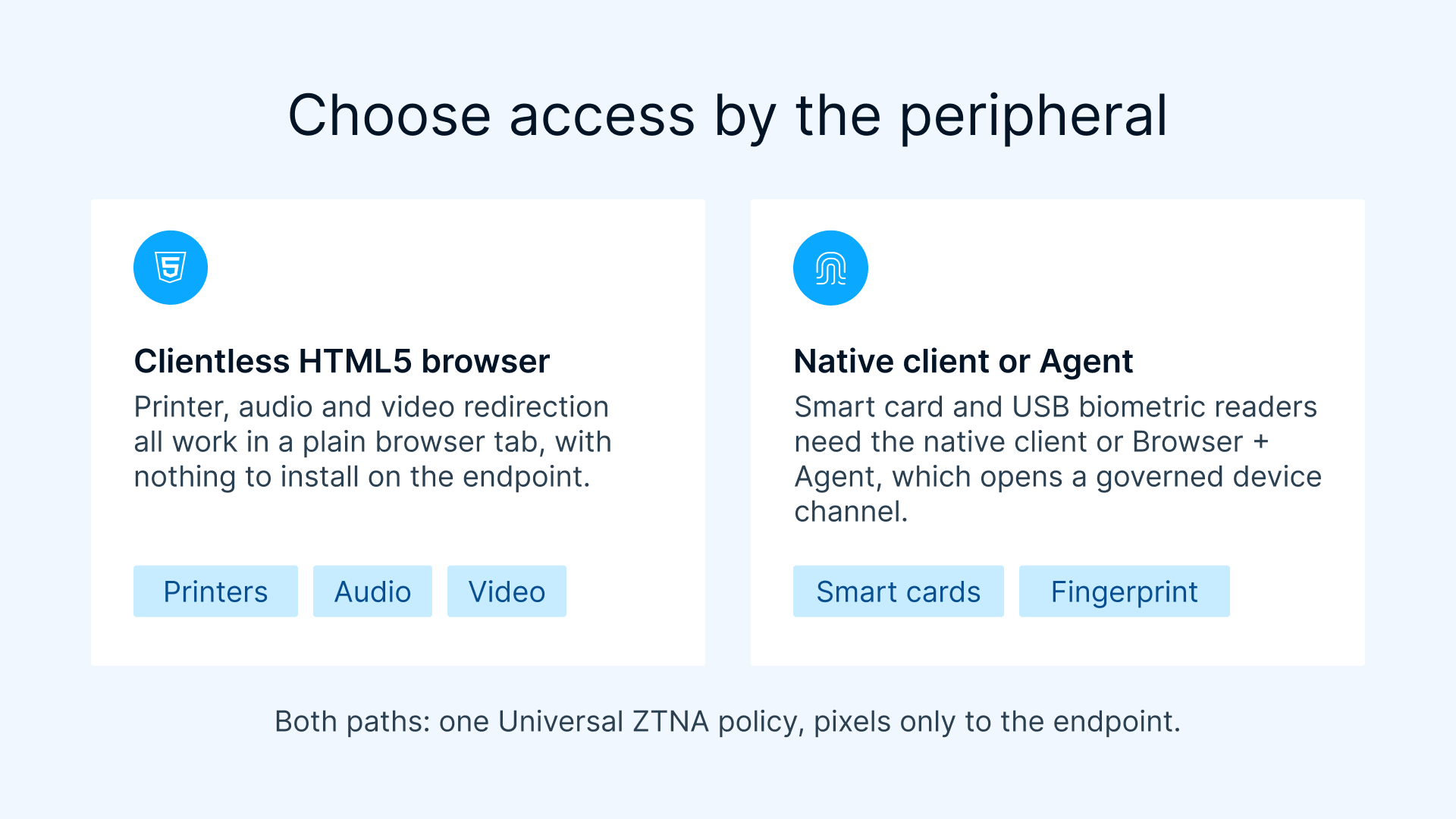
Here is the accuracy point that must not be blurred: smart card redirection and USB device redirection (which is how fingerprint and other biometric readers are carried into the session) require the native client (Windows, Linux, or mobile) or the Browser + Agent. These peripherals are not available in a plain, pure-browser HTML5 session. A clientless browser tab is excellent for many things, but a smart-card reader or a USB fingerprint scanner is not one of them.
Crucially, this redirection is a controlled device channel brokered through the Gateway, not network access. The endpoint is never given a route to the network or to back-end resources; it presents a single governed peripheral into the session and receives a pixel stream in return. So even while a smart-card reader or fingerprint scanner is bridged into the desktop, the endpoint itself still cannot reach the network, the EHR, or any PHI: it only renders pixels and streams that one device channel.
What is the difference between clientless and native/agent redirection?
The distinction is about the depth of device access each access method can provide. A pure HTML5 browser session runs inside the browser’s sandbox, which is deliberately limited in how it can talk to raw USB and cryptographic hardware. That is perfect for high-level peripherals like printing, audio, and video, which can be redirected clientlessly. But low-level, security-sensitive hardware (smart-card cryptography and USB biometric devices) needs a component running with deeper access on the endpoint. That component is either the native client or the Browser + Agent, which pairs the convenience of a browser entry point with a local agent that can perform true smart card and USB device redirection.
Which peripherals are clientless and which need the native client or agent?
This table is the accuracy centerpiece of the article. Use it to decide, per device, how clinicians will connect.
| Peripheral | Typical clinical use | Pure HTML5 browser (clientless)? | Delivery method required |
|---|---|---|---|
| Printer redirection | Wristbands, labels, discharge paperwork | Yes (clientless) | Any HTML5 browser |
| Audio redirection | Alerts, dictation playback, notifications | Yes (clientless) | Any HTML5 browser |
| Video redirection | Imaging review, telehealth video | Yes (clientless) | Any HTML5 browser |
| Smart card redirection | Badge tap-in / tap-out, certificate sign-on | No | Native client (Windows/Linux/mobile) or Browser + Agent |
| USB device redirection (fingerprint / biometric readers) | Fingerprint fast user switching, biometric re-auth | No | Native client (Windows/Linux/mobile) or Browser + Agent |
Read the table as a design rule, not a limitation to work around: put the everyday, high-level peripherals on the clientless browser path for maximum reach, and route the security-critical tap-and-go hardware through the native client or Browser + Agent so smart-card and fingerprint redirection function reliably. In every case the endpoint still receives only pixels plus, where needed, that one governed device channel, never network or resource access.
How does this map to EHR fast user switching on Thinfinity?
Fast user switching is the clinical pattern where a shared endpoint hosts a persistent session context and each clinician’s badge tap or fingerprint scan swaps the active identity quickly, without a full cold logon each time. The redirected smart card or biometric reader supplies the credential; the virtual desktop and the EHR resolve the identity; the previous user’s context is secured. Because Thinfinity streams the desktop as pixels rather than moving data to the device, the EHR and the PHI it contains stay in the session: the endpoint sees rendered images, not records, and is never handed a path to the network or the data behind it.
Thinfinity layers identity on top of this with MFA, SSO, and SAML, plus broad identity-provider support and cross-forest authentication. That means the badge or fingerprint can act as one strong factor within a wider policy (for example, a smart-card certificate for primary sign-on with a secondary factor for privileged actions), all governed centrally rather than device by device.


Why does “no endpoint management” make healthcare more secure?
Thinfinity needs no endpoint management, and in a healthcare setting that is a genuine security advantage rather than a mere convenience. The client or browser connects through the Gateway and receives only a pixel stream of the desktop or app; the endpoint is never given network or resource access: it only renders streams of apps and desktops. That inverts the usual endpoint-security burden: instead of hardening, patching, and locking down every BYOD clinician laptop, shared workstation, or kiosk, you rely on the fact that those devices have no route to the network or to PHI/EHR in the first place. Endpoint vulnerabilities therefore stay fully isolated: a compromised, personal, or unmanaged device cannot reach the network or the records; it can only render pixels.
The one nuance is the tap-and-go hardware, and the two facts hold together cleanly. Smart-card and fingerprint/USB redirection open a controlled device channel brokered through the Gateway so the reader can be presented into the session, but that channel is not network access. The endpoint still gets no route to the network or resources; it streams a single governed peripheral in, and pixels out. So the endpoint sees only pixels plus a governed device channel, never network reach. For a clinical fleet, that means device risk is isolated by design, not by how well any given endpoint happens to be managed.
How does the connection path stay secure without opening ports?
Security posture is as important as speed in a clinical setting. With Thinfinity, the connection path runs from the client (whether a native client or a browser under the same Thinfinity Workspace) to a reverse Gateway over port 443 using TLS 1.3. The host agent dials outbound to the broker using RDC, which means no inbound ports need to be opened on the firewall or on the session host. The attack surface that a traditional inbound RDP exposure would create simply is not there.
For a healthcare organization, this outbound-only model is one of the most defensible parts of the architecture: the workstations and session hosts never listen for inbound connections from the network edge, and every clinician, browser or native client, passes through the same reverse Gateway under one Universal ZTNA policy. Combined with the fact that the endpoint receives only a pixel stream and never network access, that single policy plane is what keeps the tap-and-go convenience from turning into a patchwork of exceptions.
How does this support HIPAA access and audit controls?
The HIPAA Security Rule, published by the U.S. Department of Health and Human Services (HHS), sets out access-control and audit-control expectations for systems that handle electronic protected health information. At a factual, non-prescriptive level, access controls address ensuring that only authorized users reach ePHI, and audit controls address recording and examining activity in systems that contain or use it. (See the HHS HIPAA Security Rule as the primary source, and confirm the current text and your obligations with your compliance team.)
Here is how the Thinfinity architecture enables those controls in a tap-and-go environment:
- Access control: Smart-card and fingerprint redirection tie a session to a verified individual rather than a shared password, while RBAC governs what each role can reach. MFA, SSO, and SAML strengthen the authentication event itself.
- Audit control: Built-in session recording captures what happened inside sessions, giving reviewers a concrete record to examine, complementing role and authentication logs.
- Data locality and isolation: Running on OCI keeps data in-region, and pixel streaming keeps PHI off endpoints, reducing where records can come to rest. Because the endpoint gets no network or resource access, device compromise stays isolated from the data.
Important: this architecture enables HIPAA access-control and audit-control requirements; it does not by itself determine compliance. Compliance depends on your full configuration, policies, workforce practices, business associate agreements, and more. Treat the points above as capabilities to build on, and confirm your specific obligations with qualified legal counsel and your compliance officers.
Why run this on Oracle Cloud Infrastructure?
OCI gives healthcare teams a place to keep data in-region while streaming desktops to wherever clinicians roam. Because Thinfinity uses pixel streaming, the PHI rendered inside a session never has to be copied down to the badge-tap workstation: the endpoint receives images, and the records stay in the OCI region. That reduces endpoint exposure and simplifies the story you tell auditors about where data lives.
Cybele Software documents this deployment pattern directly in its native OCI VDI for enterprises material, and the cost dynamics of OCI for regulated VDI are explored in a related analysis of predictable-cost banking VDI on OCI versus other clouds. Healthcare and banking share the same underlying needs here: strong access control, dependable audit trails, data locality, and predictable economics at scale.
How do you roll out tap-and-go smart-card and fingerprint access?
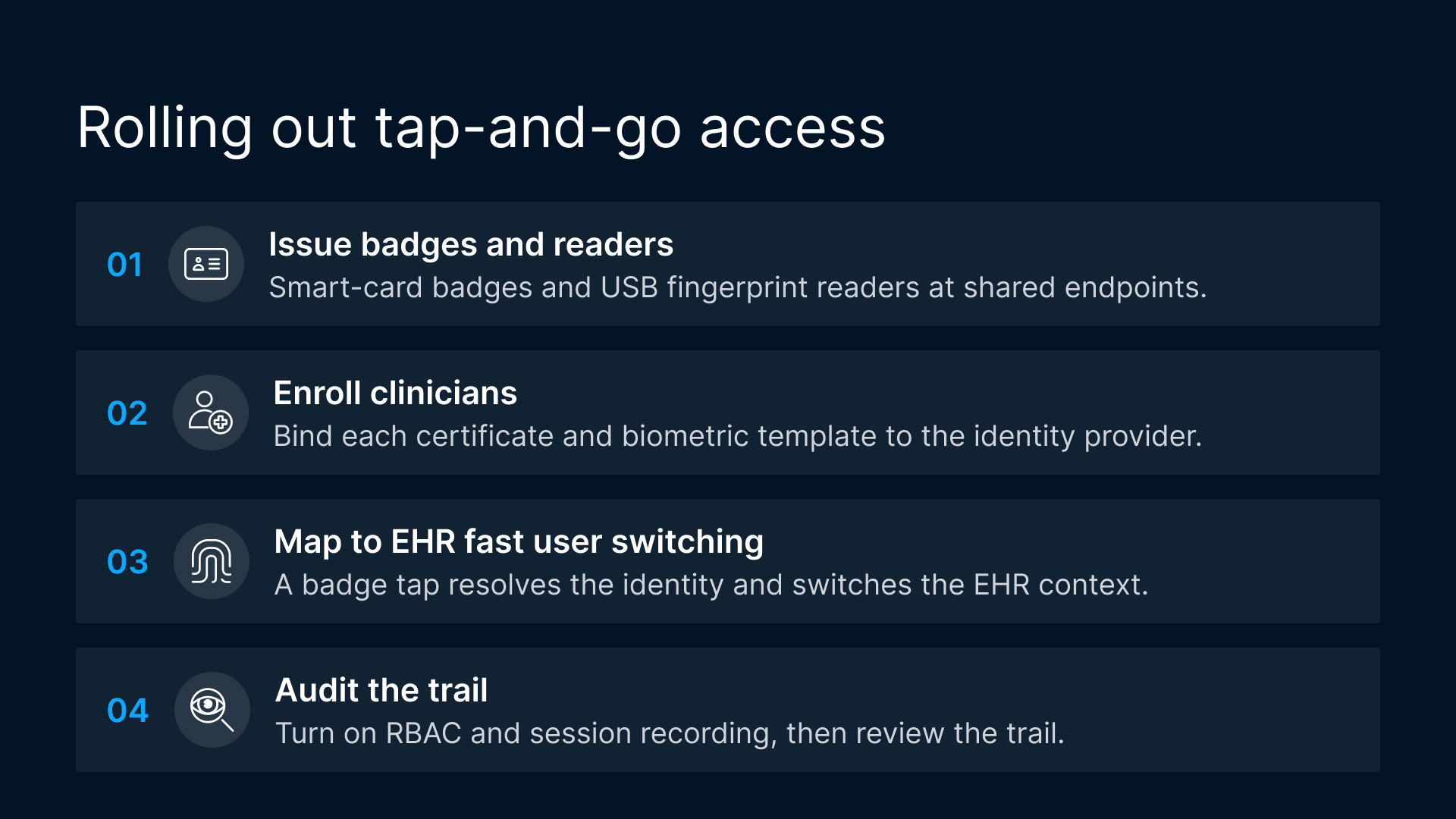
A clean rollout follows a predictable sequence. Use this ordered list as the backbone of a pilot on a single unit before you scale house-wide.
- Issue badges and readers. Distribute smart-card badges and provision fingerprint/USB biometric readers at the shared endpoints where fast user switching will live, and install the native client or Browser + Agent on those endpoints so smart-card and USB redirection function.
- Enroll clinicians. Register each clinician’s smart-card certificate and biometric template, and bind them to the identity provider through Thinfinity’s MFA/SSO/SAML and cross-forest support.
- Map to EHR fast user switching. Configure sessions so a badge tap or fingerprint scan resolves the identity and switches the active EHR context quickly, with pixel streaming keeping PHI in-session.
- Audit. Turn on RBAC and built-in session recording, verify that access and activity are being captured, and review the trail against your HIPAA access-control and audit-control expectations with your compliance team.
Where a pure browser session isn’t enough (and when to use the native client)
It is worth being blunt about the limits, because getting this wrong wastes a pilot. A pure HTML5 browser session (the clientless path) is the right choice for reach and for high-level peripherals: printer, audio, and video redirection all work clientlessly. It is the wrong choice for the two peripherals at the center of tap-and-go: smart card readers and USB fingerprint/biometric readers do not work in a plain browser tab.
For those, you must use the native client (Windows, Linux, or mobile) or the Browser + Agent, which brings the local agent needed for smart card and USB device redirection. That agent opens only a controlled device channel through the Gateway; it does not give the endpoint network or resource access. The practical guidance for a clinical fleet:
- Use the native client or Browser + Agent on shared tap-and-go workstations, med carts, and any endpoint where badge or fingerprint sign-on is required.
- Use the clientless HTML5 browser for lighter-weight access where only printing, audio, or video redirection is needed, or where installing software on the endpoint is impractical.
- Remember that both paths sit under the same Universal ZTNA and the same outbound-only, no-inbound-ports Gateway model, and in both the endpoint receives only pixels (plus a governed device channel where needed), so mixing them does not fragment your security posture.
In short: choose the access method by the peripheral. If the workflow depends on a smart card or a fingerprint reader, plan for the native client or Browser + Agent from day one, knowing the endpoint still never gets network reach.