

Summary
- An Amazon WorkSpaces alternative worth evaluating should deliver both published applications and full desktops from one platform, and increasingly containerized app and browser sessions delivered as pods on Kubernetes (Oracle OKE); Thinfinity Workspace on Oracle Cloud Infrastructure (OCI) does all of this, while WorkSpaces splits desktops, application streaming, and secure browsing across separate products.
- Thinfinity reaches users through any HTML5 browser and through native Windows, Linux, iOS, and Android clients, all under one Universal ZTNA, so you are not choosing between browser access and full-client access.
- The connection model opens no inbound ports: a Thinfinity agent on each host dials outbound to a reverse Gateway over port 443 with TLS 1.3 and streams the session up, keeping desktop and app hosts private.
- Concurrent single-licensing charges for simultaneous sessions rather than per named or provisioned desktop, which reshapes cost for shift, part-time, contractor, and task workforces compared with per-user billing.
- Running natively on OCI adds flexible compute shapes, in-region and sovereign data residency, and eliminated outbound egress fees, while true cloud portability and multi-tenant white-label support serve enterprises and MSPs alike.
If you are shopping for an Amazon WorkSpaces alternative, the real question is not whether another vendor can hand you a Windows desktop in the cloud, because most can. The question is whether you can consolidate apps and desktops, reach users on any client, control your egress bill, and keep the freedom to move clouds later. This article compares Amazon WorkSpaces with Thinfinity Workspace on OCI across delivery scope, access clients, connection security, identity, licensing and TCO, cloud portability, and migration. It also includes a fair section on when Amazon WorkSpaces is the right choice, an illustrative cost comparison, and a single FAQ block for the questions buyers ask most.
What is an Amazon WorkSpaces alternative, and why look for one?
Amazon WorkSpaces is AWS’s secure, fully managed VDI and DaaS offering. It delivers Windows and Linux cloud desktops on a pay-as-you-go basis, carries a financially backed 99.9% monthly uptime SLA, runs across 17 global regions for its DaaS product, was named a Leader in the 2025 Gartner Magic Quadrant for DaaS, and adheres to 21 compliance programs. These are figures published by AWS on aws.amazon.com/workspaces, and you should confirm the current numbers before you build a business case on them.
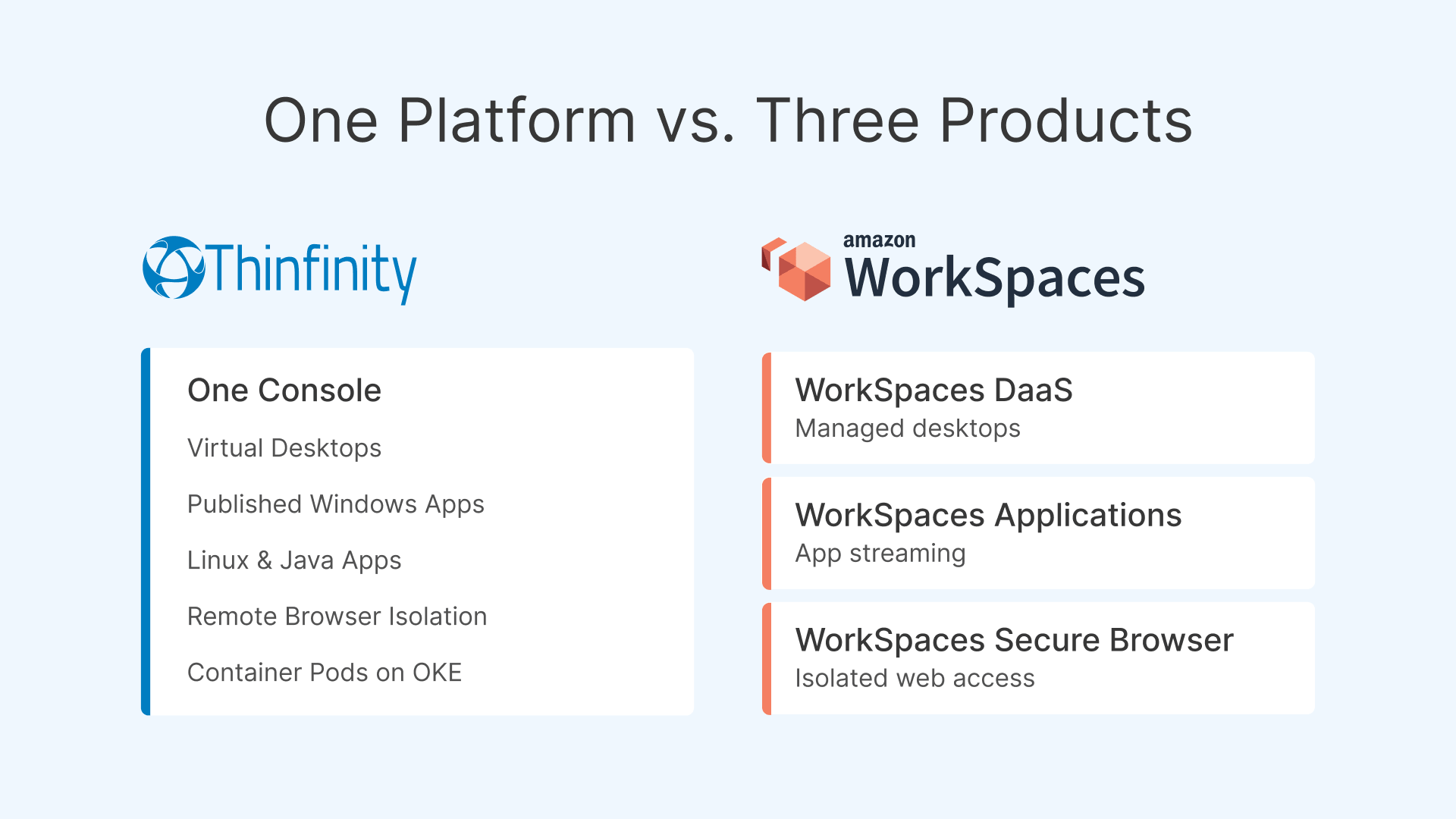
The product is not a single service. The WorkSpaces family splits into WorkSpaces DaaS for managed desktops, WorkSpaces Applications for streaming individual apps and converting desktop software into SaaS, and WorkSpaces Secure Browser for isolated web access, plus VDI Partners APIs and streaming through Amazon DCV. Billing is per user, typically monthly or hourly with an AutoStop option, and identity runs through AWS Directory Service, IAM Identity Center, or AD Connector. AWS positions WorkSpaces with claims like “no vendor lock-in, no forced migrations,” and in fairness it does interoperate broadly; the honest caveat is that it still runs only on AWS.
Teams look for an alternative when that shape does not match theirs. Some want apps and desktops from one console rather than three products. Some need to reach browser-only users and full-client power users under one access policy. Some are watching data-egress charges climb, or need in-region and sovereign data residency, or want the option to run the same platform on another cloud or on-premises. Those motivations are where a portable, application-plus-desktop platform earns a second look.
How does Thinfinity Workspace on OCI compare to Amazon WorkSpaces?
Thinfinity Workspace is a secure platform for VDI, DaaS, and application delivery with Universal ZTNA built in. It publishes full persistent and non-persistent desktops as well as individual Windows applications through multi-session and RemoteApp, plus Linux and Java apps and Remote Browser Isolation. Running it natively on OCI pairs that breadth with flexible compute shapes, GPU options, and in-region data residency. The table below sets the two side by side.
| Dimension | Amazon WorkSpaces | Thinfinity Workspace on OCI |
|---|---|---|
| Delivery scope | Split products: WorkSpaces DaaS (desktops), WorkSpaces Applications (app streaming), WorkSpaces Secure Browser | Apps and desktops in one platform: persistent and non-persistent desktops, published Windows apps (multi-session / RemoteApp), Linux/Java apps, Remote Browser Isolation |
| Container / Kubernetes delivery | VM/instance-based managed desktops and app streaming; not delivered as Kubernetes pods | Can deliver app and browser sessions as ephemeral containers/pods on Kubernetes (Oracle OKE), with pod-level elasticity, plus VM-based desktops. Includes containerized Linux/Java apps and RBI browser pods. |
| Access clients | WorkSpaces clients and DCV streaming | Any HTML5 browser plus native Windows, Linux, iOS, and Android clients, all under one Universal ZTNA |
| Connection / ports | Managed AWS connectivity within the AWS network | Agent on each host dials outbound over 443 / TLS 1.3 to a reverse Gateway; no inbound ports opened on host or firewall; hosts stay private, Gateway in a DMZ |
| Identity | AWS Directory Service, IAM Identity Center, AD Connector | Simple user management, simple cross-forest authentication, broad IdP integration (SAML, OpenID Connect, Active Directory, Entra ID, Okta), RBAC |
| Licensing / TCO | Per user, monthly or hourly (AutoStop) | Concurrent single-licensing: pay for simultaneous sessions, not per named or provisioned desktop |
| Cloud / portability | AWS only | Cloud-agnostic with a strong OCI partnership; runs natively on OCI or any cloud or on-premises |
| Egress / data-out economics | Standard AWS data-out charges apply (confirm current) | OCI eliminates outbound egress fees; pixel streaming keeps data in-region |
| Multi-tenant / white-label | Primarily first-party AWS tenancy model | Built-in multi-tenancy and white-label for MSPs and ISVs |
| Migration | Native to the AWS ecosystem | Turnkey migration from WorkSpaces, Citrix, and VMware environments |
| Best fit | AWS-committed shops wanting a managed, first-party Gartner-Leader service | Teams wanting apps plus desktops, any client, concurrent licensing, OCI economics, and cloud portability |
Delivery scope: apps and desktops in one platform
The most practical difference is consolidation. With WorkSpaces you reach for DaaS when you need a desktop, WorkSpaces Applications when you want to stream a single program, and Secure Browser when you want an isolated web session. Each is a capable product, but each is a separate thing to license, configure, and operate. Thinfinity publishes a full desktop and an individual application from the same platform, so a task worker who only needs one line-of-business app can receive exactly that app through application publishing, while a power user on the next desk gets a persistent desktop, and both are managed together. That also covers Linux and Java apps and Remote Browser Isolation, so the surface you administer is one platform rather than a suite you stitch together.
Delivery is not limited to virtual machines. Thinfinity can also run isolated application and browser sessions as ephemeral containers, spun up as pods and orchestrated by Kubernetes, a natural fit for Oracle Container Engine for Kubernetes (OKE) on OCI. Each session runs in a right-sized, isolated pod that is torn down when the user disconnects, so capacity scales pod by pod with pay-per-pod elasticity rather than by pre-provisioned instances. This model covers containerized Linux and Java application delivery and Thinfinity Remote Browser Isolation browser pods, and it matters because it keeps sessions right-sized, elastic, and isolated. Because Amazon WorkSpaces is instance-based and does not deliver app sessions as Kubernetes pods, this is a Thinfinity-only axis.
Access clients and Universal ZTNA
Thinfinity does not force a choice between browser access and native-client access. The same session can be reached from any HTML5 browser with nothing to install, or from native Windows, Linux, iOS, and Android clients when users need local peripheral integration or a richer experience. All of them sit under one Universal ZTNA policy, so authentication, authorization, and RBAC are consistent no matter how someone connects. Built-in session recording, USB peripheral redirection, and audio and video redirection round out the experience, and GPU-capable delivery handles heavy workloads such as GIS and SCADA. For terminal access to legacy hosts, the platform includes z/Scope terminal emulation.
The zero-inbound-port connection model
The connection path is where the security posture differs most visibly. Every client connects to a reverse Gateway over port 443 with TLS 1.3. On each desktop or application host, a Thinfinity agent dials outbound to that Gateway using RDC, its streaming protocol, and streams the session up. Because the host initiates the connection, no inbound ports are opened on the firewall or the host itself. Hosts stay private, the Gateway sits in a DMZ, and pixel streaming carries the session so application data never has to leave the region. This is a meaningfully smaller attack surface than any model that requires inbound reachability to desktops.

[…] network location is no longer seen as the prime component to the security posture […]

How does Amazon WorkSpaces pricing compare to concurrent licensing?
Amazon WorkSpaces bills per user, monthly or hourly. That model is clean when your population is stable and each person is at their desktop most of the day. It fits less well when a large share of your workforce is part-time, seasonal, shift-based, or contract, because you provision and pay for named desktops that sit idle for most of the clock.
Concurrent single-licensing takes a different measure. Thinfinity charges for simultaneous sessions rather than for every named or provisioned desktop, so your cost tracks how many people are actually connected at once. The following example is illustrative, uses round numbers, and is not a quote; validate any pricing against current published rates before deciding.
Suppose a support operation employs 300 agents across three eight-hour shifts, with no more than 120 connected at any moment. Under per-user billing you license roughly 300 desktops. Under concurrent licensing you license the peak concurrency, closer to 120 sessions, plus a modest buffer. For a workforce whose headcount is two to three times its peak concurrency, that gap is the core of the TCO story, and it is exactly the profile of shift, part-time, contractor, and task teams. Where concurrency is close to headcount, the advantage narrows, and per-user pricing can be perfectly reasonable.
Why does OCI change the economics of virtual desktops?
The platform matters as much as the licensing. Running Thinfinity on OCI removes a cost line that many desktop programs underestimate: outbound data-egress fees. Every remote session streams pixels to users continuously, so data-out is not a rounding error; on OCI those outbound egress fees are eliminated, which confirm-current Oracle documentation describes as a standing advantage. On AWS, standard data-out charges apply and should be confirmed against the current pricing page.
OCI also brings flexible compute shapes from 1 to 80 cores and GPU shapes, so you can size a task-worker pool and a graphics-heavy engineering pool from the same cloud without over-provisioning either. In-region data residency, including sovereign regions, lets regulated organizations keep sessions and data where policy requires, and because pixel streaming keeps data in-region, the residency guarantee extends to the live session rather than just storage. Teams that want the full picture of a native OCI build can read our note on native OCI VDI for enterprises, and for a worked cost comparison there is our analysis of predictable-cost banking VDI on OCI.
Architecture enables outcomes; it does not by itself determine compliance. In-region and sovereign options make it easier to design for residency requirements, but the compliance result depends on how you configure, operate, and attest to the whole environment.
What about cloud portability and multi-tenancy?
Amazon WorkSpaces runs only on AWS. That is not a flaw so much as a fact of a first-party service, and for an AWS-committed shop it is often an asset. But if your strategy values the option to move, or to run the same platform across clouds and on-premises, a single-cloud service constrains you. Thinfinity is cloud-agnostic. It runs natively on OCI through a strong Oracle partnership, and the same platform runs on other clouds or in your own datacenter, which is genuine portability rather than a migration promise.
For service providers, the multi-tenant and white-label capabilities matter just as much. An MSP or ISV can stand up isolated tenants, brand the experience, and bill against concurrent sessions, all from one deployment. Teams migrating off other stacks often arrive here from a broader consolidation effort; if that is your situation, our guides to a VMware alternative and to an AVD and Nerdio alternative cover adjacent moves.
How do you migrate from Amazon WorkSpaces to Thinfinity on OCI?
Migration is turnkey rather than a rebuild, and it follows a predictable sequence. A typical rollout looks like this:
- Inventory your current WorkSpaces population, separating full-desktop users from users who only need one or two published applications.
- Map peak concurrency by shift and role to size concurrent licenses and OCI compute shapes accurately.
- Stand up the reverse Gateway in a DMZ and deploy Thinfinity agents on your desktop and application hosts on OCI, confirming outbound-only connectivity over 443.
- Connect identity through your existing IdP, whether that is Active Directory, Entra ID, Okta, or a SAML or OpenID Connect provider, and configure RBAC and cross-forest authentication.
- Publish desktops and individual apps, then pilot with a representative group spanning browser-only and native-client users.
- Validate peripherals, audio and video redirection, GPU workloads, and session recording, then cut over in waves and decommission the corresponding WorkSpaces desktops.
The same sequence applies when you are moving from Citrix or VMware, since the platform is built to absorb those environments as well.
When Amazon WorkSpaces is the right choice
Amazon WorkSpaces is a mature, first-party AWS service and a 2025 Gartner Magic Quadrant Leader for DaaS, and there are situations where it is the better fit. If your organization is deeply committed to AWS and your identity, networking, security tooling, and data already live there, the native integration is a real advantage that a third-party platform cannot fully replicate. If a financially backed 99.9% monthly uptime SLA from the cloud provider itself is a procurement requirement, WorkSpaces delivers that directly. If your compliance program depends on the specific set of 21 programs AWS attests to, or on the breadth of its 17 DaaS regions, staying first-party can simplify your audits. And if your workforce is stable and full-time, so that headcount and peak concurrency are close, per-user billing may cost about the same as concurrent licensing with less to rethink. These are genuine reasons, not consolation prizes; confirm the current SLA, region, and compliance figures on the AWS site, as they are AWS’s own published claims.