

Summary
- IaaS, PaaS, and SaaS are the three cloud service models defined by NIST SP 800-145: IaaS gives you raw compute, storage, and networking; PaaS gives you a managed platform to run your apps; SaaS gives you finished software you just log in and use.
- The practical difference is the shared-responsibility line: as you move from IaaS to PaaS to SaaS, the provider manages more of the stack and you manage less, trading control for speed and lower operational overhead.
- Related models fill the gaps: CaaS (Containers as a Service) sits between IaaS and PaaS, and DaaS (Desktop as a Service) delivers virtual desktops as a subscription.
- VDI is not one model. It can be built DIY on IaaS, consumed as fully managed DaaS (SaaS-like), or delivered through a platform you deploy and operate yourself, which sits between the two. These classifications overlap, and that is normal.
- Thinfinity VDI on Oracle Cloud Infrastructure (OCI) is a platform you deploy and operate in your own tenancy: you control the apps, desktops, images, and users, and the platform provides the brokering, secure gateway, and access controls you would otherwise assemble yourself on raw IaaS.
What are IaaS, PaaS, and SaaS?
IaaS vs PaaS vs SaaS is the standard way to describe how much of the technology stack a cloud provider runs for you versus how much you run yourself. Understanding these three cloud service models, and the shared-responsibility line that separates them, is the foundation for almost every modern architecture decision, from where you host a database to how you deliver virtual desktops. This guide defines each model against the authoritative NIST definition of cloud computing, compares them side by side, gives real-world examples, shows how they combine, and then answers the questions generic explainers skip: where do VDI and DaaS fit, and how should you classify a platform-delivered workspace such as Thinfinity VDI on OCI? The short version: all three models rest on the same NIST essential characteristics (on-demand self-service, broad network access, resource pooling, rapid elasticity, and measured service). What changes between them is the boundary of responsibility.
Infrastructure as a Service (IaaS)
IaaS provides on-demand compute, storage, and networking. In NIST’s words, the consumer can “deploy and run arbitrary software, which can include operating systems and applications,” while the provider runs the underlying physical infrastructure. You rent virtual machines, block and object storage, virtual networks, and load balancers, and you remain responsible for the operating system, middleware, runtime, applications, and data on top. IaaS gives you the most control and the most operational work. Oracle’s own OCI IaaS and PaaS overview groups core compute, storage, and networking under IaaS.
Platform as a Service (PaaS)
PaaS provides a managed platform and runtime. You deploy and manage your applications and data; the provider manages everything beneath: the operating system, patching, scaling, and the infrastructure. NIST describes PaaS as the capability to deploy consumer-created applications onto the cloud infrastructure “without managing or controlling the underlying cloud infrastructure including network, servers, operating systems, or storage.” A managed Kubernetes service, a managed database, or an application platform are typical examples. On OCI, services such as Oracle Kubernetes Engine (OKE) and MySQL HeatWave are managed PaaS: you bring the workload, Oracle runs the platform.
Software as a Service (SaaS)
SaaS provides finished, ready-to-use applications. The provider runs the entire stack (infrastructure, platform, and application), and you simply use the software through a browser or client. NIST notes the consumer “does not manage or control the underlying cloud infrastructure… with the possible exception of limited user-specific application configuration settings.” Email, CRM, collaboration suites, and help desks are classic SaaS. Your only real responsibilities are your data, your users, and how you configure the app.
Related models: CaaS and DaaS
Two adjacent models matter for this discussion. CaaS (Containers as a Service) sits between IaaS and PaaS: the provider manages the container orchestration layer (often Kubernetes) while you package and deploy containerized workloads. DaaS (Desktop as a Service) delivers virtual desktops and applications as a subscription, with the provider operating the desktop-delivery backend. DaaS is important here because it is the model most people reach for when they ask whether virtual desktops are IaaS, PaaS, or SaaS, and, as we will see, the honest answer is “it depends how they are delivered.”
What is the shared-responsibility model across IaaS, PaaS, and SaaS?
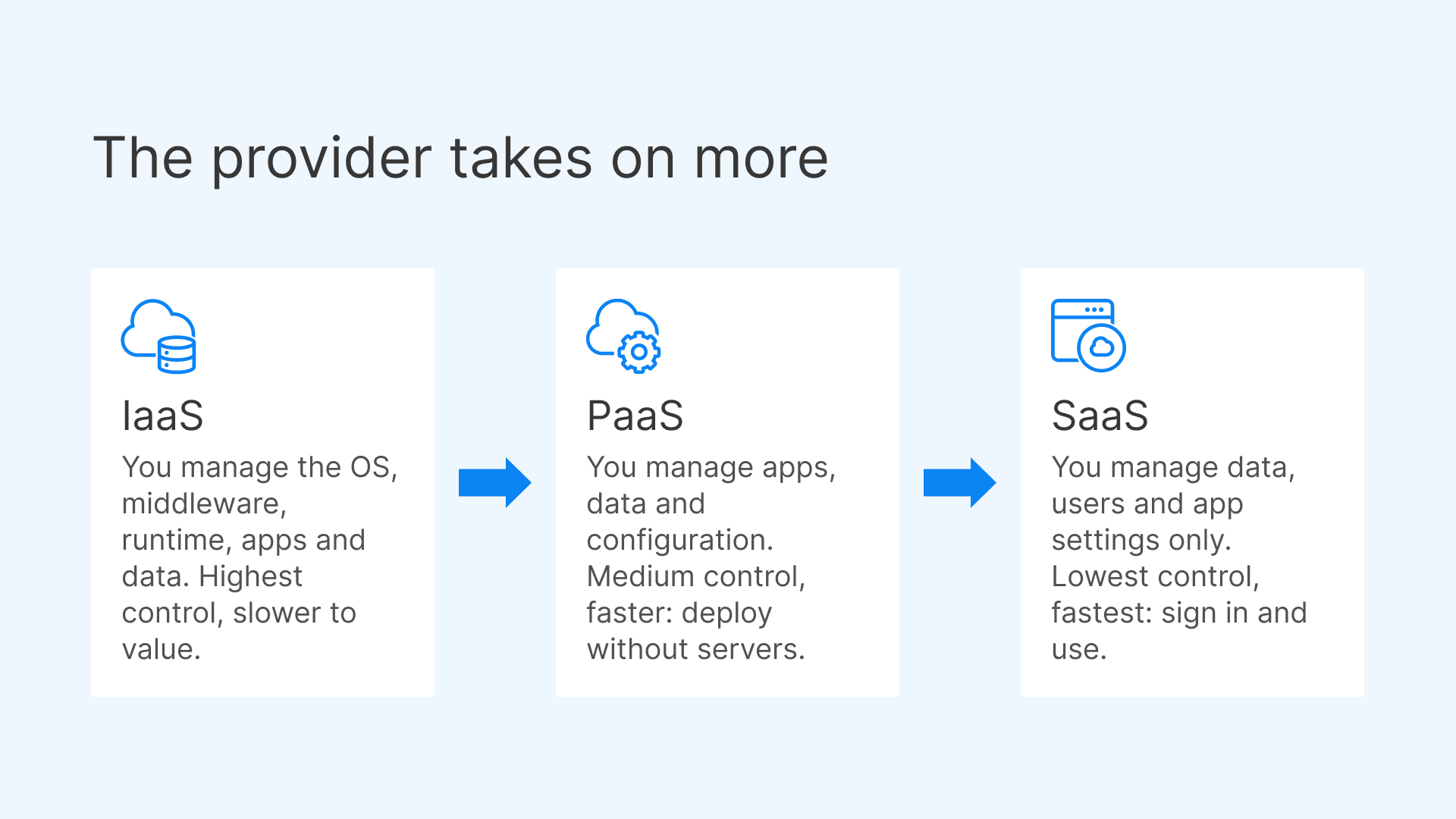
The clearest way to see the difference between the models is a shared-responsibility comparison. As you move down the table, the provider takes on more and you take on less.
| Dimension | IaaS | PaaS | SaaS |
|---|---|---|---|
| What you manage | OS, middleware, runtime, apps, data, configuration | Apps, data, and configuration | Data, users, and app settings only |
| What the provider manages | Physical hardware, virtualization, compute, storage, network | Infrastructure plus OS, runtime, patching, scaling of the platform | The entire stack, including the application |
| Control | Highest: full control of the environment | Medium: control of apps and data, not the platform | Lowest: configuration only |
| Speed to value | Slower: you assemble and operate the stack | Faster: deploy code without managing servers | Fastest: sign in and use |
| Typical use cases | Lift-and-shift, custom infrastructure, HPC, DIY platforms | App development, managed databases, container platforms | Business apps: email, CRM, collaboration |
A useful mental model: with IaaS you get the ingredients, with PaaS you get the kitchen, and with SaaS you get the finished meal. None is universally “better.” The right choice depends on how much control you need and how much operational work you want to own.

Generally, the higher up the stack you go (IaaS → PaaS → SaaS), the more security responsibility transfers to the vendor and the less remains with the customer.

What are the key differences between IaaS, PaaS, and SaaS?
The three models differ along a few consistent axes:
- Level of abstraction. IaaS abstracts hardware; PaaS abstracts the operating system and runtime; SaaS abstracts the entire application.
- Responsibility and control. IaaS gives you maximum control and maximum responsibility. SaaS gives you minimum of both. PaaS is the balanced middle where you own the application layer only.
- Operational overhead. Patching, scaling, and availability are your job in IaaS, shared in PaaS, and the provider’s job in SaaS.
- Customization. IaaS is fully customizable; SaaS is the least customizable; PaaS lets you customize your app but not the platform beneath it.
- Cost shape. IaaS bills for raw resources you must right-size yourself; PaaS bundles platform operations into the price; SaaS is typically per-user or per-feature subscription.
What are real-world examples of each model?
Concrete examples make the boundaries obvious:
- IaaS: OCI Compute instances, block volumes, and virtual cloud networks; comparable services on other clouds. You provision the machines and run everything on them.
- PaaS: Oracle Kubernetes Engine (OKE) for managed containers and MySQL HeatWave for a managed database. You deploy workloads and data; Oracle runs the platform. App-hosting platforms and managed message queues are also PaaS.
- SaaS: Business email, CRM, document collaboration, and help-desk tools you access through a browser. You never touch the servers.
- CaaS: A managed Kubernetes offering used purely to run containers, sitting between IaaS and PaaS.
- DaaS: A first-party virtual-desktop subscription where the provider operates the desktop-delivery backend and you bring users and images.
How do IaaS, PaaS, and SaaS work together?
In practice, most organizations use all three at once, and the models layer rather than compete. A SaaS application is itself built on a platform, which runs on infrastructure. A typical enterprise stack might combine SaaS for email and CRM, PaaS such as OKE and a managed database for custom applications, and IaaS for specialized or legacy workloads that need OS-level control. Hybrid and multi-cloud patterns are common: identity and data may live in one place, compute in another, and finished apps consumed as SaaS across the board. The value of understanding the shared-responsibility line is that it lets you deliberately choose, per workload, how much of the stack you want to own. That same reasoning is exactly what you need when you get to virtual desktops, because desktop delivery can be assembled at any layer.
Where do VDI and DaaS fit across IaaS, PaaS, and SaaS?
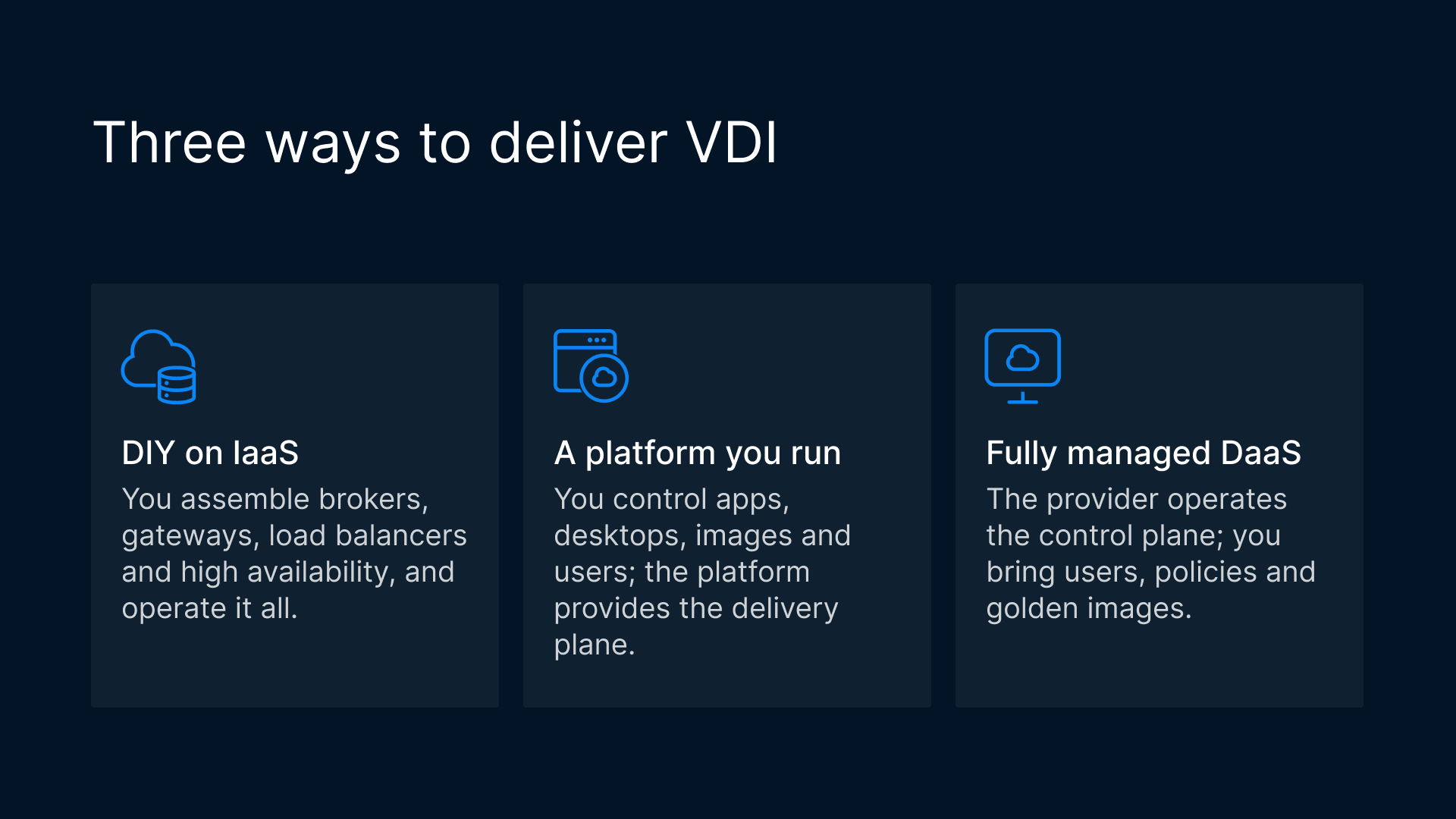
This is where generic explainers stop and real architecture questions begin. Virtual Desktop Infrastructure (VDI) delivers full desktops and applications from the data center or cloud to any endpoint. But VDI is not a single service model: it can be delivered in at least three ways, and the classification depends entirely on who operates the delivery plane.
VDI built DIY on IaaS
You can build VDI yourself on raw IaaS: spin up compute for the session hosts, assemble connection brokers, gateways, load balancers, and high-availability yourself, and operate the whole thing. This gives maximum control and maximum operational burden. In shared-responsibility terms, this is squarely IaaS: the cloud gives you machines, and everything above is yours to design, secure, and maintain.
In a fully isolated, single-tenant, bare metal server with no Oracle software on it, your responsibility increases because you own the entire software stack (operating systems and above) on which you deploy your applications.
VDI consumed as fully managed DaaS
At the other end, DaaS delivers desktops as a fully managed, SaaS-like subscription. A first-party desktop-pool service runs the delivery backend for you; you bring users, policies, and golden images. Because the provider operates the control plane and you consume a finished capability, DaaS behaves much like SaaS for the buyer, even though what is delivered is a desktop rather than a single app.
VDI delivered through a platform you run
Between DIY-on-IaaS and fully managed DaaS sits a third, increasingly common option: you deploy a platform that provides the desktop-and-app delivery plane, and you run your workspaces on it. You control the apps, desktops, images, and users; the platform provides the brokering, secure gateway, access controls, and scale. It sits between the two: you still run the platform, but you no longer assemble the delivery plane from separate parts. These categories overlap, and it is important to say so plainly. The same technology can be labeled “VDI,” “DaaS,” or “a workspace platform” depending on who operates which layer. The useful question is not “which single label is correct?” but “who runs the delivery infrastructure, and how much control do I keep over my desktops and data?” For a deeper look at running virtual desktops natively on Oracle Cloud, see Cybele’s guide to native OCI VDI for enterprises.
Where Thinfinity VDI on OCI fits
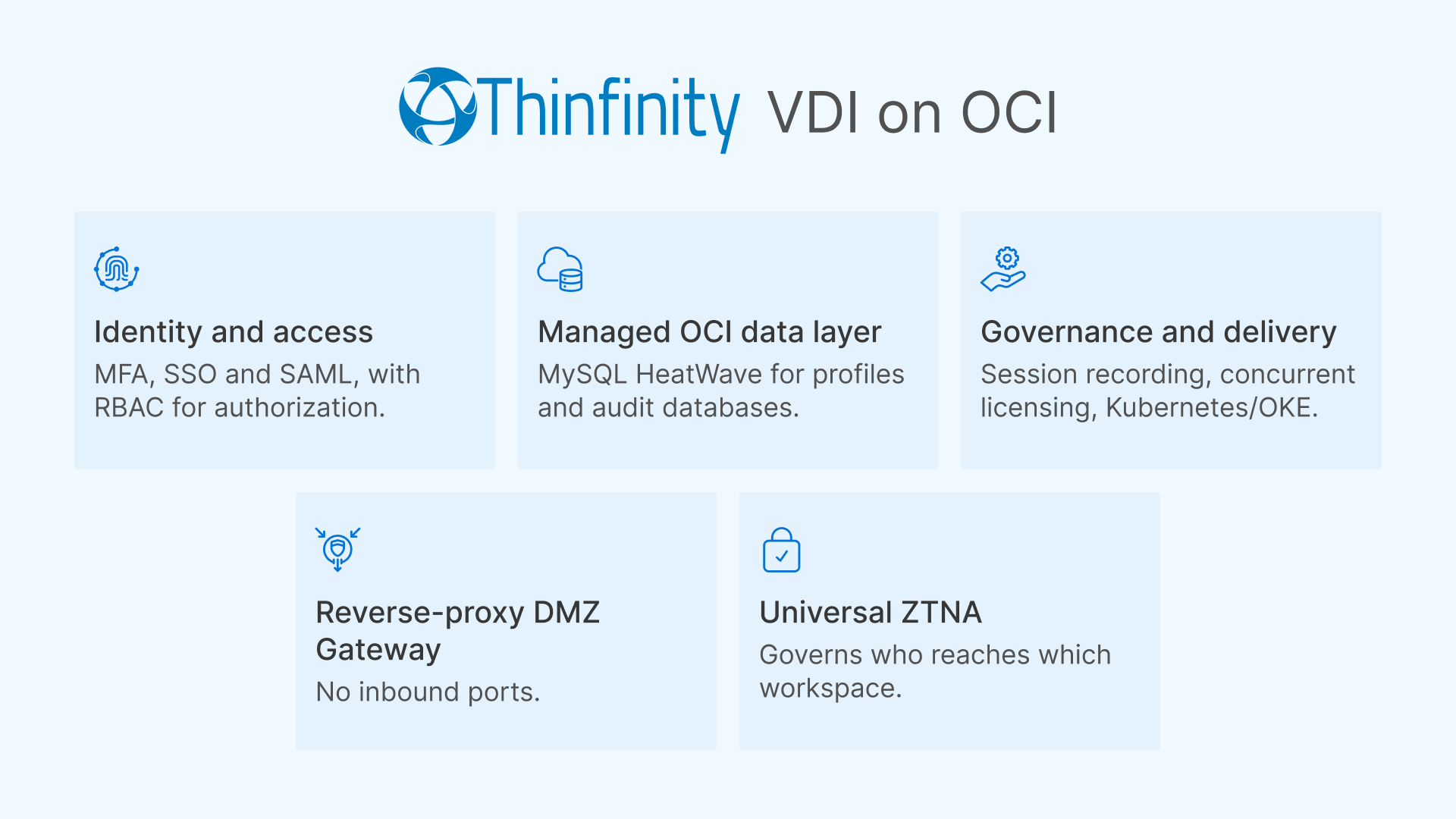
Thinfinity Workspace is a platform you deploy in your own Oracle Cloud Infrastructure tenancy to deliver secure desktops and applications. It is neither raw infrastructure nor a black-box SaaS desktop: it is the third option above, a delivery platform you run. You bring and control your apps, desktops, images, and users; Thinfinity provides the brokering, secure gateway, and access controls, and OCI managed services can carry parts of the stack, such as the databases. You operate the platform, but you do not have to build the delivery plane from separate products.
What the platform provides
The delivery plane includes the pieces you would otherwise have to assemble and maintain on raw IaaS:
- Reverse-proxy DMZ Gateway with zero inbound ports. Desktops and published applications are delivered through a reverse-proxy gateway, and host agents connect outbound, so you do not open inbound ports to your desktop hosts.
- Universal ZTNA. Zero-trust network access governs who reaches which workspace. See Cybele’s Universal ZTNA for how access is brokered without exposing the network.
- Identity and access: MFA, SSO, and SAML for authentication, with RBAC for granular authorization.
- Governance and delivery: session recording for oversight, concurrent licensing, and containerized app and session delivery on Kubernetes/OKE.
- A managed OCI data layer, for example MySQL HeatWave for Thinfinity’s profiles and audit databases, a managed OCI service underneath the platform.
Who runs what
The responsibility boundary is what places it. You manage the workspaces, applications, desktop images, users, and policies, and you also run the Thinfinity gateways and brokers: deploying, patching, and sizing them is your team’s job. What you do not have to do is assemble a delivery plane from separate products. Access is delivered through pixel streaming: endpoints receive a stream of pixels and send back keyboard and mouse input, so desktops and data stay on your OCI hosts rather than on the device. The labels overlap: the same platform can also be offered as white-label DaaS, for example by managed service providers who run it and resell finished desktops to their own customers. For those customers it behaves like DaaS; for the provider it is a platform they operate. The useful question is not which label is correct but who operates which layer. For teams weighing economics, Cybele’s analysis of predictable-cost banking VDI on OCI versus Azure and AWS shows how this model plays out on cost. Cybele’s z/Scope terminal emulation complements the workspace when legacy host access is also in scope.
How do you choose the right model?
Choosing between IaaS, PaaS, and SaaS (and between DIY VDI, DaaS, and platform-delivered VDI) comes down to a few questions:
- How much control do you need? If you need OS-level control or run specialized workloads, lean toward IaaS. If you want to focus on your apps and data, PaaS. If you want a finished capability, SaaS or DaaS.
- How much operational work can you absorb? IaaS demands the most staff time for patching, scaling, and availability. PaaS and SaaS shift that to the provider.
- What are your security and compliance boundaries? Where must data live, and who is allowed to touch the infrastructure? A zero-inbound-ports, ZTNA-fronted platform can satisfy strict access requirements while keeping data on your OCI tenancy.
- What is the cost shape you can plan around? Per-resource IaaS billing, bundled PaaS pricing, and per-user SaaS/DaaS subscriptions behave very differently at scale.
- For desktops specifically: do you want to build and run the delivery stack (IaaS), consume finished desktops (DaaS), or keep control of your workspaces while a platform handles delivery (a platform you run, as with Thinfinity on OCI)?
Most organizations end up with a blend, matching each workload to the model that fits its control, speed, and cost needs.