

Summary
- Most enterprises consolidate VDI and app virtualization badly: they run one tool for published apps (VDA, such as Citrix Virtual Apps, RDS RemoteApp, or Azure Virtual Desktop app groups) and a second tool for full desktops (VDI, such as Omnissa Horizon, AVD desktops, or on-prem VDI), doubling their consoles, images, licenses, and gateways.
- Running two stacks means paying twice: duplicate golden-image pipelines, overlapping licenses, parallel gateway and identity configurations, and two separate skill sets your team has to keep current.
- Thinfinity Workspace delivers both full persistent and non-persistent VDI desktops and individually published Windows apps from one platform, one console, and one concurrent license, plus Linux/Java apps, remote browser isolation (RBI), and containerized app delivery on Kubernetes/OKE.
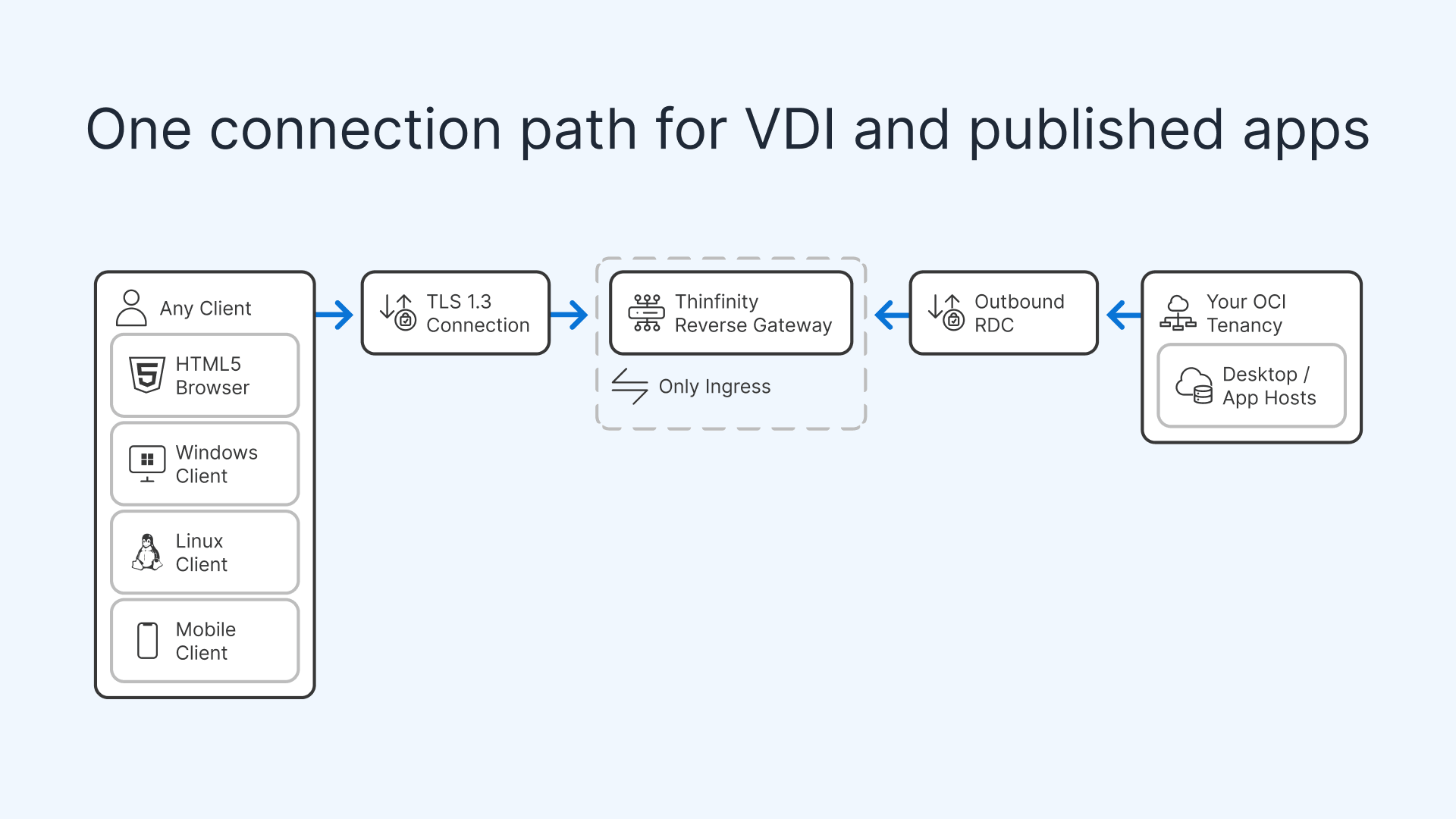
- Access runs through one Universal ZTNA: any HTML5 browser or native Windows, Linux, and mobile client reaches every resource, and both full desktops (VDI) and published apps (VDA) are delivered through the RDC protocol via the Thinfinity Gateway, with the host agent dialing outbound so no inbound ports sit open on your firewall or hosts.
- You do not have to migrate everything at once: move one workload type first (published apps or full desktops), then the other; and because Thinfinity licensing is concurrent rather than per named user, you never double-pay during the transition.
The fastest way to cut cost and complexity in a digital-workspace estate is to consolidate VDI and app virtualization onto a single platform instead of paying for two. Yet the default in most organizations is exactly the opposite: one product publishes individual Windows applications (the VDA, or virtual-application-delivery, side) while a separate product streams full virtual desktops (the VDI side). Each stack arrives with its own management console, its own image build process, its own licensing meter, its own gateway and identity plumbing, and its own operational playbook.
That split made sense a decade ago, when app publishing and desktop virtualization were genuinely different engineering problems. It makes far less sense now. This article looks at why the two-stack pattern persists, what it actually costs, and how a single platform, Thinfinity Workspace on Oracle Cloud Infrastructure (OCI), can deliver both models without forcing the trade-off. It also lays out a phased path to consolidate onto one platform without a risky big-bang migration.
Why do organizations end up running two virtualization stacks?
Almost nobody sets out to run two overlapping platforms. The split accumulates. A team stands up published apps for a line-of-business use case, then adds full desktops later for a different one, or inherits both through acquisitions, mergers, and years of “best tool for this project” decisions. The result is two parallel investments that solve adjacent problems with almost no shared infrastructure.
The VDA side: published apps
Virtual application delivery publishes a single Windows application (an ERP client, a claims tool, a trading terminal) so users run it remotely without a full desktop around it. Citrix Virtual Apps, Microsoft RDS RemoteApp, and Azure Virtual Desktop (AVD) app groups all live here. It is lightweight per user and ideal when people need one or two specific applications rather than a whole Windows environment. If you already have RemoteApp or VDA how-tos in place, you know the pattern well: package the app, assign it, publish it, and stream the window.
The VDI side: full desktops
VDI streams a complete Windows (or Linux) desktop. Users get a persistent or non-persistent environment they log into, with the full shell, multiple applications, and their own profile. Omnissa Horizon (formerly VMware Horizon), AVD desktops, and on-prem VDI built on a hypervisor plus a connection broker all target this model. It is the right fit for knowledge workers, developers, and anyone who needs a durable, multi-application workspace rather than a single published tool. For a deeper contrast between the two delivery models, see VDI vs Virtual Apps on OCI.
The problem is not that either model is wrong. It is that when you buy a dedicated product for each, you buy two of everything around them.
What does the split actually cost you?
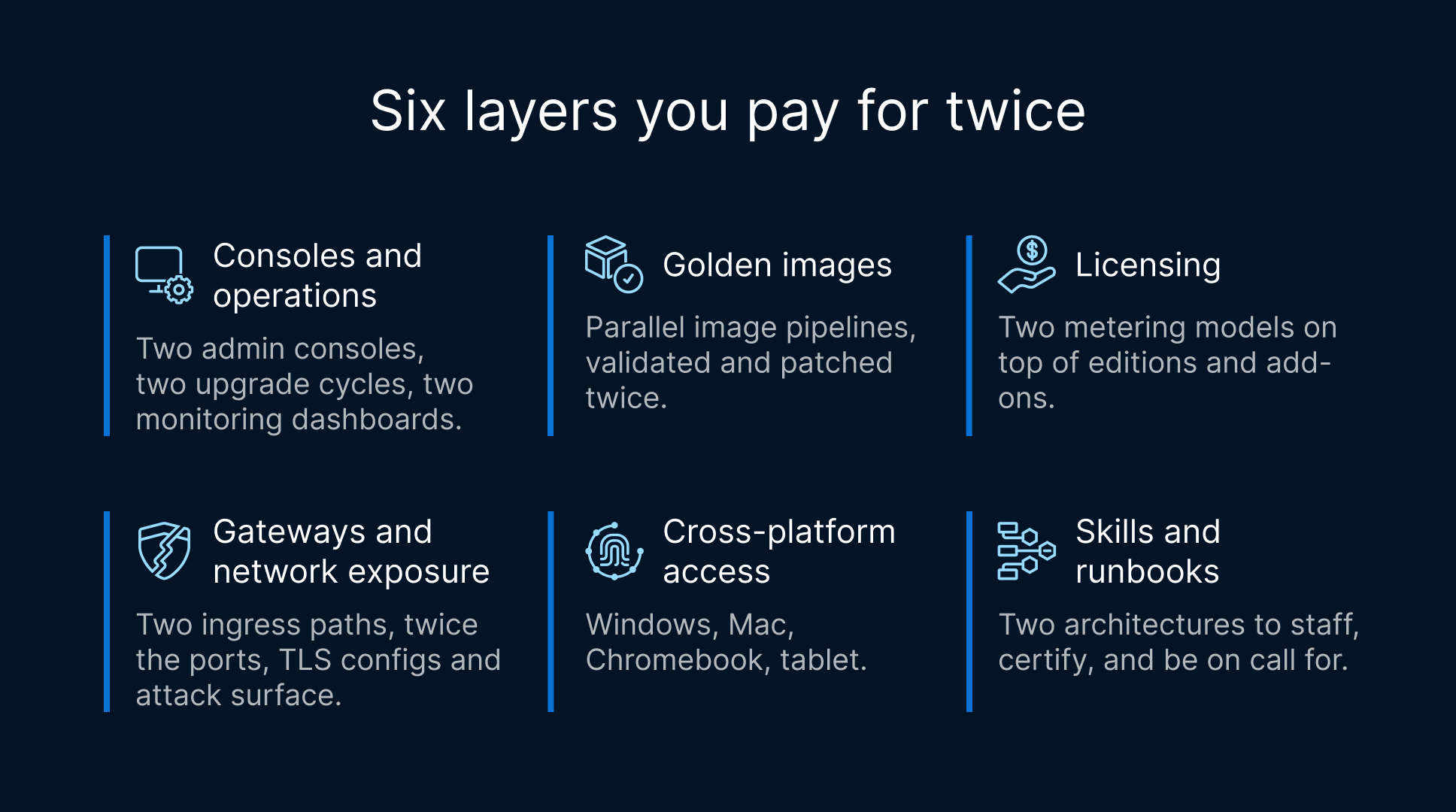
The obvious cost is licensing, but that is only the surface. Running separate VDA and VDI stacks multiplies effort across six layers at once, and the overhead compounds with every environment, image, and identity source you add.
Duplicate consoles and operations. Two products mean two admin consoles, two upgrade cycles, two patch cadences, and two monitoring dashboards. Industry comparisons of the major suites note that even within a single vendor, cloud and on-prem services frequently ship separate management consoles, so a mixed estate can easily leave admins toggling among three or four control planes to answer one simple question about who can access what.
Duplicate images. A published-app tool and a desktop tool each maintain their own golden images and update pipelines, even when the underlying Windows build and much of the software stack are identical. Every security patch, driver update, and application version has to be validated twice.
Duplicate licensing. Licensing is already the hardest part of VDI to forecast: per-user, per-device, and concurrent models, plus edition tiers and add-ons. Multiply that by two products and cost modeling becomes guesswork. Analysts tracking VDI in 2026 note that cloud-native consolidation and automation are helping teams cut total cost of ownership meaningfully, and vendor consolidation is now one of the dominant IT cost strategies precisely because parallel tools are so expensive to run.


Duplicate gateways and network exposure. Each stack typically brings its own remote-access gateway, its own set of published ports, and its own TLS and firewall configuration to maintain and audit. Two ingress paths mean twice the attack surface to defend and twice the change-control paperwork.
Duplicate identity and access configuration. Single sign-on, multi-factor policies, conditional access, and directory integration all have to be wired into both products and kept consistent. Drift between them is a security and audit liability.
Duplicate skills. Your team has to stay certified and current on two different architectures. Staffing, on-call, runbooks, and vendor relationships all double. When a specialist leaves, you have two knowledge gaps instead of one.
How does one platform consolidate VDI and app virtualization?
Consolidation works when a single platform can natively deliver both full desktops and individually published applications, not bolt one onto the other. That is the design premise behind Thinfinity Workspace: full persistent and non-persistent VDI desktops and published Windows apps come out of the same platform, the same console, and the same access layer.
One console and one image strategy
Administrators define desktops and published applications in a single management interface. A user who needs only the ERP client gets it as a published app; a user who needs a full workspace gets a desktop, both provisioned, assigned, and monitored from the same place. Because the same platform brokers both, you can standardize on a shared image approach and stop maintaining parallel golden-image pipelines for ‘apps’ and ‘desktops’ separately. Both models are delivered exactly the same way: through the RDC protocol via the Thinfinity Gateway, so a single Windows application can be published to a browser over the same connection path as a full desktop, without wrapping a whole desktop around it.
One Universal ZTNA and one connection path
Every resource, desktop or app, is reached through the same Universal ZTNA layer. Users connect from any HTML5 browser or from native Windows, Linux, and mobile clients, and the access policy is defined once rather than twice. The connection path is deliberately simple: the client reaches a reverse Gateway on port 443 over TLS 1.3, and the host agent dials outbound to the Gateway using RDC and streams the session up. No inbound ports are opened on your firewall or on the hosts themselves. That single ingress model replaces the separate gateways each legacy stack would otherwise require, and it shrinks the attack surface instead of doubling it. The visual stream itself is pixel streaming, so the endpoint only ever renders pixels; application data and the OS stay on the host in your OCI tenancy.
One concurrent license and one client
Instead of paying two meters, Thinfinity Workspace uses a single concurrent-licensing model that covers desktops and published apps together. The same client experience serves both, so users do not learn two access portals and admins do not reconcile two entitlement systems. The platform is also multi-tenant and white-label, which lets service providers and larger enterprises carve out isolated, branded environments without standing up separate deployments per tenant.
Two-stack approach vs one platform: side by side
The table below compares the typical two-product pattern, a separate VDA tool plus a separate VDI tool, against consolidating both on a single platform running on OCI.
| Dimension | Two-stack approach (separate VDA tool + separate VDI tool) | One platform (Thinfinity Workspace on OCI) |
|---|---|---|
| Consoles / management | Two or more admin consoles, upgrade cycles, and dashboards to keep in sync | One console for both published apps and full desktops |
| Images / golden images | Parallel image pipelines validated and patched twice | Shared image strategy across apps and desktops |
| Delivery protocol | Different protocols and clients per stack (e.g., HDX for one, Blast or RDP for the other) | Both VDI and VDA delivered through the RDC protocol via the Thinfinity Gateway |
| Licensing | Two metering models; hard to forecast combined cost | Single concurrent-licensing model covering both |
| Gateways / ports | Separate gateways; multiple inbound ports and TLS configs to audit | One reverse Gateway on 443/TLS 1.3; host agent dials outbound over RDC, no inbound ports |
| Identity / ZTNA | SSO, MFA, and conditional access wired into each product; drift risk | One Universal ZTNA policy layer for every resource |
| Client | Two portals or clients; often browser for one, native for the other | Any HTML5 browser plus native Windows, Linux, and mobile under one access model |
| Cost / TCO | Duplicate infrastructure, licenses, and change overhead | Consolidated infrastructure and predictable per-concurrent cost on OCI |
| Skills / ops | Two architectures, two runbooks, two vendor relationships | One architecture and operating model to staff and support |
What can you actually deliver from the consolidated platform?
Consolidation is only worthwhile if the single platform covers the full range of what the two stacks did, and then some. On OCI, Thinfinity Workspace delivers a broad set of workload types through the same console and the same Universal ZTNA:
- Full VDI desktops. Persistent desktops for users who need a durable environment and profile, and non-persistent desktops for pooled, reset-on-logoff scenarios. For enterprises standardizing on Oracle’s cloud, see the approach to native OCI VDI for enterprises.
- Published Windows apps (VDA). Individual applications streamed to the browser or native client without a surrounding desktop: the same use case Citrix Virtual Apps, RDS RemoteApp, or AVD app groups cover, but from the consolidated platform.
- Linux and Java applications. Non-Windows workloads delivered through the same access layer, so mixed estates do not need yet another delivery tool.
- Remote browser isolation (RBI). Internal web apps and risky browsing rendered in an isolated session, so untrusted content never touches the endpoint, without spinning up a full desktop just to open a browser.
- Containerized app and session delivery on Kubernetes/OKE. Applications and sessions packaged as containers and streamed from Oracle Kubernetes Engine, so scaling and lifecycle follow a cloud-native model rather than a VM-per-user one.
For teams that also depend on host-based terminal access, z/Scope terminal emulation covers mainframe and IBM i connectivity from the same browser-first model, so green-screen workloads do not force a separate client either.
How do you consolidate without a risky big-bang migration?
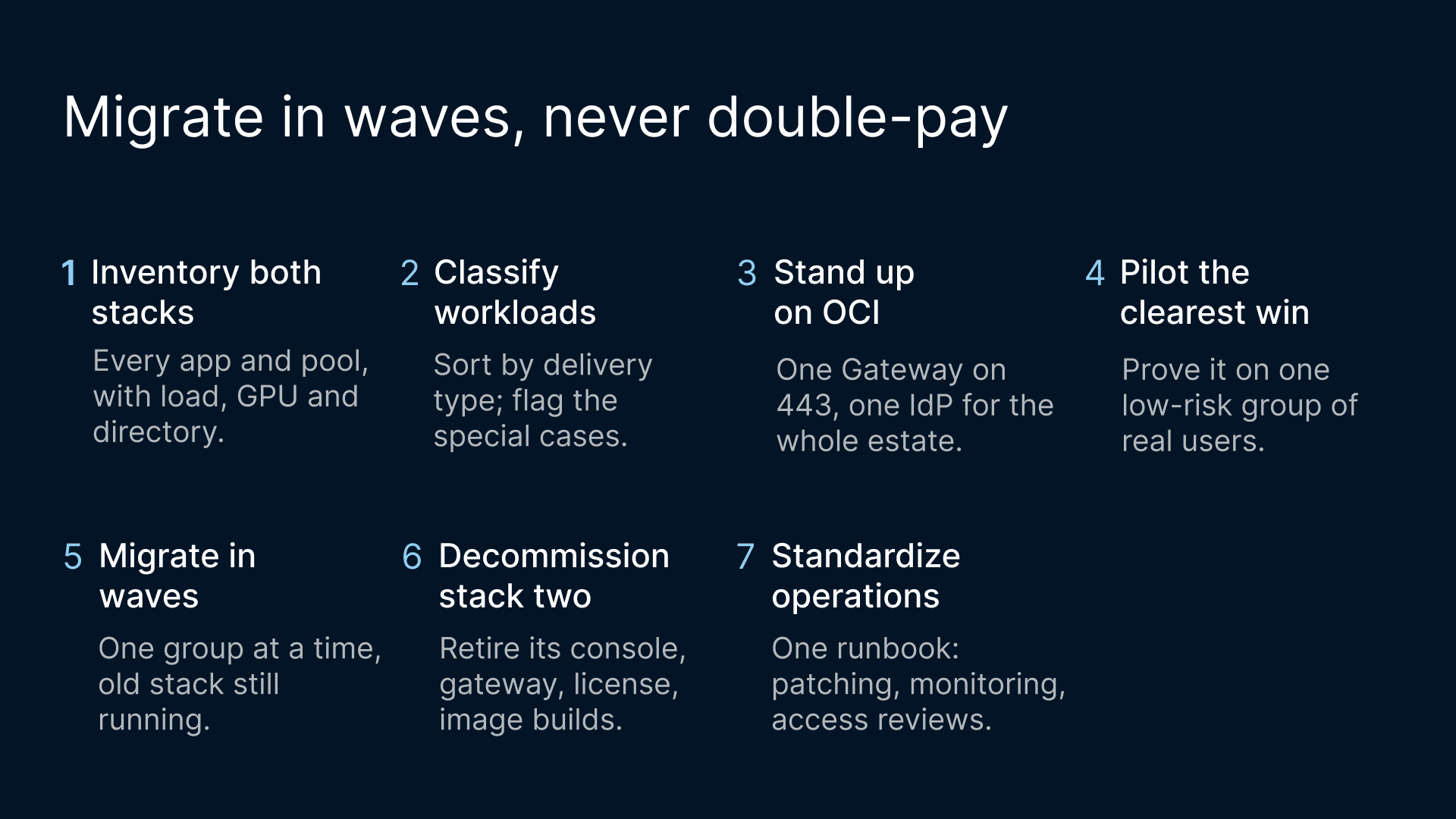
Consolidation does not require ripping out both incumbents over a weekend. A staged path lets you prove the model, move the easy wins first, and retire the second stack only when its workloads have a validated home. A practical sequence looks like this:
- Inventory both stacks. Catalog every published app and every desktop pool, with their users, peak concurrency, peripherals, GPU needs, and identity sources. This is where you find the overlap that justifies consolidation.
- Classify workloads. Sort each item into published-app, non-persistent desktop, persistent desktop, Linux/Java, browser-isolation, or containerized. Flag anything with special requirements (HDX-specific peripherals, heavy GPU/CAD, strict certification) for early application-compatibility testing in the pilot.
- Stand up the platform on OCI. Deploy Thinfinity Workspace with the reverse Gateway on 443/TLS 1.3 and connect your identity provider once for the whole estate.
- Pilot the clearest win. Migrate one well-understood published-app group or a non-persistent desktop pool. Validate performance, the pixel-streaming experience, and the Universal ZTNA policy against real users.
- Migrate in waves. Move workloads group by group, consolidating images and entitlements as you go. Keep the incumbent running in parallel for each wave until it is signed off.
- Decommission the second stack. As each workload is validated on the single platform, retire the corresponding gateway, console, license, and image pipeline, capturing the cost and operational savings that justified the project.
- Standardize operations. Fold monitoring, patching, and access reviews into one runbook and one operating model. For cost governance, the predictable-cost banking VDI on OCI analysis is a useful reference for modeling concurrent-based spend.
Plan the consolidation: a phased migration
You do not have to move everything at once. The lowest-risk way to consolidate is to migrate one workload type first (either your published apps or your full desktops), prove it on the single platform, and then move the other. Splitting the work in two lightens the lift-and-shift and keeps each cutover small enough to validate against real users before you take on the next.
Because Thinfinity Workspace licensing is concurrent rather than per named user, you do not double-pay during the transition. While the incumbent stack and the consolidated platform run in parallel, you are only charged for concurrent sessions wherever they land, so overlapping the two environments for a wave or two carries no license penalty. That is an added advantage of consolidating onto Thinfinity: the licensing model itself removes the usual financial pressure to rush the move, letting you sequence it around risk instead of around a meter.
A phased move is still a real project, and a few things deserve planning up front:
- Application-compatibility testing. Validate each published app and desktop image on the platform before you cut users over, giving extra attention to anything with special peripherals, GPU needs, or strict certification.
- A pilot group. Start with a well-understood group of users who can give fast, honest feedback on performance and the pixel-streaming experience, so you catch issues while the blast radius is small.
- Change management. Communicate the new access path and client options early, and give users a short runbook so the switch to browser or native access feels routine rather than disruptive.
- Profile and identity cutover. Plan how user profiles, entitlements, and single sign-on move across, so people keep their data and access without manual rework as each wave lands on the consolidated platform.
Handled this way, consolidation stays a controlled, wave-by-wave migration onto one platform rather than a disruptive big-bang, and every wave you complete retires more duplicate console, gateway, image, and license overhead.